File Ops Plus
 swiSwift125 downloads
Supercharge Obsidian menus — file ops (copy/move/pin/delete/color), editor icon tiles, formatting, regex, AI prompts, pipelines & highlights. Fully customizable. CN/EN.
- Overview
- Scorecard
- Updates11
Obsidian 文件操作增强插件,为文件管理器、标签页、编辑器提供可配置的图标化右键菜单,支持 27 套配色 × 12 套风格外观自定义、AI 处理选中文本、暂存面板等功能。
An Obsidian plugin providing configurable icon-based context menus for the file explorer, tab headers, and editor, with 27 color themes × 12 button styles, AI text processing, and a stash panel.
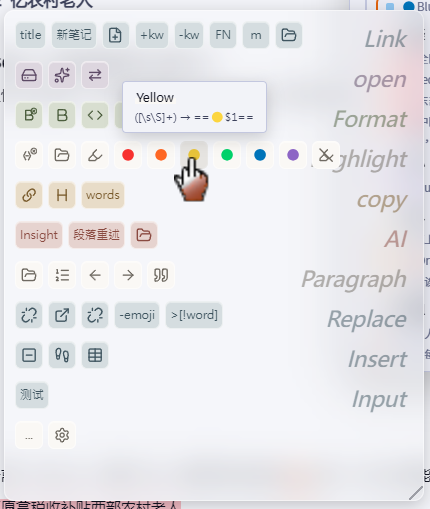
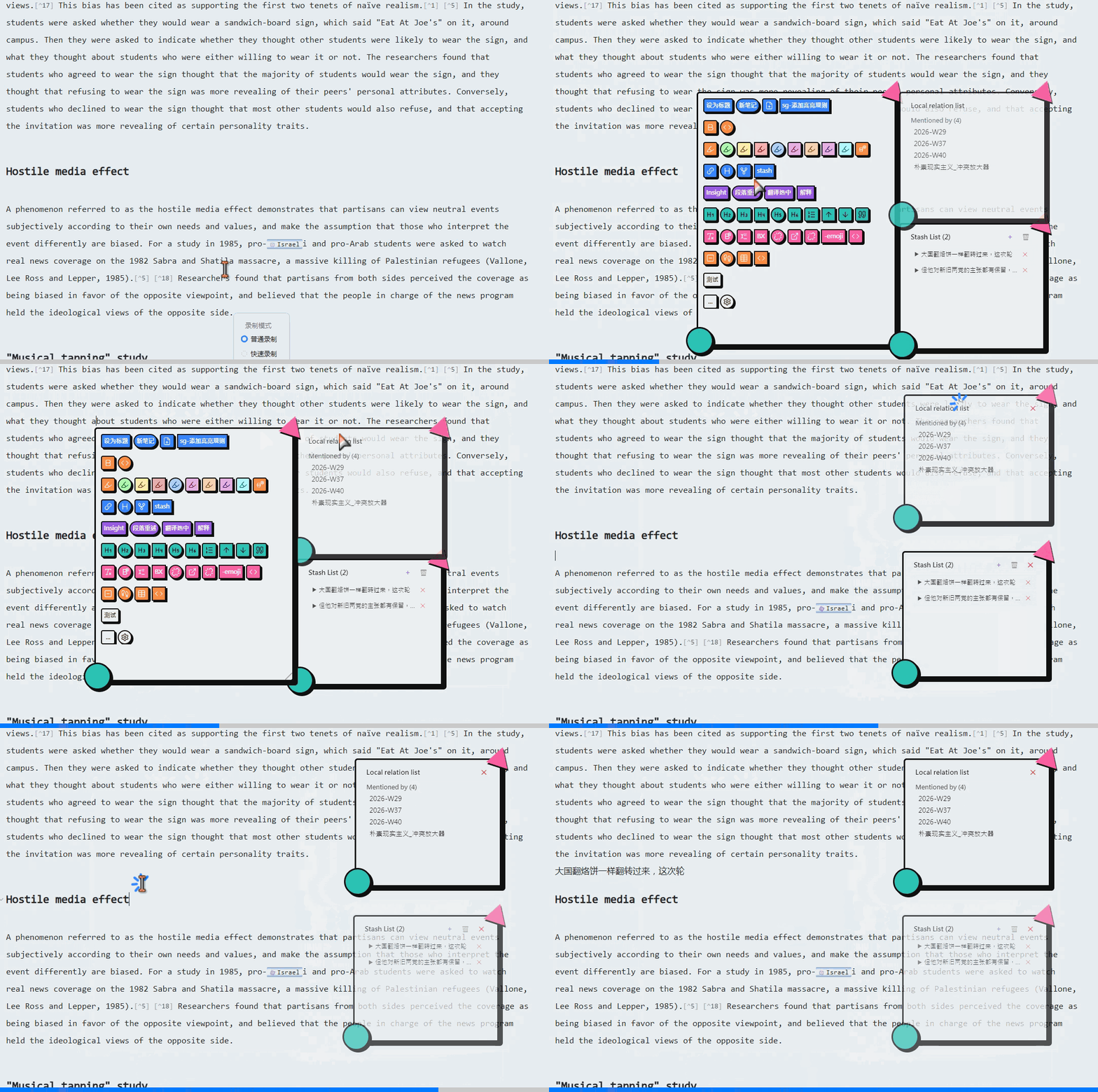
外观自定义 / Appearance Customization
- 27 套配色方案:柔彩粉彩、莫兰迪灰调、深色霓虹、孟菲斯、霓虹夜城、合成波日落、故宫红墙、浮世绘、黑金暗房、莫奈睡莲、青花瓷、敦煌矿彩、Nord极光、终端荧光等
- 12 套按钮风格:扁平、新拟态、玻璃拟态、新粗野、赛博朋克、蒸汽波、Win95、果冻、包豪斯、手绘、和纸、孟菲斯
- 间距可调:按钮间距、分组间距数值自定义
- 设置面板左侧实时预览,点击卡片即时切换
- 27 color themes: Soft Pastel, Morandi Gray, Dark Neon, Memphis, Neon City, Synthwave Sunset, Forbidden City, Ukiyo-e, Black Gold, Monet Lily, Porcelain, Dunhuang, Nord Aurora, Terminal Glow, etc.
- 12 button styles: Flat, Neumorphism, Glassmorphism, Neo-Brutalism, Cyberpunk, Vaporwave, Win95, Jelly, Bauhaus, Hand Drawn, Washi, Memphis
- Adjustable spacing: Custom button and group spacing
- Live preview; click cards to switch instantly
编辑器右键菜单 / Editor Context Menu
在 Markdown 源码模式下拦截右键,展示分组化图标菜单。支持 7 种选项类型:
Intercepts right-click in Markdown source mode to show a grouped icon menu with 7 option types:
| 类型 | 说明 |
|---|---|
| cmd | 下拉选择 Obsidian 命令 |
| regex | 正则匹配 + 替换 |
| custom | 预设转换(toggleHeading、toggleChecklist、fullwidthToHalf 等) |
| pipeline | 链式执行多个 transform,用 → 分隔 |
| action | 复制块引用 / 提取为新笔记 / 复制标题链接 / 设为文档标题 |
| keystroke | 录制并回放键盘快捷键 |
| ai | 选中文本发送给 AI,结果在悬浮面板展示 |
Type Description cmd Dropdown to select an Obsidian command regex Regex match + replace custom Preset transforms (toggleHeading, toggleChecklist, fullwidthToHalf, etc.) pipeline Chain transforms with →separatoraction Copy block ref / Extract to new note / Copy heading link / Set as title keystroke Record and replay keyboard shortcuts ai Send selected text to AI, display result in floating panel
局部关系列表 & 暂存面板 / Local Relation List & Stash Panel
- 局部关系列表:展示当前文档的提及/被提及文档,点击跳转
- 暂存面板:暂存选中文本或剪贴板内容,点击插入到光标位置;手风琴悬停展开,支持清空
- 两个面板均吸附在菜单旁,可拖动脱离、Ctrl+滚轮调透明度、右下角拖拽调整大小
- Local relation list: Shows mentioning/mentioned-by docs of the current note, click to navigate
- Stash panel: Stash selected text or clipboard content, click to insert at cursor; accordion hover-expand, supports clear-all
- Both panels dock beside the menu, can be undocked, Ctrl+wheel for opacity, bottom-right drag to resize
AI 结果面板 / AI Result Panel
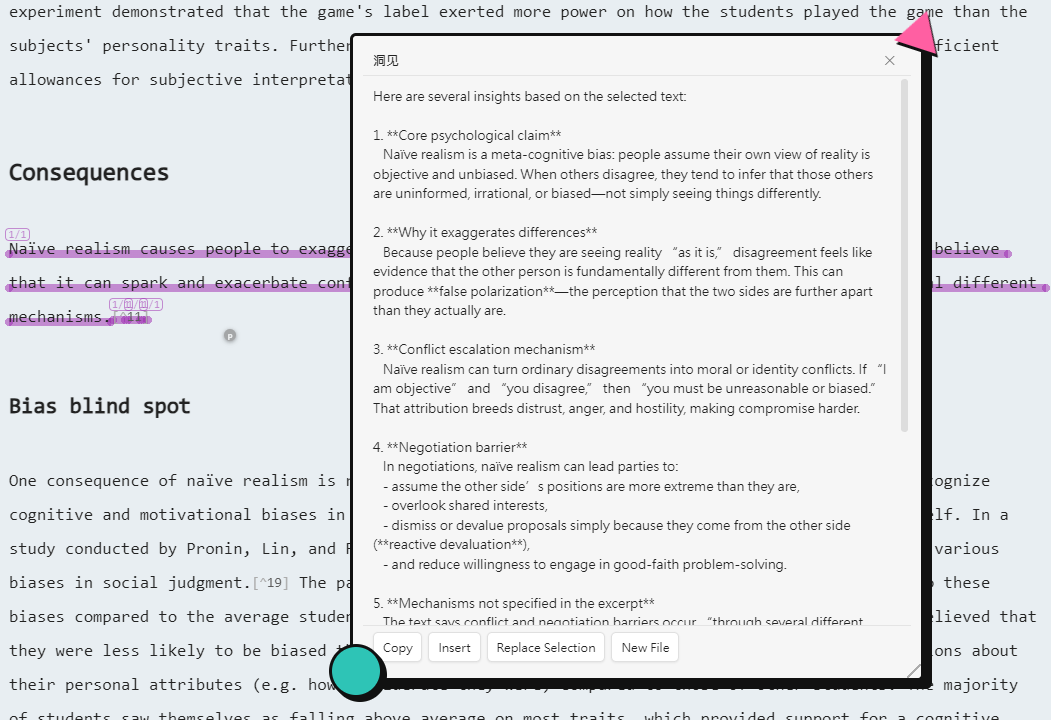
- AI 返回内容用非模态悬浮面板展示,Markdown 渲染
- 底部三按钮:复制 / 插入到光标 / 替换选中文本
- AI 配置:model / base_url / apiKey / temperature(OpenAI 兼容 API)
- Non-modal floating panel with Markdown rendering
- Three buttons: Copy / Insert at cursor / Replace selection
- Config: model / base_url / apiKey / temperature (OpenAI-compatible API)
选中文本悬浮球 / Selection Hover Ball
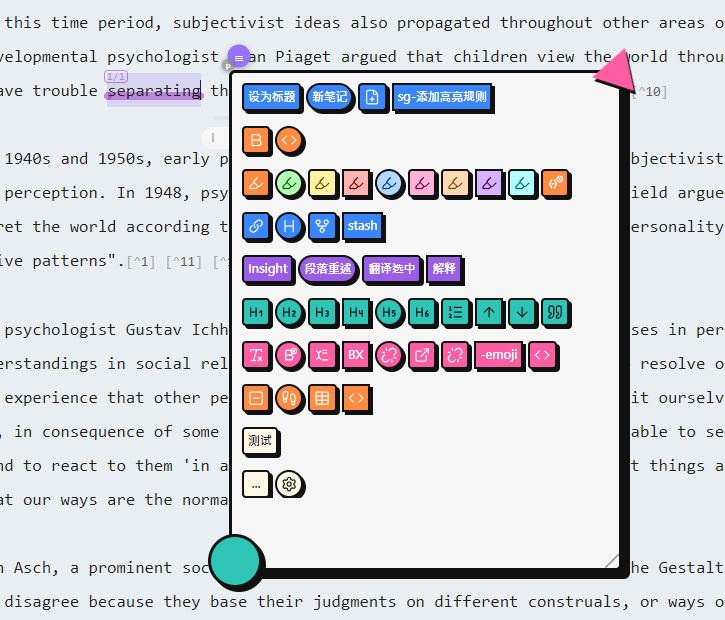
- 选中文本后选区右上角显示悬浮球,悬停即展开编辑器增强菜单
- Hover ball appears at selection top-right; hover to expand the editor menu
文件 & 标签页菜单 / File & Tab Menus
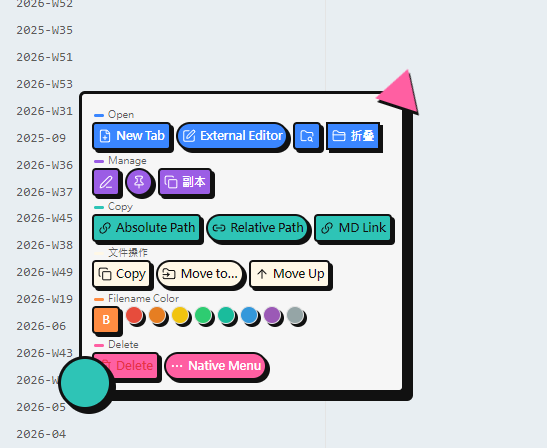
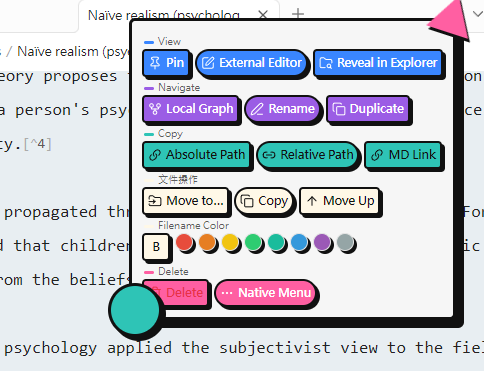
- 将原生右键菜单替换为可配置的图标化分组菜单
- 文件名着色:自定义颜色标签 + 加粗,在文件管理器中着色显示
- 移动到…:两步式选择目标文件夹
- 所有菜单均可拖动定位,
...按钮可回退到原生菜单
- Replaces native context menus with configurable icon-based grouped menus
- Filename coloring: Custom color labels + bold, displayed in file explorer
- Move to…: Two-step target folder selection
- All menus draggable;
...button falls back to native menu
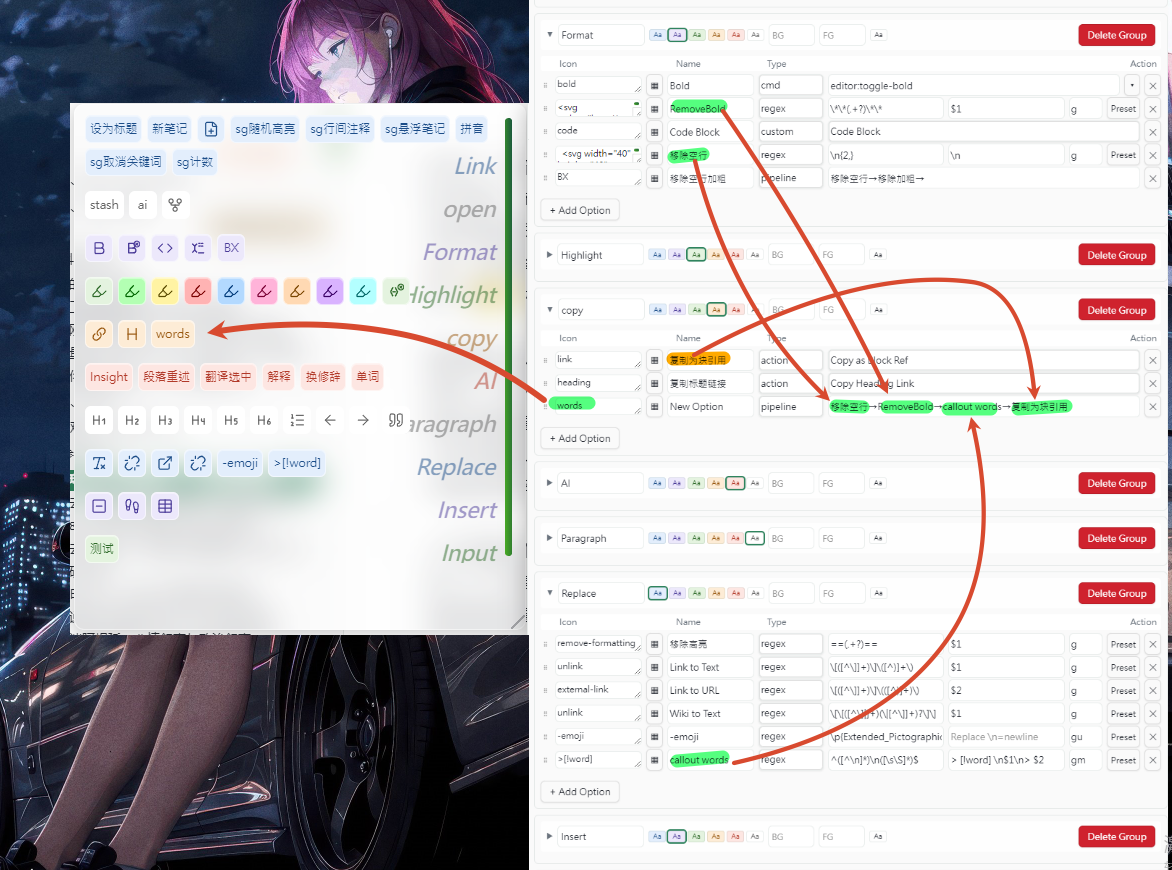
设置面板 / Settings Panel
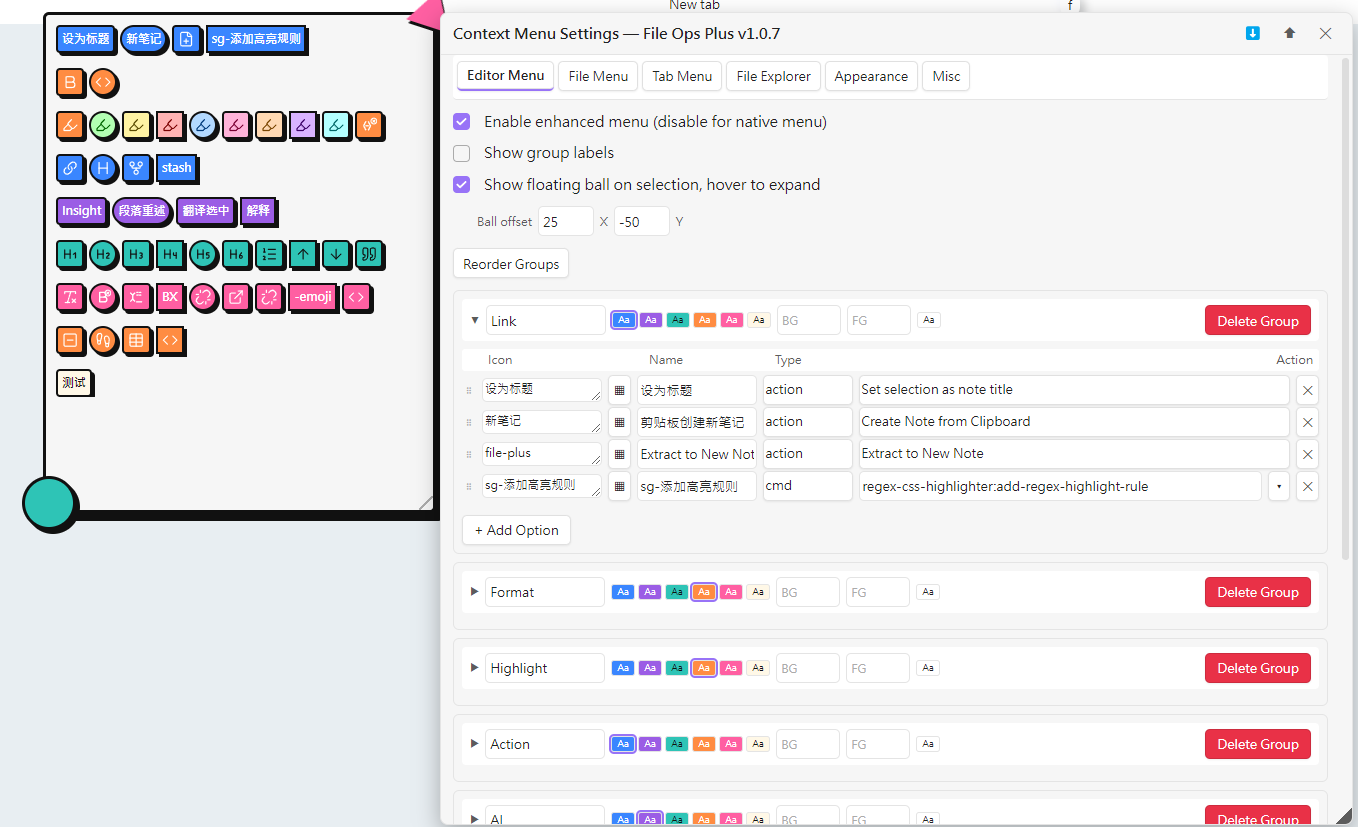
- 六个标签页:编辑器菜单 / 文件菜单 / 标签页菜单 / 文件管理器 / 外观 / 杂项
- 左侧实时预览,右侧配置区
- 分组增删/改名/配色/拖拽排序,选项增删/拖拽排序
- 导入/导出设置 JSON,折叠/展开分组
- Six tabs: Editor Menu / File Menu / Tab Menu / File Explorer / Appearance / Misc
- Left: live preview; right: configuration
- Group add/remove/rename/color/drag-reorder, option add/remove/drag-reorder
- Import/export settings JSON, collapsible groups
安装 / Installation
将 main.js、manifest.json、styles.css 放入 .obsidian/plugins/file-ops-plus/,在设置 → 第三方插件中启用。
Place
main.js,manifest.json,styles.cssinto.obsidian/plugins/file-ops-plus/, enable in Settings → Community Plugins.
兼容性 / Compatibility
- 最低 Obsidian 版本:1.2.7 | 仅桌面端 | 中/英文 i18n
- Min Obsidian: 1.2.7 | Desktop only | CN/EN i18n