Family Tree Diagram
 vicmosin1 downloads
Build an interactive family tree, timeline and map from person notes, with relationship labels and checks for missing or conflicting data.
- Overview
- Scorecard
- Updates2
Build an interactive family tree, timeline and map from the person notes in your vault. Relationships are read from note properties, so your data stays plain Markdown.
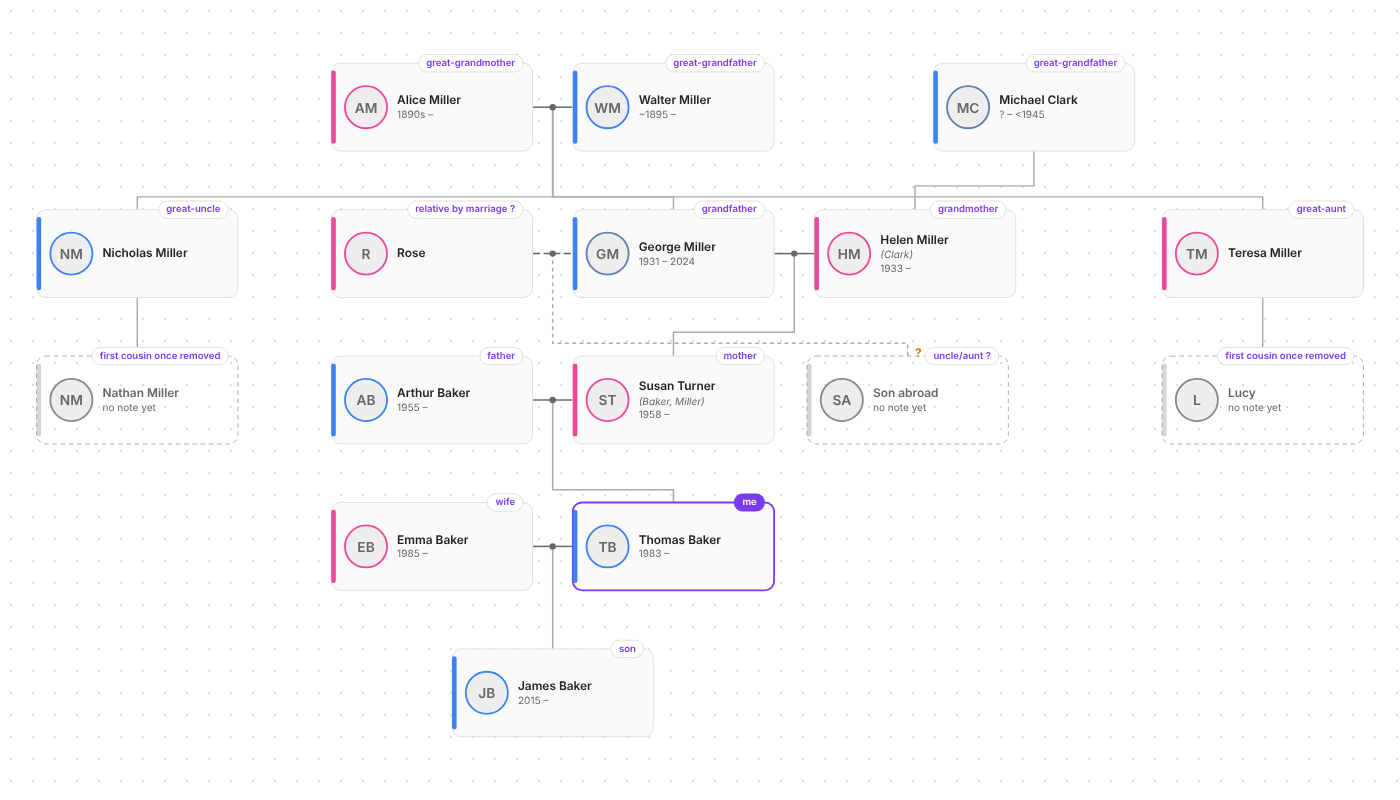
How it reads your notes
A note is a person when it has type: family-tree, or the #family-tree tag plus at least one relation or date (so overview notes tagged #family-tree aren't drawn as people). Relations come from the frontmatter:
birth_date: 1931-11-09
birth_place: "[[Leeds, England]]"
death_date: 2024-03-03
child_of: ["[[Walter Miller]]", "[[Alice Miller]]"]
parent_of: "[[Susan Turner (Baker, Miller)]]"
married_to: "[[Helen Miller (Clark)]]"
siblings:
  - "[[Nicholas Miller]]"
  - "[[Teresa Miller]]"
type: family-tree
gender: m        # optional; for Russian names it's guessed from the patronymic (…вич / …вна)
photo: "[[george.jpg]]"  # optional, otherwise the first image embedded in the note
- One side is enough.
parent_ofon the father implieschild_ofon the daughter,married_toworks both ways, and so on. - If a child lists only one parent and that parent has exactly one spouse, the child is drawn under the couple (can be turned off in settings).
- Siblings with no known parents are kept together under a hollow "unknown parents" dot.
- The part in parentheses in the note name is shown as previous/maiden surnames.
- People who are linked but have no note yet appear as dashed cards. Click one to create its note, pre-filled with the relations already known.
All property names are configurable in settings.
Uncertain links and approximate dates
Put a ? (or "maybe", "possibly", "возможно", "предположительно"…) next to a link to mark it as unconfirmed. It's drawn dashed with a ?, and isn't used to guess the second parent:
parent_of:
  - "[[Susan Turner (Baker, Miller)]]"
  - "[[Son abroad]] ?"
Dates may be approximate: около 1895 / 1895? → ~1895, до 1941 → <1941**, после 1945 → **>1945, 1890-е → 1890-е, 1890–1895 → ~1890.
Two people who share a child but aren't married_to each other are joined by a dashed line.
Relationship labels
Right-click your own card → This is me (or Settings → Me, or the command Set current note as me). Every card then shows how that person is related to you — отец, двоюродная тётя, троюродный брат, внучатый племянник, тесть, свекровь, золовка, сват, муж тёти… (Russian or English, see settings).
- Hover any card to highlight the chain of people connecting it to you.
- Right-click → Show relationships to this person to see the tree from someone else's point of view (✕ in the toolbar to go back).
- The tag button in the toolbar toggles labels. In code blocks use
labels: false. - Labels ending in ? go through an uncertain link.
Timeline
The calendar button in the toolbar (or the command Open family timeline) switches the view to lifelines on a time axis.
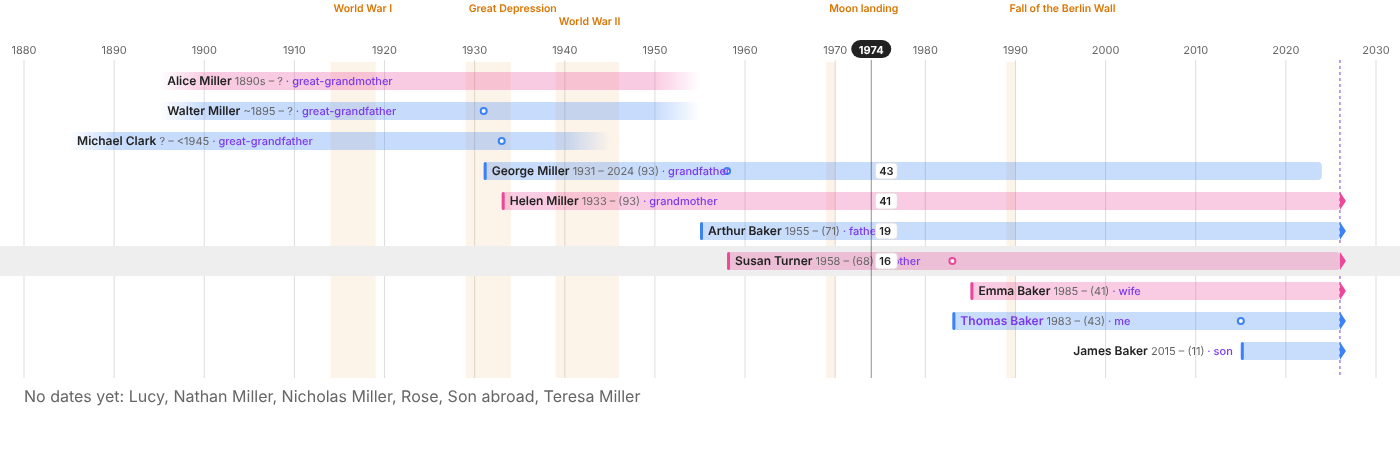
- Each person is a bar from birth to death. Approximate dates fade out, people still alive end in an arrow at today, and someone with no death date who'd be over 105 gets a faded end.
- Circles on a bar are that person's children being born (hover for name and the parent's age).
- Move the mouse over the chart: a cursor shows the year and everyone's age at that moment.
- Historical events are shaded bands; edit them in Settings → Timeline (one per line,
1941-1945 Великая Отечественная война). - By family orders rows like the tree (generation by generation, couples together); By birth sorts by birth year.
- Focus mode, search, relationship labels and the right-click menu work the same as in the tree. People without any dates are listed under the chart.
- Embed:
```family-timelinewith the same options asfamily-tree(root,depth,height,labels) plusorder: birth.
Map
The map button in the toolbar (or Open family map) shows where people were born ★, lived ⌂ and died †, with each person's route as a line (blue/pink; dashed if a place is uncertain).
birth_place: "[[Leeds, England]]"            # links to place notes, or plain text
lived_in:
  - "[[Manchester]] 1949-1955"              # years are optional
  - "[[Liverpool]] 1956-1990"
death_place: "[[Toronto]]"
- Coordinates come from the place note's
location: [lat, lng](same format as the Map View plugin). Use Find coordinates for places (or the 📍 button on the map) to look them up on OpenStreetMap. You check each match before it's saved. Places that have no note are remembered by the plugin. - When a value has a link plus text ("предположительно рядом [[Leeds, England]]", "maybe near [[Leeds, England]]"), only the link counts and the place is marked uncertain.
- Click a pin for everyone connected to that place (with relationship labels). The slider at the bottom shows only what happened up to a given year.
- Online / offline: the map uses OpenStreetMap tiles when there's a connection. Country borders are built into the plugin and drawn underneath, so without internet you still get borders, pins, names and routes (marked "Offline — built-in map").
- Embed with
```family-map, same options as the other blocks. - Privacy: only place names (when you press Search) and map-tile requests go to OpenStreetMap. Nothing about people leaves your vault. See Network use.
Data check
Command Check family tree data lists:
- Links written on one side only (e.g. George says
parent_of: Susanbut Susan has nochild_of: George), with a button that adds all the missing reverse links. Uncertain links stay uncertain, and text/list properties keep their format. - Suspicious dates: died before birth, parent younger than 13 or very old at a child's birth, child born after a parent's death, born more than 105 years ago with no death date. Approximate dates are skipped.
- Structure problems: more than two parents, spouse also listed as parent/child, someone being their own ancestor.
- People without a note and no birth date (collapsed).
Using it
Ribbon icon / command Open family tree opens a full-tab view.
- Drag to pan, wheel or pinch to zoom.
- Click a card to open the note, Ctrl/Cmd+click to open it in a new tab, right-click for more (focus, relationships, "This is me").
- The person toggle switches between everyone and focus mode (ancestors and descendants ±N generations, plus aunts/uncles and spouses).
- Opening a person note highlights it in the tree (or re-centres the focus).
- "Find person…" searches by name.
Command Show family tree of current person opens the view focused on the active note.
Right-click menu of any note (file explorer, the note's ⋯ menu, tab header, or inside the note text): Show in family tree on a person note, Open family tree on any other note.
Embed in any note with a code block:
```family-tree
root: [[George Miller]]
depth: 2
height: 500
```
Without
root, a block inside a person note focuses on that person; elsewhere it shows everyone (root: allforces everyone). In embeds use Ctrl/Cmd+wheel to zoom so normal scrolling still works.
Installation
- Community plugins: Settings → Community plugins → Browse → search for "Family Tree Diagram" → Install → Enable.
- Manual: download
family-tree-diagram-<version>.zipfrom the latest release, unzip it into<vault>/.obsidian/plugins/(it contains thefamily-tree-diagramfolder), then enable the plugin under Settings → Community plugins.
Network use
The tree, timeline, relationship labels and data check work fully offline. Only the map uses the network, and only these two OpenStreetMap services:
| Service | When | What is sent |
|---|---|---|
OpenStreetMap tiles (tile.openstreetmap.org) |
While the map view is open and online | Requests for map images of the area you're looking at |
Nominatim (nominatim.openstreetmap.org) |
Only when you press Search in Find coordinates for places | The place names listed in that dialog, one request per second |
No names, dates or other details about people are ever sent. Without a connection the map falls back to country borders bundled with the plugin. There is no telemetry, no account and nothing to pay for.
Development
npm install, thennpm run devrebuilds on change (symlink the folder into a test vault's plugins directory).npm testruns the parsing, layout, kinship and timeline tests.npm run lintruns Obsidian's ESLint plugin, the same checks the Community directory uses, including manifest validation, and stylelint with the directory's CSS checks (no duplicate properties, no!important, features supported by Obsidian's Chromium).
Releasing
First run npm version patch (or minor / major), or edit version in manifest.json, package.json and versions.json on GitHub, and merge that into main. Then either:
- On GitHub: Actions → Release Obsidian plugin → Run workflow on
main. When it finishes, open Releases, edit the new draft, add release notes and select Publish release. Publishing creates the version tag. - From the command line:
git push --follow-tagsafternpm version. The tag starts the same workflow.
The release workflow checks the tag matches the manifest, lints, tests, builds, attests the files and creates a draft release with main.js, manifest.json, styles.css and a zip for manual installs. If the release already exists, it replaces those files instead.
License
MIT © Victor Mosin
The plugin bundles these open-source components:
- Leaflet (BSD-2-Clause): map rendering. Its stylesheet is included in
styles.csswith its license notice. - world-atlas (ISC) with Natural Earth data (public domain): the offline country borders.
- topojson-client (ISC): reads the bundled borders.
- dagre (MIT): tree layout.
Map tiles and place search © OpenStreetMap contributors, available under the Open Database License.