Faceless
 Precieux Fassinou45 downloads
A home page in the style of a sci-fi HUD that speaks: where you left off, idle projects, a note to revisit, overdue tasks to settle, deadlines and a weekly review. Phosphor icons in the file explorer.
- Overview
- Scorecard
- Updates7
A home page for Obsidian in the style of a sci-fi HUD, with a voice and no face.
It opens in its own tab and tells you, in one short paragraph built from your vault, what matters today: where you left off, which projects have gone idle, which dated tasks are long overdue, what deadline is next. Press Listen and it reads it aloud with your system voice.
The interface follows Obsidian's language: English or French.
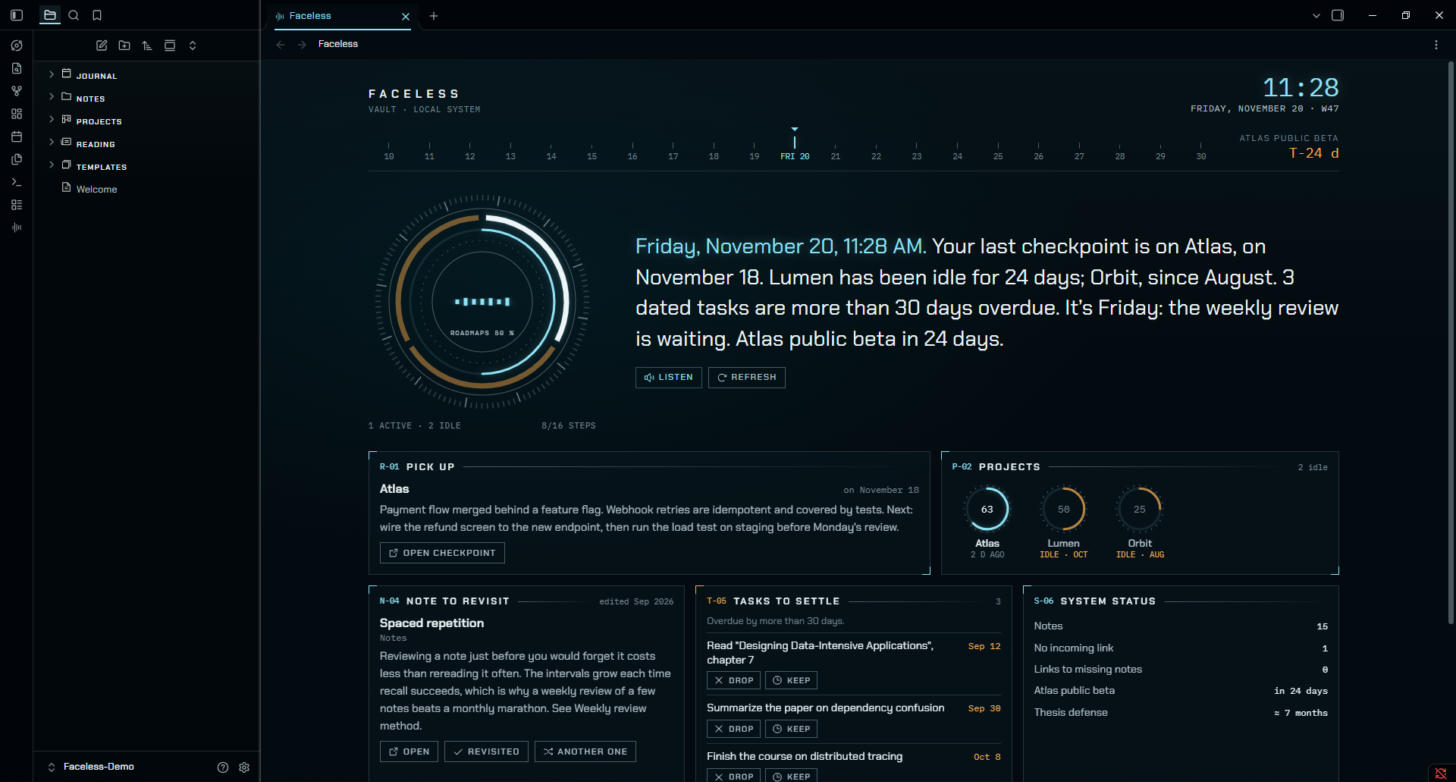
What is on the page
- The voice paragraph. Plain facts computed locally from your notes. No AI, no network.
- The reactor. Concentric rings: one segment per project (white when active, amber when idle), the overall progress of your roadmaps, and a waveform in the middle that moves with the voice.
- Heading tape. Three weeks with today in the middle; dated tasks and deadlines are marked on it. The next deadline is shown as a countdown.
- Pick up. For each project, the first heading of its hub that matches your checkpoint pattern (by default "Point de reprise", "Checkpoint" or "Where I left off") and the paragraph under it.
- Projects. One gauge per subfolder of your projects folder: roadmap progress (checked / total tasks in a note whose name contains "roadmap") and last activity. A project with no edited note for 14 days is marked idle.
- Note to revisit. One older note per day, picked at random but weighted towards notes linked to your active projects. Mark it as revisited or draw another one.
- Tasks to settle. Tasks whose 📅 due date is more than 30 days past. Drop marks the task as cancelled (
- [-] … ❌ date, the Tasks plugin format); Keep hides it for 30 days. - System status. Note count, notes with no incoming link, links to missing notes, and optionally the size of an instructions file against its cap.
- Weekly review. On the day you choose (Friday by default), a button creates a note with seven fixed questions, one to three sentences each.
- Ask the vault (only if the Claudian (by YishenTu) plugin is installed). Types your question into Claudian with an instruction to answer from your notes.
- Phosphor icons in the file explorer, chosen from folder names and the
type:property, with a right-click menu to pick any icon and color. - Optional theme across Obsidian (sidebar, tabs, headings, status bar) in the same colors, and an optional skin for Claudian. Both can be turned off.
Getting started
- Enable the plugin. Faceless guesses your projects folder (a top-level folder whose name contains "project" / "projet") and your journal folder ("journal", "daily"). Check them in Settings → Faceless.
- Optional: add deadlines (
Final exam | 2027-03,Thesis defense | 2027-06-14), shortcuts to notes, and the checkpoint heading you use in your project hubs. - Run Faceless: Open home or click the waveform icon in the ribbon.
Voice
Listen reads the paragraph with your system's text-to-speech voice, in the interface language. While it speaks, the waveform in the reactor moves.
Disclosures
- Network use: none.
- Files outside the vault: none. Faceless does not use Node.js file or process APIs.
- Files inside the vault: Faceless reads your notes through Obsidian's API to build the page (it lists every note to count them, find notes with no incoming link and pick a note to revisit). It writes only when you click: a weekly review note when you start the review, and a task line when you click Drop.
- Clipboard, local storage, telemetry, ads, accounts: none.
- The file explorer icons rely on an undocumented part of Obsidian's file explorer; a future Obsidian update could break them without affecting the rest of the plugin.
- The Claudian integration is optional and only active when Claudian is installed: it types your question into Claudian's input.
Desktop only.
Building
npm install
npm run build   # writes dist/main.js, dist/styles.css, dist/manifest.json
License: MIT. Bundled fonts and icons: see THIRD_PARTY_NOTICES.md.
Français
Page d'accueil façon HUD de science-fiction, qui parle : où tu t'es arrêté, les projets en veille, une note à relire, les tâches très en retard à trancher, les échéances, la revue de la semaine. L'interface suit la langue d'Obsidian (français ou anglais). Lecture à voix haute avec la voix du système. Aucune requête réseau, aucun accès hors du vault, aucune télémétrie.