Extended Base
 Jiwoo Roh788 downloads
An Extended Base view with column wrap, top-aligned cells, and transparent background.
- Overview
- Scorecard
- Updates7
Notion-style views for Obsidian Bases — Table, List, and Board. Clean chrome, colored value pills, inline cell editing, nested collapsible groups, and a Notion-style page panel for editing a note without leaving the view.
By Lucy Roh.
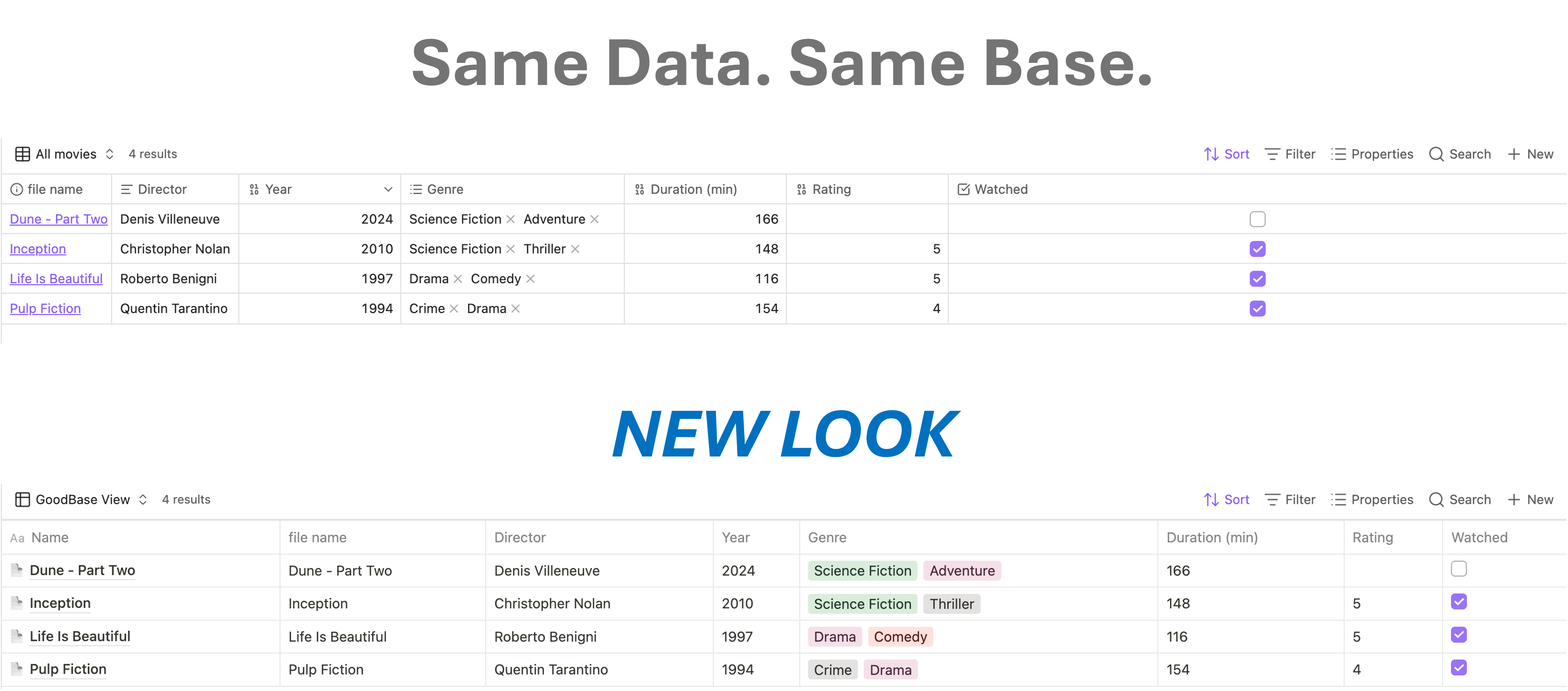
Requires Obsidian 1.10.2+ with the Bases core plugin enabled.
Extended Base is a fork of GoodBases by Umberto Francesco Carolini (MIT). v1.0.1 adds the List and Board views, nested groups, column resizing/renaming, and per-column options on top of GoodBases 0.5.3. See Credits.
The three views
Pick one from the base's view selector. All three share the same pill colors, select editor, inline editing, and page panel.
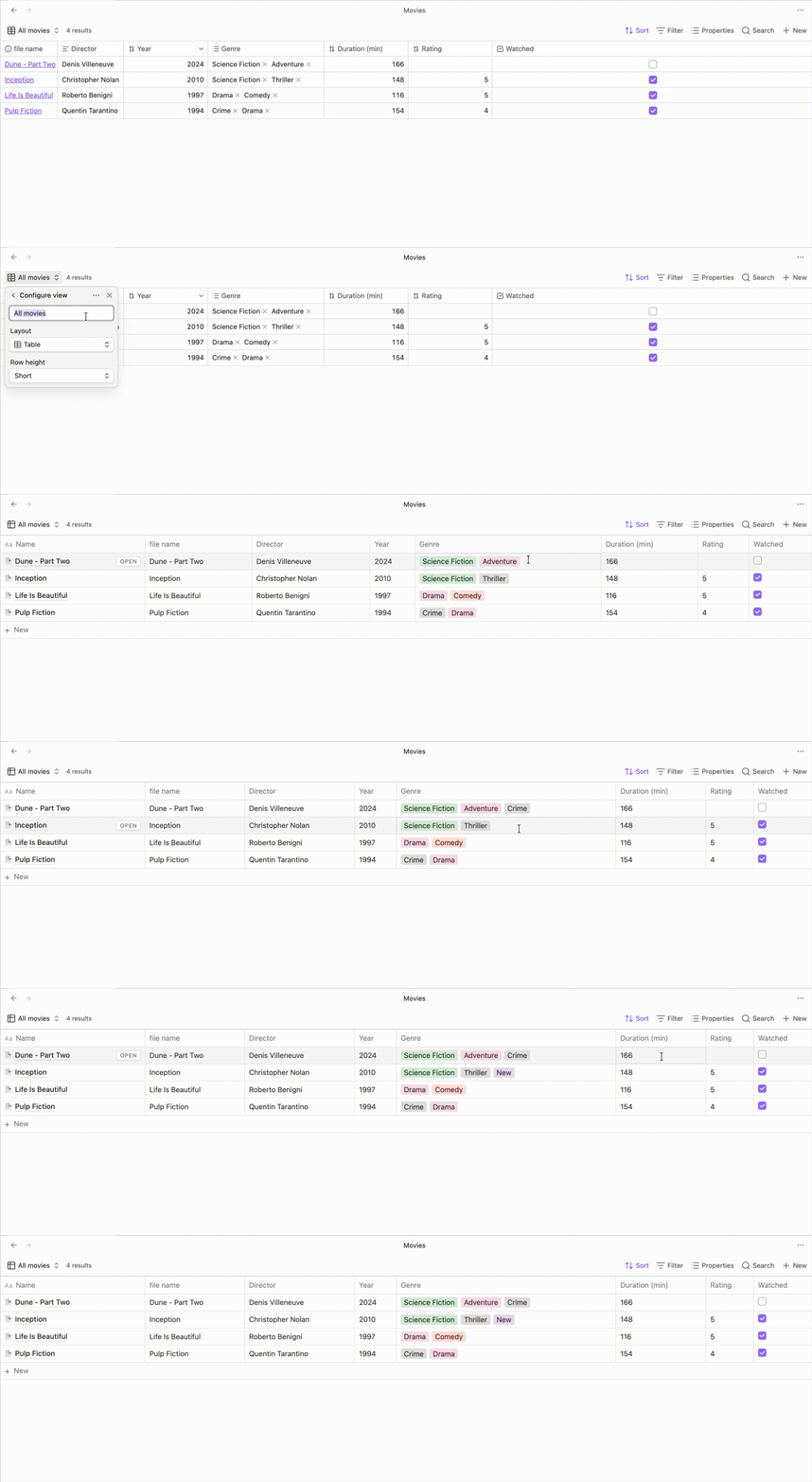
Notion Table
The full database grid.
- Resizable columns — drag the border between two headers; widths are saved per view.
- Rename a column — double-click a header title, type, Enter. The original property name is untouched; only the display name changes.
- Per-column right-click menu — toggle text wrapping for that column, and (for pill columns) turn the automatic pill colors off so values render plain.
- Property-type icons — each header shows an icon matching the property's type (text, number, checkbox, date, tags).
- Nested collapsible groups — see Nested groups.
- Row limit — a subtle
Rows: 50 ▾control in the footer caps how many rows render (10 / 20 / 50 / All).
Notion List
A compact one-line-per-note layout: the note title on the left, its
properties on the right. Same grouping, pills, and inline editing as the
table, minus the grid. The Row count limit view option decides how many
rows to draw (0 or all for no limit).
Notion Board
A Kanban board built from the base's grouping: one column per group, one card per note.
- Cards show the note title plus every visible property.
- Notes with no group value collect under No Status.
- Each column has its own + New at the bottom.
- Right-click a column header → Hide group to drop it from the board (stored in the Hidden groups view option).
Group keys containing / render as stacked, indented pills in the column
header — so Project/Alpha shows both levels.
Cards are not drag-and-drop yet; change a note's group from the card's own pill cell or the page panel.
Nested groups
Group by a property whose values use / as a separator and Extended Base
builds a real tree instead of a flat list. Work/Client/Alpha becomes
three nested levels, each with its own collapsible header and a count of
everything beneath it. Click ▼ / ▶ on any header to fold it.
Pills throughout the views show only the last path segment (Work/Client
renders as Client), so nested tags stay readable — the underlying value
is unchanged.
The page panel
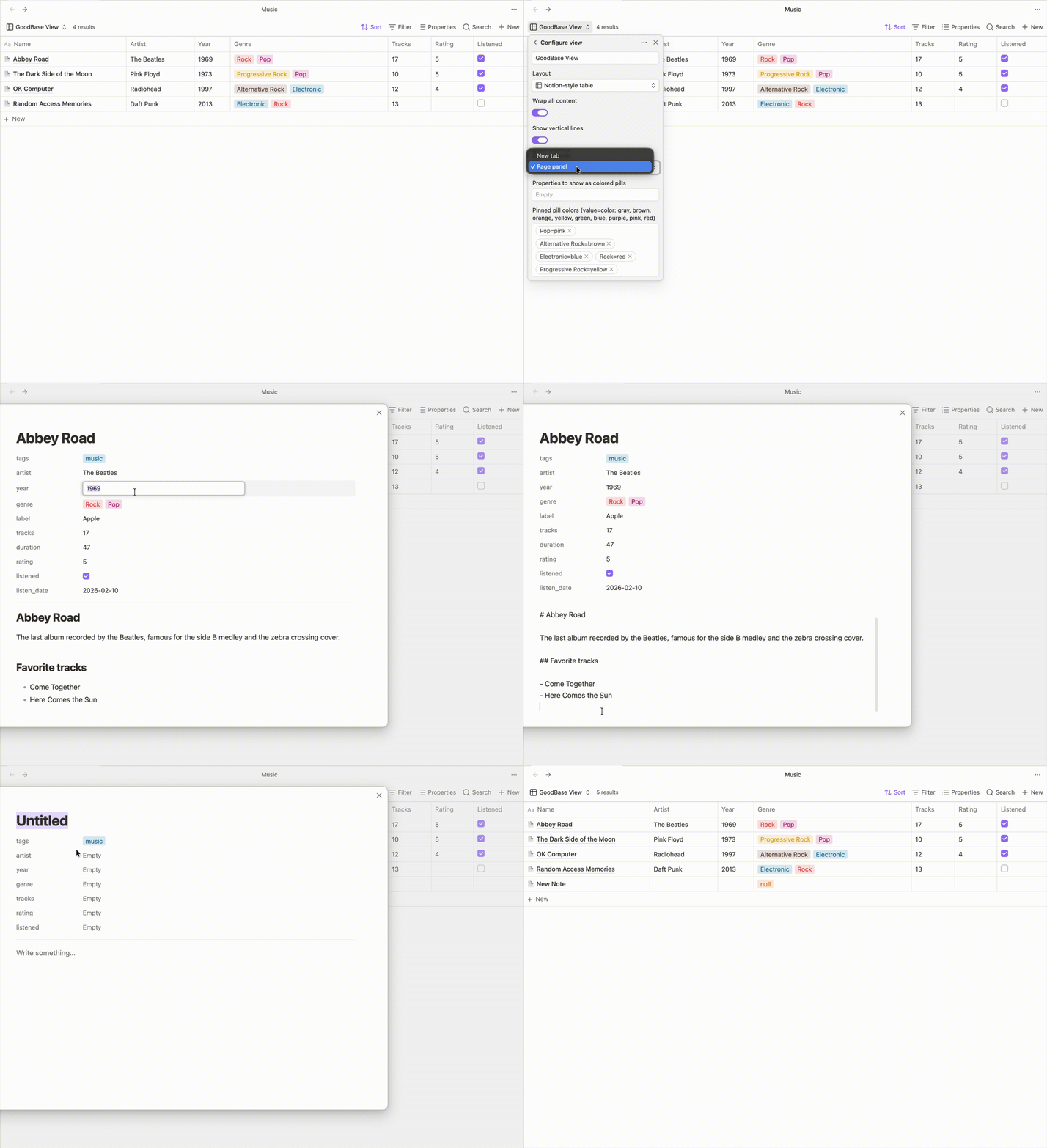
Click + New (in the footer, in a board column, or the base toolbar's New button) to create and edit a note in a centered Notion-style panel, without leaving the view. To open existing notes there too, set the Open notes in view option to Page panel — clicking a note title then opens the panel instead of a tab (Ctrl/Cmd-click still opens a tab):
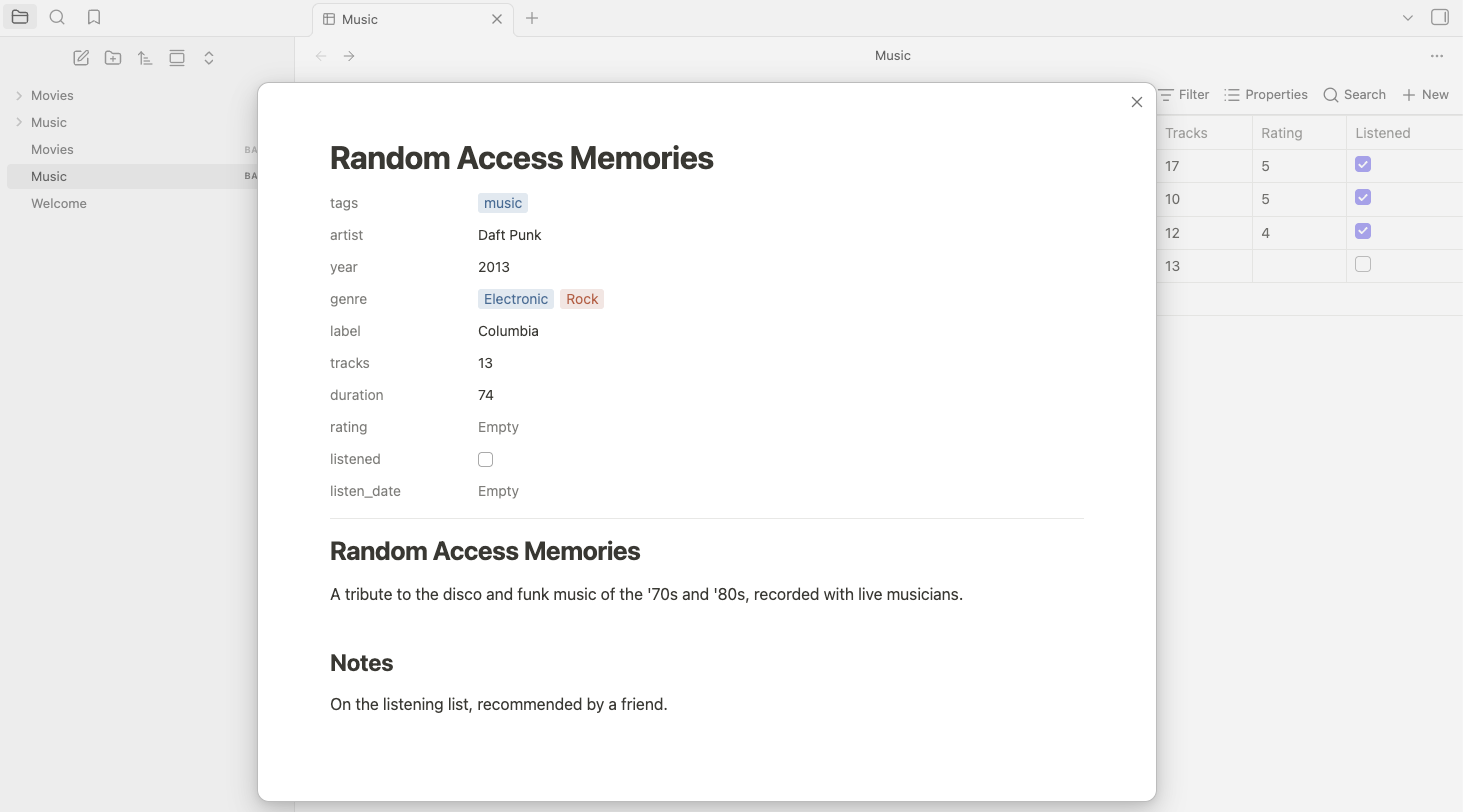
- Title — a real heading; type to rename the note, Enter jumps to the body.
- Properties — the note's frontmatter, editable exactly like the table: pill values open the select editor (with the color picker), checkboxes toggle in place, text and numbers edit inline.
- Body — rendered as formatted Markdown; click it to edit the source, click away and it renders again. Changes save automatically as you type.
- An open-in-new-tab button next to the close button saves pending edits and opens the note in a tab.
Features
Colored pills — list properties (tags, multitext) render as pills using Notion's 9-color palette, with accurate light- and dark-mode values. Colors are assigned by a deterministic hash, so a value keeps its color forever — unless you choose your own.
Per-value color picker — click the colored square on the right of any row in the pill select menu and pick from Notion's palette, or Default for no color. Your choice is saved and applies everywhere that value appears. (You can also set colors in bulk with the Pinned pill colors view option —
value=color, e.g.Done=green.)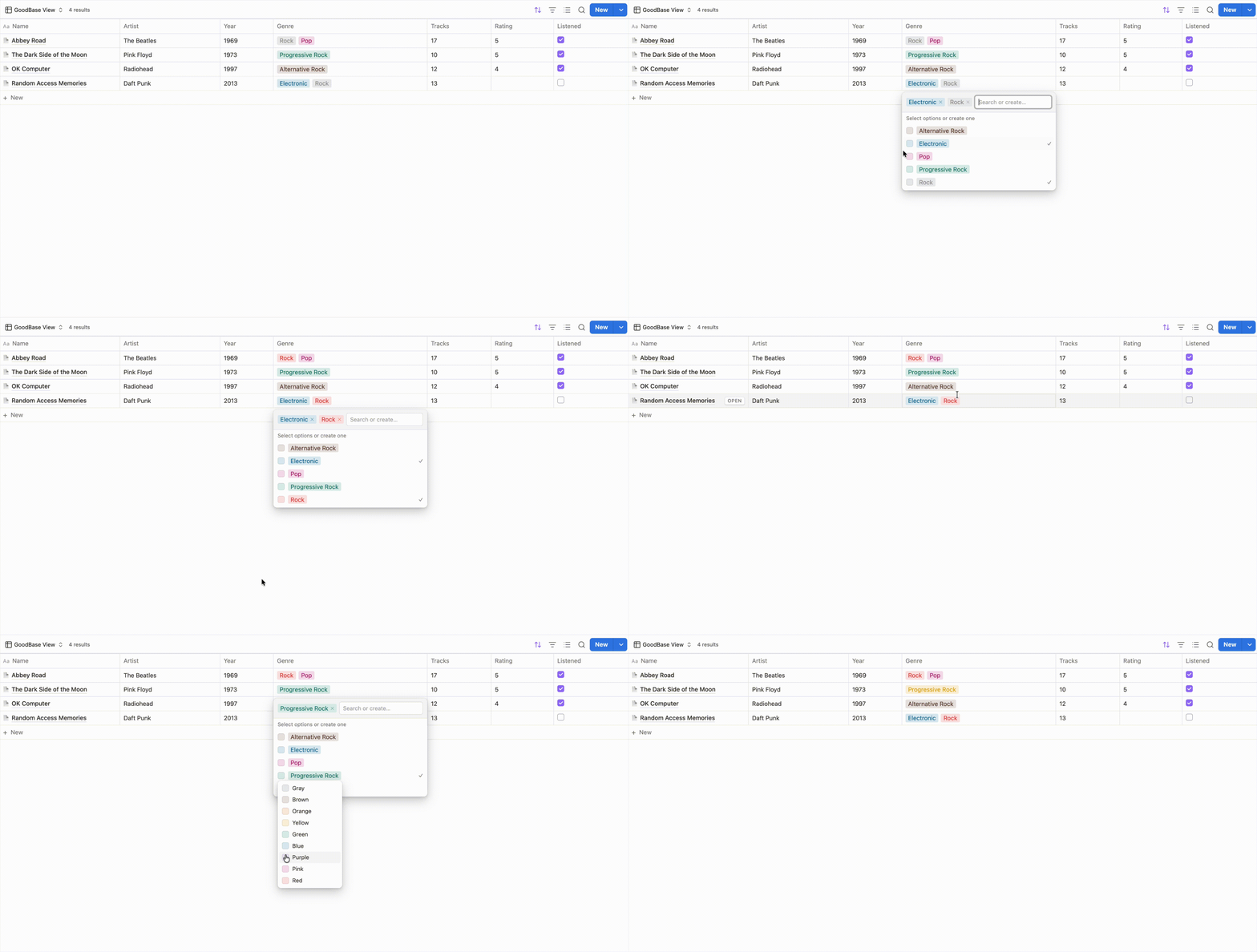
Select editor — pill cells open a select-style menu listing every value already used for that property, with a checkmark on the selected ones, search, and create-on-Enter.
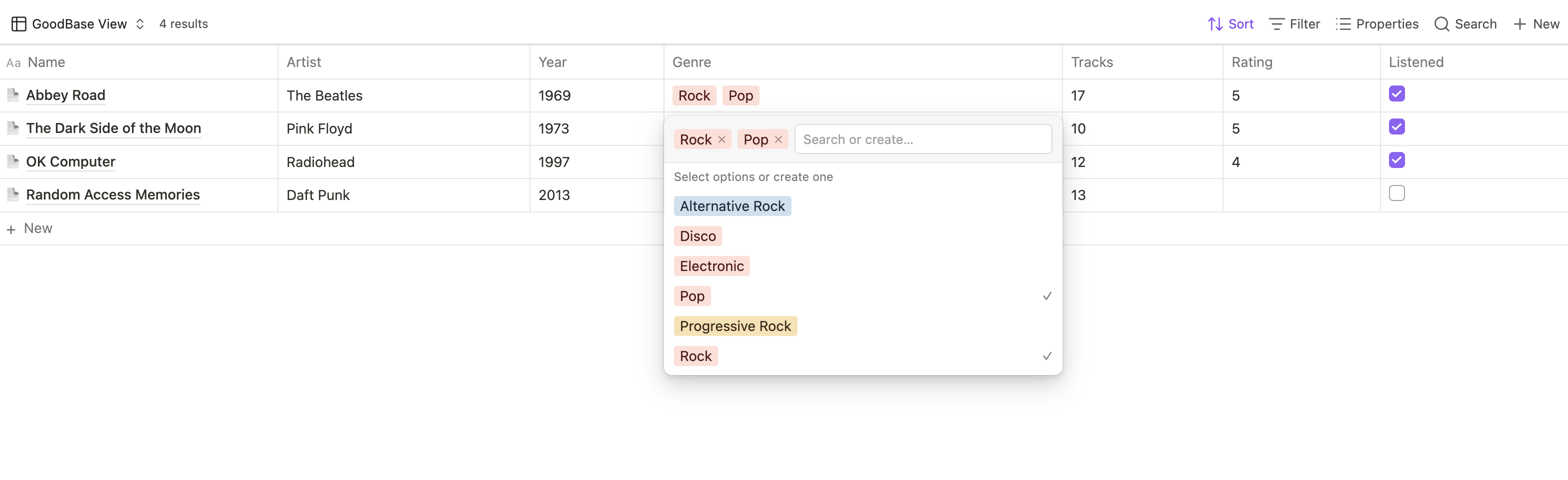
Inline editing — click a cell to edit text and numbers in a floating input sized to the cell; long text opens a textarea (Enter saves, Shift+Enter adds a newline). Checkboxes toggle in place.
Markdown in cells — text and multitext values render as Markdown, so links and formatting work inside a cell.
Path-stripped values — values that look like paths display their last segment, while URLs, wiki links, and comma-separated lists are left alone.
Grouping — respects the Bases
group byconfiguration, with the nesting and collapsing described above.
Usage
- Enable the Bases core plugin and create a base.
- In the base toolbar, open the view selector and choose Notion Table, Notion List, or Notion Board.
- Configure columns, filters, sorting, and grouping with the normal Bases controls. Each view adds its own settings on top:
| Option | Table | List | Board |
|---|---|---|---|
| Wrap all content | ✅ | ||
| Show vertical lines | ✅ | ||
| Row count limit | ✅ (footer) | ✅ | |
| Open notes in | ✅ | ✅ | ✅ |
| Group by property | ✅ | ||
| Hidden groups | ✅ | ||
| Properties to show as colored pills | ✅ | ✅ | ✅ |
| Pinned pill colors | ✅ | ✅ | ✅ |
Column widths, renamed headers, per-column wrapping, and per-column color toggles are set directly on the table (drag / double-click / right-click) and persist in the view config.
Notes on editing:
- Only note frontmatter properties (
note.*) are editable;file.*andformula.*columns are read-only by nature. tagspills are intentionally read-only for now — tags have special semantics and deserve a careful write path.
Installation
Extended Base is not in the community plugin browser. Install it manually:
- Build it (see Development) or download
main.js,manifest.json, andstyles.cssfrom a release. - Put them in
VaultRoot/.obsidian/plugins/extended-base/. - Reload Obsidian and enable the plugin in Settings → Community plugins → Installed plugins.
Optional: Notion-style toolbar
The blue Notion-style New button and icon-only Sort / Filter / Properties / Search are an optional CSS snippet — the toolbar is core Obsidian UI, outside the plugin's views, so the plugin doesn't style it:
- Copy
snippets/extended-base-notion-toolbar.cssintoVaultRoot/.obsidian/snippets/. - Enable it under Settings → Appearance → CSS snippets.
Once enabled, the snippet restyles every Bases toolbar, not just Extended Base views.
Development
npm install
npm run dev    # esbuild watch mode with inline sourcemaps
npm run build  # type-check + production bundle → main.js
Point the repo (or a symlink) at
VaultRoot/.obsidian/plugins/extended-base/ and reload the
plugin in Obsidian after each build.
Source layout:
src/main.ts— registers the three Bases views.src/view/notion-table-view.ts,notion-list-view.ts,notion-board-view.ts— one file per view.src/view/note-modal.ts— the page panel;select-editor.ts— the pill select menu.src/lib/— pill detection, the Notion color palette, group-tree building, frontmatter and value helpers.src/view-options.ts— the per-view settings shown in the Bases toolbar.
Roadmap
- ✅ List and Board views (1.0.1) — a compact list layout and a Kanban board built from the base's grouping.
- ✅ Nested groups (1.0.1) —
/-separated group values become a collapsible tree with per-level counts. - ✅ Column resizing and renaming (1.0.1) — drag column borders, double-click a header to rename; both persist per view.
- 🔵 Drag-and-drop cards — move a card between board columns to rewrite its group property.
- 🔵 Calculated footers — a Notion-style per-column Calculate row (count, sum, average, and more).
- 🔵 Editable tags — extend the select editor to write
tagssafely (currently read-only). - ⚪️ Gallery view — card galleries with cover images.
Changelog
1.0.6
- Fixed: text and multitext cells truncated at the first
/— pill/path values are meant to show only their last path segment, but that stripping was being applied to every rendered value, so ordinary text containing a/(a fraction, a date,"km/h", …) got cut short. It's now applied only to genuine link/file values. - Fixed: colors were a fixed Notion light/dark palette instead of the active Obsidian theme. Text, borders, hover wash, and the view's own background now come from Obsidian's theme variables, so a custom theme — not just light/dark mode — is followed everywhere.
- Fixed: rows could look misaligned because Markdown-rendered cells carry a paragraph's own margin while plain cells (numbers, dates, pills) don't; that margin is now reset so every cell lines up on the same baseline.
- Added: press-and-hold a column header and drag to reorder columns; click a header to sort by it (ascending → descending → off).
- Added: right-click a header for Change icon (a searchable icon picker) and Change property name, alongside the existing wrap/color toggles.
- Added: the pill select editor's option list can be drag-reordered; sorting a select/pill column now follows that saved order instead of alphabetical.
1.0.5
Housekeeping only — no functional change to the plugin.
- Changed: the optional toolbar snippet is now
snippets/extended-base-notion-toolbar.css(it was still named after the upstream project). Only the filename and its header comment changed — no CSS selector depended on the old name, so a copy you already enabled in.obsidian/snippets/keeps working untouched. - Docs: recorded 1.0.4 below, which shipped without a changelog entry.
1.0.4
Housekeeping only — no functional change to the plugin.
- Fixed: the
docs/landing page was still the upstream GoodBases site verbatim — its title, brand, hero copy, support section, GitHub links and OG tags all pointed at the original author, andpages.ymlpublishes that folder. It is now the Extended Base site: the three views, the 1.0.x changelog, and correct install instructions. The stale roadmap section was dropped rather than reattributed, since those were upstream's plans. - Changed: attribution to Umberto Francesco Carolini is now explicit in a
Credits section and the site footer, alongside
LICENSEand this README. - Changed: the leftover
[good-bases]build log prefix, and the plugin path in.env.example(the deploy code already used the manifest id, so only the comment was wrong).
1.0.3
- Fixed: the Open notes in view option did nothing — nothing read it after the hover OPEN button was dropped in 1.0.1, so the page panel could only ever be reached by creating a new note. Clicking a note title now honours the setting and opens an existing note in the panel when it is set to Page panel; Ctrl/Cmd-click still opens a tab. Applies to all three views.
- Changed: the plugin description in
manifest.jsondescribed settings this plugin does not have; it now describes the three views. - Docs: Open notes in is listed in the view-options table and explained under The page panel.
1.0.2
- Fixed: the Default swatch in the pill color picker followed the light-mode palette even in dark mode; it now tracks the theme.
- Changed: addressed the community plugin review lint — inline element
styles are gone in favour of CSS classes and
setCssPropscustom properties, group toggles usesetTextinstead ofinnerHTML, and the property-type lookup moved into a typed helper (src/lib/property-types.ts) shared by all three views. - Changed:
styles.cssand the toolbar snippet no longer use!important— overrides win by selector specificity instead. - Changed: note titles are underlined with
border-bottomrather thantext-decoration-*longhands, which Obsidian only partially supports.
No functional changes beyond the color-picker fix.
1.0.1
New — two more views.
- Notion List: a one-line-per-note layout, title on the left, properties on the right, with a Row count limit option.
- Notion Board: a Kanban board from the base's grouping — one column per group, cards carrying every visible property, per-column + New, and right-click → Hide group.
New — nested, collapsible groups. Group values containing / build a
real tree: indented headers per level, counts that include descendants,
and a ▼ / ▶ toggle on every header. Shared by the table and list views.
New — column controls in the table.
- Drag a column border to resize; widths persist per view.
- Double-click a header to rename it (display name only).
- Right-click a header to toggle wrapping for that column, or to turn off automatic pill colors for that column.
- Headers now show an icon matching the property's type.
- A
Rows: N ▾footer control limits how many rows render.
Also in this release:
- Added: text and multitext cells render Markdown, so links and formatting work in-cell.
- Added: a Default (no color) entry in the pill color picker.
- Changed: the select editor's rows are now checkmark → pill → color swatch, with the swatch on the right.
- Changed: pills and path-like values display only their last
/segment; URLs, wiki links, and comma-separated lists are preserved. - Changed: the table's Name column is a normal, reorderable column instead of a pinned first column — the hover OPEN button is gone; click a title to open it, Ctrl/Cmd-click for a new tab.
- Changed: outside-click detection uses
pointerdowninstead ofmousedown. - Changed: gray pills use
--text-normalfor their label so they stay legible in both themes. - Fixed: the MIT copyright notice for the original GoodBases work is
retained in
LICENSEalongside the fork's.
1.0.0
🎉 Extended Base — the fork's first release, on top of GoodBases
0.5.3. A rename and re-attribution only: plugin id extended-base, the
Extended Base name, and updated author metadata. The table view kept the
bases view-type id, which later versions preserve for compatibility.
Feature work landed in 1.0.1.
Inherited history — GoodBases 0.3.1 → 0.5.3
0.5.3
- Changed: addressed the community plugin review feedback — inline
styles now go through Obsidian's
setCssStyles/setCssPropsAPIs, modal lifecycle methods match Obsidian's types, andstyles.cssno longer uses!important(overrides win by selector specificity instead). No functional changes.
0.5.2
- Fixed: in the page panel, editing the body of a note with many properties could squeeze the editor to nothing, hiding the content — the editor now grows with its content and the panel scrolls.
0.5.1
- Added: the base's native toolbar New button now opens the page panel too, while a plugin view is active (other Bases views keep the core popover).
- Added: an open-in-new-tab button next to the page panel's close button — it saves pending edits, closes the panel, and opens the note in a new tab.
0.5.0
📄 New — Notion-style page panel. + New now opens the freshly created note centered in a panel, like Notion's page peek: an editable title, the note's properties — pills open the same select editor as the table, checkboxes toggle, text and numbers edit inline — and the body rendered as formatted Markdown (click to edit the source, click away to render it again; changes autosave as you type).
Also in this release:
- Added: an Open notes in view option — point the hover OPEN button at a new tab (default) or at the page panel.
0.4.5
- Fixed: in dark mode the table header no longer shows a light background — it now follows the page background like the rest of the table.
- Fixed: column headers now align consistently between editing and reading mode (header text is vertically centered in both).
0.4.4
- Fixed: long, multi-line text cells now edit in a textarea, so the full wrapped text stays visible while you type — previously a single-line input scrolled the text sideways. Shift+Enter inserts a newline; Enter saves.
0.4.3
- Fixed: clicking a pill cell again now closes its tag selector (previously only an outside click or Esc would).
- Fixed: the inline text/number edit box now matches the size of the cell you click, instead of a fixed size.
0.4.2
- Changed: the optional Notion-style toolbar snippet no longer uses
the
:has()selector, avoiding the performance cost of broad selector invalidation. Once enabled, the snippet now restyles every Bases toolbar.
0.4.1
- Changed: the Notion-style toolbar restyle (blue "New" button +
icon-only Sort / Filter / Properties / Search) became an optional CSS
snippet (
snippets/extended-base-notion-toolbar.css) rather than shipping in the plugin, so the plugin no longer restyles Obsidian's core UI.
0.4.0
🎨 New — per-value color picker. Click the colored square next to any value in the pill select menu and pick a color from Notion's palette. Your choice is saved (persisted to the Pinned pill colors option) and applies everywhere that value appears.
Also in this release:
- Changed: cell content now wraps by default.
- Changed: colored pills use Notion's exact light- and dark-mode palette values.
- Changed: restyled the Bases toolbar for the Notion-style view.
- Fixed: the inline edit box no longer lingers after you click away from a cell without changing it.
0.3.2
- Added: the project landing page, demo GIF, and a Buy Me a Coffee funding link.
0.3.1
- Initial release: Notion-style table view — colored pills, inline cell editing, the pill select editor, pinned pill colors, hover-reveal OPEN button, grouping support, and view options.
Credits
Extended Base is a fork of GoodBases by Umberto Francesco Carolini, released under the MIT license. The Notion-style table, colored pills, select editor, and page panel are their work; this fork adds the List and Board views, nested groups, and the column controls listed under 1.0.1.
If GoodBases is useful to you, you can support the original author with a coffee ☕.
Disclaimer
This plugin is not affiliated with, endorsed by, or sponsored by Notion Labs, Inc. "Notion" is a trademark of Notion Labs, Inc.; it is used here only to describe the visual style the views emulate.
License
MIT — Copyright (c) 2026 Umberto Francesco Carolini (the original GoodBases work) and Lucy Roh (Extended Base modifications).