Export Markdown ZIP
 padane22-spec497 downloads
Export a note with linked notes and local attachments into a zip archive.
- Overview
- Scorecard
- Updates5
Export markdown ZIP is an Obsidian desktop plugin that exports one Markdown note together with:
- recursively linked Markdown files
- local image and non-image attachments
- a rewritten Markdown graph that still works after extraction
The export is written as a single zip archive to a directory you choose or configure in plugin settings.
Background
Sharing an Obsidian note is often more complicated than sharing a single .md file.
In real vaults, one note usually depends on:
- linked notes referenced through wiki links or Markdown links
- local images and other attachments embedded in the note
- relative paths that only work inside the original vault structure
If you only copy the current note, the receiver often gets broken links, missing images, and an incomplete context graph.
This plugin solves that problem by exporting the selected note as a self-contained zip bundle. It collects linked Markdown files, includes local attachments, and rewrites internal links so the exported content still works after extraction.
Features
- Export the active note from the command palette.
- Export a note from the file context menu.
- Recursively follow Obsidian wiki links and Markdown links.
- Include local attachments such as images, PDFs, audio, and other linked files.
- Rewrite exported Markdown links to standard relative Markdown paths.
- Preserve vault-relative paths inside the zip under a top-level folder named after the archive.
Usage
- Build the plugin with
npm installandnpm run build. - Copy manifest.json, main.js, and styles.css into your vault at
.obsidian/plugins/export-markdown-zip/. - In Obsidian, open
Settings -> Community plugins, disable restricted mode if needed, and enableExport markdown ZIP. - Optionally set a default export directory in the plugin settings. You can also leave prompt mode enabled and choose a directory each time.
- Open a Markdown note and run
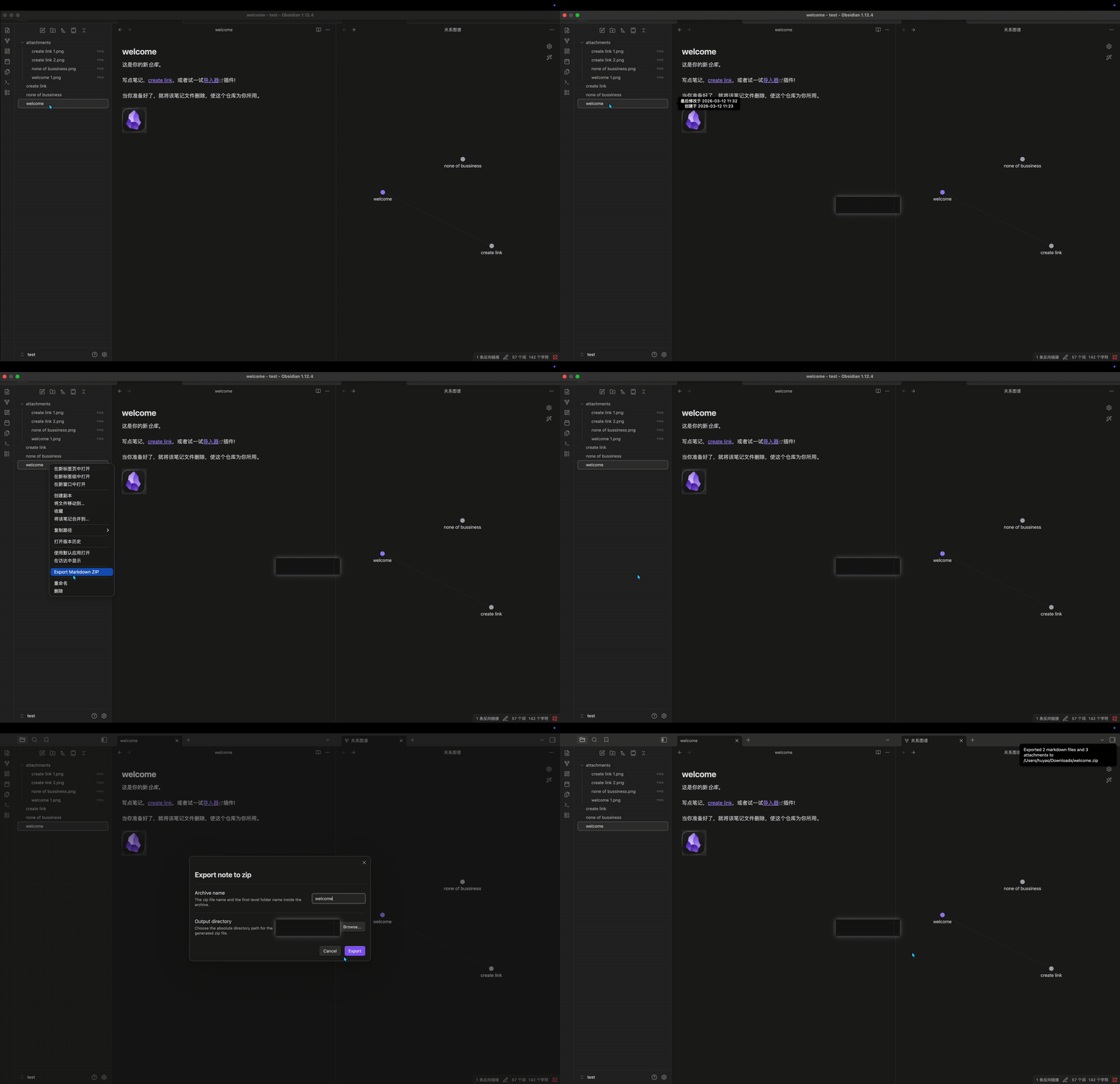
Export markdown ZIP: Export markdown ZIPfrom the command palette, or right-click a note in the file explorer and chooseExport markdown ZIP. - In the export dialog, set the archive name and output directory, then confirm.
- The plugin writes one zip file whose filename matches the archive name. Inside the zip, the first-level folder uses the same name.
Example
In the example below, entries without a file extension are Markdown notes:
attachments/
├── create link 1.png
├── create link 2.png
├── none of bussiness.png
└── welcome 1.png
create link
none of bussiness
welcome
Relationships:
welcome.mdlinks tocreate link.mdwelcome.mdalso embedsattachments/welcome 1.pngcreate link.mdembedsattachments/create link 1.pngandattachments/create link 2.pngnone of bussiness.mdonly usesattachments/none of bussiness.pngand is not linked from the other notes
When you export welcome.md, the plugin produces welcome.zip.
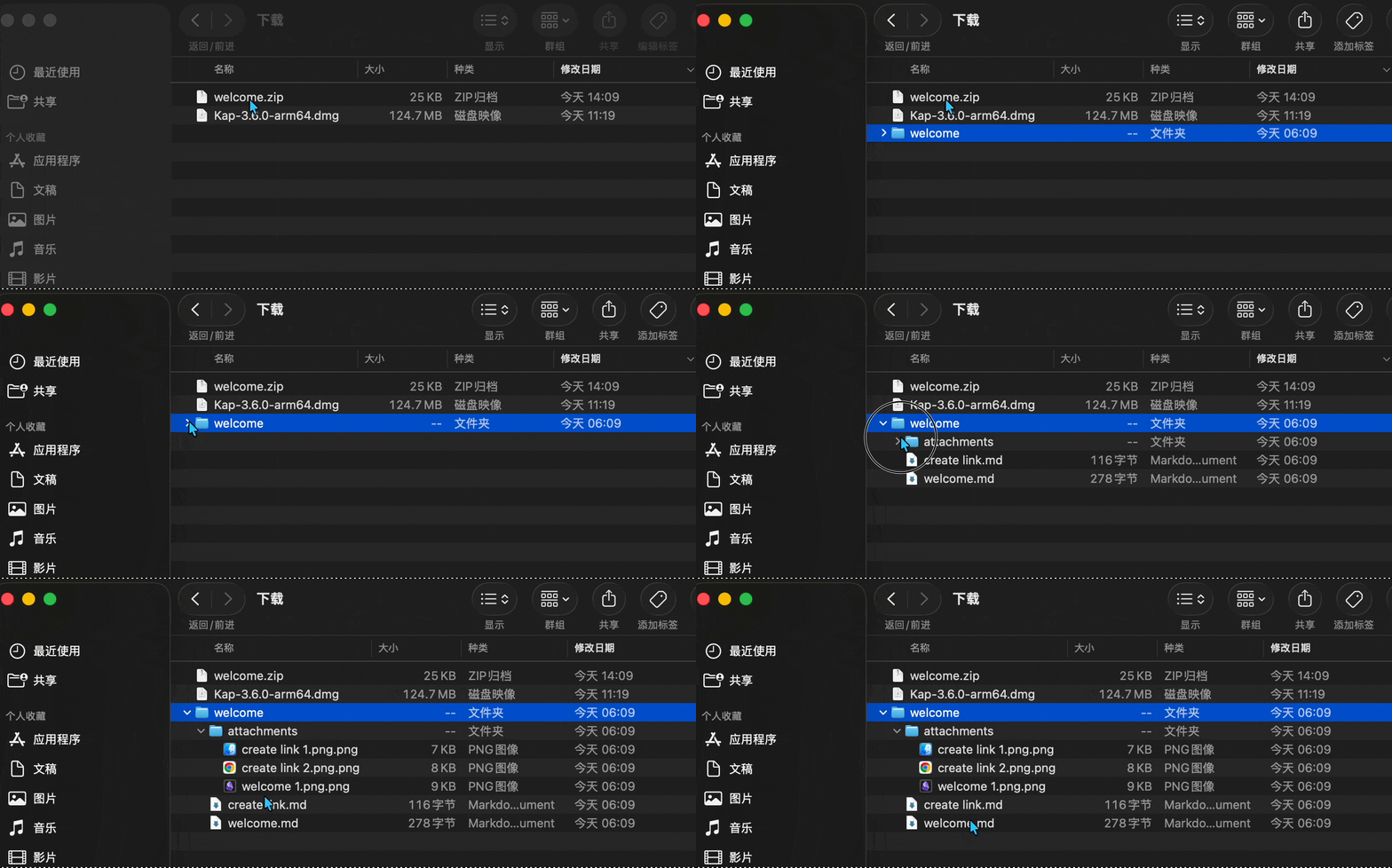
That archive includes only the files reachable from welcome.md:
welcome.zip
└── welcome/
    ├── welcome.md
    ├── create link.md
    └── attachments/
        ├── create link 1.png
        ├── create link 2.png
        └── welcome 1.png
none of bussiness.md and attachments/none of bussiness.png are not included because they are unrelated to welcome.md.
Demo GIF placeholder: add your recording at ./docs/export-welcome.gif.
Development
npm install
npm run build
npm test
Notes
- Desktop only.
manifest.jsonmarks the plugin as desktop-only. - Vault read access is used only during export. The plugin reads the selected Markdown file, Markdown files reachable through local Obsidian or Markdown links, and local attachments included in that export graph.
- Files outside the reachable export graph are not read or included.
- Unresolved local links are left unchanged and counted in the export result.
- External URLs are preserved unchanged.