Explorer Stepper
 kefate219 downloads
Navigate to the previous or next file in the current folder.
- Overview
- Scorecard
- Updates1
Explorer Stepper is a lightweight Obsidian plugin for navigating to the previous or next file in the current folder.
Features
- Navigate to the previous or next file with configurable hotkeys.
- Include every direct child file, including Markdown, images, PDFs, and Canvas files.
- Sort file names naturally, so
file2appears beforefile10. - Stay in the current folder without scanning nested folders.
- Stop at the first and last file instead of wrapping around.
- Display commands and notices in English or Chinese based on the Obsidian interface language.
How It Works
Explorer Stepper reads the direct files in the active file's folder and sorts them by file name using locale-aware natural ordering. It then opens the adjacent file in the current tab.
For example:
file1.md
file2.md
file10.md
Folders are not included in the sequence, and files inside nested folders are not scanned.
Installation
Manual Installation
Download
main.jsandmanifest.jsonfrom the latest GitHub release.Create this folder inside your vault:
<vault>/.obsidian/plugins/explorer-stepper/Copy both files into that folder.
Reload Obsidian.
Open Settings → Community plugins and enable Explorer Stepper.
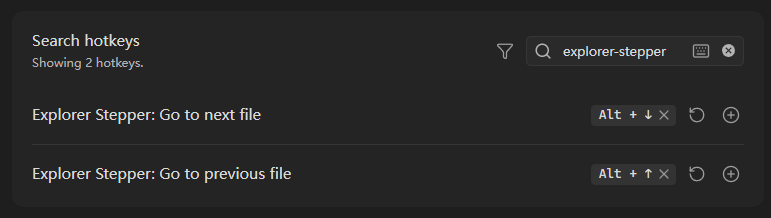
Configure Hotkeys
- Open Settings → Hotkeys.
- Search for
explorer-stepperor Explorer Stepper. - Assign shortcuts to:
- Explorer Stepper: Go to previous file
- Explorer Stepper: Go to next file
The plugin intentionally does not provide default shortcuts to avoid conflicts with existing Obsidian or plugin hotkeys.
Boundary Behavior
When the active file is already the first or last file in the sorted sequence, Explorer Stepper stays on the current file and displays a localized notice. Navigation does not wrap around.
If there is no active file, the plugin asks you to open one before using a navigation command.
Language Support
The plugin uses Chinese when the Obsidian locale starts with zh. All other
locales use English.
Development
npm install
npm test
npm run build
The production build creates main.js in the project root.