Search...Search plugins and themes...
⌘K
Sign in
  • Get started
  • Download
  • Pricing
  • Enterprise
  • Account
  • Obsidian
  • Overview
  • Sync
  • Publish
  • Canvas
  • Mobile
  • Web Clipper
  • CLI
  • Learn
  • Help
  • Developers
  • Changelog
  • About
  • Roadmap
  • Blog
  • Resources
  • System status
  • License overview
  • Terms of service
  • Privacy policy
  • Security
  • Community
  • Plugins
  • Themes
  • Discord
  • Forum / 中文论坛
  • Merch store
  • Brand guidelines
Follow us
DiscordTwitterBlueskyThreadsMastodonYouTubeGitHub
© 2026 Obsidian

ExMemo Tools

exmemo-aiexmemo-ai1k downloads

Use LLMs for smart document management and optimization, including relocating files, enhancing text, and generating tags and summary.

Add to Obsidian
  • Overview
  • Scorecard
  • Updates3

English | 中文简体

ExMemo Tools

ExMemo Tools is an Obsidian plugin powered by large language models (LLM), offering intelligent document management and content optimization features.

Watch the video:
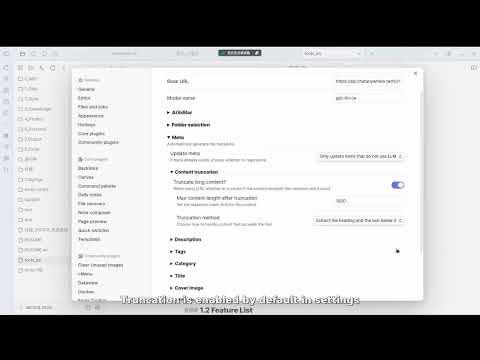
Watch the video

Main Features

  • Smart File Archiving - Auto-recommend suitable directories
  • Smart Content Insertion - Auto-locate optimal insertion points
  • Metadata Management - Auto-generate tags, descriptions, titles
  • Directory Indexing - Create directory summaries and content tags
  • AI-Assisted Editing - Support content optimization and text continuation
  • Generate Card - Create Luhmann cards for files or selected paragraphs

Quick Start

Basic Configuration

  1. Configure LLM parameters: Set API key, base URL, and model name
  2. Optional: Configure tag list or auto-extract tags from repository
  3. Optional: Customize metadata generation prompts
  4. Recommended: Enable "content truncation" for long documents to control API costs

Need more detailed setup guide? Check out the Configuration Documentation

Core Features

Generate Metadata (Ctrl+P > ExMemo Tools: Generate Metadata)

  • Auto-generate tags, descriptions, titles, categories, and dates
  • Support incremental updates for existing metadata

Smart Archiving (Ctrl+P > ExMemo Tools: Select Suitable Directory for Current File)

  • Recommend best directories based on file content
  • Support directory filtering and path completion

Smart Content Editing (Ctrl+P > ExMemo Tools: Insert selected text/LLM Assistant/Continue Writing)

  • Smart insertion point location
  • AI-assisted content editing (with prompt management)
  • Context-aware text continuation

Generate Card (Ctrl+P > ExMemo Tools: Generate Luhmann Card)

  • Create Luhmann cards based on selected text or file content
  • Automatically insert cards into the file

Generate Index (Right-click directory > ExMemo Generate Directory Index / Search results > Create Index)

  • Generate directory structure and content summary
  • Auto-extract and aggregate tags
  • Auto-extract cards from files

License

This project is licensed under the GNU Lesser General Public License v3.0. For more details, please refer to the LICENSE file.

73%
HealthGood
ReviewCaution
About
Manage notes with LLM-driven tools for smart archiving, metadata generation, directory indexing, and AI-assisted editing. Auto-generate tags, titles and descriptions, recommend suitable folders, insert or continue text contextually, and create Luhmann cards or directory indexes from files or selections.
AIFoldersTags
Details
Current version
1.2.0
Last updated
12 months ago
Created
2 years ago
Updates
3 releases
Downloads
1k
Compatible with
Obsidian 1.4.5+
Platforms
Desktop, Mobile
License
OTHER
Report bugRequest featureReport plugin
Author
exmemo-aiexmemo-ai
tencent.xyan666.com/
GitHubexmemo-ai
  1. Community
  2. Plugins
  3. AI
  4. ExMemo Tools

Related plugins

Simple Note Review

Simple, customizable plugin for easy note review, resurfacing and repetition.

Tars

Text generation based on tag suggestions, using Claude, OpenAI, Ollama, Kimi, Doubao, Qwen, Zhipu, DeepSeek, QianFan & more.

Copilot

Your AI Copilot: Chat with Your Second Brain, Learn Faster, Work Smarter.

Claudian

Embeds Claude Code/Codex as an AI collaborator in your vault. Your vault becomes agent's working directory, giving it full agentic capabilities: file read/write, search, bash commands, and multi-step workflows.

Smart Connections

AI link discovery copilot. See related notes as you write. Lookup using semantic (vector) search across your vault. Zero-setup local model for embeddings, no API keys, private.

Agent Client

Chat with Claude Code, Codex, Gemini CLI, and more via the Agent Client Protocol — right from your vault.

Text Generator

Generate text content using GPT-3 (OpenAI).

Smart Composer

AI chat with note context, smart writing assistance, and one-click edits for your vault.

Flexplorer

Enhance the file explorer with custom sorting, pinning, and hiding.

HiNote

Add comments to highlighted notes, use AI for thinking, and flashcards for memory.