Search...Search plugins and themes...
⌘K
Sign in
  • Get started
  • Download
  • Pricing
  • Enterprise
  • Account
  • Obsidian
  • Overview
  • Sync
  • Publish
  • Canvas
  • Mobile
  • Web Clipper
  • CLI
  • Learn
  • Help
  • Developers
  • Changelog
  • About
  • Roadmap
  • Blog
  • Resources
  • System status
  • License overview
  • Terms of service
  • Privacy policy
  • Security
  • Community
  • Plugins
  • Themes
  • Discord
  • Forum / 中文论坛
  • Merch store
  • Brand guidelines
Follow us
DiscordTwitterBlueskyThreadsMastodonYouTubeGitHub
© 2026 Obsidian

Event Highlight

playmeanplaymean1k downloads

Render colored bars with relative event dates

Add to Obsidian
  • Overview
  • Scorecard
  • Updates3
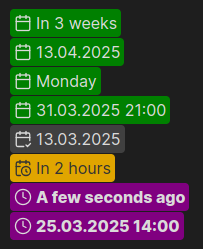
```event-highlight
2025-03-25
```

```event-highlight
2025-03-25 21:00
```
Example

HealthExcellent
ReviewCaution
About
Highlight event tokens written as ISO dates with optional times (e.g., event-highlight 2025-03-25 or event-highlight 2025-03-25 21:00) directly in your notes. Render date and time entries distinctly so scheduled items stand out while you edit.
DatesSyntaxEditing
Details
Current version
0.7.0
Last updated
9 months ago
Created
2 years ago
Updates
3 releases
Downloads
1k
Compatible with
Obsidian 0.15.0+
Platforms
Desktop, Mobile
License
MIT
Report bugRequest featureReport plugin
Author
playmeanplaymean
github.com/playmean
GitHubplaymean
  1. Community
  2. Plugins
  3. Dates
  4. Event Highlight

Related plugins

Thino

Quickly capture memos and display them in the sidebar with a heatmap. (Closed source)

VSCode Editor

Edit Code Files like VSCode.

LanguageTool Integration

Advanced grammar and spell checking, powered by LanguageTool.

Meta Bind

Make your notes interactive with inline input fields, metadata displays, and buttons.

Advanced Tables

Improved table navigation, formatting, and manipulation.

Tasks

Track tasks across your vault. Supports due dates, recurring tasks, done dates, sub-set of checklist items, and filtering. Maintained by Clare Macrae and Ilyas Landikov, created by Martin Schenck.

Day Planner

Turn tasks from daily notes, the Tasks plugin, and calendars into time blocks on an editable timeline, with built-in time tracker.

Editing Toolbar

The Editing Toolbar is modified from cMenu, which provides more powerful customization settings and has many built-in editing commands to be a MS Word-like toolbar editing experience.

Simplified Chinese Word Splitting

Adds Simplified Chinese word splitting support for the editor and Vim mode.

Full Calendar Remastered

Complete Calendar HUB experience. Work with all your calendars in one place. Analyze your time and take action!