Search...Search plugins and themes...
⌘K
Sign in
  • Get started
  • Download
  • Pricing
  • Enterprise
  • Account
  • Obsidian
  • Overview
  • Sync
  • Publish
  • Canvas
  • Mobile
  • Web Clipper
  • CLI
  • Learn
  • Help
  • Developers
  • Changelog
  • About
  • Roadmap
  • Blog
  • Resources
  • System status
  • License overview
  • Terms of service
  • Privacy policy
  • Security
  • Community
  • Plugins
  • Themes
  • Discord
  • Forum / 中文论坛
  • Merch store
  • Brand guidelines
Follow us
DiscordTwitterBlueskyThreadsMastodonYouTubeGitHub
© 2026 Obsidian

Etch - Weather

parenteparente256 downloads

Etches weather forecasts into your local notes.

Add to Obsidian
  • Overview
  • Scorecard
  • Updates1

An Obsidian plugin that etches daily weather forecasts into your notes for permanent, local, offline access.
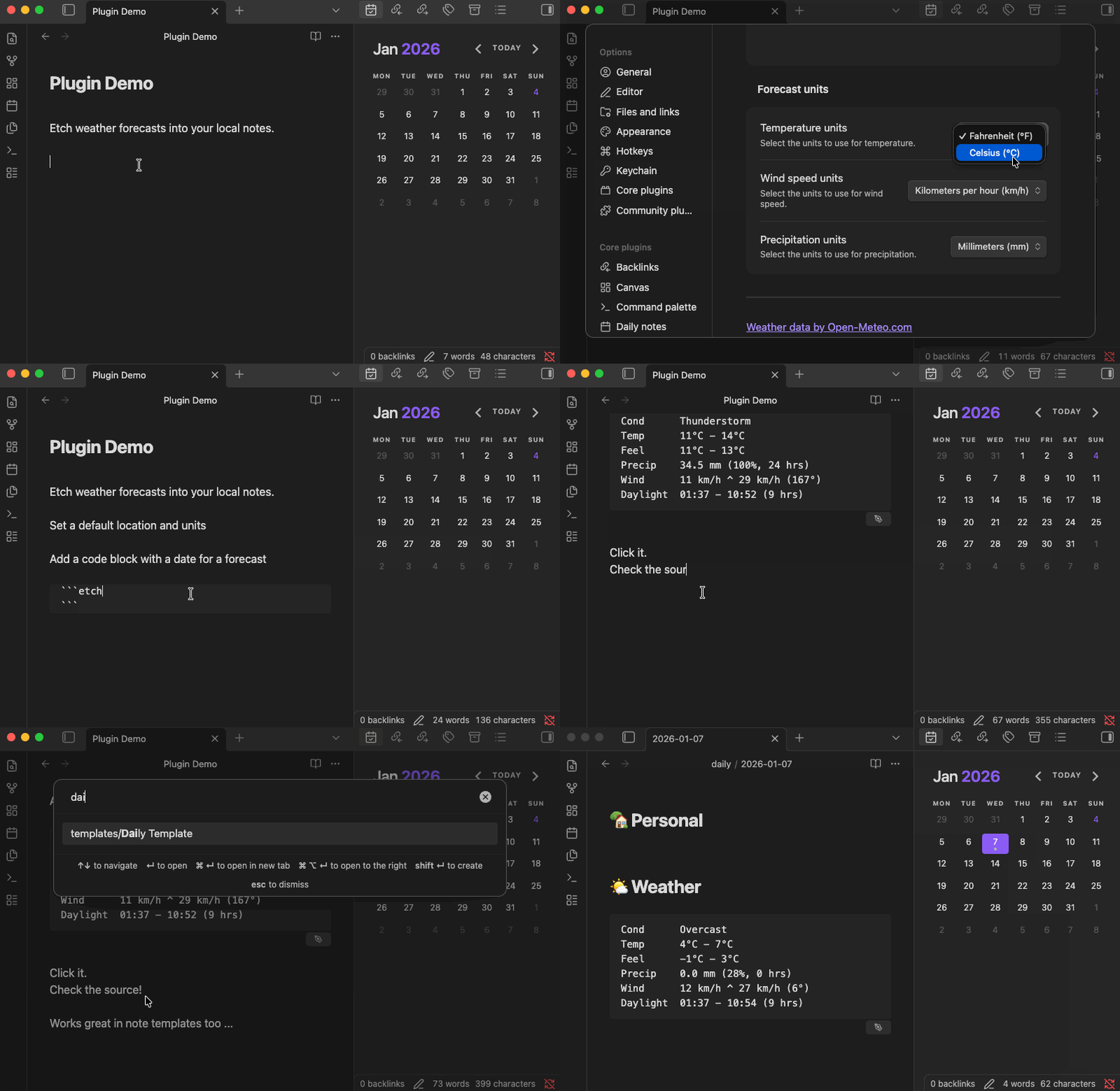
Animated gif demo of the steps documented in the Usage section below

Why?

I wanted another plugin like [parente/obsidian-etch-google-calendar], this time to get an glimpse of expected weather in my daily notes and to maintain a history of those forecasts in my markdown files.

Setup

I've submitted this plugin for inclusion in the Obsidian Community Plugins list. You can one-click install it from there once it's approved. Until then, you can use the BRAT plugin to install a release from this repository.

Once installed, configure the default location for forecasts, measurement units, and other details in the Obsidian settings.

Usage

Add a fenced code block with language identifier like etch-weather{date: 2025-12-31} to a note. Move the text caret out of the block so that it renders. Click the pen icon that appears in the bottom right to etch the forecast for the default location on that date (2025-12-31) into the code block.

```etch-weather{date: 2025-12-31}
```

Alternatively, create a daily note with a title like 2025-12-31 and place a code block without a {date: ...} into the note. The plugin will put the forecast for the default location for that date into the code block instead. This approach works great with the Periodic Notes and Calendar plugins.

```etch-weather
```

You can override the default location using fenced block parameters too.

```etch-weather{lat: 34.1030, lon: -118.4105, tz: America/Los_Angeles}
```

Development

cd /path/to/vault/.obsidian/plugins
git clone [email protected]:parente/obsidian-etch-weather.git
npm i
npm run eslint
npm run svelte-check
npm run dev

Attribution

The structure of this plugin originates from https://github.com/obsidianmd/obsidian-sample-plugin. I reused some code and patterns from https://github.com/parente/obsidian-etch-google-calendar.

All weather data by Open-Meteo.com under the Attribution 4.0 International (CC BY 4.0) license. The project uses the Open-Meteo Typescript client which is MIT licensed.

HealthExcellent
ReviewCaution
About
Etch daily weather forecasts into your notes for permanent, local, offline access. Insert an etch-weather fenced code block—optionally include a date or coordinates—to render and save the forecast in your Markdown file as a historical record.
DatesDataIntegrations
Details
Current version
1.0.0
Last updated
9 months ago
Created
9 months ago
Updates
1 release
Downloads
256
Compatible with
Obsidian 1.11.0+
Platforms
Desktop, Mobile
License
0BSD
Report bugRequest featureReport plugin
Sponsor
Buy Me a Coffee
Author
parenteparente
github.com/parente
GitHubparente
  1. Community
  2. Plugins
  3. Dates
  4. Etch - Weather

Related plugins

BRAT

Easily install a beta version of a plugin for testing.

LanguageTool Integration

Advanced grammar and spell checking, powered by LanguageTool.

Self-hosted LiveSync

Sync vaults securely to self-hosted servers or WEBRTC.

Fast Note Sync

Real-time sync of your vaults across server, mobile, and web; shareable with anyone; supports REST and MCP integrations to build your personal AI knowledge base.

Thino

Quickly capture memos and display them in the sidebar with a heatmap. (Closed source)

Custom Frames

Turn web apps into panes using iframes with custom styling. Also comes with presets for Google Keep, Todoist and more.

Local REST API with MCP

Unlock your automation needs by interacting with your notes over a secure REST API.

Tasks

Track tasks across your vault. Supports due dates, recurring tasks, done dates, sub-set of checklist items, and filtering. Maintained by Clare Macrae and Ilyas Landikov, created by Martin Schenck.

Day Planner

Turn tasks from daily notes, the Tasks plugin, and calendars into time blocks on an editable timeline, with built-in time tracker.

Mood Tracker

Track your moods & emotions easily. Visualize tracked history and browse the past entries.