EngramQuest
 bahfahh3k downloads
Turn notes into gamified Quest Maps, visual Memory Maps (Canvas), and flashcard Review Decks powered by AI Skills. Supports Claude Code, Gemini CLI, and Cursor. Features FSRS spaced repetition, active recall, memory retention, and AI hints.
- Overview
- Scorecard
- Updates28
English · 繁體中文
🗺️ EngramQuest
You take notes you never open again. EngramQuest turns your Obsidian vault from a note graveyard into memory you can actually use.
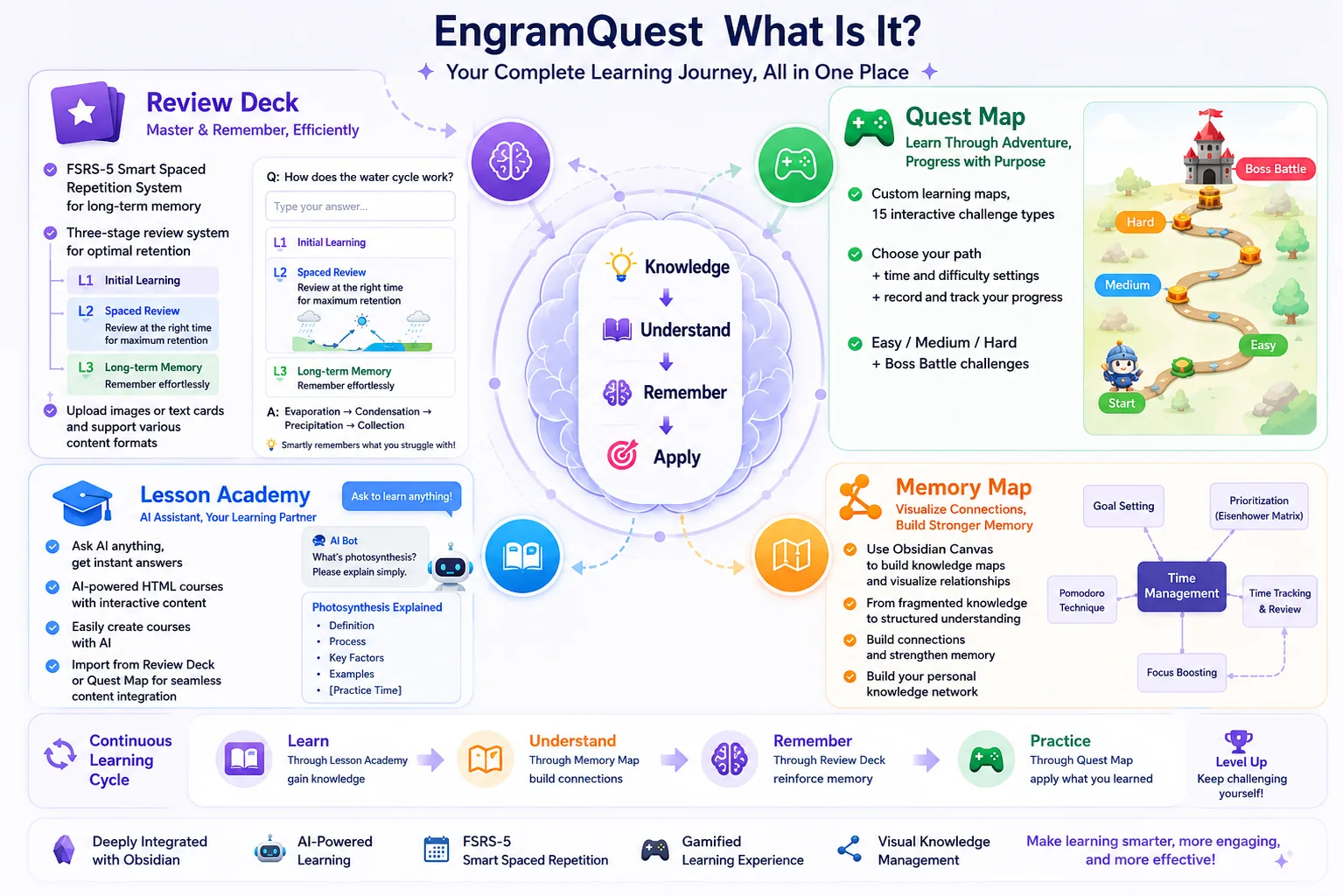
What is EngramQuest?
EngramQuest is an AI-powered learning layer on top of your Obsidian notes. Most notes get written once and never touched again — EngramQuest closes that loop and turns them into knowledge you actually keep.
You can write flashcards by hand, or just point your AI tool at a note and let it build the study material for you — no copy-pasting, no rebuilding cards from scratch. From the same notes, EngramQuest can spin up an interactive course that teaches the topic, a game-like quest that drills you, a memory map that shows how the ideas connect, or a review deck that uses FSRS spaced repetition to make it stick.
The AI runs through tools you already have — Claude Desktop, Claude Code, Codex, Antigravity, Gemini CLI, Cursor, and more. They do the generating, so there's no extra subscription and no per-token API fees — your existing plan is enough, and AI is fully optional.
The point isn't to collect more notes. It's to learn them, practice them, and remember them — all inside Obsidian.
💡 Why EngramQuest?
Anki solves when to review. EngramQuest solves how to actually remember — and what to do before the flashcard stage: learning it, practicing it, and connecting it, not just drilling cards.
Every module works on its own, or chains into the next. AI is optional — and it runs on the AI tools you already use (Claude Code, Codex, Antigravity, Gemini CLI, Cursor), not another subscription.
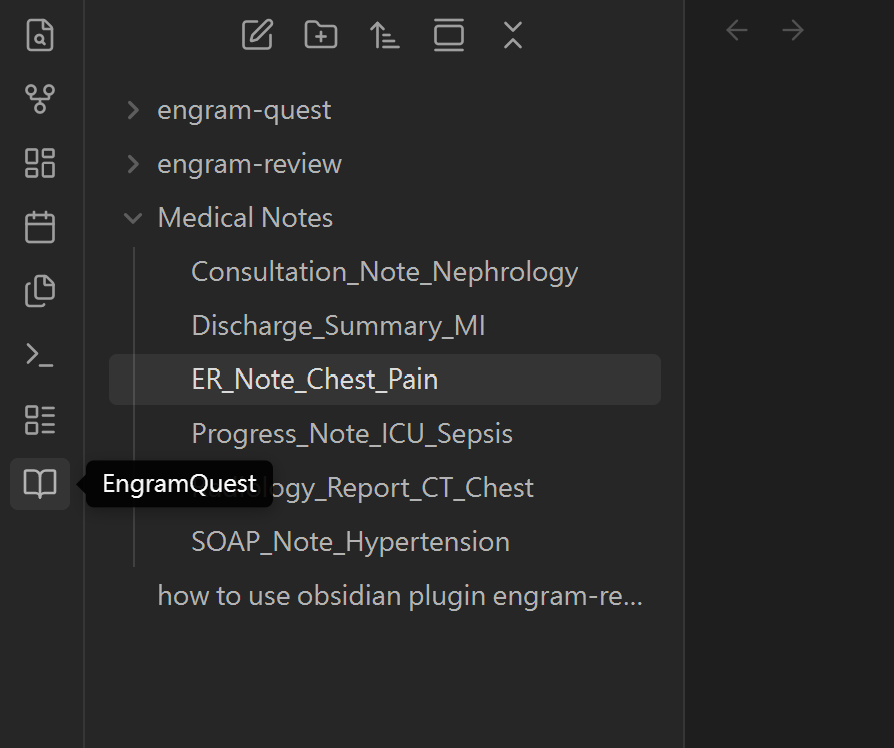
🧭 Where to open it
Once the plugin is installed, click the EngramQuest icon in the left ribbon — that's how you open it. (A few people miss this at first, so here's exactly where to look.)
⚡ Quick Start (AI Path)
- Install the plugin — open in Obsidian, search EngramQuest in Community Plugins, or grab it from GitHub Releases.
- Install the Skills — go to
Settings → EngramQuest → AI Skillsand click Install for your tool (Claude Code, Codex / Antigravity, Gemini CLI, or Cursor).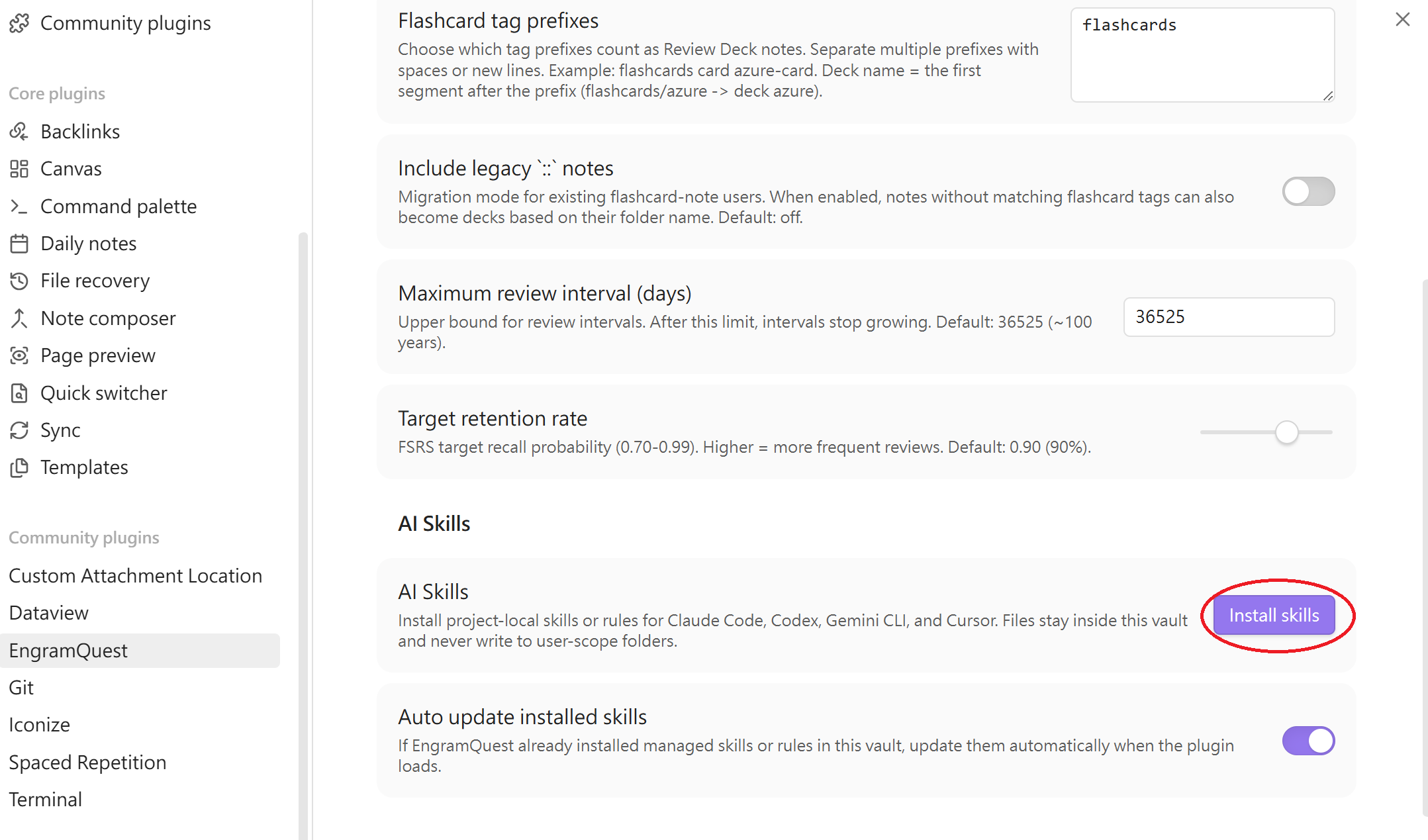
- Ask your AI — "Turn
Note.mdinto a quest-map medium" or "Build a review deck from notes tagged math." - Open the Hub — click the 🗺️ ribbon icon, switch to the relevant tab, and start learning.
💬 Using Claude Desktop? No terminal required — paste one Setup Prompt and Claude connects to your vault automatically, loads the skills, and remembers the rules. Open the in-plugin Guide (❓ icon in the Hub) and copy the Claude Desktop Setup Prompt from the top of the guide. Claude Desktop also has built-in web search and can generate SVG diagrams alongside your content.
Not a SaaS. Skills are the execution logic that run inside the AI tool you already have. No extra account, no subscription, and AI is fully optional.
✨ Features
🃏 Review Deck — Remember More, Study Less
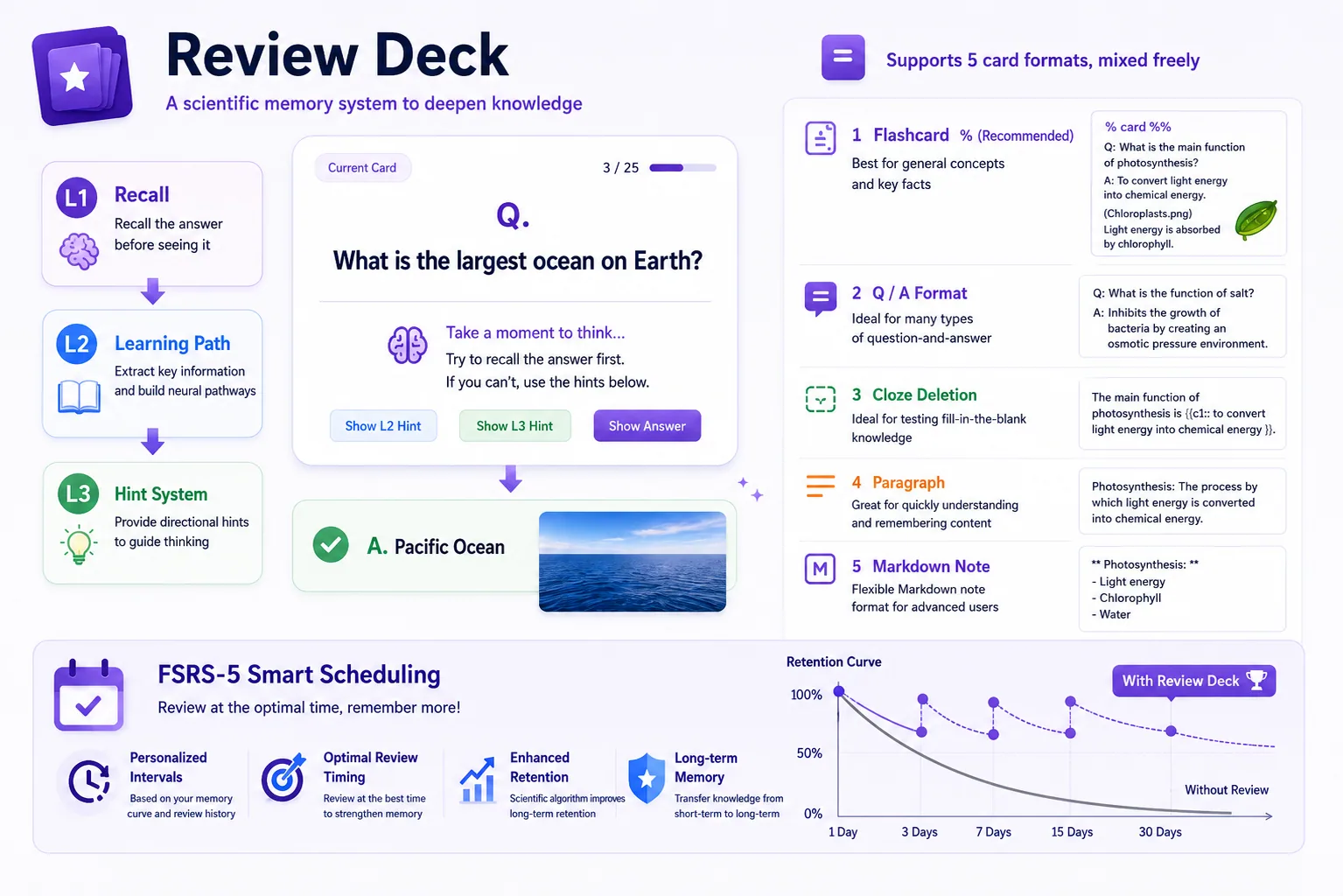
A three-stage recall system that builds real memory, not just familiarity:
| Stage | What it does | Anywhere else? |
|---|---|---|
| L1 Active Recall | Question only — forces your brain to search first, before any hint | ✅ most flashcards |
| L2 Contextual Anchor ⭐ | AI searches your vault and rebuilds the moment you first learned this topic | ❌ only here |
| L3 Narrowing Hint | A keyword direction as a last resort — never the full answer | rare |
- FSRS-5 scheduling — intervals adapt to your actual recall, not preset multipliers
- AI cards stay separate — generated cards live in
engram-review/, AI never touches your source notes - 5 mixable card formats — paste long AI answers, multi-line Q&A, cloze, one-liners, all in one note
- Edit writes back — fix a card mid-review and the change saves to your source note
- Auto-detection — any note tagged
#flashcards/topicis picked up automatically
📺 Watch: 
▶️ Build your own Review Deck · ▶️ Create a deck by pasting an AI answer
🗺️ Quest Map — Practice Missions
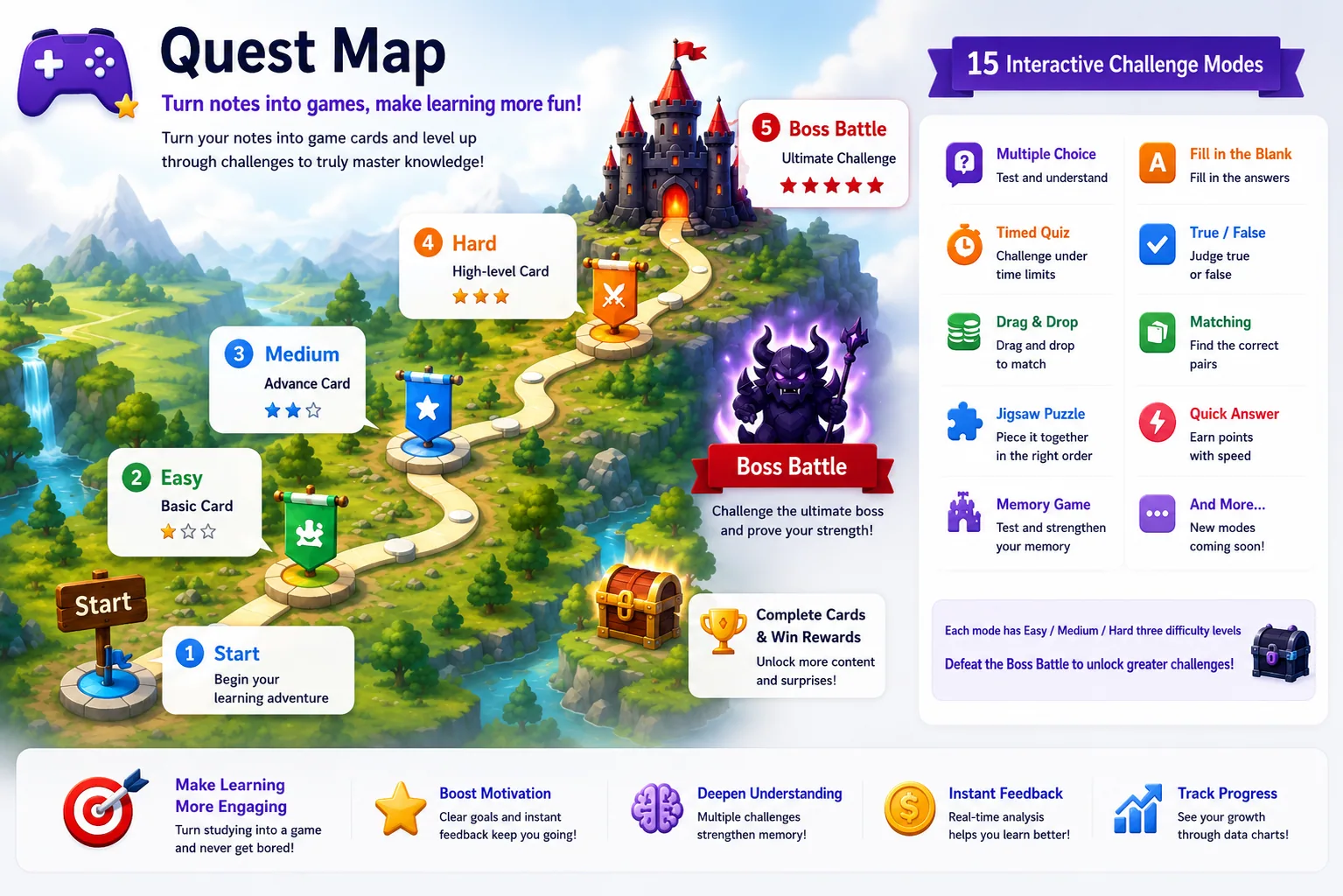
Transforms any note into a game-like practice map: briefings, scenario missions, decisions under constraints, and Boss Battles embedded in your vault as a .md file.
- 15 challenge types — quiz, true/false, cloze, input, ordering, matching, countdown, snapshot, auction (bet coins on your confidence), timeline, chain, memory palace, image quiz, image occlusion, and interactive iframe HTML simulations
- Difficulty tiers — Easy / Medium / Hard, ask your AI for the level you need
- 5 visual themes — Sky Island, Sci-Fi, RPG, Ocean, Minimal
- Boss Battle — a final applied case that tests judgment, sequencing, tradeoffs, or diagnosis
- Progress is safe — scores and completion live apart from the quest YAML, so AI can update a quest without wiping your progress
🎓 Lesson Academy — AI-Built Courses
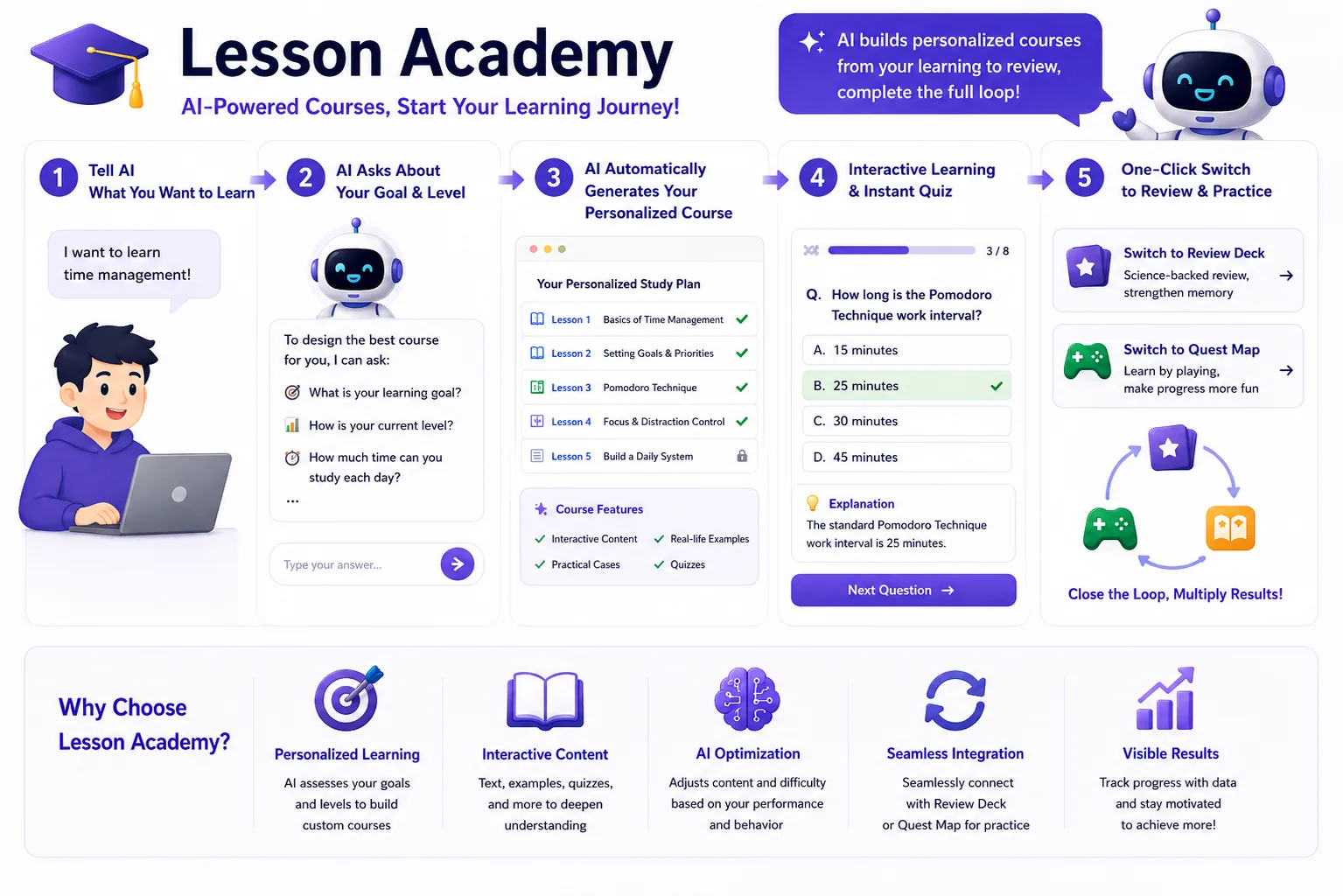
Tell the AI what you want to learn — it builds a course of interactive HTML lessons you study right inside Obsidian.
- Goal-first — the skill asks why you're learning and your current level, so a .NET dev learning React gets a different course than a designer would
- Outline-first — it shows the course plan for your approval before generating (changing the plan is cheap; regenerating lessons is not)
- Vault-aware — point it at your existing notes and the course connects to what you already know
- Web-verified — for fast-moving tech topics it checks the web and cites sources, instead of guessing
- Each lesson ends with a quiz for an immediate feedback loop — then convert the whole course into Review Deck cards or a Quest Map
📺 Watch: 
▶️ Create a course with Claude Code
🧠 Memory Map — See the Big Picture
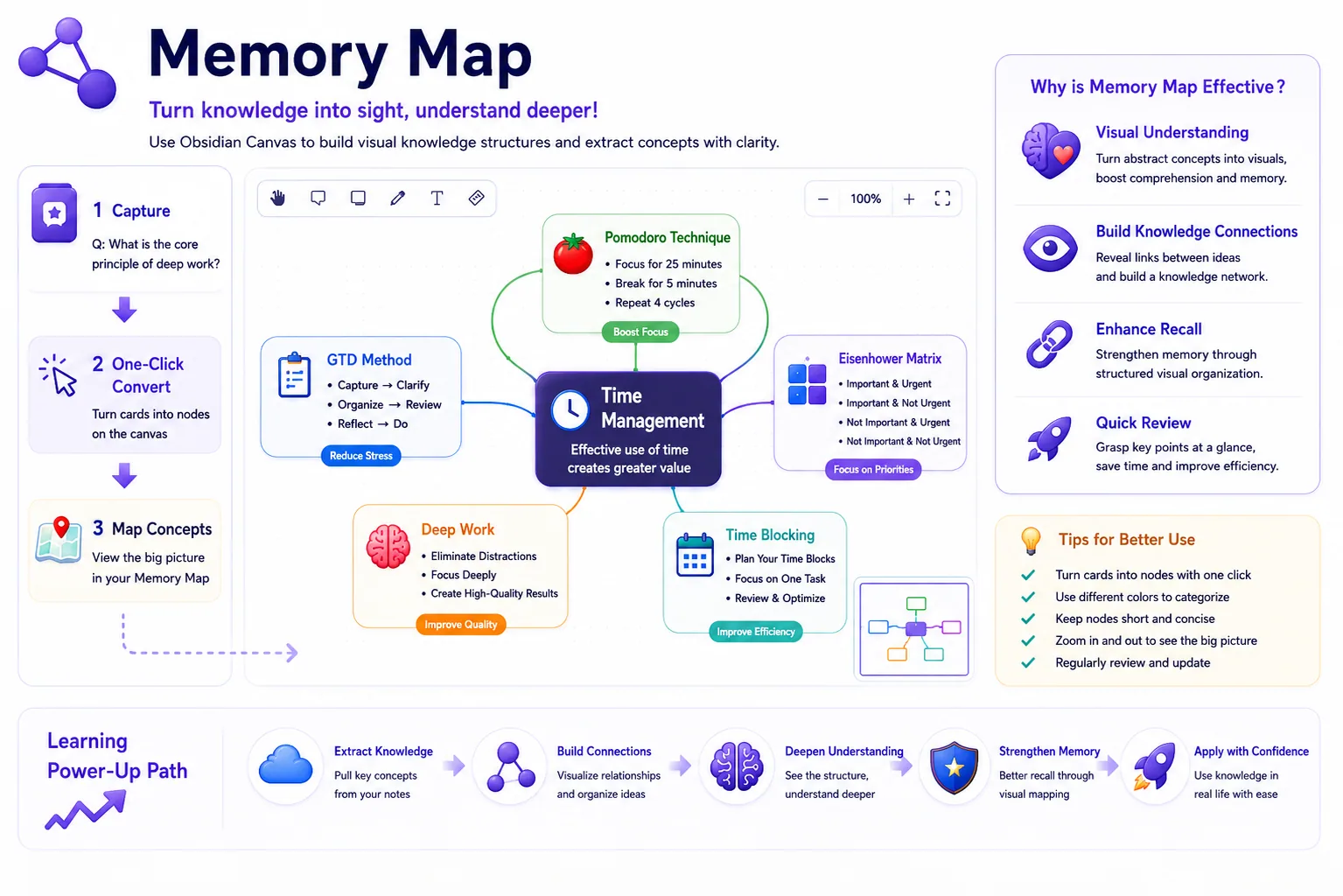
Visualizes abstract concepts using Obsidian Canvas.
- AI generates a visual knowledge graph using memory science — novelty, association to your existing notes, chunking, and analogy
- Any file named
{note-name}-memory.canvasis auto-detected in Hub → Memory Map - During review, the Memory Map button finds and opens the matching canvas automatically
🏆 Achievements
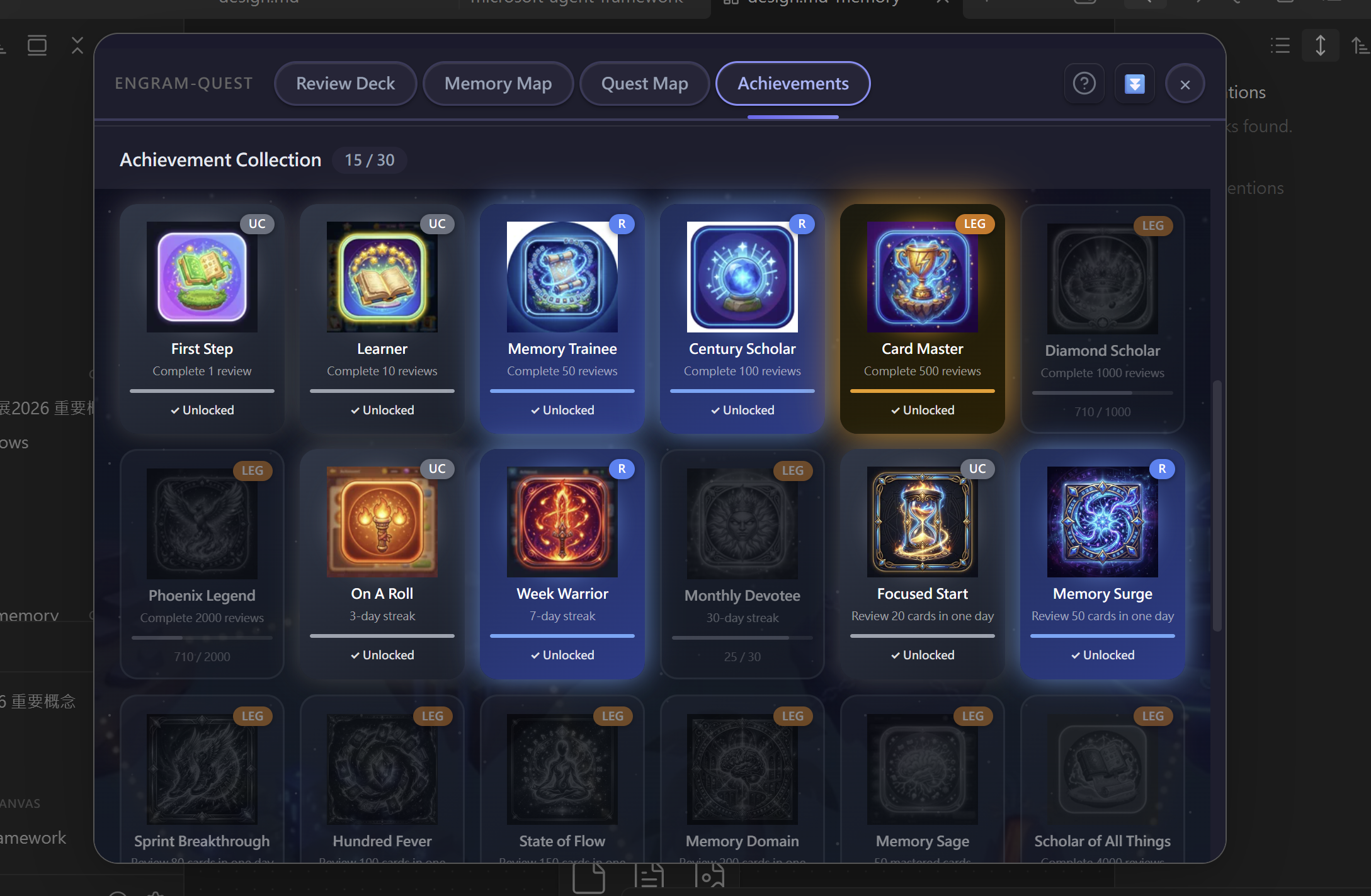
Track your learning milestones with 3D-rendered icons and rarity tiers — from reviews and streaks to mastered cards, Lesson Academy completion, and Quest Map progress. Click any achievement for your activity calendar and progress data.
🎴 Quadrant Card — A4 Super-Memory (Pro)
Turns a single flashcard into an A4 four-quadrant "super memory" sheet (Q1 question · Q2 answer · Q3 verbal metaphor · Q4 visual image), each carrying its own FSRS schedule separate from your review decks. Upgrade existing cards in a batch, or create new ones directly — "Make a quadrant card about the data flywheel."
🚀 Decided to try it? Your first 60 seconds
- Install the plugin — search EngramQuest in Community Plugins (or open it in Obsidian).
- Open the Hub — click the 🗺️ ribbon icon on the left.
- Pick a path:
- No AI? Tag any note
#flashcards/topic, write aQ:/A:card, and it appears in your Review Deck instantly. → Write cards yourself - Have an AI tool? Install the Skills once (
Settings → EngramQuest → AI Skills), then just say "Build a review deck from my math notes." → The AI path
- No AI? Tag any note
✍️ Write Cards Yourself (No AI Required)
Add a #flashcards/topic tag and pick a format. All five are freely mixable in one note:
| Format | Best for | Syntax |
|---|---|---|
🟢 Q:/A: Q&A ⭐ |
Recommended daily format. Multi-line answers, images, tables, code | Q: question → A: — two blank lines end the card |
🔵 --- fenced Q&A |
Existing notes where blank lines appear inside answers | Wrap Q:/A: with --- lines |
🟡 %%card%% long answer |
Pasted AI output that may contain its own --- separators |
Wrap one card between two %%card%% lines |
🧩 {{c1::}} Cloze |
Fill-in-the-blank, Anki-compatible | {{c1::answer}} or {{c1::answer::hint}} |
⚪ :: one-liner |
Quick single-line Q&A only | question :: answer |
See card format examples
#flashcards/math

Q: What is a derivative?
A: The instantaneous rate of change of a function at a point.
   Formally: lim(h→0) [f(x+h) − f(x)] / h

---
Q: What is Stripe's core model?
A: Stripe is essentially a Saga system.
   It handles the payment_intent state machine, retry / failure handling,
   and fund consistency. You only receive the result.
---

%%card%%
Q: How should I explain agentic testing?
A:
Agentic testing checks whether an AI system can complete a task reliably.
---
This separator stays inside the answer.
%%card%%

{{c1::Calculus}} is built on limits, derivatives, and integrals.

Pythagorean theorem :: a² + b² = c²
Tip: Press
Ctrl+/(orCmd+/) on an empty line — Obsidian inserts%% %%with the cursor inside. Typecardand you get%%card%%instantly.
🔬 Why It Works
EngramQuest is built on four pillars of cognitive science:
| Principle | Feature |
|---|---|
| Spaced Repetition | FSRS schedules reviews at the moment of near-forgetting |
| Retrieval Practice | L1 forces active recall before any hint is shown |
| Contextual Anchoring | L2 anchors each card to knowledge already in your vault |
| Elaborative Encoding | Memory Map builds visual structure for abstract concepts |
❓ FAQ
Q: Do I have to use AI?
No — many users don't. Write cards with Q:/A:, ::, or {{c1::}}, add a #flashcards/topic tag, and the plugin picks them up automatically.
Q: Where is my progress stored?
Scheduling data lives in engram-review/sr/ inside your vault as JSON. AI-generated cards are in engram-review/ai-cards/. Neither touches your source notes.
Q: Does EngramQuest support Anki?
Partially. The :: and {{c1::}} formats are Anki-compatible — pair them with the Obsidian_to_Anki community plugin. The Q:/A: format is EngramQuest-native (rich multi-line answers) and does not sync to Anki.
Q: How do I make AI always follow a pattern when building decks?
Mark key answers with ==highlight== or **bold**, then add a rule to your AI config file (CLAUDE.md, GEMINI.md, or AGENTS.md):
IMPORTANT: When building a Review Deck, every highlighted ==text== must become a review card.
☕ Support
If EngramQuest is useful to you, consider supporting its development:
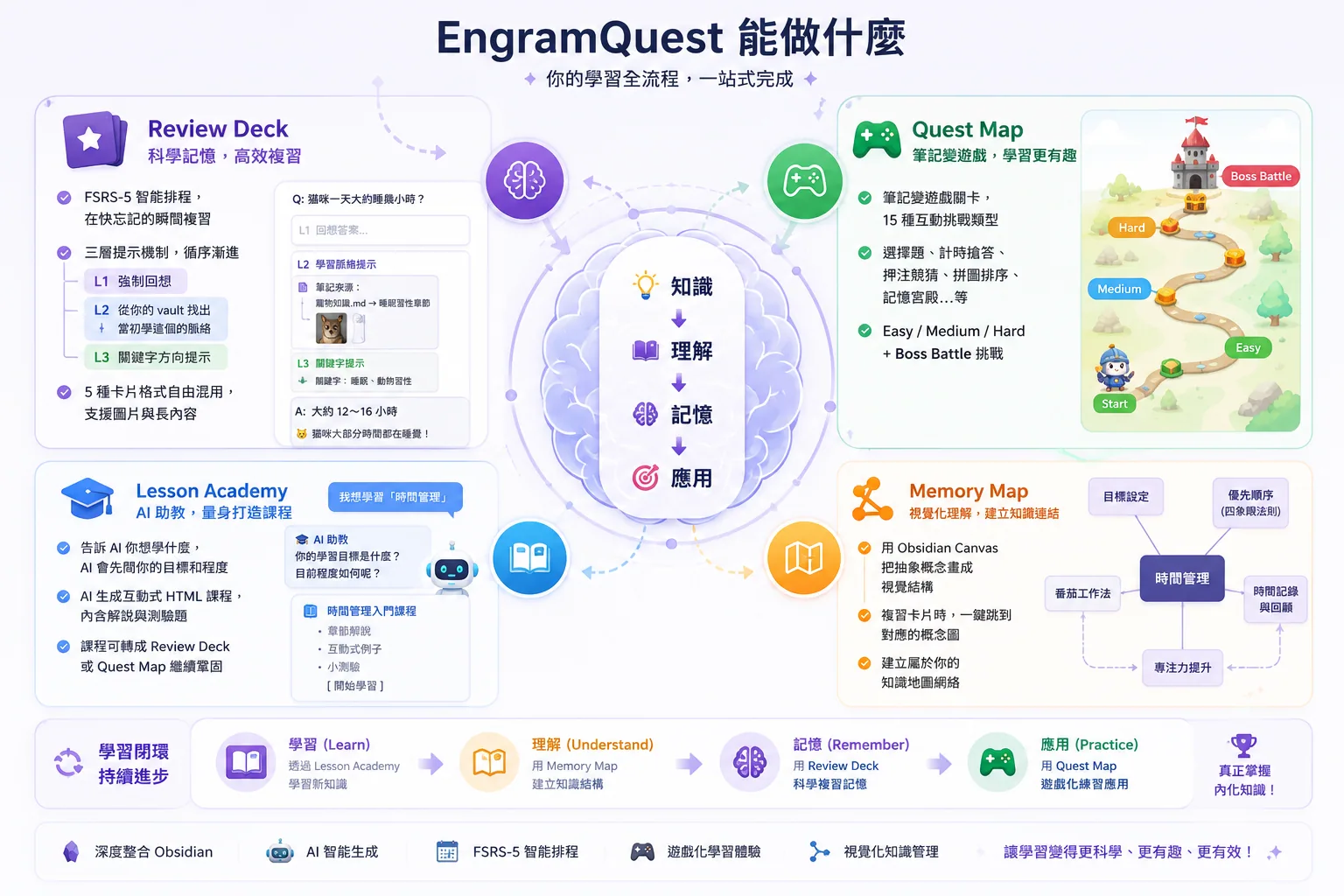
EngramQuest 是什麼?
EngramQuest 是架在你 Obsidian 筆記之上的一層 AI 學習系統。大多數筆記都是寫完就再也沒碰 — EngramQuest 把這個迴圈補起來,讓筆記變成你真正留得住的知識。
你可以自己手寫複習卡,也可以直接把一篇筆記丟給你的 AI 工具,讓它幫你把學習材料生出來 — 不用複製貼上、不用一張張重做卡片。同一篇筆記,EngramQuest 能變成一門教你這個主題的互動教材、一張操練你的闖關地圖、一張看出概念怎麼連結的記憶地圖,或一套用 FSRS 間隔複習、讓你真的記住的複習卡組。
AI 跑在你本來就在用的工具上 — Claude Desktop、Claude Code、Codex app、Antigravity、Gemini CLI、Cursor 等等。生成都由它們完成,所以不用另外訂閱、也不用額外付 API token 費用 — 你現有的方案就夠了,而且 AI 完全可選。
重點不是再囤更多筆記,而是真的學會它、練熟它、記住它 — 全部在 Obsidian 裡。
💡 為什麼選 EngramQuest?
Anki 解決「何時複習」。EngramQuest 解決「如何真正記住」 — 以及閃卡階段之前該做什麼:學會它、練熟它、把它連起來,而不只是反覆刷卡。
每個模組都能單獨使用,也能串接到下一個。AI 完全可選 — 而且它跑在你已經在用的 AI 工具上(Claude Code、Codex、Antigravity、Gemini CLI、Cursor),不是另一個訂閱服務。
🧭 從哪裡打開
安裝插件完成後,點左側 ribbon 的 EngramQuest 圖示就能打開。(不少人一開始會找不到入口,這裡標清楚位置。)
⚡ 快速開始(AI 路徑)
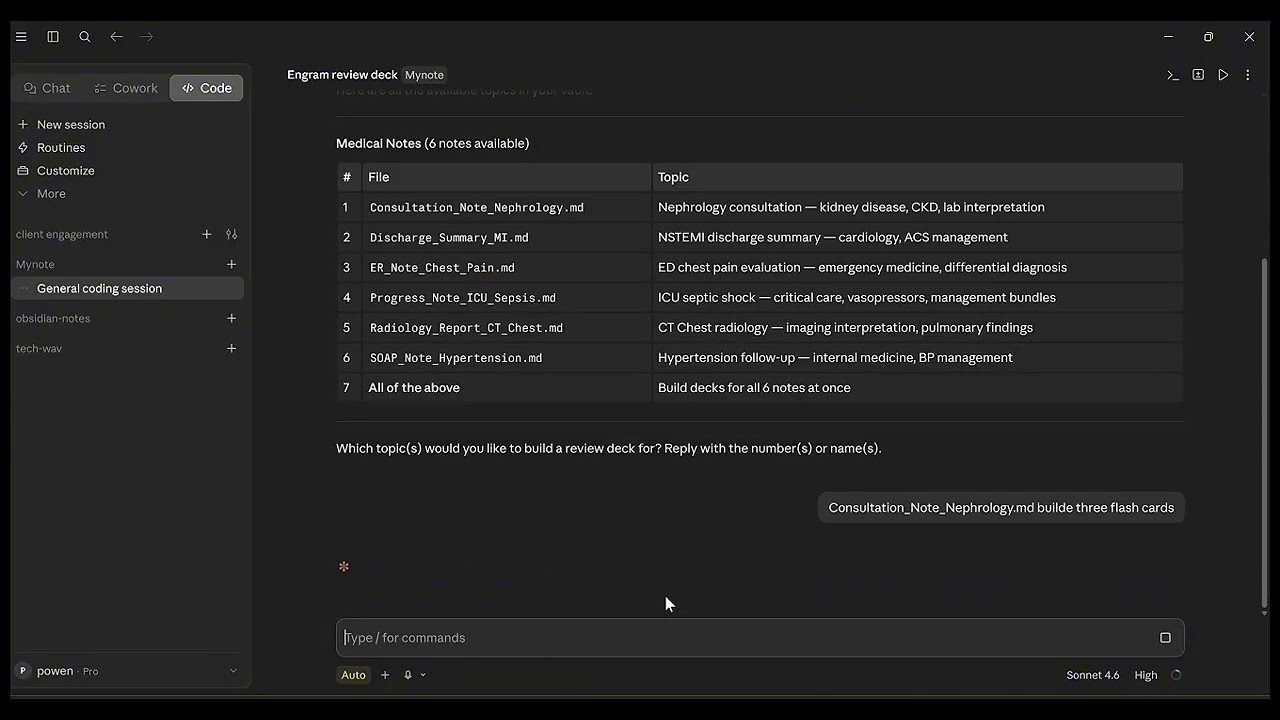
▶️ 看 1 分鐘快速上手影片
- 安裝插件 — 在 Obsidian 中開啟、在 Community Plugins 搜尋 EngramQuest,或從 GitHub Releases 下載。
- 安裝 Skills — 到
設定 → EngramQuest → AI Skills,為你的工具(Claude Code、Codex / Antigravity、Gemini CLI 或 Cursor)點 安裝。 - 問你的 AI — 「把
Note.md變成 quest-map medium」 或 「用標 math 的筆記建一副 review deck。」 - 打開 Hub — 點 🗺️ ribbon 圖示,切到對應分頁,開始學習。
💬 用 Claude Desktop? 不需要 terminal — 貼一段 Setup Prompt,Claude 自動連上你的 vault、載入 skills 並記住規則。開 plugin 的 Guide(Hub 的 ❓ 圖示),在指南最上方的「連接 AI 工具」區塊複製 Claude Desktop Setup Prompt。Claude Desktop 還有內建網路搜尋,可以生成 SVG 圖解。
不是 SaaS。 Skills 是在你已有的 AI 工具裡執行的邏輯,不需要額外帳號、不需要訂閱,而且 AI 完全可選。
✨ 功能特色
🃏 Review Deck — 記得更多,學得更少
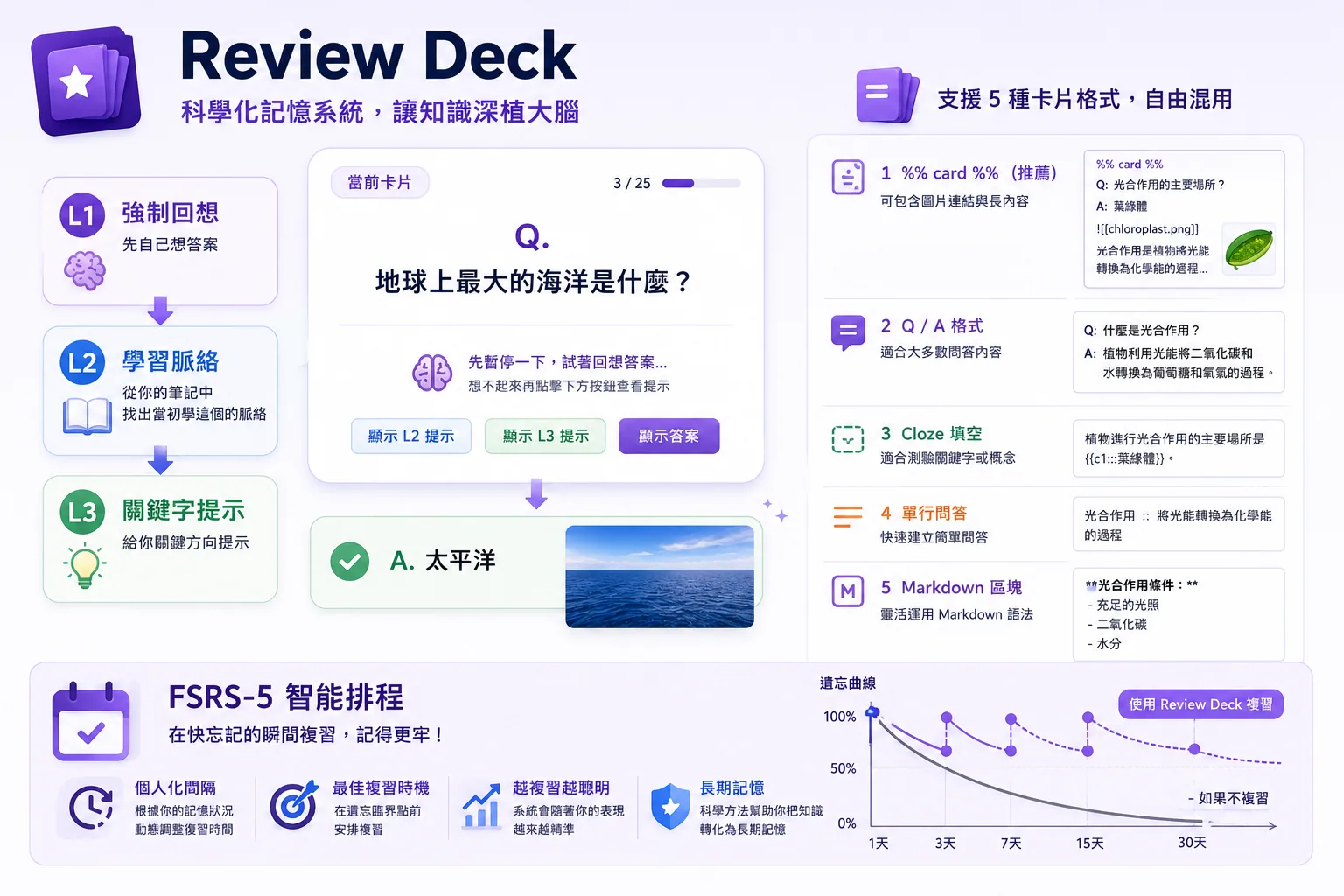
一套建立真實記憶(而非單純「眼熟」)的三階回想系統:
| 階段 | 做什麼 | 其他工具有嗎 |
|---|---|---|
| L1 主動回想 | 只給問題,強迫大腦在任何提示前先自行搜索 | ✅ 多數閃卡 |
| L2 脈絡錨點 ⭐ | AI 搜尋你的 vault,重建你第一次學這個概念的場景 | ❌ 只有這裡有 |
| L3 收斂提示 | 最後手段,給關鍵字方向,不給答案本身 | 少數有 |
- FSRS-5 排程 — 間隔依你的實際回想表現調整,不是固定倍數
- AI 卡片獨立存放 — 生成的卡片放在
engram-review/,AI 永遠不動你的來源筆記 - 5 種可混用格式 — 貼整段 AI 回答、多行 Q&A、克漏字、單行卡,同一筆記自由混用
- 編輯寫回 — 複習中改卡片,修改直接存回來源筆記
- 自動偵測 — 任何打上
#flashcards/主題的筆記都會自動收錄
📺 影片:
▶️ 自己手動建立 Review Deck · ▶️ 貼上 AI 回答快速建卡
🗺️ Quest Map — 應用任務地圖
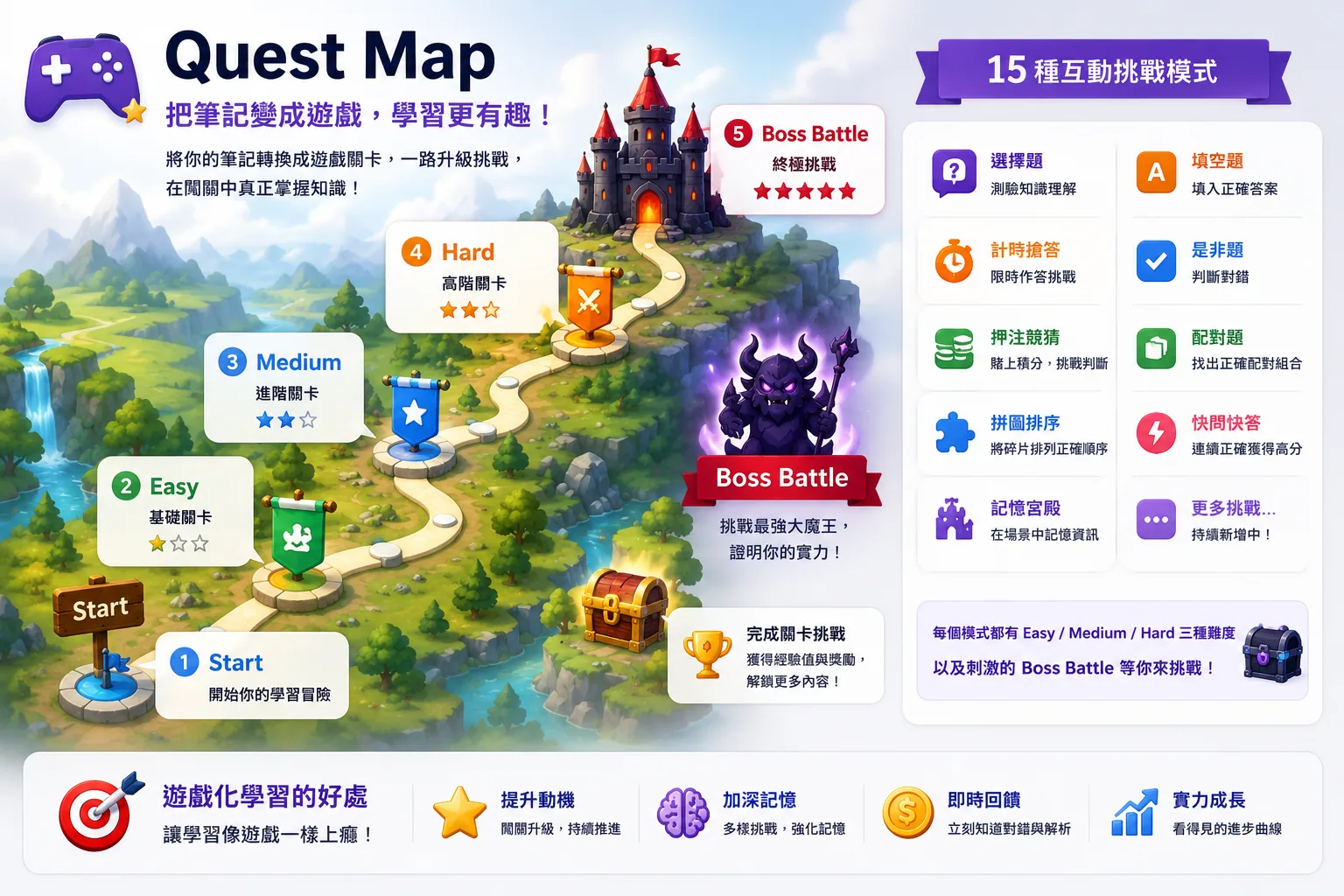
把任何筆記轉成遊戲化應用地圖:任務簡報、情境案例、限制下的決策,以及嵌入 .md 的 Boss Battle。
- 15 種挑戰類型 — 選擇題、是非、克漏字、輸入、排序、配對、倒數計時、快照記憶、競標(用籌碼押注你的信心)、時間軸、序列接龍、記憶宮殿、圖片題、圖片遮罩,以及互動式 iframe HTML 模擬
- 難度分級 — Easy / Medium / Hard,跟 AI 要你需要的程度
- 5 種視覺主題 — 天空島、科幻、RPG、海洋、極簡
- Boss Battle — 章末的整合案例,測判斷、排序、取捨或診斷能力
- 進度安全 — 分數和完成度與 quest YAML 分開儲存,AI 更新關卡時不會洗掉你的進度
🎓 Lesson Academy — AI 打造的課程

告訴 AI 你想學什麼 — 它建立一整套可在 Obsidian 內研讀的互動式 HTML 課程。
- 目標導向 — skill 會先問你為什麼學、現在的程度,所以 .NET 工程師學 React 拿到的課,和設計師學 React 完全不同
- 課綱先行 — 生成前先給你課程大綱確認(改大綱很便宜,重生成課程很貴)
- 讀懂你的 vault — 指向你既有的筆記,課程就和你已知的知識連在一起
- 網路查證 — 對快速更新的技術主題會查網路並附上來源,而不是瞎猜
- 每堂課以測驗結尾,形成即時回饋迴圈 — 之後還能把整套課程轉成 Review Deck 卡片或 Quest Map
📺 影片:
🧠 Memory Map — 看見全局
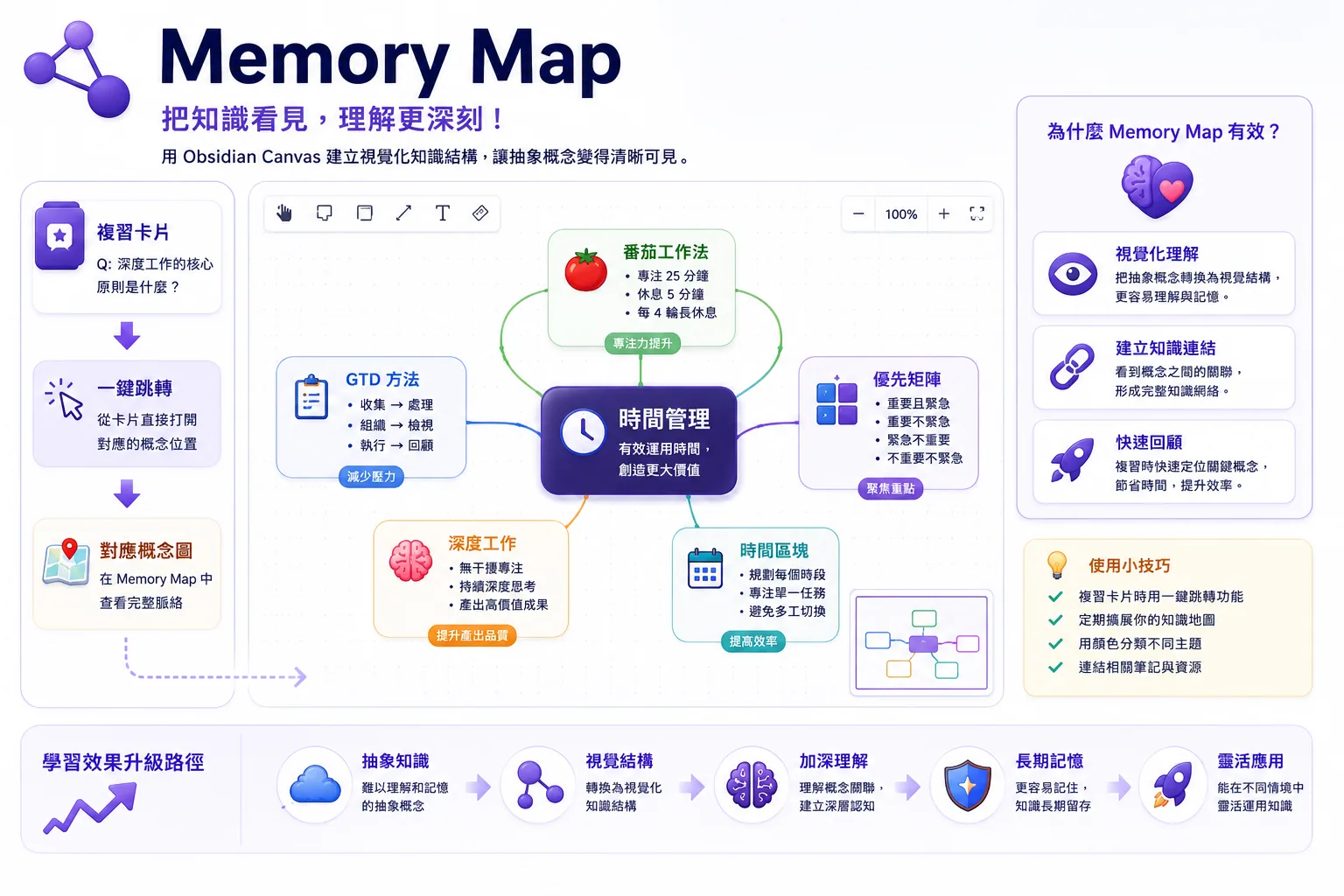
用 Obsidian Canvas 視覺化抽象概念。
- AI 用記憶科學生成視覺知識圖 — 反直覺(novelty)、連結你既有筆記(association)、分組(chunking)、類比(elaboration)
- 任何命名為
{筆記名}-memory.canvas的檔案會在 Hub → Memory Map 自動偵測 - 複習途中,Memory Map 按鈕會自動找到並打開對應的 canvas
🏆 成就系統
用 3D 渲染圖示與稀有度分級追蹤你的學習里程碑 — 從複習次數、連續天數、精熟卡片,到 Lesson Academy 完課與 Quest Map 進度。點任一成就查看你的活動日曆與進度數據。
🎴 四象限卡 — A4 超記憶(Pro)
把單張閃卡升級成一張 A4 四象限「超記憶」卡(Q1 問題 · Q2 答案 · Q3 語言比喻 · Q4 視覺圖像),每張卡有自己獨立的 FSRS 排程,與你的 review deck 分開。可批次升級既有卡片,也能直接建立新卡 — 「幫我做一張關於資料飛輪的四象限卡。」
🚀 決定要用了?安裝後的第一分鐘
- 安裝插件 — 在 Community Plugins 搜尋 EngramQuest(或在 Obsidian 中開啟)。
- 打開 Hub — 點左側的 🗺️ ribbon 圖示。
- 選一條路:
✍️ 自己寫卡片(不需要 AI)
打上 #flashcards/主題 tag,選一種格式。五種格式可在同一筆記自由混用:
| 格式 | 最適合 | 語法 |
|---|---|---|
🟢 Q:/A: 問答 ⭐ |
推薦的日常格式。 多行答案、圖片、表格、程式碼 | Q: 問題 → A: — 兩個空行結束卡片 |
🔵 --- 圍欄問答 |
答案內含空行的既有筆記 | 用 --- 行包住 Q:/A: |
🟡 %%card%% 長答案 |
貼可能含 --- 分隔線的 AI 輸出 |
用兩行 %%card%% 包住一張卡 |
🧩 {{c1::}} 克漏字 |
填空,與 Anki 相容 | {{c1::答案}} 或 {{c1::答案::提示}} |
⚪ :: 單行 |
快速單行問答 | 問題 :: 答案 |
看卡片格式範例
#flashcards/math

Q: 什麼是導數?
A: 函數在某點的瞬時變化率。
   形式上:lim(h→0) [f(x+h) − f(x)] / h

---
Q: Stripe 的核心模型是什麼?
A: Stripe 本質上是一個 Saga 系統。
   它處理 payment_intent 狀態機、重試/失敗處理、
   以及資金一致性。你只收到結果。
---

%%card%%
Q: 該怎麼解釋 agentic testing?
A:
Agentic testing 檢查一個 AI 系統能否可靠完成任務。
---
這個分隔線會留在答案裡面。
%%card%%

{{c1::微積分}} 建立在極限、導數、積分之上。

畢氏定理 :: a² + b² = c²
小技巧: 在空行按
Ctrl+/(或Cmd+/),Obsidian 會插入%% %%並把游標放中間。打card就立刻得到%%card%%。
🔬 為什麼有效
EngramQuest 建立在認知科學的四根支柱上:
| 原理 | 對應功能 |
|---|---|
| 間隔複習 | FSRS 在快遺忘的瞬間安排複習 |
| 提取練習 | L1 在任何提示前強制主動回想 |
| 脈絡錨定 | L2 把每張卡錨定到 vault 既有的知識 |
| 精緻化編碼 | Memory Map 為抽象概念建立視覺結構 |
❓ 常見問題
Q:一定要用 AI 嗎?
不用 — 很多使用者都不用。用 Q:/A:、:: 或 {{c1::}} 寫卡片,打上 #flashcards/主題 tag,插件就會自動收錄。
Q:我的進度存在哪?
排程資料以 JSON 存在 vault 的 engram-review/sr/。AI 生成的卡片在 engram-review/ai-cards/。兩者都不碰你的來源筆記。
Q:EngramQuest 支援 Anki 嗎?
部分支援。:: 和 {{c1::}} 格式與 Anki 相容 — 搭配 Obsidian_to_Anki 社群插件使用。Q:/A: 是 EngramQuest 原生格式(豐富的多行答案),不同步到 Anki。
Q:怎麼讓 AI 建卡時永遠遵守某個模式?
在筆記用 ==highlight== 或 **bold** 標記關鍵答案,然後在 AI 設定檔(CLAUDE.md、GEMINI.md 或 AGENTS.md)加一條規則:
IMPORTANT: When building a Review Deck, every highlighted ==text== must become a review card.
☕ 支持
如果 EngramQuest 對你有幫助,歡迎支持它的開發:
Built for lifelong learners. Made with ❤️