EndNote Cite
 xijli30 downloads
Cite as you write with your EndNote library: insert citations with autocomplete, see them formatted live, and export to Word or LaTeX.
- Overview
- Scorecard
- Updates5
Cite as you write with your EndNote library, then export to Word or LaTeX.
An Obsidian take on EndNote's Word add-in: the library is read straight out of
EndNote's own .enl database, so nothing has to be exported by hand.
EndNote Cite is an independent, unofficial plugin. It isn't affiliated with, endorsed by, or supported by Clarivate (the maker of EndNote) or by Obsidian. "EndNote" is a trademark of Clarivate, used here only to say which library format the plugin reads. Using it still requires your own EndNote licence.
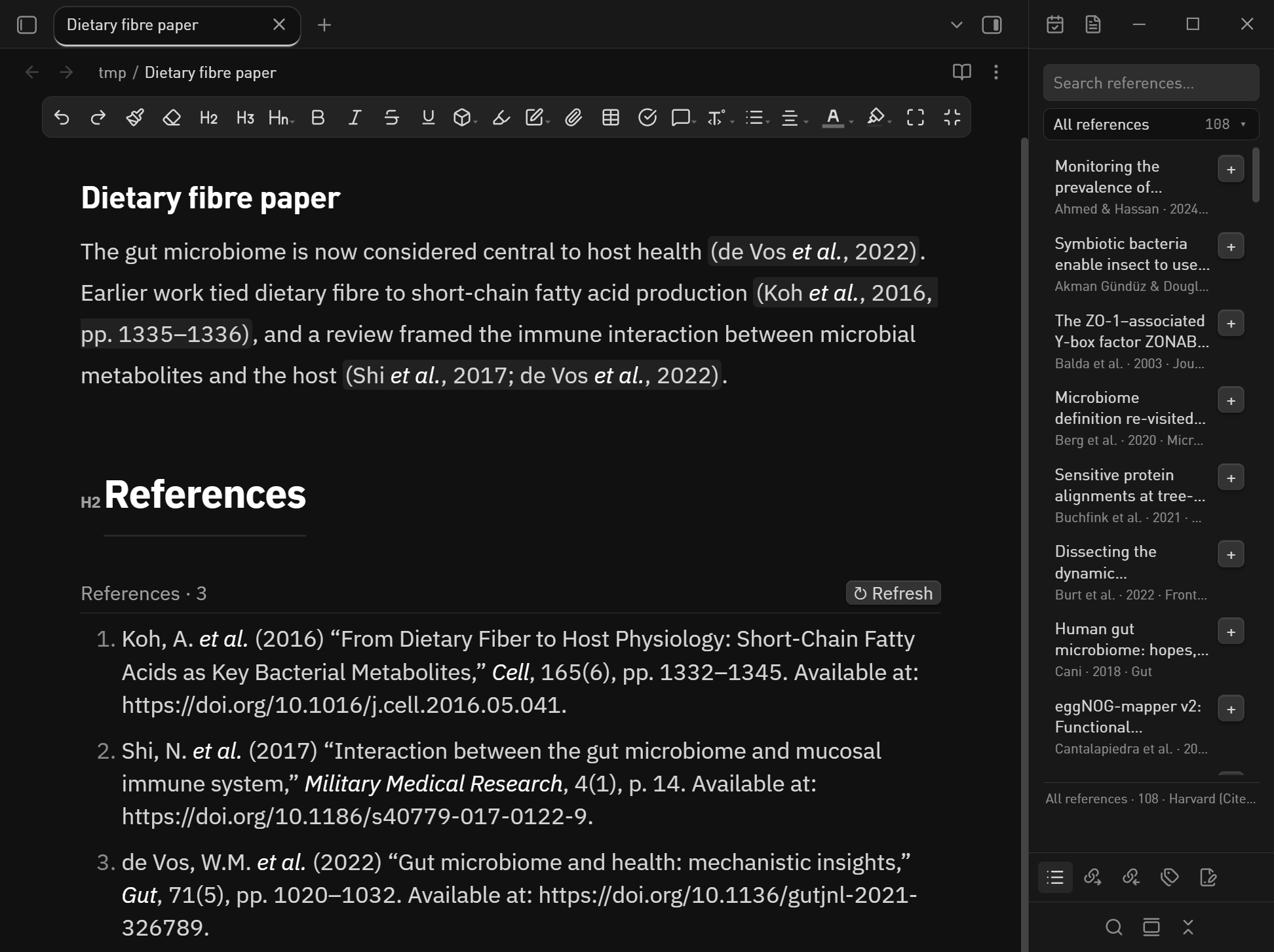
What it does
| Library | Opens .enl files read-only (they are SQLite under the hood) and reloads automatically whenever EndNote saves. |
| Cite as you write | Type [@ in a note to get a searchable reference list; the citation is inserted as [@citeKey]. |
| Live formatting | [@citeKey] is rendered as (de Vos et al., 2022) or [1], depending on the style. Put the cursor inside and the raw marker comes back for editing. |
| Style | Reads the output style currently selected in EndNote and maps it onto the closest CSL style; any .csl file can be used instead. |
| Bibliography | insert bibliography writes a formatted list, or drop a ```endnote-bib block into the note and it keeps itself up to date. |
| Export | .docx (with references, optionally styled by your own Word template), .tex + .bib, .bib, CSL-JSON. |
| Library sidebar | Search the library, browse EndNote groups, and insert a citation with one click. |
| EndNote-native Word output | A second Word mode that hands the document to Word + EndNote so they write real ADDIN EN.CITE fields — the same thing you get from Insert Citation in Word. |
Two kinds of Word output
Export to Word (.docx) |
Export to Word (live EndNote fields) |
|
|---|---|---|
| How it is produced | pandoc + citeproc, fully offline | pandoc → Word + EndNote ENFormatBibliography |
| Citation content | formatted text | real EndNote fields + traveling library |
| Change style later | no, re-export | yes — EndNote ▸ Update Citations and Bibliography |
| Edit a citation (add pages, delete) | no | yes — EndNote ▸ Edit & Manage Citations |
| Speed | ~1 s | ~10 s (Word and EndNote are driven invisibly) |
| Needs | pandoc | pandoc + Word + EndNote with the CWYW add-in |
| File name | Note.docx |
Note (EndNote).docx |
Disclosures
Obsidian's directory policies ask plugins to be explicit about file access, shell use and network traffic, so here is the complete list.
- Network: none. The plugin never contacts a server — no analytics, no update pings,
no crash reporting, no sync. Two
fetch/XMLHttpRequestcall sites exist inside the bundled sql.js WASM loader and citeproc's XML parser; both are only ever handed adata:URL or the inline WebAssembly bytes, so they never open a socket. Thehttp://strings in the bundle are XML namespace identifiers and citation-style metadata links from the CSL files, never requests. - Files outside the vault. The only one is the
.enlEndNote library you point the plugin at (typicallyDocuments\My EndNote Library.enl) — EndNote keeps the library there, which is the only reason it sits outside the vault. It is opened read-only, never written; when EndNote holds a lock, a temporary copy is read and deleted. - Shell execution. Only for exports, and only with the tools you already installed:
pandocfor the text exports, and on Windows PowerShell + Microsoft Word (through COM) to build live EndNote fields. Nothing is downloaded or installed by the plugin. - Clipboard: write-only. Copy citation key puts an
@keyon the clipboard. The plugin never reads the clipboard. - Bundled WebAssembly.
sql-wasm.wasmis SQLite compiled to WebAssembly (from sql.js, MIT), inlined intomain.js. It reads the.enldatabase in-process and exports its memory to JavaScript by design — that is how the SQLite engine works. No other native code is bundled.
Requirements
- Desktop Obsidian 1.5+ (the plugin uses Node APIs, so mobile is not supported).
- EndNote (any version whose
.enlis a SQLite file — EndNote 20/21/2025 all are). - pandoc on
PATHfor the Word/LaTeX export.
Install
- Copy this folder into
<vault>/.obsidian/plugins/endnote-cite/withmain.js,manifest.jsonandstyles.cssin it. - Settings → Community plugins → enable EndNote Cite.
- Open the plugin settings and check that the
.enlpath was detected.
Writing
The gut microbiome is central to host health [@deVos2022].
Dietary fibre feeds short-chain fatty acid producers [@Koh2016, pp. 1335-1336].
Multiple sources in one bracket: [@Shi2017; @deVos2022].
[@→ autocomplete; Enter inserts.- Ctrl/Cmd+P → “EndNote: Insert citation” for the search dialog (Shift+Enter collects several references).
[@key, p. 12]adds a page locator, matching pandoc's citation syntax.
The reference list
There are two ways to get a formatted reference list at the end of a note.
Static text — command palette → EndNote: Insert bibliography. It writes the formatted list into the note once. Simple, but it does not follow later edits.
Live block — add an empty fenced code block tagged endnote-bib:
## References

```endnote-bib
```
The plugin replaces the block with the reference list for every [@key] in the
note — nothing is stored in the note itself, the source stays those two lines.
The list redraws by itself when:
- you cite something new, or delete a citation (about half a second after you stop typing);
- EndNote saves the library (within 5 s) — new references appear, edited metadata updates;
- you change the output style or the UI language;
- you press
↻ Refreshin the block header.
The heading text comes from Settings ▸ EndNote Cite ▸ Bibliography title
(References by default). The block is ignored by the exporters — Word, LaTeX and
BibTeX all build their own reference list — so it is safe to leave in the note.
Exporting
Command palette → EndNote: Export to Word (.docx) / EndNote: Export to LaTeX (.tex + .bib).
Exports land next to the note (or in the folder set in the settings). Word files
keep the note's name; LaTeX files are slugged (My Paper → My_Paper.tex) because
BibTeX does not handle spaces in \bibliography{}.
To compile the LaTeX output:
pdflatex My_Paper.tex
bibtex   My_Paper
pdflatex My_Paper.tex
pdflatex My_Paper.tex
EndNote-native Word output
EndNote: Export to Word (live EndNote fields) produces a .docx that EndNote treats as
its own. The plugin converts every [@key] into EndNote's temporary citation
syntax ({Koh, 2016 #4@1335}), runs pandoc, then drives Word and EndNote through
bridge/format-docx.ps1 so that EndNote itself rewrites them into
ADDIN EN.CITE fields with the full record attached and generates the
ADDIN EN.REFLIST bibliography.
In Word you can then use the EndNote ribbon exactly as if you had cited there:
- Update Citations and Bibliography — reformat after changing the output style in EndNote, adding references, or reordering text.
- Edit & Manage Citation(s) — add page numbers, prefixes, remove a citation.
- Right-click → Edit Library Reference jumps to the record in EndNote.
Requirements and caveats:
- Word (desktop) and EndNote with the Cite While You Write add-in must be installed; both are driven invisibly and closed afterwards if the plugin started them.
- EndNote must be running with the same library open — record numbers are resolved inside EndNote. The bridge starts EndNote with the configured library if it is not running.
- EndNote scans the whole document for
{...}patterns. If your note contains text that looks like{Author, #12}, EndNote may stop and ask you to pick a reference; the export then times out with a hint. - The bibliography is appended at the end of the document, under the last heading (the plugin reuses a trailing “References” heading, or adds one).
The library sidebar
Click the library icon in the left ribbon (or run EndNote: Open library sidebar) to open a panel on the right:
- Search — author, title, year, journal or citation key, ranked by relevance.
Enterinserts the first hit,Escclears the box. - Groups — a single row showing the current group and its count; click it and a
floating list of every EndNote group drops down (counts on the right, current one
highlighted). Click a group to filter, click anywhere else or press
Escto close. The list comes straight from the library'sgroupstable. +on any row — drops[@key]at the caret of the note you were last editing. If the caret is already inside a[...]it appends; @keyinstead.- Click the row itself — expands the record (citation key, volume/issue/pages,
DOI, type, abstract) with a copy citation key button; click anywhere on the row
again to collapse it. The whole row is the target, and
Entertoggles it from the keyboard, so a narrow sidebar is no obstacle. - Rows already cited in the current note show a ✓ and a muted title.
The list follows the library file: saving in EndNote refreshes it within a few seconds.
Style notes
EndNote's own .ens styles are a proprietary format, so the plugin reads the
name of the style EndNote has selected (Windows registry,
HKCU\Software\ISI ResearchSoft\EndNote) and picks the nearest bundled CSL style.
Bundled: Harvard (Cite Them Right), Nature, APA, Chicago, GB/T 7714-2015
(numeric and author-date), IEEE, AMA, Elsevier Vancouver, Springer Basic.
For anything else, download a .csl from https://zotero.org/styles and point the
settings at it.
How it works
.enl (SQLite) ──sql.js──▶ references ──▶ CSL-JSON ──▶ citeproc-js ──▶ editor preview
                                                   └─▶ pandoc --citeproc ─▶ .docx
                                                   └─▶ BibTeX ────────────▶ .tex + .bib
The preview and the export share the same CSL file, so what you read while writing is what lands in the document.
Development
npm install
npm run build     # tsc + esbuild → main.js
npm test          # headless end-to-end test (needs pandoc; skipped parts need Word/EndNote)
Releasing is one tag: bump manifest.json, package.json and versions.json,
commit, then git push origin 0.3.6 (the tag is the bare version — the community
directory resolves the release by exactly the string in manifest.json, so a v
prefix makes it report "No release matches your manifest version"). .github/workflows/release.yml builds the
plugin, zips it with bridge/, writes SHA256SUMS.txt and publishes the GitHub
release. Notes come from docs/release-notes/v<version>.md when that file exists
(English body plus a collapsible 中文说明), otherwise from the commits since the
previous tag.
Install by copying main.js, manifest.json, styles.css and the bridge/
folder into <vault>/.obsidian/plugins/endnote-cite/ — without bridge/ the
EndNote-field Word export cannot run.
License
This plugin's own source is MIT — see LICENSE.
main.js also bundles third-party components that keep their own licences:
| Component | Licence | Used for |
|---|---|---|
| citeproc-js 2.4.63 | CPAL-1.0 or AGPL-1.0 | CSL citation processor (bundled unmodified; source at the link and in the package's node_modules/citeproc) |
| sql.js 1.16.0 | MIT | SQLite compiled to WebAssembly, reads the .enl database |
| SQLite | Public domain | inside sql.js |
| CSL styles and locales | CC BY-SA 3.0 | Harvard (Cite Them Right), APA, Chicago, Nature, IEEE, AMA, Elsevier Vancouver, Springer, GB/T 7714-2015 (numeric and author-date) |