Embed Metadata
 schemen3k downloads
Render frontmatter metadata (Properties) inside your notes with a lightweight inline syntax.
- Overview
- Scorecard
- Updates15
Render frontmatter metadata (Obsidian Properties) inside your notes with a lightweight inline [%key] or {{key}} syntax.
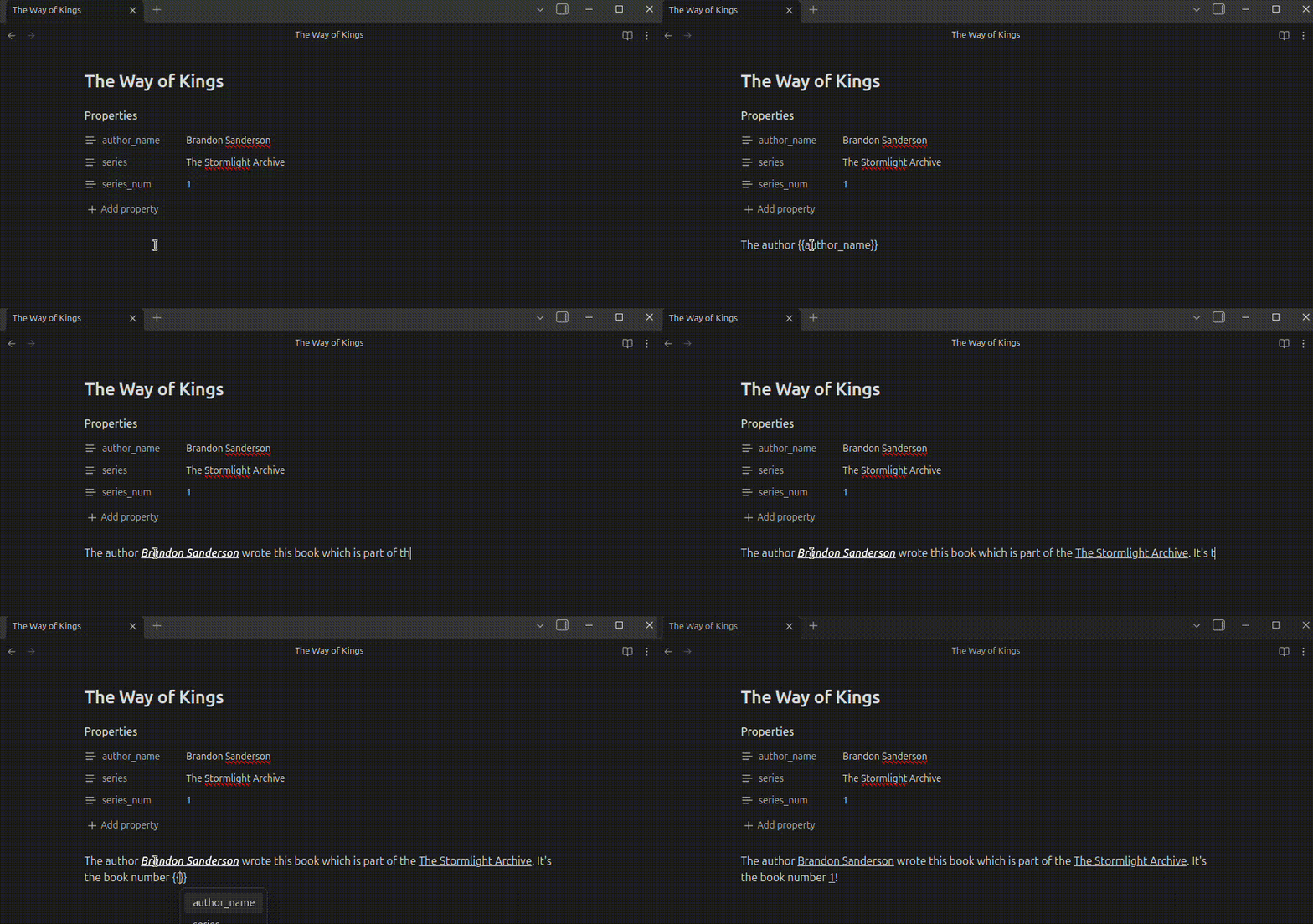
The intent for developing this is as a lightweight replacement for Dataview's =this.key embedded metadata rendering, specifically if Obsidian Bases cover most everything else.
Demo
Installation
Install Embed Metadata from Settings → Community plugins → Browse in Obsidian.
For a manual installation, download main.js, manifest.json, and styles.css from the latest GitHub release and place them in <Vault>/.obsidian/plugins/embed-metadata/. Reload Obsidian, then enable the plugin under Settings → Community plugins.
Usage
Add frontmatter (Properties) to a note:
---
title: Stay out of the sun!
tags:
  - Alexander
  - Cynic
author_name: Diogenes
---
Then reference it in the note body:
What do you think of [%title] as book title?
We recommend using those tags: [%tags]
The Author called [%author_name] is really funny!
You can also reference properties from another note by putting an Obsidian link
target inside the marker, followed by @property:
Current status: [%[[Project]]@status]
Project owner: [%[[Projects/Website|Website project]]@owner]
Review date: [%[Website project](Projects/Website.md)@review_date]
The same target syntax works with double braces when that syntax format is selected:
Current status: {{[[Project]]@status}}
Review date: {{[Website project](Projects/Website.md)@review_date}}
Deprecation: earlier releases used
#propertyas the separator (e.g.[[Project]]#status). That form still renders but is deprecated and will be removed in a future release, because Obsidian indexes the trailing#statusas a tag. Switch existing references to@to avoid stray tags.
The syntax markers are replaced in reading view and live preview. Source mode keeps the syntax as plain text. If a local key, target note, or target property is missing, the marker is left unchanged. Inline code and code blocks are ignored in preview. If a key exists but has no value, the marker renders empty. Markdown in remote property values is rendered relative to the target note, so links stored in that property keep the same meaning.
Built-in keys (when enabled):
filename(full file name with extension)basename(file name without extension)extensionpath(vault-relative path)folder(parent folder path)link(wikilink to the file)ctime(created time)mtime(last modified time)
Settings
Use Settings → Community plugins → Embed Metadata to choose the syntax
format: [%key] or {{key}}.
- Optional case-insensitive key lookup
- Optional built-in keys (enabled by default; frontmatter keys take priority)
- Optional outline rendering (experimental; replaces markers in the Outline sidebar)
Visual look options apply in Live Preview:
- Bold / Italic / Underline toggles
- Optional highlight with theme color or override
- Hover emphasis (subtle style shift on hover)
Note: Obsidian Properties do not support nested properties in Reading view or Live Preview.
If you use nested YAML, use Source mode to view them, or flatten keys (for example,
author_name).
Migration
You can migrate existing notes:
- Migrate from dataview converts dataviews backticked
=this.keysyntax to your selected format. - Migrate to current syntax converts the other supported syntax formats to the selected one.
Each migration opens a review modal listing matching files with counts. Deselect any files you want to skip, then confirm the migration (it edits your files). Vault-wide Markdown file scanning is used only for these user-initiated migrations, not during normal rendering or autocomplete.
Autocomplete
Type the configured opener ([% or {{) to see a dropdown of frontmatter keys
from the current file. For remote references, use Obsidian's normal file
autocomplete inside [[...]], then type @ after the completed target to see
that note's property keys. Results are sorted alphabetically and update as you
type.
Development
Use Node.js 22 or newer and npm:
npm ci
npm run build
npm run lint
Production builds generate the ignored main.js release artifact at the repository root. Tag pushes run the release workflow, which builds from the lockfile, attests the release assets, and creates a draft GitHub release for review.
Disclaimer
AI was used during the development of this project.