Search...Search plugins and themes...
⌘K
Sign in
  • Get started
  • Download
  • Pricing
  • Enterprise
  • Account
  • Obsidian
  • Overview
  • Sync
  • Publish
  • Canvas
  • Mobile
  • Web Clipper
  • CLI
  • Learn
  • Help
  • Developers
  • Changelog
  • About
  • Roadmap
  • Blog
  • Resources
  • System status
  • License overview
  • Terms of service
  • Privacy policy
  • Security
  • Community
  • Plugins
  • Themes
  • Discord
  • Forum / 中文论坛
  • Merch store
  • Brand guidelines
Follow us
DiscordTwitterBlueskyThreadsMastodonYouTubeGitHub
© 2026 Obsidian

Editor Commands Remap

c4ctus5c4ctus54k downloads

Map hotkeys to editor commands.

Add to Obsidian
  • Overview
  • Scorecard
  • Updates3

This plugin for Obsidian let's you map hotkeys to editor commands available in the API. Available commands are :

  • goUp : move cursor up a line
  • goDown : move cursor down a line
  • goLeft : move cursor left
  • goRight : move cursor right
  • goStart : move cursor to the start of the note
  • goEnd : move cursor at the end of the note
  • indentMore : indent current or selected lines
  • indentLess : unindent current or selected lines
  • newlineAndIndent : create a new line and indent cursor
  • swapLineUp : swap the current line and the line above it
  • swapLineDown : swap the current line and the line below it
  • deleteLine : delete the current line
  • toggleFold : fold or unfold item at current position
  • foldAll : fold everything
  • unfoldAll : unfold everyting

Note : these commands are only available when an editor is opened.

Note : some commands are already available in Obsidian, but for the sake of completeness, I still added them here.

The original idea was to replicate the behaviour of the Tabout extension for VSCode by Albert Romkes, but mapping Tab as a hotkey is not possible in Obsidian. While studying the Obsidian API, I discovered the editor commands and thought it would be a good idea to be able to assign hotkeys to them. Thus, to kinda replicate the Tabout behaviour, just set an hotkey to the 'goRight' command.

Manual installation

You can manually install this plugin by downloading the latest release, and copy the file manifest.json and main.js under the folder vaultFolder/.obsidian/plugins/editor-commands-remap.

How to use ?

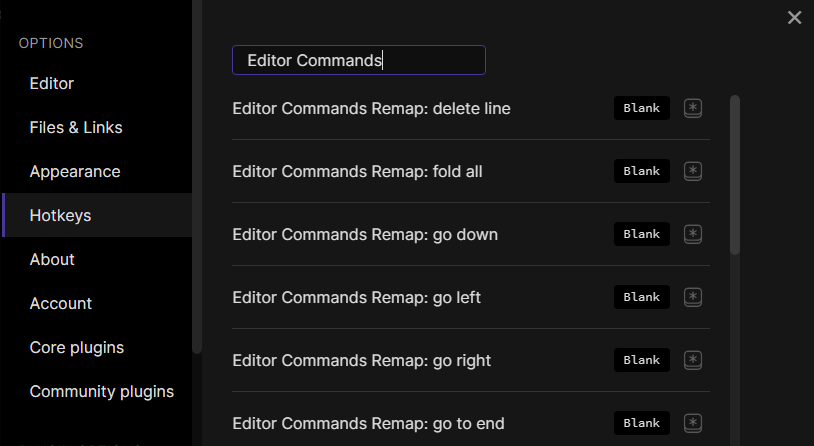
This plugin does not set default hotkeys. To set hotkeys, go to Settings > Hotkeys and search for Editor Commands Remap. settings image
Hotkeys recommendations

When moving the cursor, pressing Shift or Ctrl+Shift also select text. Thus, it is not recommended to use Ctrl or Shift as hotkey modifiers for moving the cursor. Alt is the recommended modifier.

68%
HealthFair
ReviewSatisfactory
About
Map hotkeys to Obsidian editor commands for cursor movement, indentation, line swapping, line deletion, and folding. Activate these editor-only commands whenever an editor is open to streamline text editing.
EditingHotkeysCommands
Details
Current version
1.0.2
Last updated
5 years ago
Created
5 years ago
Updates
3 releases
Downloads
4k
Compatible with
Obsidian 0.9.7+
Platforms
Desktop, Mobile
License
MIT
Report bugRequest featureReport plugin
Author
c4ctus5c4ctus5
github.com/c4ctus5
GitHubc4ctus5
  1. Community
  2. Plugins
  3. Editing
  4. Editor Commands Remap

Related plugins

Code Editor Shortcuts

Add keyboard shortcuts (hotkeys) commonly found in code editors such as Visual Studio Code (VS Code) or Sublime Text.

Emoji Toolbar

Quickly search for and insert emojis into your editor.

Paste URL into selection

Paste URL "into" selected text.

Tray

Run Obsidian from the system tray for customisable window management and global quick notes.

Leader Hotkeys

Add leader hotkey support to any command (like tmux or vim).

Vimrc Support

Auto-load a startup file with Vim commands.

Slash Commander

Customize the slash command list, assign each command an icon.

Doubleshift

Open the command palette by pressing Shift (or any other key) twice like in IntelliJ and create your own shortcuts.

Advanced Tables

Improved table navigation, formatting, and manipulation.

Quick Switcher++

Enhanced Quick Switcher, search open panels, and symbols.