Search...Search plugins and themes...
⌘K
Sign in
  • Get started
  • Download
  • Pricing
  • Enterprise
  • Account
  • Obsidian
  • Overview
  • Sync
  • Publish
  • Canvas
  • Mobile
  • Web Clipper
  • CLI
  • Learn
  • Help
  • Developers
  • Changelog
  • About
  • Roadmap
  • Blog
  • Resources
  • System status
  • License overview
  • Terms of service
  • Privacy policy
  • Security
  • Community
  • Plugins
  • Themes
  • Discord
  • Forum / 中文论坛
  • Merch store
  • Brand guidelines
Follow us
DiscordTwitterBlueskyThreadsMastodonYouTubeGitHub
© 2026 Obsidian

Easy File Replace

SrPernaxSrPernax32 downloads

An Obsidian plugin to effortlessly replace your attachments' contents without breaking links

Add to Obsidian
  • Overview
  • Scorecard
  • Updates2
Easy File Replace Banner

Easy File Replace

Easy File Replace is an Obsidian plugin designed to let you effortlessly replace the contents of your vault's attachments without breaking any internal links.

Normally in Obsidian, if a file needs to be updated (for example, when an artist delivers a new version of an audio file or an image), you have to delete the old file, import the new one, and manually rename it so your Markdown links ([[file.png]]) don't break. Easy File Replace solves this by letting you choose a new file from your operating system and transparently overwrite the original file's content while keeping its original name and path intact.

Installation

  1. Open Obsidian Settings.
  2. Go to Community plugins and ensure Safe Mode is Off.
  3. Click Browse and search for Easy File Replace.
  4. Click Install and then Enable.

How it works

Just right-click on the attachment you want to replace in the file explorer and click on Replace file (Easy File Replace). Alternatively, you can use the command palette while the file is open.
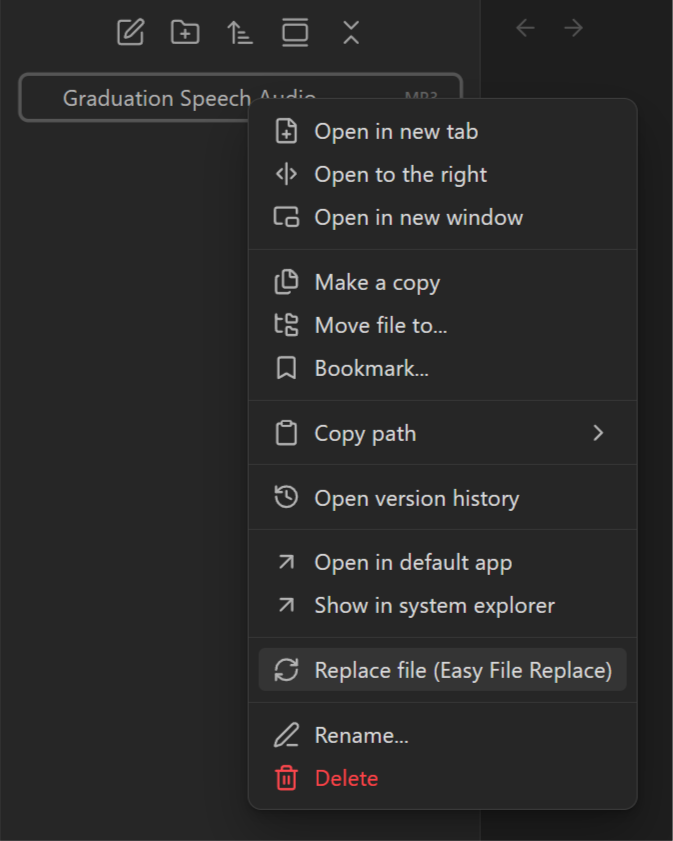
Easy File Replace Example

A native file picker will open. Select the updated file and the plugin will automatically update the attachment data in your vault.

Format Protection

To prevent corruption or unexpected behaviors, the plugin strictly requires the new file to have the exact same extension as the file you are replacing. If you attempt to replace a file with a different format (e.g., replacing a .png with a .jpg), the plugin will automatically block the operation.
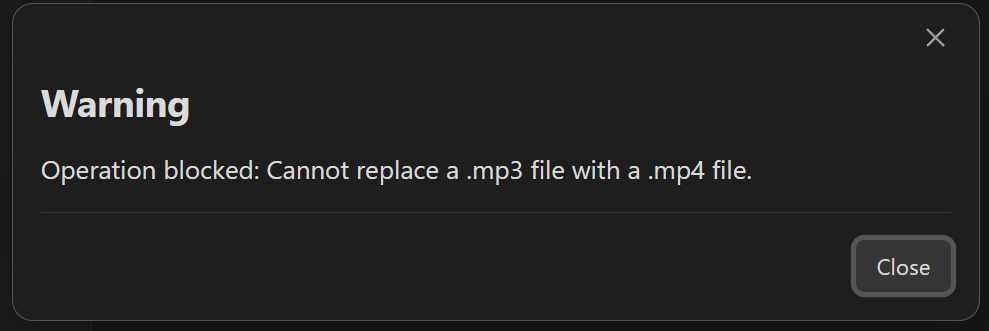
Format Blocked Warning

Support Me

If you find this plugin useful for your projects and want to support its development, consider buying me a coffee! :]


SrPernax


Other Projects

Check out my other plugins for Obsidian:
StoryScore
StoryScore - Organize soundtracks and leitmotifs directly in your vault.

Thanks for using Easy File Replace
HealthExcellent
ReviewSatisfactory
About
Replace attachment files in-place without breaking internal Markdown links. Select a file from your system to overwrite the attachment while retaining its original name and path, and require the same file extension to prevent format mismatches or corruption.
AttachmentsFiles
Details
Current version
1.0.1
Last updated
2 weeks ago
Created
2 weeks ago
Updates
2 releases
Downloads
32
Compatible with
Obsidian 1.0.0+
Platforms
Desktop only
License
0BSD
Report bugRequest featureReport plugin
Sponsor
Ko-fi
Author
SrPernaxSrPernaxsrpernax
GitHubsrpernax
  1. Community
  2. Plugins
  3. Attachments
  4. Easy File Replace

Related plugins

Pixel Perfect Image

Pixel perfect 100% image resizing, copy to clipboard, show image in Finder/Explorer, and much more.

Janitor

Perform cleanup tasks on your vault.

File Cleaner Redux

Help you to clean empty files and unused attachments in the vault.

Notebook Navigator

A better file browser and calendar inspired by Apple Notes, Bear, Evernote and Day One.

Claudian

Embeds Claude Code/Codex and other local Agents as AI collaborators in your vault.

Advanced URI

Control everything with URI.

Local REST API with MCP

Unlock your automation needs by interacting with your notes over a secure REST API.

Share Note

Instantly share/publish a note, with the full theme and content exactly like you see in Obsidian. Data is shared encrypted by default, and only you and the person you send it to have the key.

Find orphaned files and broken links

Find files that are not linked anywhere and would otherwise be lost in your vault. In other words: files with no backlinks.

Omnisearch

Intelligent search for your notes, PDFs, and OCR for images.
