Easy TikZ
 Saiki774k downloads
Visually design TikZ and pgfplots graphs with a live SVG preview. Supports 2D functions, 3D surfaces, tangents, extrema, and one-click code insertion.
- Overview
- Scorecard
- Updates57

Section 2 of the overview film: drag the tangent point of x^3 - 3x, and the tangent, its slope and the area between them follow; press play and it moves by itself. Watch the whole film (40 s, MP4).
Easy TikZ is an Obsidian plugin for TikZ and pgfplots charts, without writing TikZ. Write a chart in your note in plain words, or build it in the editor from formulas and cards. It draws in the note as you type, with no TeX install, on phones and tablets too, and exports pgfplots code that compiles with pdflatex.
What's new · Guides · Reference · AI guide · Changelog
- Charts in plain words.
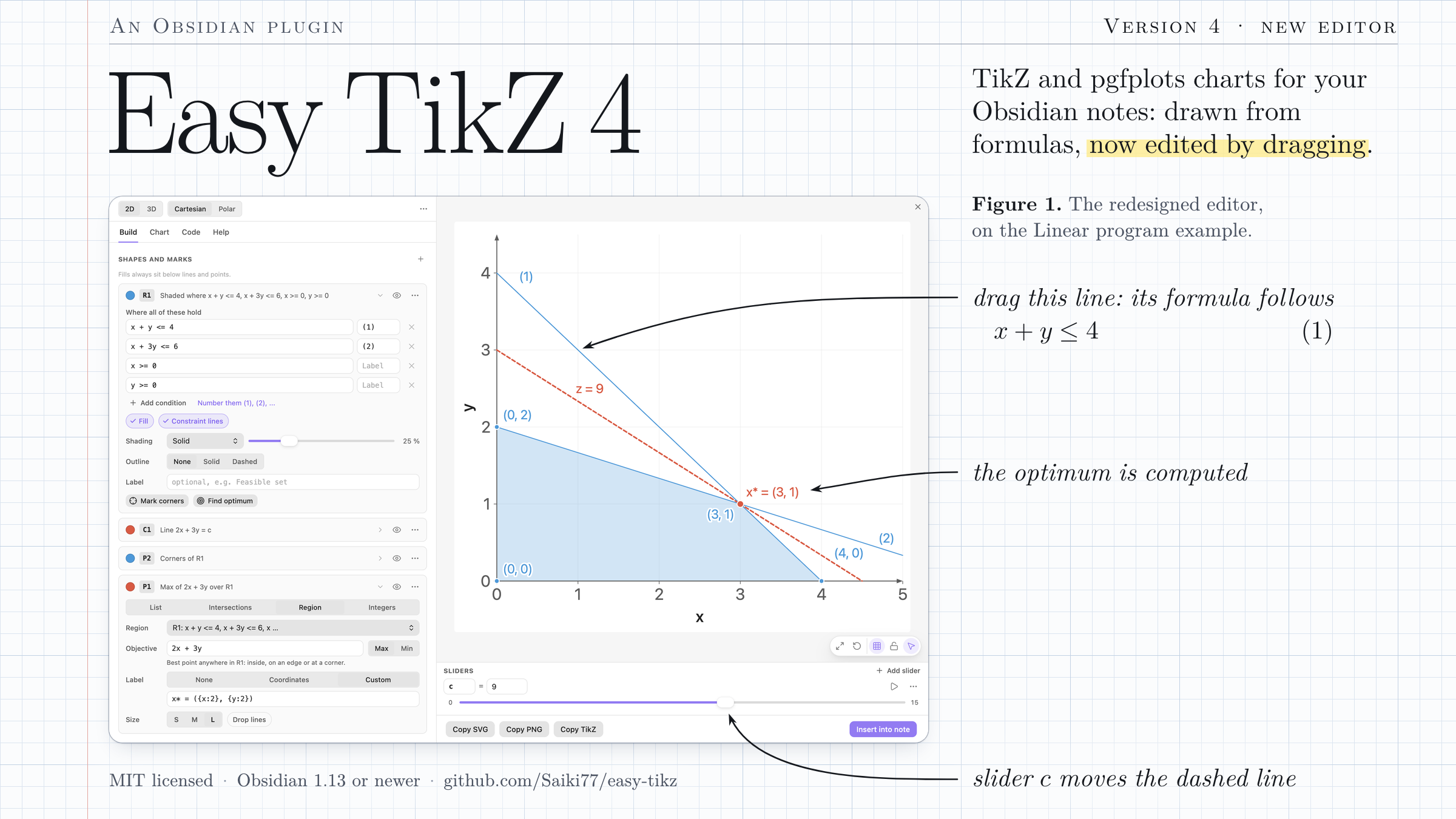
plot f(x) = x^2 in blue,shade where x + y <= 4 and x >= 0,mark the maximum of 2x + 3y in the region. While you type, the chart draws right under the block. - Drag to edit. Grab a line, curve or point in the editor and the numbers in its formula follow; Shift turns a line about a point.
- Live sliders and computed values. Any number can be a slider, in your notes too, and computed points publish values such as
P1_xthat any formula or label can use. - Pictures for lectures. Areas between curves, tangents, linear and integer programs with their optimum, level curves, market equilibria, parametric and polar curves, 3D surfaces.
- LaTeX and AI. Export a standalone pgfplots document that compiles with pdflatex, or let an AI app make the chart: it checks it with the plugin's own code (AI guide).
What's new in 4.6
- Your own chart words. Give any piece of the chart language your own words, in your language or your own terms (
plotcan begraph, orzeichne), and one word of your own for several options (objective=in red, dashed). Settings, Chart words. The built-in words keep working beside yours, and the editor writes yours. - Change a word later. Charts in your notes that used the old word are offered for rewriting, line by line.
From 4.5, charts in plain words with the chart drawn under the block as you type:

From a note with no chart: a block is opened, each line is typed in words, and the chart appears under the block and follows every key. Watch the MP4 (37 s).
Everything new in version 4: charts in plain words (4.5), charts as text and phones (4.4), charts with AI (4.3), drag to edit and live sliders (4.0).
Guides
24 step-by-step guides (171 steps) take you from the first formula to integer programs, live calculations and LaTeX export. They come from one source and exist in two places:
- In the editor: the Help tab. Search or pick a guide; every step shows a live chart and has a button Open this step in the editor, and the things to type are rows with a Copy button.
- On GitHub: docs/guides. The same steps with 166 screenshots of the plugin in Obsidian, one for nearly every step, and every guide ends with its finished chart as a block to paste into a note.
Five to start with:
| Finished chart | Guide |
|---|---|
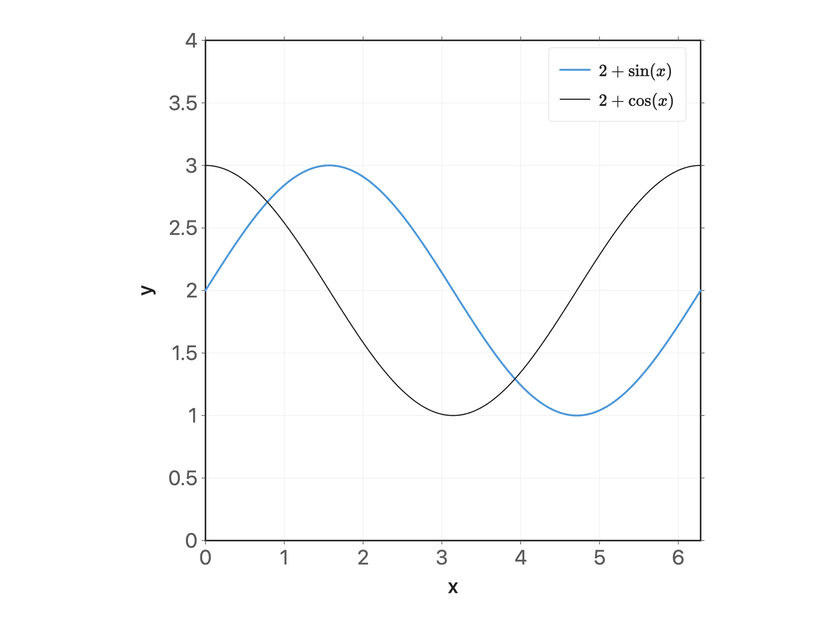 |
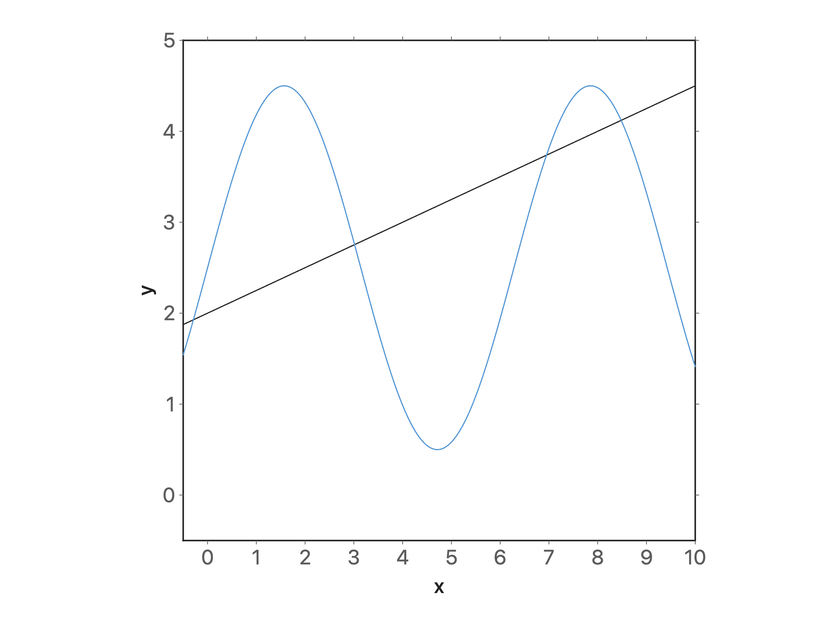
Your first chart From an empty editor to a chart in your note: type a formula, style it, set the ranges and insert it. Start here · 5 min · 8 steps |
 |
Drag shapes to edit them Grab a line or a curve in the preview and its numbers follow: move, turn, stretch, undo. Start here · 7 min · 8 steps |
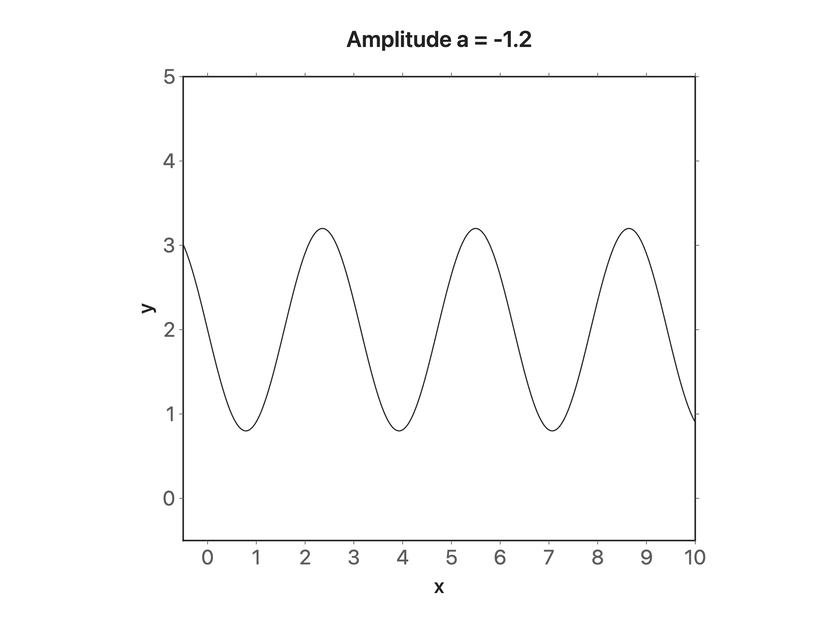 |
Sliders that move the picture Turn a letter in a formula into a slider, set its range, play it and print its value in the chart. Core · 6 min · 7 steps |
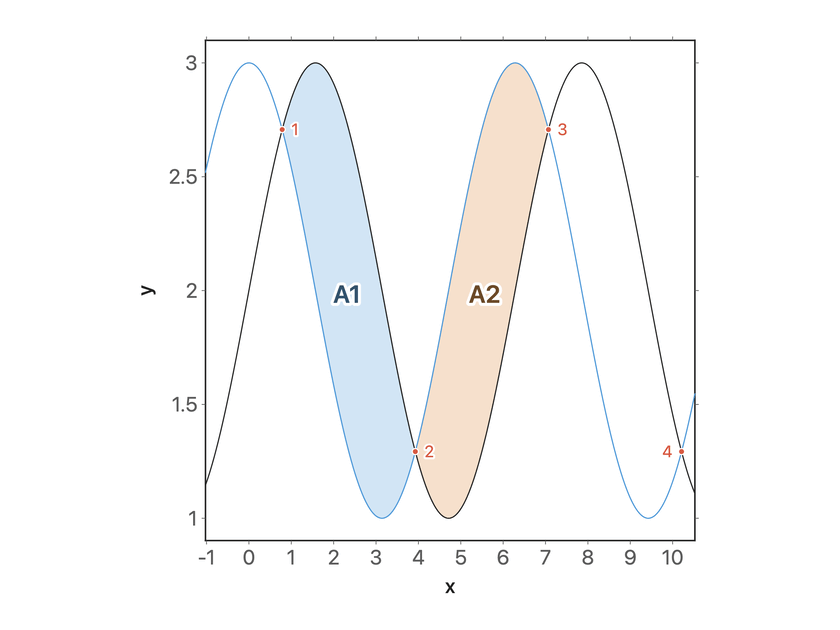 |
Shade the areas between two curves Two curves, the areas between them in two colours, and their crossing points as the limits of the shading. Core · 7 min · 7 steps |
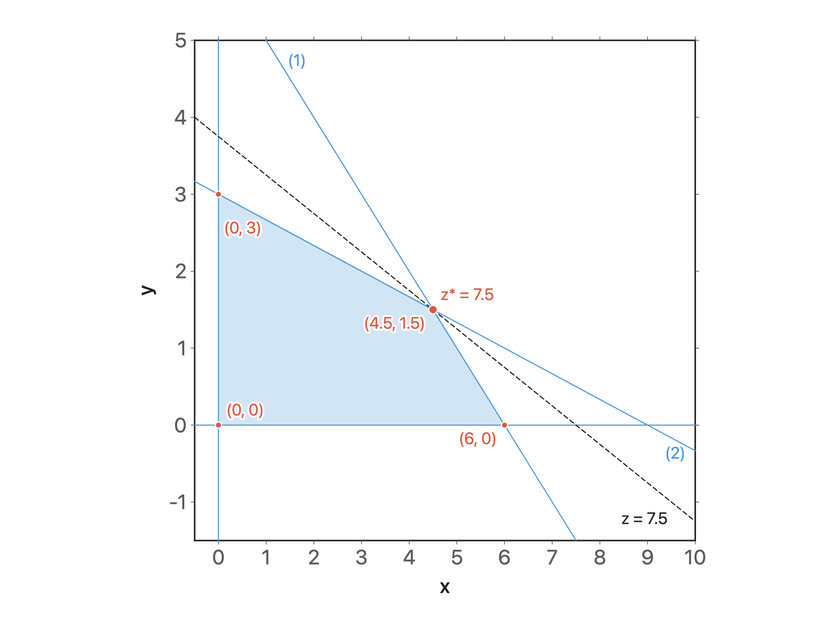 |
Solve a linear program in a picture Feasible region, labelled constraint lines, an objective line on a slider, the optimum, the corners, and a sensitivity test by dragging. Core · 10 min · 8 steps |
All guides by topic: Getting started, Functions and sliders, Regions and optimisation, Points, lines and labels, 3D, Notes and export and Reference (coming from 3.x, shortcuts and troubleshooting).
Privacy and permissions
- Clipboard: writes TikZ code / SVG / PNG on the Copy … buttons, the text of a "type" row when you press Copy in a guide, the AI guide, connection lines and token when you press their Copy buttons in the AI tab or the settings, and your chart words when you press Copy your words. It reads the clipboard only when you press Paste the chart in the AI tab.
- Active note: inserts an
easy-tikzblock on Insert into note, replaces an existing block when saving from click-to-edit, and updatesdisplayWidth/displayAlignwhen you use a chart's width or alignment controls. Inline sliders never write to the note. - Plugin data: the plugin settings (with the AI access token), your saved function templates, the state of the Edit shapes by dragging switch (and that its first-use tip was shown), which version of the What's new popup was shown and, while the editor is open, an autosaved draft of the chart (cleared when you insert or save).
- Notes with charts, after you change your chart words: the plugin looks through the notes that hold
easy-tikzblocks for charts that used a word you changed. Only when you agree (Rewrite N charts) does it rewrite those lines in your new words, each chart only when it stays exactly the same chart. - Your notes, read only: when the plugin starts without any stored data and What's new is switched on, it looks through your notes for an
easy-tikzblock and stops at the first one. A 3.x user who never changed a setting has charts but no stored data, and this tells such an update from a new install. It runs once, since its answer is stored, and it never writes to a note. - Network: nothing goes to the internet. The guides in the Help tab are part of the plugin and their charts are drawn locally; each guide has a link to its page on GitHub, which opens in your browser only when you click it. With Let AI apps make charts switched on (off by default), the plugin answers HTTP on
127.0.0.1at the port you choose, which only programs on this computer can reach. Every request needs the token from the settings, and a POST must carry JSON; requests from web pages (with anOriginheader) and for other host names are refused. It serves the AI guide, checks and draws charts one at a time (charts over its size limits are refused before anything is computed), and addseasy-tikzblocks to Markdown notes (at the end, below a heading, or in place of a placeholder line) or replaces them, nothing else: never in hidden folders and never in instruction files for AI agents such asAGENTS.mdorCLAUDE.md. A new note is only made when the AI asks for it. Each change shows a notice, with Undo when an existing note changed. - Vault root, on request: Tell AI agents in this vault adds or updates a marked Easy TikZ section in
AGENTS.mdandCLAUDE.mdat the top of the vault (creating them if needed). It never touches the rest of those files. - Telemetry: none.
- Math evaluation: user expressions are parsed by a built-in parser and compiled into closures; no dynamically generated code runs. Nothing is persisted or transmitted.
License
MIT. Working on the plugin itself: Developing Easy TikZ.