Dynamic Font Size
 nancyel785 downloads
Dynamically adjust font size of note content using a property slider.
- Overview
- Scorecard
- Updates1
A custom Obsidian plugin that allows you to dynamically adjust the font size of note content through frontmatter properties with an intuitive slider interface.
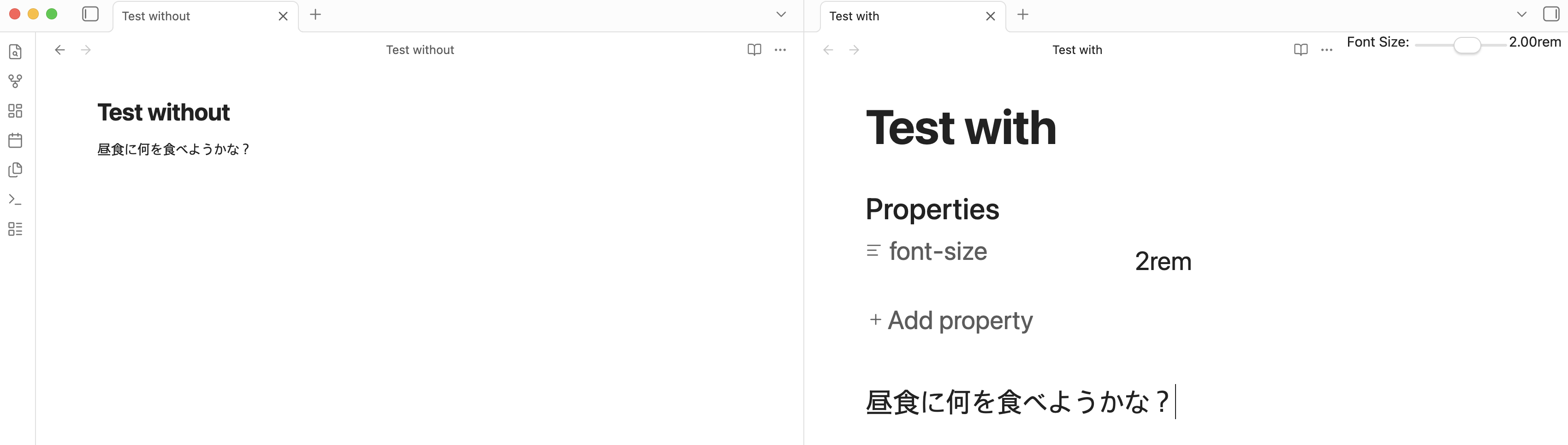
Features
- Property-based font sizing: Set font size using the
font-sizeproperty in note frontmatter - Real-time updates: Font size changes are applied immediately when you modify the property
- Interactive slider: Toggle a slider UI for easy font size adjustment
- Status bar indicator: Shows current font size in the status bar
- Configurable ranges: Customize minimum, maximum, and default font size values
- Smooth transitions: Font size changes animate smoothly for better UX
Usage
Method 1: Manual Property Setting
Add a font-size property to your note's frontmatter:
---
font-size: 1.5rem
---
Your note content will render at 1.5rem font size.
You can use either:
- String format with unit:
"1.5rem" - Numeric format:
1.5
Method 2: Slider Interface
- Open a note
- Run the command "Toggle font size slider" (Ctrl/Cmd + P, then search for it)
- A slider will appear in the view header
- Adjust the slider to change the font size
- The frontmatter will be updated automatically
Installation
Development Setup
Navigate to the plugin directory:
cd .obsidian/plugins/dynamic-font-sizeInstall dependencies:
npm installBuild the plugin:
npm run buildFor development with auto-rebuild:
npm run devEnable the plugin in Obsidian:
- Go to Settings → Community plugins
- Reload plugins
- Enable "Dynamic Font Size"
Configuration
The plugin provides several configurable settings:
- Minimum font size: The smallest allowed font size (default: 0.5rem)
- Maximum font size: The largest allowed font size (default: 3.0rem)
- Default font size: The default value when using the slider (default: 1.0rem)
Access these settings in Settings → Dynamic Font Size.
Commands
- Toggle font size slider: Show or hide the font size adjustment slider in the current note
How It Works
The plugin:
- Monitors the active note for changes
- Reads the
font-sizeproperty from the note's frontmatter - Applies the font size to the note's content area using CSS
- Updates the display when you switch between notes or modify the property
- Cleans up styles when you close notes or disable the plugin
Technical Details
- Font sizes are specified in
remunits (relative to root font size) - Values are clamped between the configured minimum and maximum
- The plugin uses Obsidian's MetadataCache API for efficient frontmatter reading
- CSS transitions provide smooth font size changes
Support
For issues or feature requests, please open an issue in the repository.
License
MIT
HealthExcellent
ReviewSatisfactory
About
Adjust note content font size using a font-size frontmatter property or an interactive slider. Apply changes in real time with smooth transitions and view the current size in the status bar. Configure minimum, maximum, and default ranges for consistent control.Details
Current version
1.0.0
Last updated
8 months ago
Created
8 months ago
Updates
1 release
Downloads
785
Compatible with
Obsidian 1.11.4+
Platforms
Desktop, Mobile
License
MIT