Duet
 Nathan Aday38 downloads
Work with Claude Code or Codex in your notes. Mention an agent on a line, or chat in a conversation note. You see the agent edit the note live while you type.
- Overview
- Scorecard
- Updates4
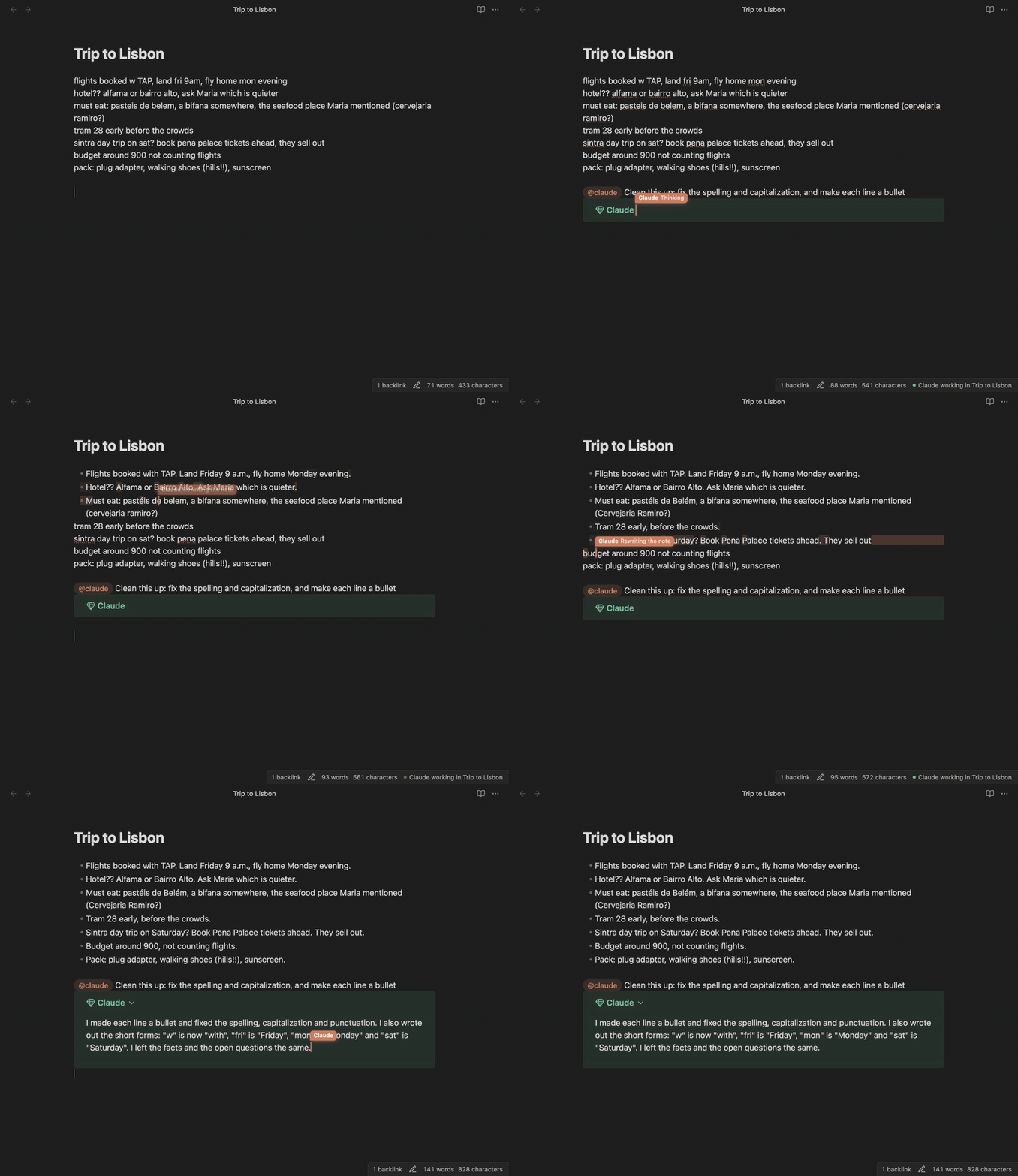
Work with Claude Code or Codex inside your Obsidian notes. You and the agent edit the same note at the same time. You see the agent's cursor and each change it makes, and your own typing is never lost.
About
Coding agents such as Claude Code and Codex are good at more than code. They can read your notes, summarize them, restructure them, and write new ones. But they run in a terminal, and a terminal is a poor place to work with notes.
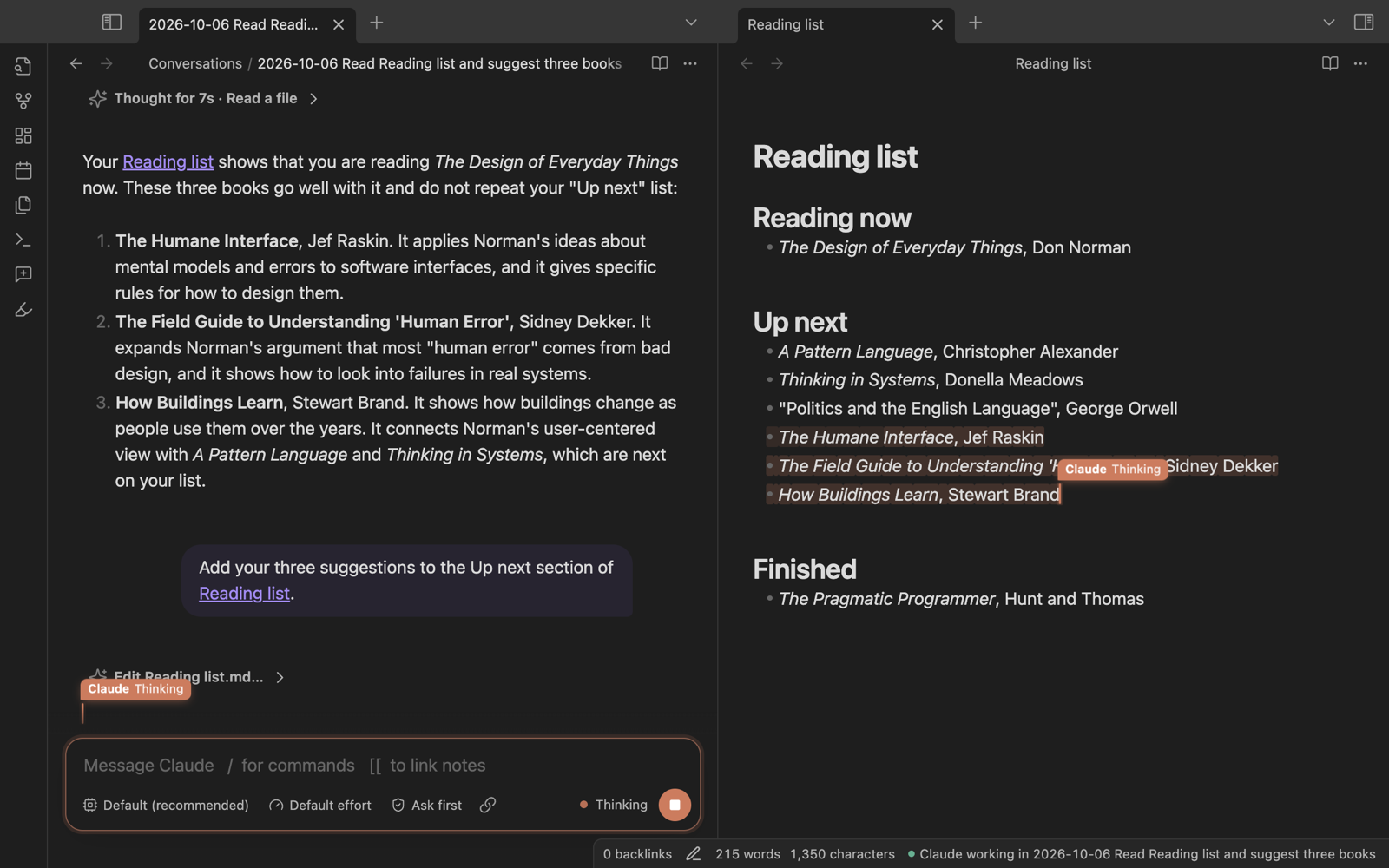
Duet puts these agents in the editor. Write @claude and a request on any line, and the agent answers under that line. It can also edit the note while you keep typing, like a second person in a shared document. For longer work, open a conversation note: the conversation becomes a note in your vault, with every message and tool call recorded.
Duet uses your own Claude Code or Codex installation and login. It does not need an API key of its own.
Quickstart
Prerequisites
- Obsidian 1.13 or later, on desktop. Duet is tested on macOS.
- Claude Code (
claude) or the Codex CLI (codex), installed and logged in. Check this in a terminal:claude --versionorcodex --version.
Install
- In Obsidian, open Settings → Community plugins and turn off restricted mode.
- Select Browse, search for Duet, then select Install and Enable.
To install by hand, download main.js, manifest.json and styles.css from the latest release. Put them in <your vault>/.obsidian/plugins/duet/, then turn on Duet under Settings → Community plugins.
Ask your first question
- Open a note with some text in it.
- On a new line, write
@claude Summarize this note in one sentence. - Press Enter.
The answer streams into a callout under the line. For Codex, write @codex instead.
Usage
Mentions
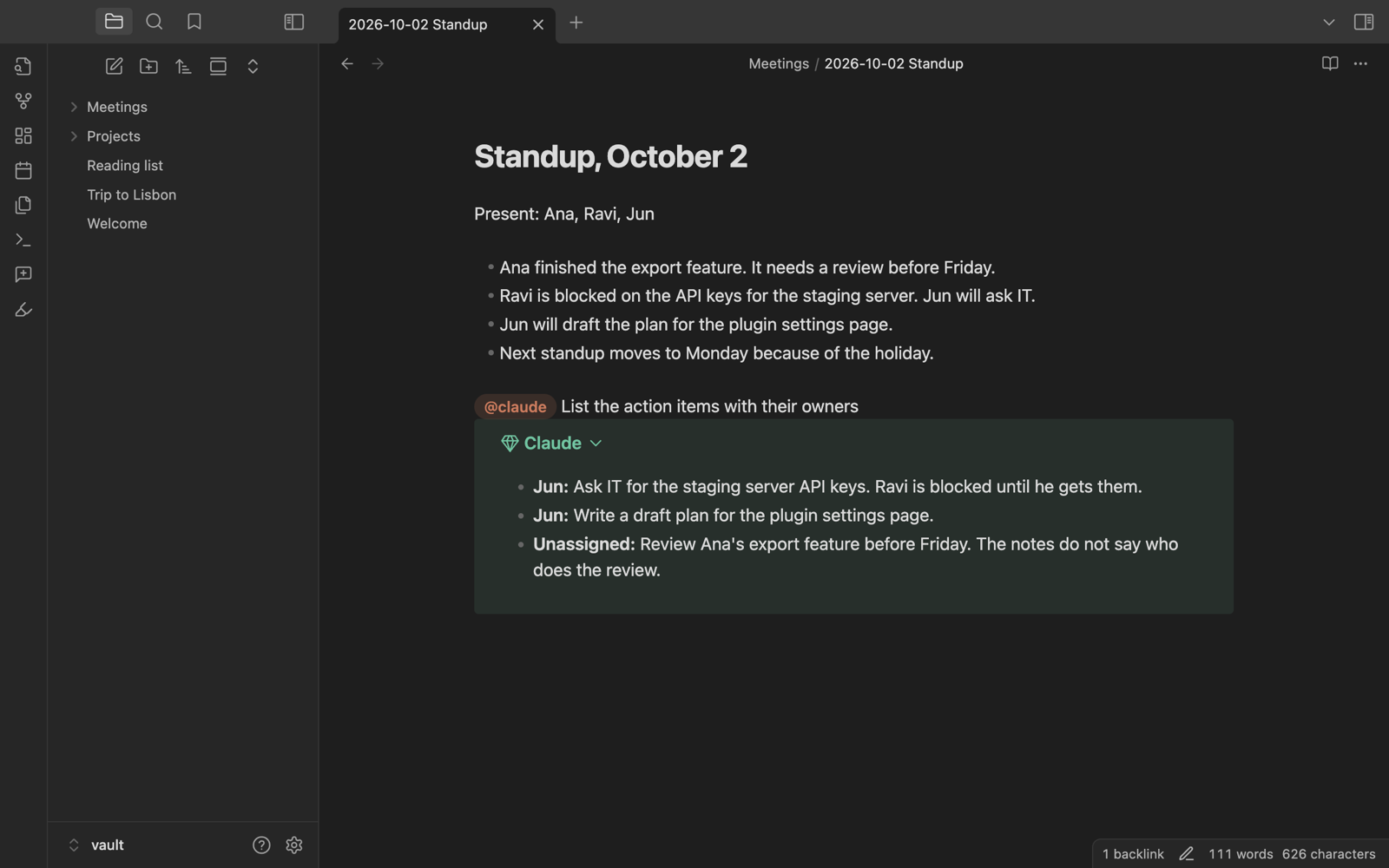
Write @claude or @codex and a request, then press Enter at the end of the line. The tag can follow other text on the line. When you type the tag of an agent, it changes to a pill in the agent's color, so you know that the tag will work.
- Edit the note: ask for a change, such as
@claude make the list shorter. The agent changes this note only. It can read your other notes, but it cannot change them or run commands, so a mention never asks for approval. - Follow up: each note keeps its own conversation. A later
@claude make it shorterin the same note continues it, also after you restart Obsidian. - Undo the agent: run Duet: Undo the agent's last changes in this note. This removes the edits of the agent's last turn and keeps your own typing and the agent's reply. Cmd+Z or Ctrl+Z undoes only your own typing.
- Stop: run Duet: Stop the agent in this note. Assign it a hotkey if you use it often.
- Start over: run Duet: Forget the mention conversation in this note.
Duet ignores tags in code blocks, in blockquotes and in email addresses. These tags stay plain text.
Conversation notes
Run Duet: New conversation, or select the ribbon button. You get a note with a message box at the bottom. The note records the conversation: your messages, the agent's replies, and its tool calls in collapsed sections. The note gets its name from your first message.
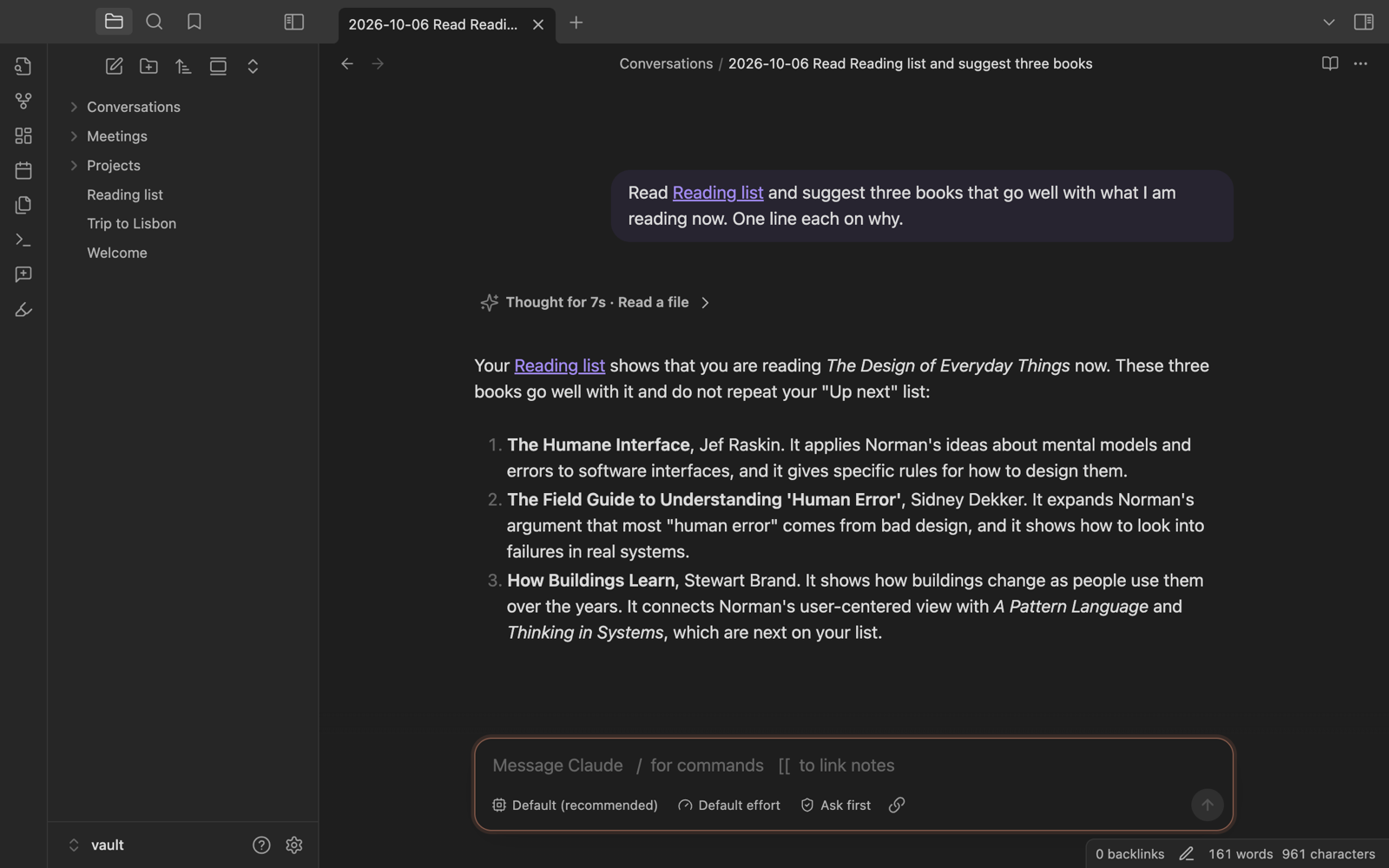
- Send: press Enter. Shift+Enter starts a new line. A message that you send while the agent works waits for the current turn to end.
- Link notes: type
[[to pick a note. The agent reads linked notes when it needs them. - Commands: type
/to see commands./model,/effort,/mode,/newand/endbelong to Duet. The other commands come from the agent, for example your Claude Code skills. - Model, effort and approvals: use the buttons under the message box. Your choice is saved in the note's properties. A new model or effort applies from the next turn. A new approval mode applies at once, also to a request that waits for you.
- Approval modes for Claude Code: Ask first asks before edits and commands. Accept edits edits files in the vault without asking, and asks before commands. Auto lets Claude Code decide which actions are safe to run without asking. Plan only reads and plans, and changes nothing.
- Stop: press Escape in the message box, or select the stop button.
- End: type
/end, or run Duet: End this conversation. The note stays as a record. Select Continue it to reopen the conversation.
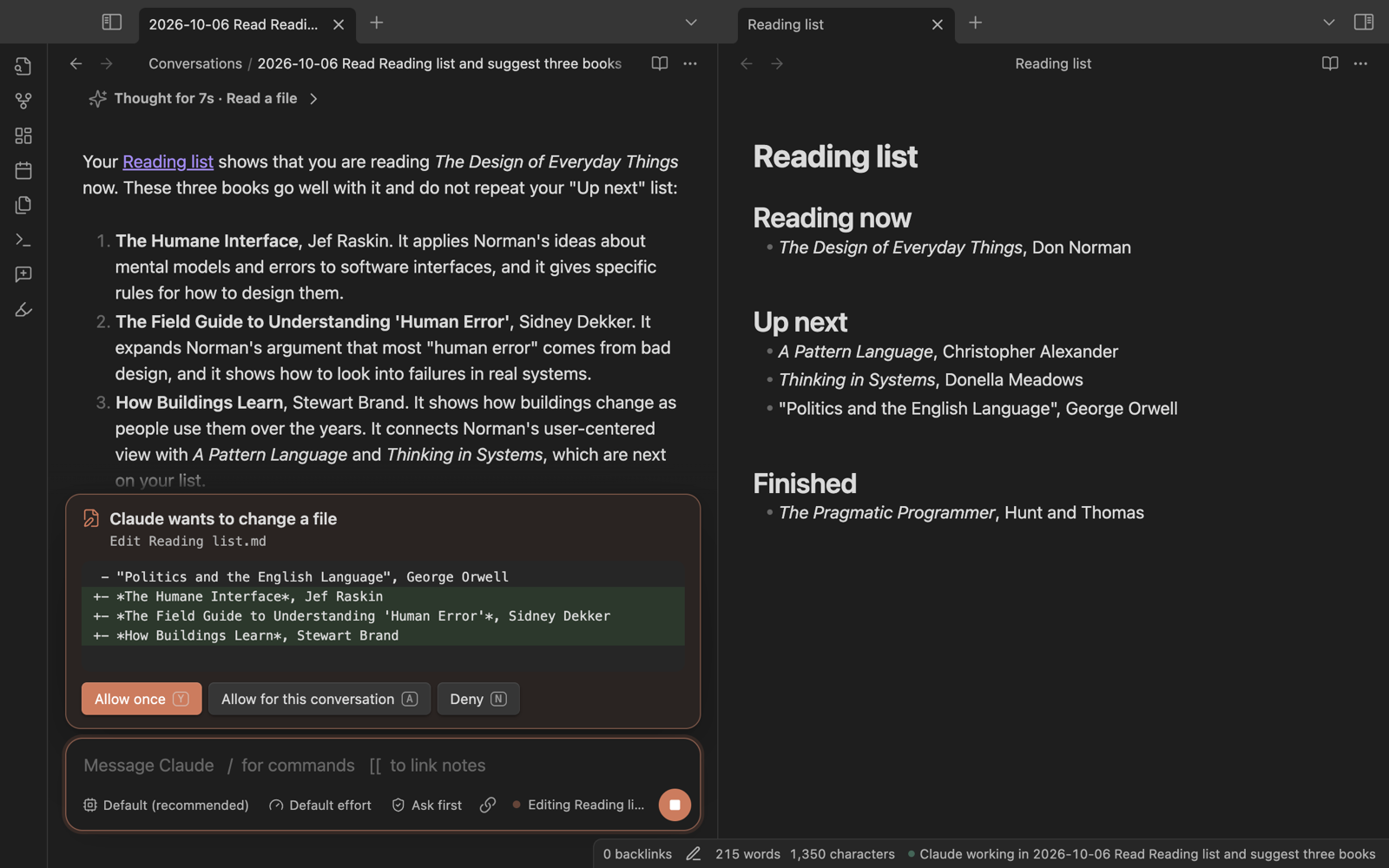
In a conversation, the agent can change any file in the vault. Before it changes a file or runs a command, the request shows above the message box with the exact change. Press Y to allow it once, A to allow it for the rest of the conversation, or N to deny it.
When Claude has questions for you, they show above the message box, one at a time. Pick an option with a click or its number key, or write your own answer and press Enter. A pick on a single-choice question moves to the next question. Select Back to change an answer, or Skip to answer nothing. The note records the questions and your answers.
When the agent changes a note that is open, you see its cursor in that note. Its changes merge with the text that you type at the same time.
Contribution lens
Duet records which text of a note its agents wrote. To see it, select the lens button in the ribbon, or run Duet: Toggle contribution lens. Text that a Duet agent wrote gets a cyan mark. Hold the pointer over a mark to see which agent wrote it and when. All other text stays plain.
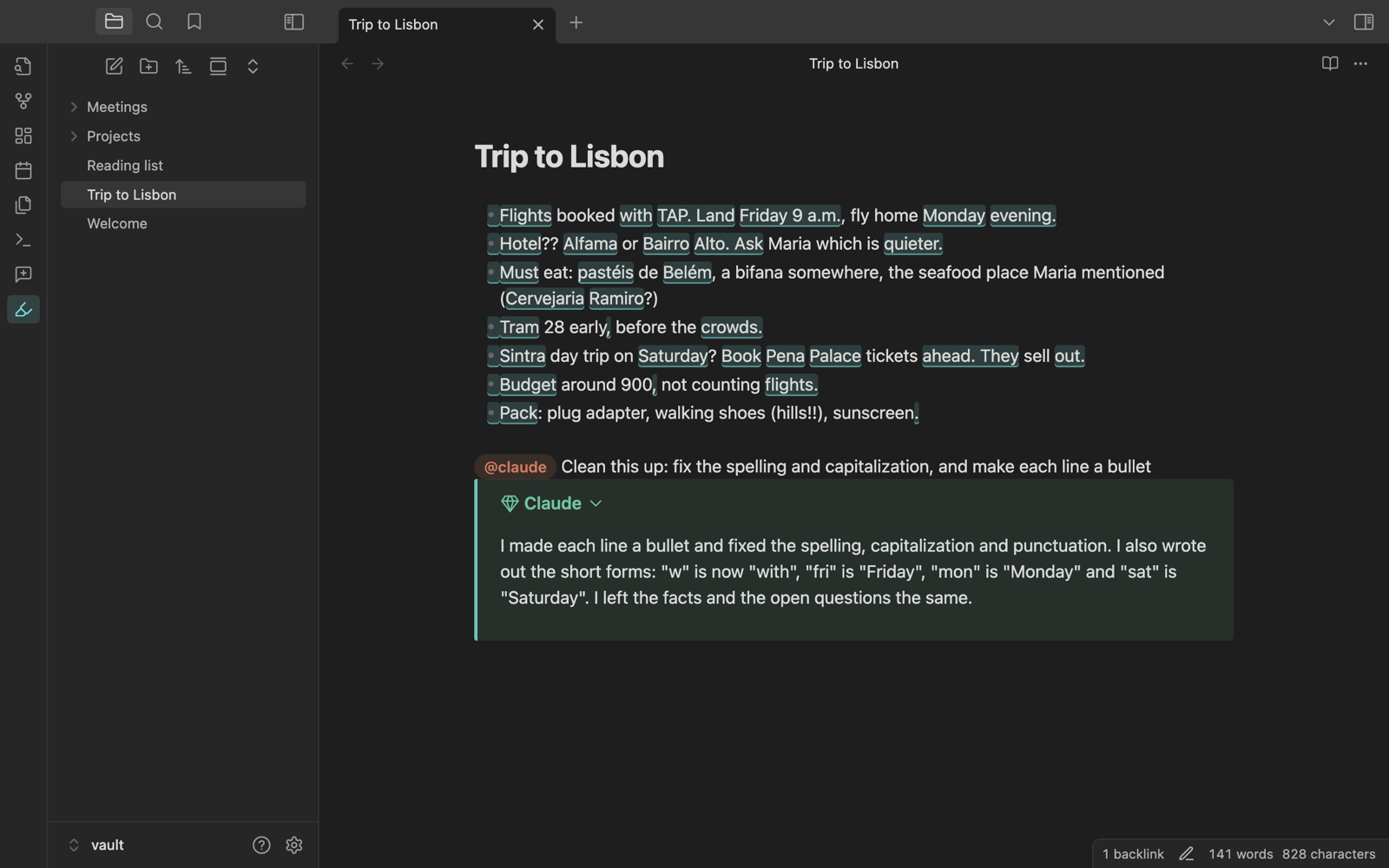
- What counts: all text that a Duet agent writes: its edits, its mention replies, and its parts of a conversation note. When an agent changes part of a word, the whole word counts as the agent's.
- Your changes win: when you or any other program changes a word that an agent wrote, that word is no longer marked. Duet also follows changes made while it was not running, for example through sync, by comparing the note with the text that it saw last.
- Not an AI detector: the lens shows only what Duet's own agents wrote. Text that another tool wrote, or that you pasted, stays plain, even when an AI wrote it.
- Limits: a Codex edit can go unrecorded when Codex does not ask for approval first. A file that an agent changes with a shell command is not recorded. In Live Preview, a rendered block such as a callout or a table gets a bar on its left edge instead of marks. In Reading view, whole sections get the bar.
Duet keeps the record in the hidden folder .duet/contributions/ in your vault, with one file for each note that an agent wrote in.
Settings
Each agent has a tag and its own options. You can add more agents, for example a second Claude account.
| Setting | What it does |
|---|---|
| Tag | The name after @. |
| Color | The color of the agent's cursor and highlights. |
| Agent | Claude Code or Codex. |
| Approvals | When the agent asks before it acts, in conversation notes. |
| Model | The model to use. Leave empty for the default. |
| Effort | How much the model reasons. Leave empty for the default. |
| Program path | Leave empty to find the program on your shell's PATH. |
| Environment variables | One KEY=VALUE per line. |
| Load my MCP servers and plugins | Claude Code only. Off by default. |
General settings:
| Setting | What it does |
|---|---|
| Conversation folder | Where new conversation notes go. The default is Conversations. |
| Show agents typing | Agents type their edits into open notes. Off: edits appear at once. Duet also turns this off when your system asks for reduced motion. |
| Close idle agents after | Minutes without activity before an agent process stops. The next message continues the same conversation. |
To use a second Claude account, add an agent with the tag work, the agent Claude Code, and the environment variable CLAUDE_CONFIG_DIR=~/.claude-work.
API for other plugins
Another Obsidian plugin can start a Duet conversation and follow it. For the types, copy plugin/src/api.ts into your plugin. It imports nothing.
import type { DuetApi } from './duet-api';

const duet = (this.app as any).plugins.getPlugin('duet')?.api as DuetApi | undefined;
if (duet && duet.version >= 1) {
  const { path } = await duet.newConversation({ message: '/my-plugin:my-skill', loadUserSetup: true });
  const stop = duet.onTurnEnd(path, (turn) => console.log(turn.status));
}
| Member | What it does |
|---|---|
version |
1. A later version only adds members. |
newConversation(options) |
Creates a conversation note, opens it in a new tab, and sends options.message as the first message. Resolves with { path } when the message is sent. |
conversationStatus(path) |
working, active (waits for a message), ended, or none (no conversation note has this path). |
onTurnEnd(path, callback) |
Calls callback with { path, status, error? } after each turn. status is completed, interrupted or failed. Returns a function that stops the calls. |
Options of newConversation:
| Option | Default | What it does |
|---|---|---|
message |
(required) | The first message. A / command runs an agent command, such as a Claude Code skill. |
profile |
the first agent | The tag of a Duet agent, without @. |
title |
the date and the first words of the message | The name of the note. |
folder |
the conversation folder setting | The folder of the note. |
open |
true |
false creates the note without opening it. |
loadUserSetup |
false |
Claude Code only. Starts the agent with the user's MCP servers and plugins, also when the agent's setting is off. The note keeps this choice. |
Limits:
apiis undefined when Duet is not installed or is turned off. Get it each time you need it. After Duet turns off,newConversationon an oldapirejects.newConversationrejects when the message is empty or when no agent has the tag inprofile.- When the agent cannot start, Duet shows a notice, and the turn ends with the status
failed. - The agent asks for approval and asks its questions as in other conversations: in the message box when the note is open, otherwise in a dialog.
- A listener follows its note when the user renames it.
conversationStatustakes the current path.
Network use, accounts and privacy
Duet does not connect to the internet. It starts Claude Code or Codex on your computer, and those programs connect to their providers:
- Network use: Claude Code sends your requests, and the note text that it reads, to Anthropic. Codex sends them to OpenAI. This is necessary because the language models run on the providers' servers.
- Accounts and payment: Duet is free. Claude Code and Codex each need an account with their provider. Their use can cost money under that account's plan.
- Files in the vault: Duet saves its contribution record in the hidden folder
.duet/contributions/. Each file holds the positions of the agent's text and a copy of the note's text. Duet uses the copy to follow changes that it did not see. - Files outside the vault: Duet runs programs that are installed outside the vault:
claudeorcodex, and your login shell, once after Obsidian starts, to read its PATH. Claude Code and Codex save their conversation history in their own folders, such as~/.claudeand~/.codex. The agents work in the vault folder. Their own permission rules control access to other files, and Duet shows you each approval request that they send. - Your environment: to find and start Claude Code and Codex, Duet reads your environment variables and your home folder. It passes your environment to the agent programs, as a terminal does. Duet does not send this information anywhere.
- Telemetry: Duet collects no data. Claude Code and Codex follow the privacy policies of Anthropic and OpenAI.
Development
npm install
npm run plugin:dev   # creates dev-vault/ and rebuilds the plugin into it on every change
Open dev-vault/ as a vault in Obsidian. Other commands:
| Command | What it does |
|---|---|
npm run plugin:build |
Builds the plugin into plugin/dist. |
npm run typecheck |
Type-checks the library and the plugin. |
npm run lint |
Runs Obsidian's review rules on the plugin code. |
npm test |
Runs the unit tests. |
npm run test:obsidian |
Starts a separate Obsidian with a temporary vault and tests mentions and conversations with Claude Code and Codex. Your own Obsidian and vaults are not touched. |
npm run screenshots |
Captures the images in this README with real agent sessions. |
Work happens on the preview branch. main takes changes only through a pull request from preview whose checks pass. To release a version:
- On
preview, runnpm run set-version <x.y.z>. It sets the version inmanifest.json,package.jsonandpackage-lock.json, and adds it toversions.jsonwith the currentminAppVersion. A unit test holds the four files to one version. - Open a pull request into
main. CI runs the type check, the lint, the unit tests and the build. Runnpm run test:obsidianbefore you merge, because CI has no Obsidian to run it in. - Merge it. The release workflow checks the code again, tags the commit with the version (no
v), and publishesmain.js,manifest.jsonandstyles.css, which Obsidian's community plugins download. A merge whose version is released already publishes nothing.
Obsidian reads manifest.json from main. Until the release job ends, about a minute, main names a version with no release, and an install in that minute fails once.
The plugin is built on a small TypeScript library in src/ that starts and drives Claude Code and Codex sessions. Other apps can use it as a package; duet-demo is a browser app built on it. The design notes are in docs/design.md.