Search...Search plugins and themes...
⌘K
Sign in
  • Get started
  • Download
  • Pricing
  • Enterprise
  • Account
  • Obsidian
  • Overview
  • Sync
  • Publish
  • Canvas
  • Mobile
  • Web Clipper
  • CLI
  • Learn
  • Help
  • Developers
  • Changelog
  • About
  • Roadmap
  • Blog
  • Resources
  • System status
  • License overview
  • Terms of service
  • Privacy policy
  • Security
  • Community
  • Plugins
  • Themes
  • Discord
  • Forum / 中文论坛
  • Merch store
  • Brand guidelines
Follow us
DiscordTwitterBlueskyThreadsMastodonYouTubeGitHub
© 2026 Obsidian

Draw a Mermaid

yaye.workyaye.work108 downloads

Build mermaid flowcharts visually. Enuf said.

Add to Obsidian
Draw a Mermaid screenshot
  • Overview
  • Scorecard
  • Updates2

Build mermaid flowcharts visually inside Obsidian: drag blocks and connectors on a canvas, rename them inline, and let the plugin generate the mermaid code for you. A live preview renders as you build.
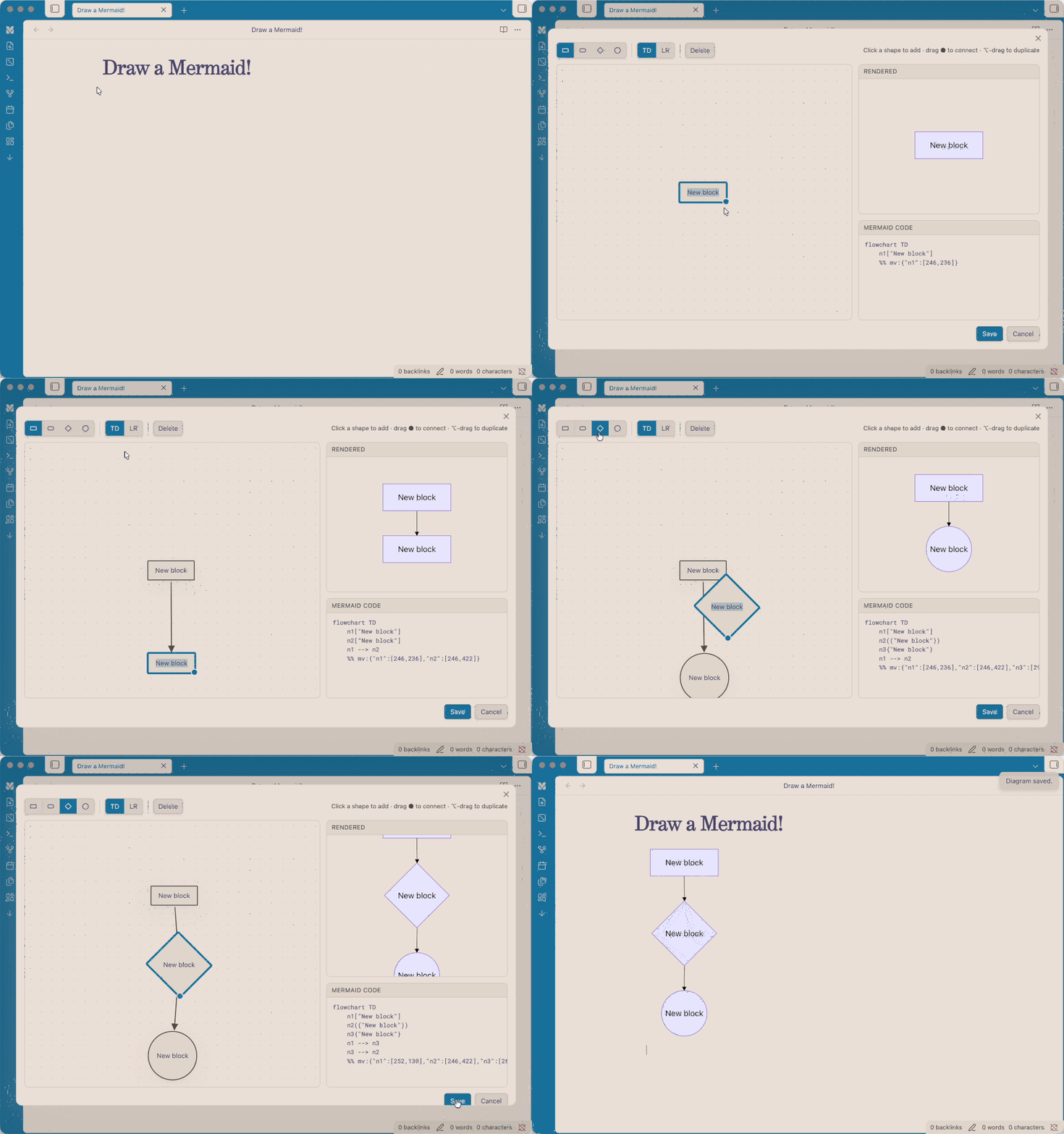
demo

Features

  • Visual-first canvas: the canvas is the source of truth; mermaid code is generated from it.
  • Add blocks by clicking a shape (rectangle, rounded, diamond, circle).
  • Connect blocks by dragging the ● handle onto another block. Drop on empty space to spawn a new connected block; drop onto an existing arrow to splice a block into that connection.
  • Rename a block by double-clicking it, or a connector by double-clicking the arrow.
  • Multi-select with a rubber-band marquee (or Shift-click) for bulk move, reshape, duplicate, and delete.
  • ⌥/Alt-drag to duplicate a block or a whole selection.
  • Live output: rendered diagram and generated mermaid code update in real time.
  • Layout persistence: your block positions are stored in a %% mv: comment in the block, so reopening restores the canvas.

Usage

  • Click the ribbon icon ("Draw a Mermaid") to start a blank diagram; on save it's inserted into the active note (or a new note).
  • Hover any rendered mermaid block in a note and click the pencil button to edit it visually.
  • Command palette: "Edit mermaid diagram at cursor" and "Insert mermaid diagram (visual editor)".

Direction TD = top-down, LR = left-to-right; this only affects how the rendered diagram is auto-laid-out.

Installation

From Community Plugins (once approved)

Settings → Community plugins → Browse → search "Draw a Mermaid".

Manual

Copy main.js, manifest.json, and styles.css into <vault>/.obsidian/plugins/mermaid-visual/, then enable it in Settings → Community plugins.

Development

npm install
npm run dev    # watch build
npm run build  # production build (type-check + bundle)

About

I'm a designer main, so when I realised I have write code for a visual chart, I almost deleted Obsidian(/s). Alas, I got claude's help to build this visual mermaid tool, hope it can help people like me who are looking for a tool like this.

License

MIT © yaye.work

HealthExcellent
ReviewPassed
About
Draw a Mermaid gives you the freedom to: Build mermaid flowcharts visually inside Obsidian: drag blocks and connectors on a canvas, rename them inline, and let the plugin generate the mermaid code for you. A live preview renders as you build. Adds an editor to mermaid code blocks and a ribbon button.
VisualizationCodeGraph
Details
Current version
0.1.1
Last updated
2 weeks ago
Created
2 weeks ago
Updates
2 releases
Downloads
108
Compatible with
Obsidian 1.5.0+
Platforms
Desktop, Mobile
License
MIT
Report bugRequest featureReport plugin
Sponsor
Buy Me a Coffee
Author
yaye.workyaye.workyaye-work
yaye.work
GitHubyaye-work
yaye.work
  1. Community
  2. Plugins
  3. Visualization
  4. Draw a Mermaid

Related plugins

Mermaid Tools

Improved Mermaid.js experience: visual toolbar with common elements and more.

Kroki

Render Kroki diagrams.

Templater

Create and use dynamic templates.

Advanced Canvas

Supercharge your canvas experience. Create presentations, flowcharts and more.

Excalidraw

Visual PKM powerhouse. Create and edit Excalidraw drawings.

Breadcrumbs

Visualise the hierarchy of your vault using a breadcrumb trail or matrix view.

Maps

Adds a map layout to bases so you can display notes as an interactive map view.

ExcaliBrain

An interactive, structured mind-map of your Obsidian vault.

PlantUML

Generate PlantUML diagrams.

Persistent Graph

Save and restore the positions of nodes on your graph.