Search...Search plugins and themes...
⌘K
Sign in
  • Get started
  • Download
  • Pricing
  • Enterprise
  • Account
  • Obsidian
  • Overview
  • Sync
  • Publish
  • Canvas
  • Mobile
  • Web Clipper
  • CLI
  • Learn
  • Help
  • Developers
  • Changelog
  • About
  • Roadmap
  • Blog
  • Resources
  • System status
  • License overview
  • Terms of service
  • Privacy policy
  • Security
  • Community
  • Plugins
  • Themes
  • Discord
  • Forum / 中文论坛
  • Merch store
  • Brand guidelines
Follow us
DiscordTwitterBlueskyThreadsMastodonYouTubeGitHub
© 2026 Obsidian

Double row toolbar

lorens-osman-devlorens-osman-dev2k downloads

Adds a second row to the toolbar on mobile devices, allowing for more quick access buttons.

Add to Obsidian
  • Overview
  • Scorecard
  • Updates4

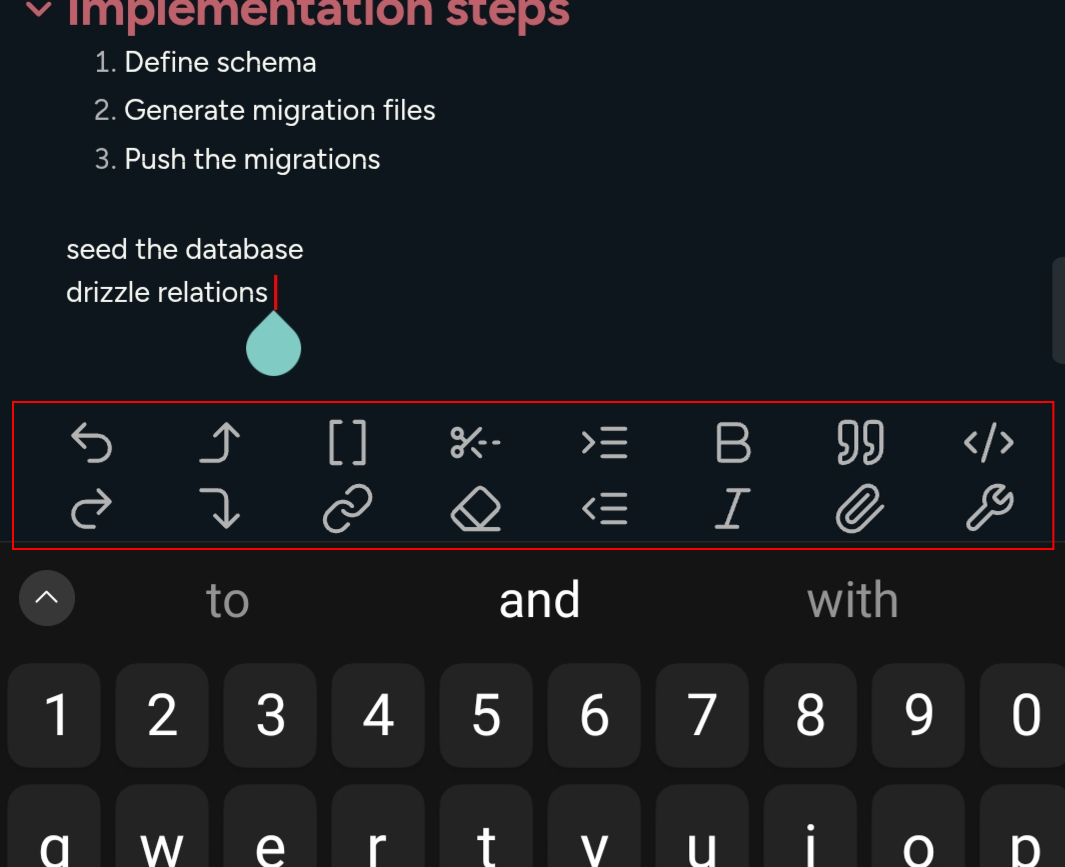
Adds a second row to the Obsidian toolbar on mobile devices, allowing for more quick access buttons.

What the plugin do screenshot.
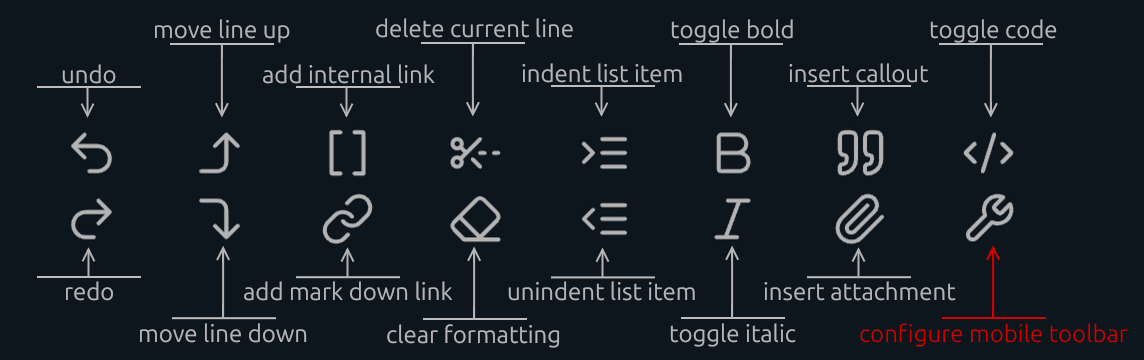
Recommended Toolbar.
How to add delete current line button.
  1. Open a note and tap inside the editing area to show the toolbar.
  2. Tap the `configure mobile toolbar` button.
  3. Find `Double row toolbar : Delete current line` and add it to `Manage toolbar options`.
  4. If you can't find it, scroll to the bottom. In the `Add global command` section, search for `Double row toolbar : Delete current line`.

Bottom Offset

NEW: The plugin allows you to adjust the vertical position of the mobile toolbar to ensure it doesn't overlap with system gestures (like the home bar on iOS/Android) or other UI elements.

  • Usage:

    1. Open Settings > Double Row Toolbar.

    2. Use the Bottom Offset slider to move the toolbar up or down.

The changes apply instantly in the editor.


78%
HealthExcellent
ReviewSatisfactory
About
Add a second row to Obsidian's mobile toolbar to expose additional quick-access buttons. Place extra editing commands, like Delete current line, on the extra row for faster mobile note editing.
InterfaceStatus barEditing
Details
Current version
1.0.3
Last updated
2 weeks ago
Created
Last year
Updates
4 releases
Downloads
2k
Compatible with
Obsidian 1.8.4+
Platforms
Desktop, Mobile
License
0BSD
Report bugRequest featureReport plugin
Sponsor
Buy Me a Coffee
Author
lorens-osman-devlorens-osman-dev
twitter.com/lorans_othman
GitHublorens-osman-dev
  1. Community
  2. Plugins
  3. Interface
  4. Double row toolbar

Related plugins

Meta Bind

Make your notes interactive with inline input fields, metadata displays, and buttons.

Hover Editor

Transform the Page Preview hover popover into a fully working editor instance.

Dragger

Drag and drop any block (paragraphs, headings, lists, etc.) to rearrange content like Notion.

Feed Bases

Adds a feed layout to bases so you can display notes with their content in an editable feed view.

Slash Commander

Customize the slash command list, assign each command an icon.

Advanced Tables

Improved table navigation, formatting, and manipulation.

Hider

Hide interface elements such as tooltips, status bar, titlebar, and more.

Outliner

Work with your lists like in Workflowy or Roam Research.

Commander

Customize your workspace by adding commands everywhere, create macros and supercharge your mobile toolbar.

Various Complements

Complete words similar to auto-completion in an IDE.