Gedcom
 Andrei Lobanov2k downloads
Edit GEDCOM files with autocomplete, validation, navigation, and semantic highlighting.
- Overview
- Scorecard
- Updates27
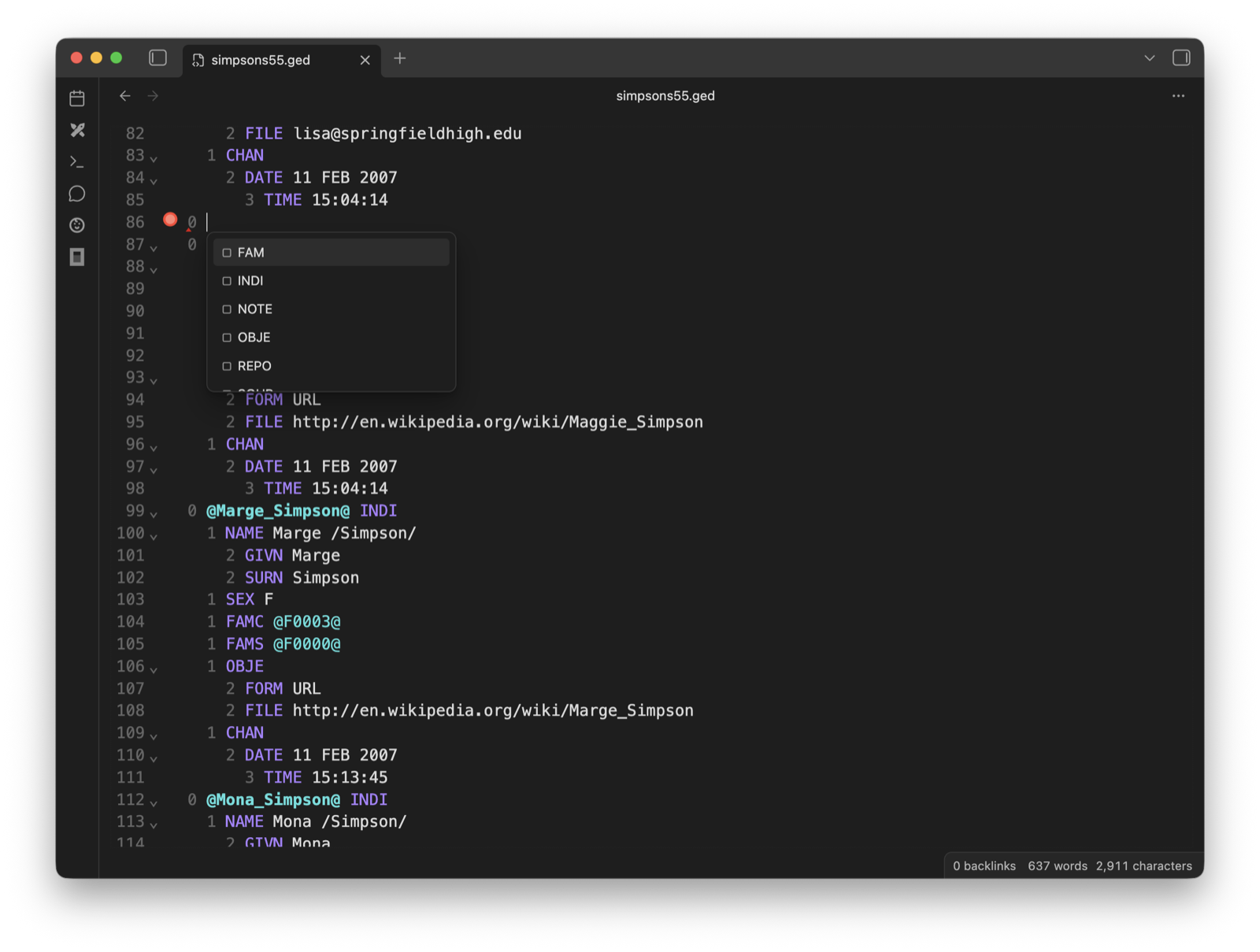
GEDCOM language support by Domorium. Read a .ged or .gedcom file as
genealogy — people, families, sources and what each fact rests on — and edit its
source directly in Obsidian with validation, autocomplete, navigation, folding,
and semantic highlighting.
Part of Domorium. The same GEDCOM language support runs in VS Code, JetBrains IDEs, and in the browser — one implementation of the format, adapted per editor.
Features
- An optional genealogy interface, off until you turn it on: a Genealogy mode that shows the file as people and sources — a page per person with their facts, names and family, a page per source — an index of everyone in the file, an evidence panel for what a fact rests on, and a timeline and a graph of the whole file
- Context-aware GEDCOM tag autocomplete
- Real-time validation errors and warnings
- Semantic highlighting for levels, tags, and cross-references
- Documentation tooltips for GEDCOM tags
- Go to definition for XREF values
- Find XREF references and highlight declarations and usages
- Safe XREF rename as one undoable edit
- Web links and vault-relative file links
- Photographs previewed from a
FILEpayload, cropped to the part of the image a multimedia link asks for - Quick fixes for broken references and invalid levels
- Folding and visual indentation for nested records
- Highlighted and checked
gedcomcode blocks in notes - Links from a note to a record, indexed by the vault or as an
obsidian://URL - Desktop and mobile Obsidian support
The plugin keeps the GEDCOM file as the source of truth. It does not convert records into Markdown, create a second genealogy database, or send vault data to a remote service.
Usage
- Enable GEDCOM in Settings → Community plugins.
- Open a
.gedor.gedcomfile in your vault. It opens in the editor, and Obsidian saves changes back to the same file. - To read the file as people and sources, turn on Genealogy interface (beta) in the plugin settings; it is still a beta and may change. Files then open in Genealogy mode, on the first person the file declares, and the view header and Switch between genealogy and source go between the two modes.
The next five paragraphs — Genealogy mode, the index and evidence panels, the timeline and the graph of the file, and Open GEDCOM files as — are part of the genealogy interface and appear only while it is on; turning it off hides it again and closes its panels without losing the mode a tab was in. The editor features after them need no setting.
Genealogy mode reads the file and never writes to it. A person's page lists their facts in the order the record states them, each marked with how many sources it cites itself, or that it cites none; their other names; and their parents, siblings, spouses and children, each of whom opens their own page. Back and forward move between the pages you visited. Show in source on a page, a fact or a missing relative switches to Source with exactly those lines selected, which is where a correction is made.
The ribbon icon, or Open Domorium, puts an index of the file's people, families and sources in the left sidebar: search by name, year or place, and a filter for the people whose records cite no source at all. A row opens its page in Genealogy mode, and in Source mode puts the cursor on the record's first line instead. Open the evidence panel puts the selected fact's sources in the right sidebar, kept apart from the sources of the whole record so that one is never mistaken for the other. On a phone the two are the left and right drawers, and tapping a fact shows the gist beneath it.
Open the timeline of the file, from the command palette, the tab's menu or the calendar icon in its header, opens a tab of its own with one row per person, ordered by generation and family, and a lifeline from birth to death — pink for a woman, blue for a man, grey where the record states no sex — with the person's dated events on it; an approximate date is drawn dashed and a period as a span. Pointing at a person picks out their parents, spouses and children with arrows from parent to child, and a year cursor gives the age everyone alive reached that year. A search by name fades everyone else, the zoom widens the years, and Other events shows or hides every event that is not a birth, a marriage or a death. Branch on a row narrows it to one person's ancestors and descendants, and a file of more than 500 people opens on the branch of the person its tab shows. A person opens their page in the file's tab, and an event its lines in the source; on a phone the first touch picks a person out and places the year cursor, and a second touch opens them. The timeline follows unsaved edits, a renamed or moved file, and is restored with the workspace.
Open the graph of the file, from the command palette, the tab's menu or the network icon in its header, opens a tab of its own with a card per person, generations from top to bottom and coloured as in the timeline. Spouses stand side by side, a husband to the left of his wife, joined by a node with the year of their marriage — hollow where it is undated — from which curved lines run to their children; the husband's family tends to stand on the left and the wife's on the right, and the rows are ordered to cross as few lines as it can find. Pointing at a person lights their parents, spouses and children; pointing at a node shows the marriage and the number of children. Drag or scroll with two fingers to move, use the wheel or pinch to zoom, and Fit to see the whole scope; far out the cards are drawn without names. The search, Branch and the 500-person rule work as in the timeline. A card opens the person's page in the file's tab, a node the family's, and every card and node can be reached and opened from the keyboard. The graph follows unsaved edits and a renamed or moved file, and is restored with the workspace at its scope, position and zoom.
A tab remembers whether it was in Genealogy or Source. Open GEDCOM files as in the plugin settings chooses which mode a newly opened file starts in, while the genealogy interface is on; set it to Source to keep the editor as the default.
Use Go to GEDCOM definition from the command palette to jump from an XREF usage to its record declaration. Find GEDCOM references moves between matching declarations and usages, and Rename GEDCOM reference updates the current XREF atomically. Editor behavior can be adjusted in the plugin settings.
A record pasted into a note is highlighted and checked when it is fenced as
gedcom. A block carries no header, so it is read as GEDCOM 7 unless the fence
names another specification — ```gedcom 5.5.1.
A note can link to a record. Copy link to record puts
[[tree.ged#@I47@|Marie /Curie/]] on the clipboard — a link the vault indexes,
so the file's Backlinks pane lists the notes that mention it and the graph draws
an edge to each. It is spelt the way this vault spells its own links, and shows
the name the record carries rather than a path. Copy Obsidian URL to
record writes the obsidian://domorium?vault=…&file=…&xref=@I47@ form instead,
which a browser or another application can follow. Either one opens the file with
the cursor on that record.
Hovering a FILE payload shows the photograph it names, and hovering the
pointer of 1 OBJE @O1@ shows the part of that photograph the link's CROP
asks for — so one group portrait shows a different face under each person who
references it. Media that is not an image is named rather than drawn, and a
FILE naming a web address says so instead of being fetched. A FILE payload
is read by its file's GEDCOM version, so in GEDCOM 7 photos/my%20photo.jpg
names photos/my photo.jpg, and a vault file that is renamed or moved is
followed into the payloads naming it — as is a renamed folder, and a GEDCOM file
moved to another folder, whose payloads are spelled again from where it now
stands — or a notice says how many it could not follow. Media preview
in the plugin settings chooses the gesture, or turns it off, independently of
Record preview. Both open on a resting hover by default; either can be set
to ask for Ctrl/Cmd instead, and a gesture already chosen is kept.
Typing [[tree.ged# in a note offers the records in that file, by name where
the format gives one. Hovering a link to a record shows the record, highlighted,
without opening the file, and ![[tree.ged#@I47@]] embeds it in the note the
same way.
A vault to try it on
demo-vault/ is an Obsidian vault: open it with Open folder as
vault, enable the plugin, and start from Start here.md. Four generations of
the Curie family live in one GEDCOM file — seventeen people, five families,
sources, repositories and images — and the notes around it link into it the way
your own notes would.
For dataviewjs and other plugins
The parsed document is reachable without opening the file:
```dataviewjs
const api = app.plugins.plugins["domorium"].api;
const tree = await api.read("family/tree.ged");
dv.list(tree.getNodes().filter((n) => n.tokens.TAG?.value === "INDI")
  .map((n) => tree.getLabel(n) ?? n.tokens.XREF?.value));
```
api.parse(text, options) does the same for text already in hand. Both answer
with the validator's GedcomDocument: getNodes, getErrors, getVersion,
getLabel, getPointerTargetTag, isRecordDeclaration. api.version says
which API you are holding.
Privacy
GEDCOM by Domorium works locally inside the vault. It does not require an account, access files outside the vault, show advertisements, or collect analytics or telemetry.
It makes no network request until you ask it to. There is one thing you can
ask for: Load images from the web, off until you turn it on, which lets the
media preview draw a FILE payload naming an https address. Until then the
preview says the file is remote and fetches nothing, and offers to draw it —
this one, or every one from now on. Nothing else reaches the network, an
unencrypted http address is refused whatever the setting says, and no
photograph is copied into the vault.
Installation
Install GEDCOM from Obsidian's Community Plugins directory. To test beta releases, use BRAT with this repository URL:
https://github.com/lavich/domorium-obsidian
For a manual installation, copy main.js, manifest.json, and styles.css
from the latest release into:
<vault>/.obsidian/plugins/domorium/
Reload Community Plugins and enable GEDCOM.
Development
npm install
npm run check
The packaged plugin is written to dist/.
The shared GEDCOM parser and editor-independent language service are maintained in the main Domorium repository and consumed as versioned public npm packages.
License
MIT © 2026 Andrei Lobanov
Domorium is an independent project and is not affiliated with or endorsed by FamilySearch or Intellectual Reserve, Inc. FAMILYSEARCH GEDCOM™ and FAMILYSEARCH® are trademarks of Intellectual Reserve, Inc.