Search...Search plugins and themes...
⌘K
Sign in
  • Get started
  • Download
  • Pricing
  • Enterprise
  • Account
  • Obsidian
  • Overview
  • Sync
  • Publish
  • Canvas
  • Mobile
  • Web Clipper
  • CLI
  • Learn
  • Help
  • Developers
  • Changelog
  • About
  • Roadmap
  • Blog
  • Resources
  • System status
  • License overview
  • Terms of service
  • Privacy policy
  • Security
  • Community
  • Plugins
  • Themes
  • Discord
  • Forum / 中文论坛
  • Merch store
  • Brand guidelines
Follow us
DiscordTwitterBlueskyThreadsMastodonYouTubeGitHub
© 2026 Obsidian

docxidian

kpaedekpaede3k downloads

Open, edit, and embed DOCX documents.

Add to Obsidian
  • Overview
  • Scorecard
  • Updates6

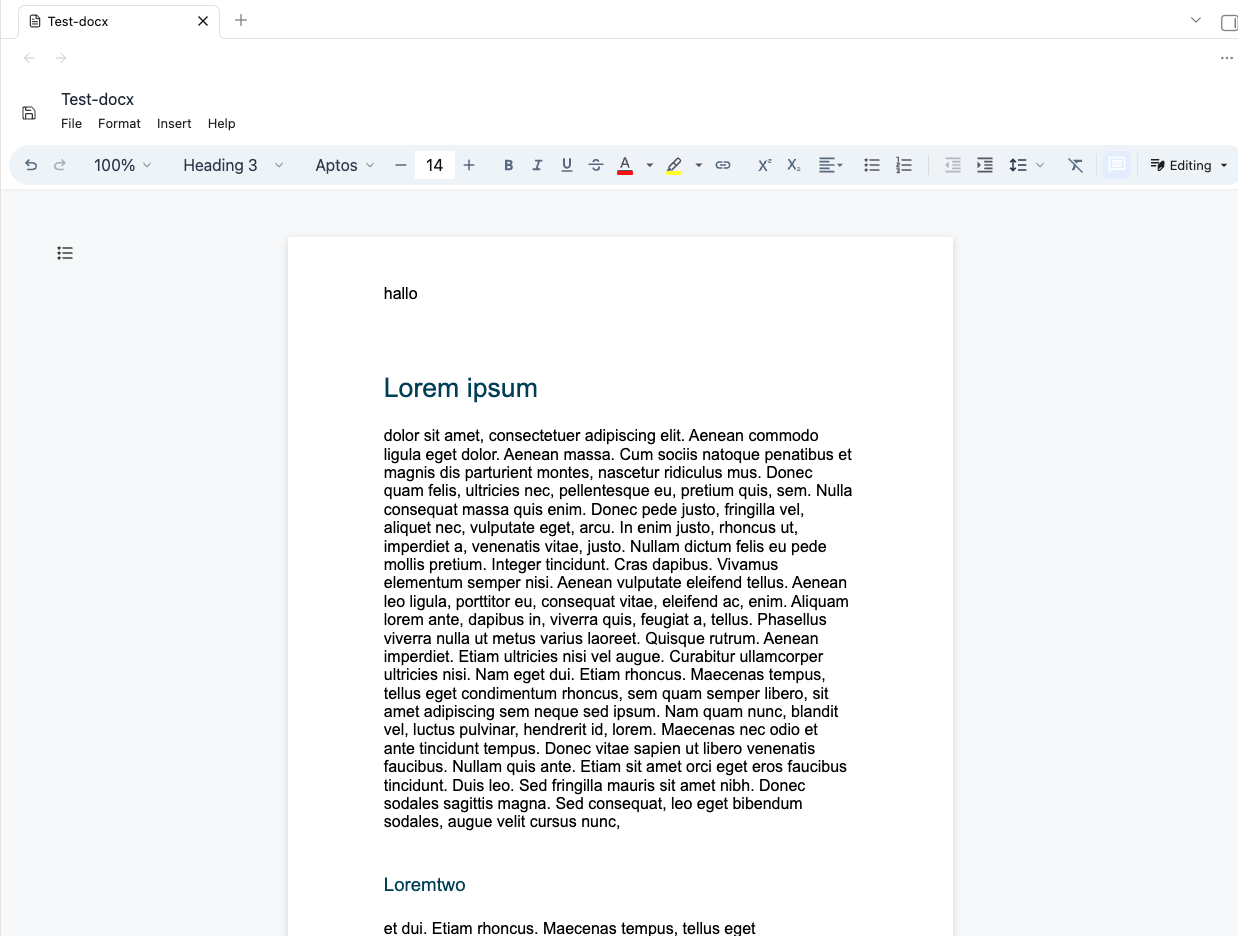
docxidian opens .docx files directly inside Obsidian and saves edits back to the same vault file. You can also embed (read-only) docx-Files via ![[filename.docx]]

The plugin is based on DOCX EDITOR, and it's Vite/React example.
Installation

This plugin is part of the Obsidian community plugins. You can also install it via BRAT (add this repository's URL as a beta plugin). To install manually, copy main.js, manifest.json, and styles.css from the same release into your vault's plugin folder.

Requires Obsidian 1.13.0 or later.

Usage

Enable the plugin in Settings -> Community plugins, then open a .docx file from the vault. Obsidian will route it to docxidian's custom file view.

Use the editor toolbar's save action (upper left) or the command Save current docx to write changes back to the open file.

You can also embed (read-only) docx-Files via ![[filename.docx]]

Beta testing

Beta versions are published as GitHub prereleases. Download main.js, manifest.json, and styles.css from the same prerelease and copy all three files into your vault's .obsidian/plugins/docxidian/ folder, then reload Obsidian. Back up documents you plan to edit during beta testing.

The automated vault integration suite requires a running Obsidian desktop app with its CLI enabled. Run it against the intended test vault:

OBSIDIAN_TEST_VAULT="Test vault" npm run test:vault
OBSIDIAN_TEST_VAULT="Test vault" npm run test:rulers
OBSIDIAN_TEST_VAULT="Test vault" npm run test:settings

Set OBSIDIAN_CLI if the CLI is installed outside the default macOS app path. The suite creates a new folder containing its own DOCX and Markdown fixtures, restores the editor settings it changes in memory, and leaves the fixtures for inspection. It does not edit existing documents. Set OBSIDIAN_TEST_REPORT to write a JSON test report.

Disclaimer

I vibecode my plugins—and the scope of this work exceeds my programming skills. Because of this, there is always a residual risk when using them. I do this primarily to bridge certain gaps in my own workflow. Should these plugins ever become obsolete because a professional developer used them as inspiration to code something truly solid and sophisticated, I would be absolutely thrilled.

HealthExcellent
ReviewPassed
About
Open .docx files directly inside Obsidian and edit them in-place, saving changes back to the original vault file. Embed read-only .docx documents in notes using ![[filename.docx]] for inline viewing.
FilesFormatsEditing
Details
Current version
0.0.4
Last updated
Last week
Created
6 months ago
Updates
6 releases
Downloads
3k
Compatible with
Obsidian 1.13.0+
Platforms
Desktop, Mobile
License
MIT
Report bugRequest featureReport plugin
Sponsor
Support
Author
kpaedekpaede
dramaturgie.lol
GitHubkpaede
  1. Community
  2. Plugins
  3. Files
  4. docxidian

Related plugins

Thino

Quickly capture memos and display them in the sidebar with a heatmap. (Closed source)

Gemini Scribe

Allows you to interact with Gemini and use your notes as context.

Code Space

Professional code file management with visual dashboard, syntax highlighting editor, Markdown embedding, external folder mounts, and terminal integration.

Remember cursor position

Remember cursor and scroll position for each note.

Notebook Navigator

A better file browser and calendar inspired by Apple Notes, Bear, Evernote and Day One.

Importer

Convert your data to Markdown files you can use in Obsidian. Works with Apple Notes, OneNote, Evernote, Notion, Google Keep, and many other formats.

LanguageTool Integration

Advanced grammar and spell checking, powered by LanguageTool.

Text Format

Format selected text upper/lower/capitalize.

Claudian

Embeds Claude Code/Codex and other local Agents as AI collaborators in your vault.

Meta Bind

Make your notes interactive with inline input fields, metadata displays, and buttons.