Reading Room
 AJ363 downloads
Read PDFs, EPUBs, articles and video transcripts inside Obsidian and clip what matters into your notes — a passage becomes a quote, a dragged box becomes an image, and you write underneath it.
- Overview
- Scorecard
- Updates12
Read the document inside Obsidian and choose what goes into your vault. Clip a passage or drag a box around a figure, have it land as a quote or an image, and type your own prose underneath it.
Bulk-extracting a PDF into markdown gives you a transcript — something you read past, not something you write in. Reader inverts that: nothing enters your vault until you point at it. What you keep is a note you wrote, with the source's own words and figures anchored inside it.
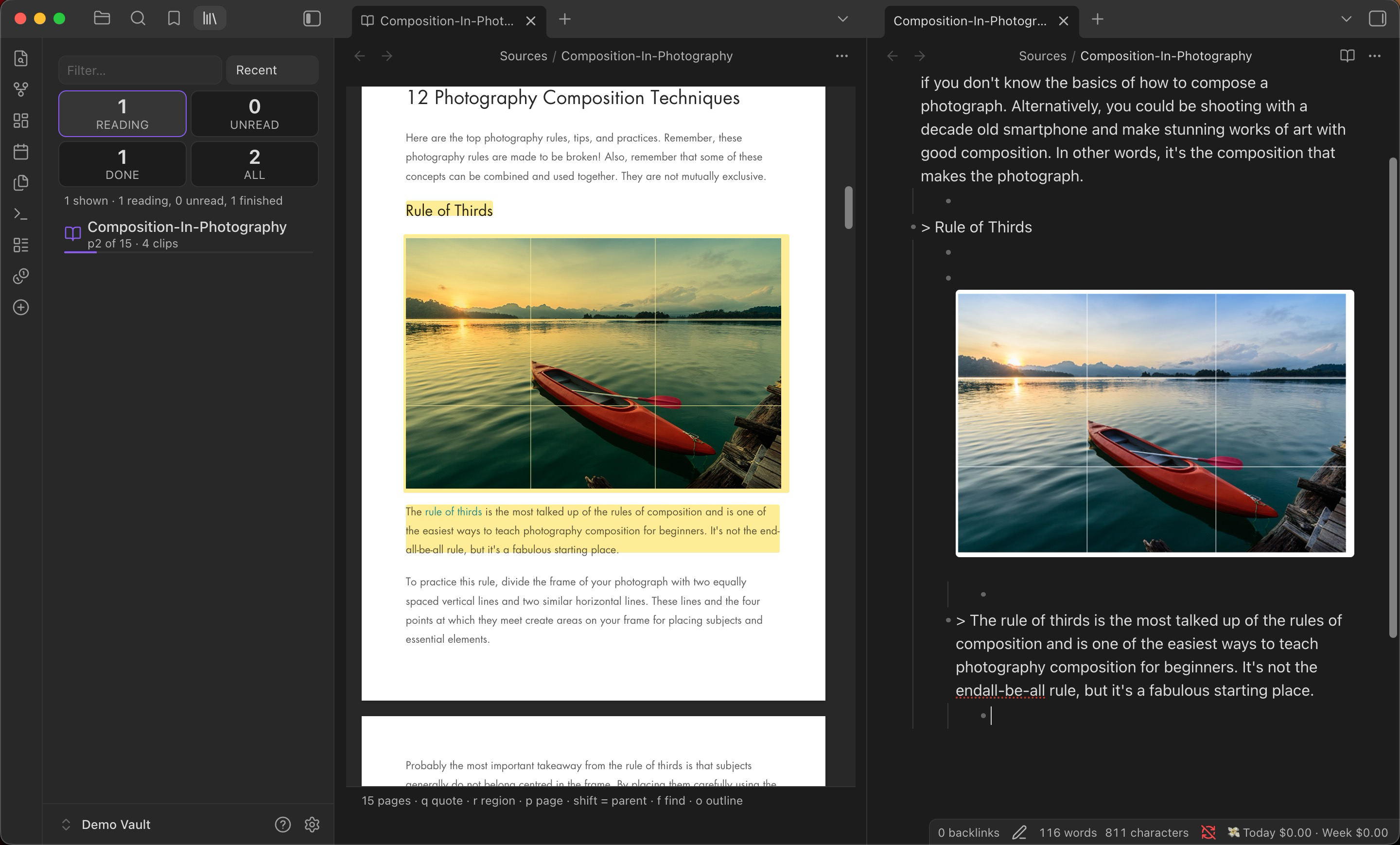
- > A random-length gap is then inserted at the same, randomly chosen place. ^hl-01k9
    - This is the operator that makes SAGA's search non-local — worth comparing
      to the block-move operator in §6.4.
That is the whole output format. A bullet with the clip, your writing nested underneath, and a block id so the highlight can find its way home.
- PDFs, EPUBs, saved web articles, and YouTube transcripts.
- Runs offline. No network requests at all unless you switch on the optional AI feature and supply your own key.
- Desktop and mobile (Obsidian 1.9+); a few features are desktop-only and say so.
- MIT licensed — see LICENSE. Recent changes: CHANGELOG.md.
Support the project: Buy Me a Coffee
Contents
- Getting started — open your first document
- The keys — the whole interaction surface
- How clipping works — quotes, figures, and the two-file contract
- Nesting and parents — structure a note as you read
- The library — a shelf for what you are part-way through
- Sources — PDFs · EPUBs · articles · video
- Leaving Readwise — import the export, no token
- Excalidraw handoff — send clipped figures to a drawing
- AI transcription — an equation to LaTeX, opt-in
- Settings · Limitations · Development
Getting started
- Install & enable. Copy
main.js,manifest.jsonandstyles.cssinto.obsidian/plugins/democratised-read-it-later/, then Settings → Community plugins → enable Reading Room. - Open a document. Right-click any PDF, EPUB or
.htmlin the file explorer and choose Open in Reader. (Reader registers its own.readerfile type rather than taking over.pdf, so Obsidian's built-in PDF viewer keeps working exactly as before.) - Clip something. Select a sentence and press q. It lands in the note beside the document, as a bullet, with your cursor on the line beneath it.
- Write. That indented line under the quote is yours.
Opening a document creates two files in Sources/:
| File | What it holds |
|---|---|
<name>.reader |
Where each clip came from — page, rectangle, quote anchor. Never rendered into a note. |
<name>.md |
What you kept. An ordinary markdown note you can grep, link and edit by hand. |
The split is the point: the note stays clean and citable, and the provenance — the coordinates, the anchors, the ugly part — lives next to it rather than inside it.
The keys
| Key | Does |
|---|---|
| q | Clip the selected text as a quote |
| r | Drag a box; the region becomes a PNG in your note |
| p | Clip the whole page as an image |
| f | Find in document · on a video, capture the current frame |
| a | (video) Clip the whole paragraph you are on |
| j k / ↓ ↑ | (video) Move a paragraph, taking the video with you |
| space | (video) Play or pause |
| g | (video) Resume following after you have read ahead |
| o | Toggle the outline |
| x | Transcribe a region (needs the AI feature on) |
| shift + any clip key | Make it a parent — everything after nests underneath |
| esc | Leave whatever mode you are in |
How clipping works
A clip materialises. It becomes a real quote or a real PNG in your vault, not a pointer into a file that might move. This is a deliberate choice: in the vault this was built for, 174 of 348 PDF page references in Excalidraw drawings were already broken because the PDF they named no longer existed anywhere. A pointer is not storage.
Quotes are rebuilt from the geometry of the text layer rather than from what the browser thinks you selected — which is what stops a two-column page handing you the figure caption sitting beside the sentence you actually highlighted.
Highlights survive: reopen a document and the marks are still on the page, positioned as fractions of it, so they stay put at any zoom or window size.
Delete a bullet from the note and the highlight goes with it. The note is the source of truth; nothing you removed comes back.
Nesting and parents
Press shift with any clip key to make that clip a parent. Everything you clip afterwards nests underneath it, until you make another one:
- ![[Sources/_assets/p14-msx2s38l.png]] ^hl-02be
    - > Two positions are randomly chosen in the alignment. ^hl-02bf
        - P1 and P2 — this is the bit I keep forgetting.
    - > The same length gap is inserted at position P2. ^hl-02bg
Parenting is positional, not per-page: a parent owns everything from its own position until the next parent, so a clip from an earlier page than the parent sits above it, under whichever parent actually precedes it.
The library
Drag a file onto the shelf to add it. A PDF, EPUB or saved .html dropped
onto the library pane is copied into your vault, given a document and a note,
and lands at the top of unread. Dropping a name that is already taken makes a
second document rather than overwriting the first.
The Reader library (command palette → Open the Reader library, or …in a tab for the full-width version) is a shelf rather than a file list: it shows how far through each document you are and how much has come out of it.
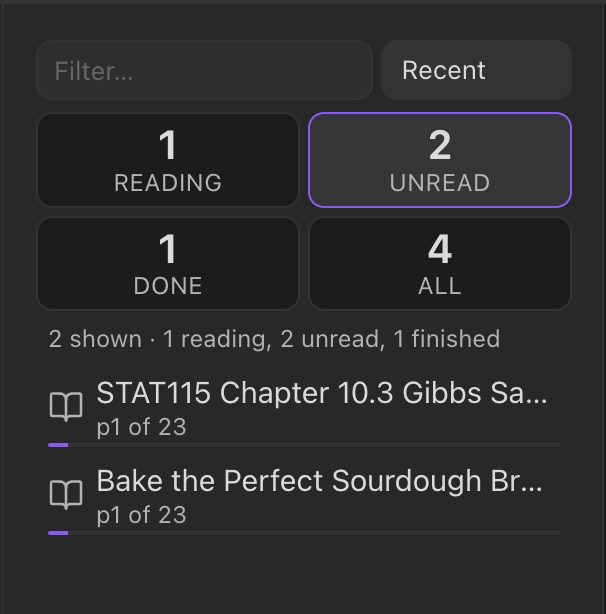
- Four counts across the top — reading, unread, done, all — click to filter.
- Opens on Reading when anything is in progress, because a dozen live documents buried in two thousand untouched ones is not a useful default.
- Right-click a row for Open in Reader, Open the note, and two removals:
Remove from library (only the
.reader) or Delete document and note. Both confirm first, tell you how much of your own writing is in the note, and move files to trash rather than deleting them.
Three commands reach it from the keyboard: Search the Reader library (a fuzzy quick-switcher), Continue reading, and Open the next unread document.
Sources
PDFs
Rendered by Reader's own pdf.js viewer, one page at a time with a hard memory budget, so a 315-page workbook is not a dead tab. Reading order is reconstructed from page geometry, which is what makes selection behave on multi-column pages.
EPUBs
One spine section at a time, never the whole book. A figure clip takes the publisher's own image file at full resolution rather than a screenshot of it.
Web articles
Save a page by pasting its link. Save a web page from a link takes a link and
writes the article into your vault as a local document — readable offline,
greppable, clipped with the same keys, and unaffected by the site going away
later. It is sanitised before it is written rather than when it is read, so the
dangerous shapes never reach your disk at all. Only http and https are
accepted, and a page with no readable text in it fails loudly instead of saving
you an empty file. This is the one thing here that reaches the network without
an API key, and only when you ask it to.
Saved .html opens as a readable document. Images are not fetched. Every
image in a saved article lives on someone else's server, so loading one tells
that host your IP and the moment you opened the page — which is exactly how a
tracking pixel works. Each image is a placeholder naming its host; click to load
them, per document, per session.
Video
Save a video by pasting its link. Save a YouTube video to Reader fetches the transcript and writes it into your vault as a document you own — searchable, quotable, and still there after the video is not. Desktop only, and about two seconds a video.
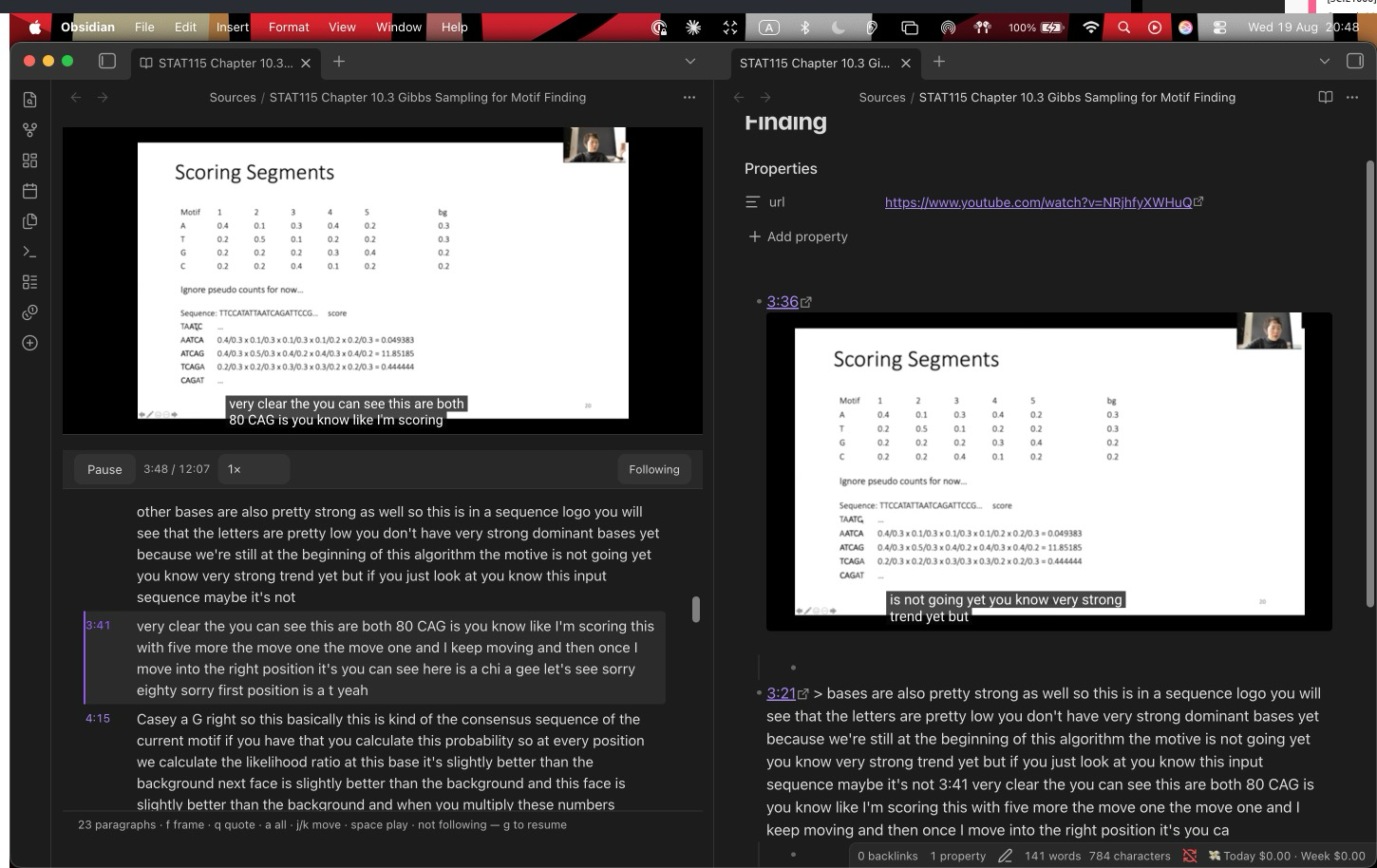
A YouTube transcript document opens as the video above its transcript, and the transcript follows the video as it plays — the paragraph being spoken is marked, and the pane scrolls to keep it in view. Scroll by hand and following stops, because being dragged back mid-sentence is worse than losing your place; g resumes it.
Reader supplies the transport rather than YouTube: play/pause, a clock, and a speed control, which is the one a recorded lecture actually needs. The embed is asked for no controls of its own, and that is not cosmetic — a captured frame is a photograph of what was drawn, so YouTube's control bar, caption overlay and end-screen suggestions were all landing inside the pictures.
f captures the exact frame on screen as a parent, stamped with the player's own clock. q quotes a selection and a takes the whole paragraph — speech has no sentence breaks worth aiming at, and the whole paragraph is usually the unit you wanted.
Every video clip carries the second it came from, as a link. Clicking 1:02 in
your note seeks the open video to that moment — which is the difference between
a reference and a citation you can follow.
Leaving Readwise
Import from a Readwise export turns the two files Readwise hands you on the way out — the CSV and the uploaded-files zip — into ordinary notes you own. No token, no API, no live subscription: run it and you can cancel the account.
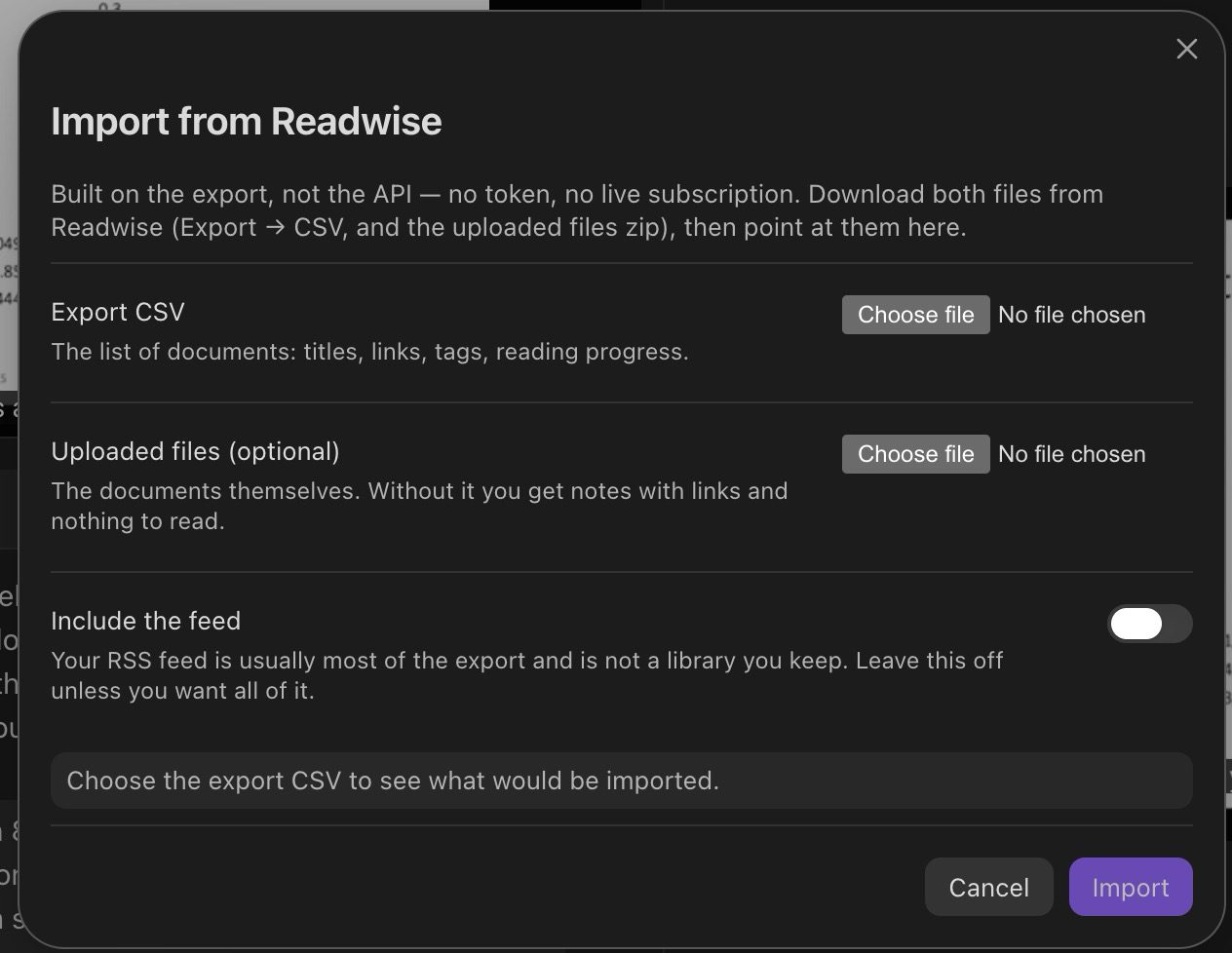
- Shows you exactly what it would write before it writes anything.
- Your feed is excluded by default — it is usually most of the export, and it is skimmed rather than kept.
- Safe to re-run: a document whose note already exists is skipped whole, never merged, because by then that note may have your prose in it.
Excalidraw handoff
Clipped a page of exam questions? Send clips from this note to Excalidraw opens a gallery of every image clip in the note, and drops the ones you pick into a drawing with blank working room underneath each — proportional to the clip, so a whole page gets more room than a one-line definition.
AI transcription (optional)
Off by default, and it is the only thing in Reader that touches the network.
Displayed maths is genuinely unrecoverable from a PDF's text layer — q
refuses rather than hand you mangled symbols. x is the answer: drag a
box around an equation and get $$…$$ back, or a table as markdown.
The result always opens in an editable box before anything is written. It is a suggestion you accept, never a silent write.
Your API key is stored in plain text in this vault's
data.json, which means it syncs wherever your vault syncs and lands in whatever backs it up. Leave the key blank to keep Reader completely offline.
Settings
| Setting | Default | Notes |
|---|---|---|
| Sources folder | Sources |
Where notes and .reader files go |
| Assets folder | Sources/_assets |
Where clipped images land |
| Clip resolution | 150 DPI | ~80–250 KB a region; lower makes dense slides unreadable when you zoom |
| Excalidraw working room | 66% | Blank space under each clip, as a share of its own height |
| Anthropic API key | (blank) | Only used by x; see the warning above |
Features are individually switchable — Reader itself, the reading skin, the importers, and AI.
Limitations
- Displayed maths cannot be quoted from a PDF. It is not in the text layer. Use r for the image, or x to transcribe it.
- Diagram-heavy pages with no clean column gutter can still mis-select.
- Readwise highlights made inside Readwise are behind their v2 API and are not imported; the documents and your reading state are.
- YouTube transcripts need the desktop app. They are read from a real YouTube page in a webview, and there is no webview on mobile. Videos already in a Readwise export work everywhere, offline.
- Apple Books import is desktop-macOS only and needs Full Disk Access.
Development
npm install
npm test          # 829 tests
npm run build     # typecheck + bundle
npm run install-local
The codebase keeps a pure core with no obsidian import — the capture model,
note writing, anchoring and rect maths are all testable in plain Node, and an
architecture test enforces the boundary.