Curtis Porter
 Jordan Newell8 downloads
(changes coming) Port ChatGPT, Claude, DeepSeek or any transcript into .curt files and vault-ready Markdown. Standalone, local-first, free and open source.
- Overview
- Scorecard
- Updates6

Carry your AI chats anywhere. Port conversations out of ChatGPT, Claude, Grok, Gemini, DeepSeek — any AI tool that can export or copy — into .curt files (Curtis's portable conversation format) and Obsidian-ready markdown. v0.2.0 adds the other direction: Curtis chats export back out as continuation packs, ChatGPT-shape JSON, or API JSONL.
Local-first, like Curtis itself: no accounts, no uploads, no telemetry. The conversion happens on your machine, period.
Why
Your chat history shouldn't live hostage inside someone else's app. AI exports are hostile JSON dumps (ChatGPT nests messages in a branch tree; Claude mixes text and content blocks; DeepSeek has no bulk export at all). Curtis Porter reads all of them and hands you back files you own:
.curt— one file, one conversation. Portable JSON: back it up, share it, move it between vaults and machines, re-import it into Curtis anytime. Full fidelity: ids, timestamps, token stats, images, tool calls survive verbatim.- Curtis markdown — drop-in transcript files for your vault's
AI/Conversations/folder. Searchable in Obsidian, continuable in Curtis with any provider, readable forever as plain notes.
Use it
Web UI (for everyone)
Open the hosted web app (landing page) and start dropping files. Or run it yourself:
npm run build
npm start                 # → http://localhost:7777
Or double-click dist/porter.html — it's a single self-contained file that runs from disk with no server at all.
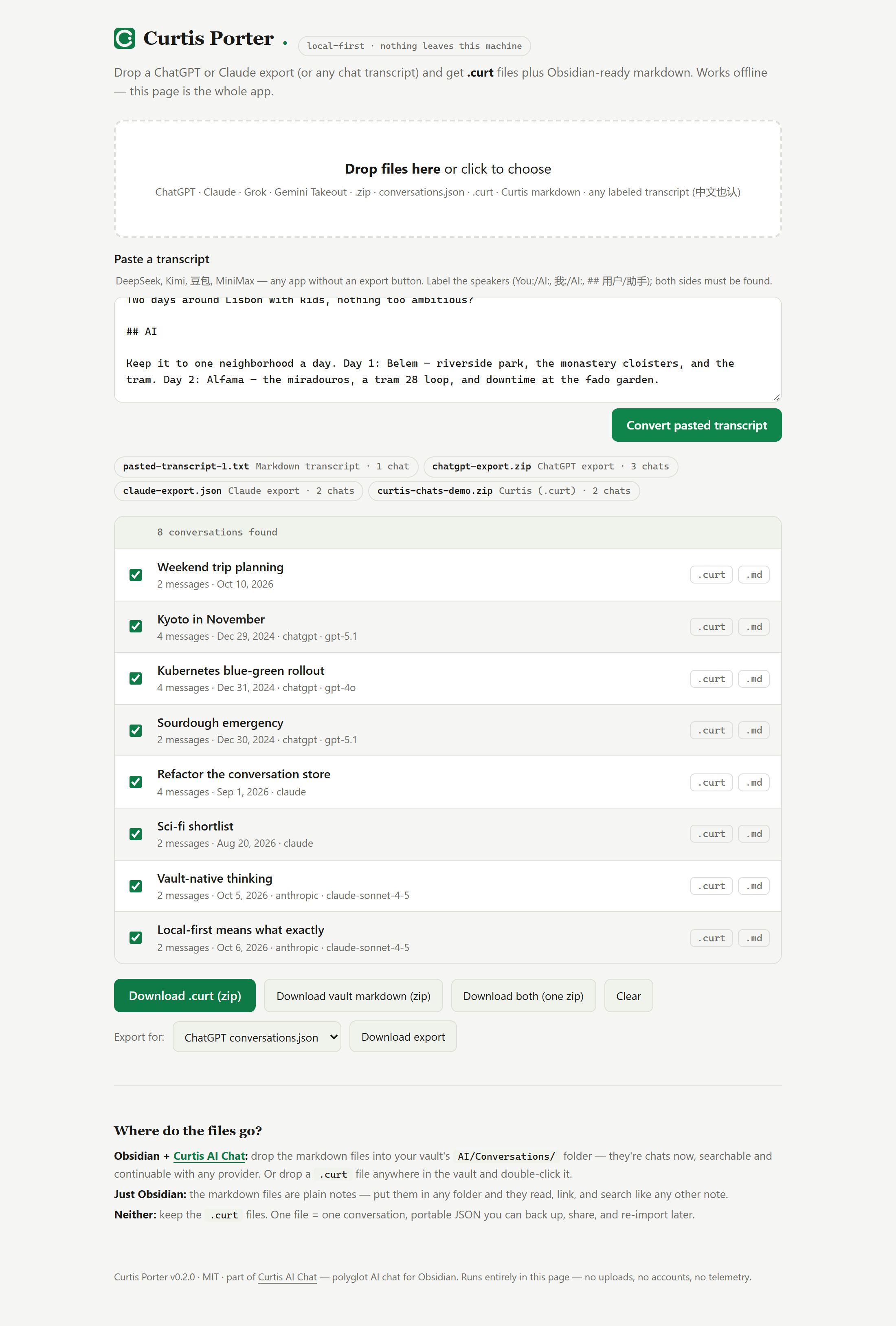
Drag your export zip in, tick the conversations you want, download .curt and/or vault markdown. There's also a paste box for tools without an export button: copy a DeepSeek or Gemini chat out of the app, paste it with the speaker labels intact (You: / AI: or ## You headings), and get files back. Want to see it driven end to end? node demo/drive-porter.mjs (uses the plugin repo's playwright-core) runs a paste + three files through the UI and screenshots the result.
CLI (for scripting)
curt-porter convert <file...> [--out <dir>] [--format curt|md|both] [--zip]
curt-porter export <file...> [--to chatgpt-json|api-jsonl|continuation] [--target chatgpt|claude|gemini|generic] [--out <dir>] [--zip] [--budget <tokens>]
curt-porter verify <file...> [--json]
curt-porter stats <file...> [--json]
curt-porter serve [--port 7777]
Examples:
node dist/cli.mjs convert ~/Downloads/chatgpt-export.zip
node dist/cli.mjs convert conversations.json --out ./curt --format curt --zip
Export (v0.2.0)
Porting runs both ways now: .curt files and Curtis markdown go back out.
node dist/cli.mjs export ~/vault/AI/Conversations/*.md --to continuation --zip
node dist/cli.mjs export ./curt/*.curt --to chatgpt-json
- continuation (default) — a markdown "continuation pack" built to be attached to a ChatGPT, Claude or Gemini chat: a preamble tells the model to adopt the transcript's context and continue from the last message. Turns are trimmed to a token budget (default 30000) that always keeps the first user message plus the most recent turns.
--target chatgpt|claude|geminitailors the preamble to the destination app; each pack carries a provenance line (turns, date span, model), and the run reports how many turns fit the budget. - chatgpt-json — a ChatGPT-export-shaped
conversations.json, for tools that read ChatGPT exports (TypingMind and similar). - api-jsonl — one
{"messages": [...]}per line, the API shape: replay, fine-tune prep, JSON importers.
After a conversion run, the web UI offers the same three targets as downloads.
Verify and stats
node dist/cli.mjs verify ./curt/*.curt
node dist/cli.mjs stats ~/vault/AI/Conversations/*.md --json
- verify — the round-trip guarantee as a command: every
.curtor Curtis markdown file must parse and re-serialize byte-for-byte, or the run exits nonzero. Valid-but-non-canonical files are named (re-save to canonicalize); files that aren't native formats fail too. - stats — what a history contains: conversations, messages, words, tokens, cost, providers, models, monthly activity, largest conversations. Works on any supported input — point it at a ChatGPT export zip, not just Curtis files.
--jsonfor machines.
Obsidian plugin
The repo also ships as an Obsidian plugin (curtis-ai-chat-porter): a ribbon icon, a "Port chats into this vault…" command, and a right-click "Port into vault (Curtis Porter)" on .zip/.json/.curt/.md/.txt files in the explorer. Ported transcripts are written straight into the vault (output folder is a setting, with an optional .curt copy alongside), and "Export ported chats as .curt (zip)" bundles them back up. The plugin is standalone — it works without Curtis AI Chat installed; when both are present, the shared format means ported chats appear in Curtis history immediately.
What it reads
| Source | You give it | Got from |
|---|---|---|
| ChatGPT | the export zip or conversations.json |
Settings → Data controls → Export |
| Claude | the export zip or conversations.json |
Settings → Privacy → Export data |
| Grok | the data-export JSON archive | grok.com → Settings → Data export |
| Gemini | Takeout "My Activity" JSON | takeout.google.com → My Activity |
| Curtis bulk export | the curtis-chats-*.zip |
Curtis: "Export all chats as .curt (zip)" |
| Curtis (.curt / markdown) | a Curtis portable file or transcript | Curtis: chat header → Save as .curt |
| DeepSeek, Kimi, 豆包, MiniMax, Z.ai, anything | a pasted or saved transcript | select, copy, paste into the web UI (中文标签 我/AI/助手 也认) |
Detection is automatic — you never pick a format. Re-running an import is idempotent: conversations already seen are skipped, so you can't double-port an export.
Details and edge cases: docs/PORTING.md.
Where the files go
- Obsidian + Curtis AI Chat — drop the markdown files into your vault's
AI/Conversations/folder; they appear in Curtis chat history. Or drop a.curtfile anywhere in the vault and double-click it. - Just Obsidian — the markdown files are plain notes. Put them in any folder.
- Neither — keep the
.curtfiles. They're the shipping container; re-import into Curtis later or hand them to another tool.
The .curt format
{
    "curt": "curtis-conversation",
    "version": 1,
    "conversation": {
        "id": "conv_1791000000000_abc123def",
        "title": "Weekly review",
        "createdAt": 1791000000000,
        "updatedAt": 1791000600000,
        "provider": "anthropic",
        "model": "claude-sonnet-4-5",
        "messages": [ { "id": "msg_…", "role": "user", "content": "…", "timestamp": 1791000000000 } ]
    }
}
One conversation per file, JSON with a magic field and a version. Chosen over markdown for portability: no escaping edge cases, and base64 images or tool-call metadata survive byte-perfect. Both formats are owned by docs/curt-format.md — the normative spec for .curt and Curtis markdown (validation, escaping, ids, canonical form).
Development
npm install
npm run build    # type-check + bundle CLI and web page
npm test         # the contract suite (incl. a live-repo run when the plugin repo sits next door)
src/core/ mirrors the plugin's src/import/ module file-for-file — see AGENTS.md before touching either side.
The contract tests are the load-bearing guarantee: they feed the porter's output through the plugin's actual parsers and require round-trip equality. The parsers are vendored verbatim under test/curtis-reference/ (pinned to a plugin version), so the suite is self-contained; when the real curtis-ai-chat repo sits next door, the same suite additionally runs against its live code. If those tests pass, "drop it in the vault and it works" is true, not aspirational.
Status
v0.2.2 — contract synced to Curtis.ai v2.0.1: agent/skill provenance (agentId on conversations and messages, skillIds on conversations) now round-trips through .curt and the markdown projection; Curtis.ai full-backup zips are covered by tests. TypeScript compiles under full strict.
v0.2.1 — plugin review fixes: requires Obsidian 1.7.2+; settings appear in Obsidian's settings search (declarative settings API); the web UI builds its chat list without HTML strings; GitHub releases carry build-provenance attestations (gh attestation verify).
v0.2.0 — working imports: ChatGPT, Claude, Grok, Gemini Takeout, .curt, Curtis markdown, Curtis bulk-export zip, generic JSON, generic markdown/paste — via CLI, web UI, or the Obsidian plugin. New: the export direction — continuation packs (attach a transcript to a live ChatGPT/Claude/Gemini chat and continue), ChatGPT-shape conversations.json, and API JSONL. New in the CLI: verify (prove files round-trip) and stats (aggregate a history), and --target continuation packs. Not yet: image export from foreign formats; bulk import into ChatGPT/Claude/Gemini — no platform offers a write API, which is exactly what the continuation pack works around. DeepSeek still has no bulk export; the paste path covers it.
MIT. Part of the Curtis family.