Search...Search plugins and themes...
⌘K
Sign in
  • Get started
  • Download
  • Pricing
  • Enterprise
  • Account
  • Obsidian
  • Overview
  • Sync
  • Publish
  • Canvas
  • Mobile
  • Web Clipper
  • CLI
  • Learn
  • Help
  • Developers
  • Changelog
  • About
  • Roadmap
  • Blog
  • Resources
  • System status
  • License overview
  • Terms of service
  • Privacy policy
  • Security
  • Community
  • Plugins
  • Themes
  • Discord
  • Forum / 中文论坛
  • Merch store
  • Brand guidelines
Follow us
DiscordTwitterBlueskyThreadsMastodonYouTubeGitHub
© 2026 Obsidian

Current File Tags

trung-tran-swetrung-tran-swe876 downloads

Display the active Markdown file's tags and associated files.

Add to Obsidian
  • Overview
  • Scorecard
  • Updates3

Display tags of the active Markdown file so you can have an overview of the tags being used.

  • Show all tags in the file and frontmatter's "tags" property.
  • Show all files containing a selected tag.
    • Click on the file to open it.
  • Search a selected tag with the Obsidian Search plugin when Ctrl-clicked it (not mobile friendly).
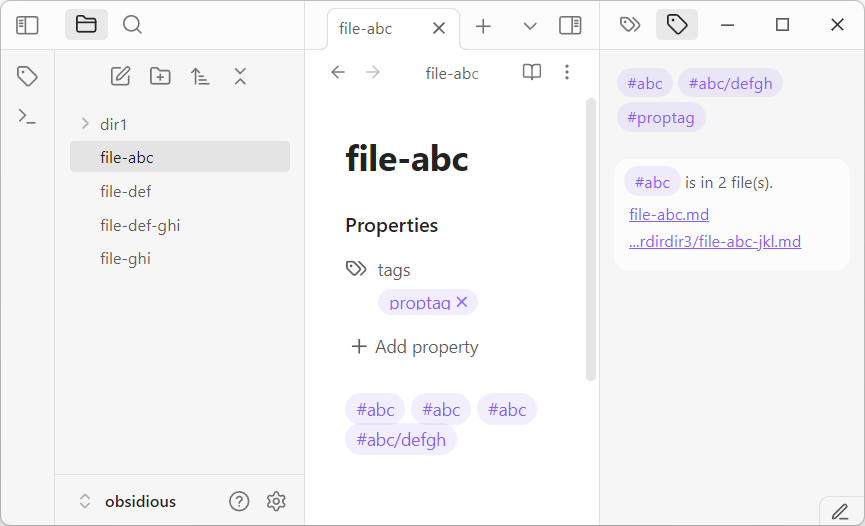
Current File Tags

Installation

Please install from the Obsidian's Community Plugins tool.

  1. Search for "Current File Tags" in Obsidian's Community Plugins tool.
  2. Enable the plugin once installed.

How to Use

After the plugin is installed and enabled, activate it on the right panel. Whenever you edit a Markdown file, the plugin will show the file's tags. Clicking on a tag will show all files containing that specific tag. To use the Search plugin to search a specific tag, hold down the Ctrl button and click on a specific tag.

Development

See https://github.com/trung-tran-swe/obsidian-current-file-tags

Donations

This plugin is developed by Trung Tran , and is free to use.

If you are in MA, I would love to meet up for a (free?) cup of coffee. If you wish to support virtually, please check out:

70%
HealthGood
ReviewSatisfactory
About
Display tags from the active Markdown file, including inline tags and the frontmatter "tags" property. Click a tag to list and open files that contain it, or Ctrl-click a tag to search it with Obsidian Search.
TagsSidebarSearch
Details
Current version
1.0.2
Last updated
12 months ago
Created
Last year
Updates
3 releases
Downloads
876
Compatible with
Obsidian 1.7.0+
Platforms
Desktop, Mobile
License
MIT
Report bugRequest featureReport plugin
Sponsor
GitHub Sponsors
Buy Me a Coffee
PayPal
Author
trung-tran-swetrung-tran-swe
github.com/trung-tran-swe
GitHubtrung-tran-swe
  1. Community
  2. Plugins
  3. Tags
  4. Current File Tags

Related plugins

Tag Wrangler

Rename, merge, toggle, and search tags from the tag pane.

TagFolder

Show tags as folder.

Checklist

Consolidate checklists across all files into a single view.

Badges

Add inline badges/callouts to notes.

floating toc

A floating directory that hovers a widget of the current directory on the notes page.

Occura

Find and highlight all occurrences of selected text in notes, similar to Notepad++ or IDEs.

Cards View

Displays a card view of your notes.

Notebook Navigator

A better file browser and calendar inspired by Apple Notes, Bear, Evernote and Day One.

Recent Files

Display a list of recently opened files.

Omnisearch

Intelligent search for your notes, PDFs, and OCR for images.