Search...Search plugins and themes...
⌘K
Sign in
  • Get started
  • Download
  • Pricing
  • Enterprise
  • Account
  • Obsidian
  • Overview
  • Sync
  • Publish
  • Canvas
  • Mobile
  • Web Clipper
  • CLI
  • Learn
  • Help
  • Developers
  • Changelog
  • About
  • Roadmap
  • Blog
  • Resources
  • System status
  • License overview
  • Terms of service
  • Privacy policy
  • Security
  • Community
  • Plugins
  • Themes
  • Discord
  • Forum / 中文论坛
  • Merch store
  • Brand guidelines
Follow us
DiscordTwitterBlueskyThreadsMastodonYouTubeGitHub
© 2026 Obsidian

Cooklang Codeblock

Raunaq GuptaRaunaq Gupta147 downloads

Add recipes written in cooklang to your notes.

Add to Obsidian
Cooklang Codeblock screenshot
  • Overview
  • Scorecard
  • Updates5

This plugin enables embedding recipes written in cooklang within an Obsidian note. In view mode, the block renders the recipe with its corresponding ingredients, cookware, and method. The recipe can also optionally render meta information such as cook time, and serving size at the top of the block.
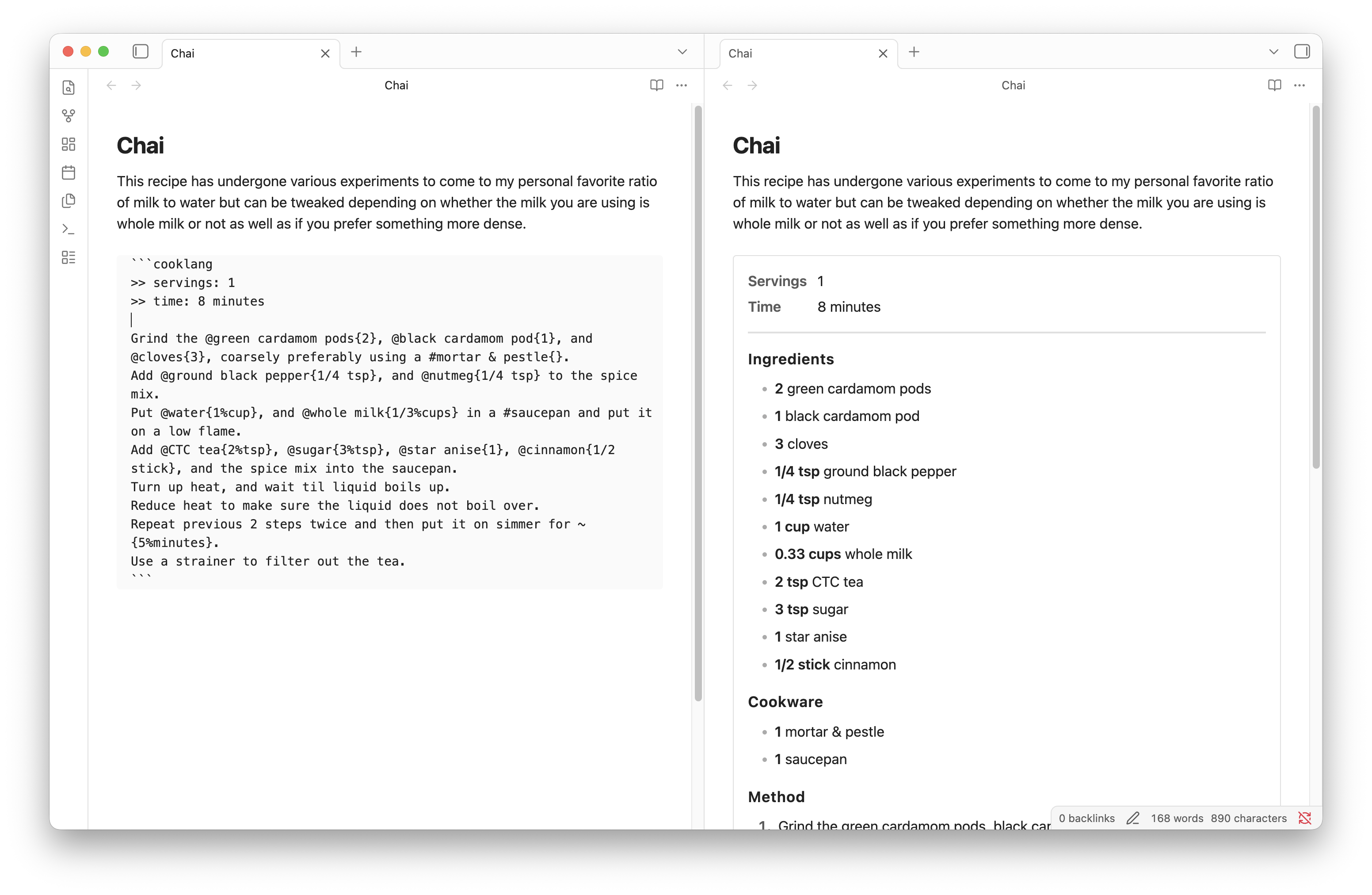
Plugin in use

HealthExcellent
ReviewPassed
About
Embed Cooklang recipes as rendered recipe blocks that display ingredients, cookware, and method in your notes. Optionally display meta information such as cook time and serving size at the top of the block.
MarkdownCode
Details
Current version
0.1.4
Last updated
3 months ago
Created
3 months ago
Updates
5 releases
Downloads
147
Compatible with
Obsidian 1.12.7+
Platforms
Desktop, Mobile
License
MIT
Report bugRequest featureReport plugin
Sponsor
Buy Me a Coffee
Author
Raunaq GuptaRaunaq Guptaraunaqgupta
www.raunaqgupta.com
GitHubraunaqgupta
  1. Community
  2. Plugins
  3. Markdown
  4. Cooklang Codeblock

Related plugins

JS Engine

Run JavaScript from within your notes.

Importer

Convert your data to Markdown files you can use in Obsidian. Works with Apple Notes, OneNote, Evernote, Notion, Google Keep, and many other formats.

Mermaid Tools

Improved Mermaid.js experience: visual toolbar with common elements and more.

Outliner

Work with your lists like in Workflowy or Roam Research.

Templater

Create and use dynamic templates.

Linter

Format and style your notes. Linter can be used to format YAML tags, aliases, arrays, and metadata; footnotes; headings; spacing; math blocks; regular Markdown contents like list, italics, and bold styles; and more with the use of custom rule options.

Custom Frames

Turn web apps into panes using iframes with custom styling. Also comes with presets for Google Keep, Todoist and more.

Various Complements

Complete words similar to auto-completion in an IDE.

Typewriter Mode

Typewriter scroll, writing focus, current line highlight, paragraph dimming, and more!

Chat View

Chat View lets you quickly and easily create elegant Chat UIs in your Markdown Files.