Controlled Tagger
 Yu Rui60 downloads
Suggest, review, and manage controlled tags with OpenAI-compatible models.
- Overview
- Scorecard
- Updates3
受控标签库驱动的 Obsidian AI 标签助手
让模型只从你认可的标签中选择,并在写入笔记前由你确认。
功能 • 界面与流程 • 安装 • 使用 • 隐私与安全 • 开发
简体中文 | English
English overview
Controlled Tagger is an AI-assisted tag manager for Obsidian. It asks an OpenAI-compatible model to choose tags only from a registry that you control. Suggestions are validated locally, displayed as a multi-select list, and written to the active note only after you confirm them. You can append the selected tags or replace the note's frontmatter tags.
The plugin can initialize its controlled registry from tags already used in your Vault. It also supports adding tags manually, importing newly discovered tags, and renaming or deleting tags across matching Markdown notes. Vault-wide operations always show the number of affected notes before you confirm them. Back up your Vault before a bulk rename or deletion.
Network access occurs when you test a connection, request tag suggestions, manually refresh the tag semantic library, or enable its opt-in refresh schedule. Requests go directly to the OpenAI-compatible endpoint that you configure. Semantic refreshes send at most three recent note titles and 800-character excerpts per changed tag; excerpts are not persisted. Controlled Tagger has no telemetry, advertising, author-operated proxy, or hidden network service. Your API key and generated semantic summaries are stored in the plugin's local data.json file.
To provide tag counts, imports, and Vault-wide rename or deletion, the plugin enumerates Markdown file paths and reads Obsidian's local metadata cache. It reads note contents only for the active suggestion request or for locally confirmed tag updates. Vault data is never sent to the plugin author.
For complete English installation, usage, privacy, and development documentation, see README_EN.md.
Controlled Tagger 是一个面向 Obsidian 的受控 AI 标签插件。它读取当前笔记,将标题和正文发送给你配置的 OpenAI 兼容模型,并要求模型只能从受控标签库中推荐标签。所有结果都会再次经过本地白名单校验,并在写入前交由你勾选确认。
✨ 功能
- 🔒 受控推荐 — 模型只能从已保存的标签库中选择,无法直接污染你的标签体系
- 🧠 多模型支持 — 内置硅基流动模型预设,并支持自定义 OpenAI 兼容地址与模型 ID
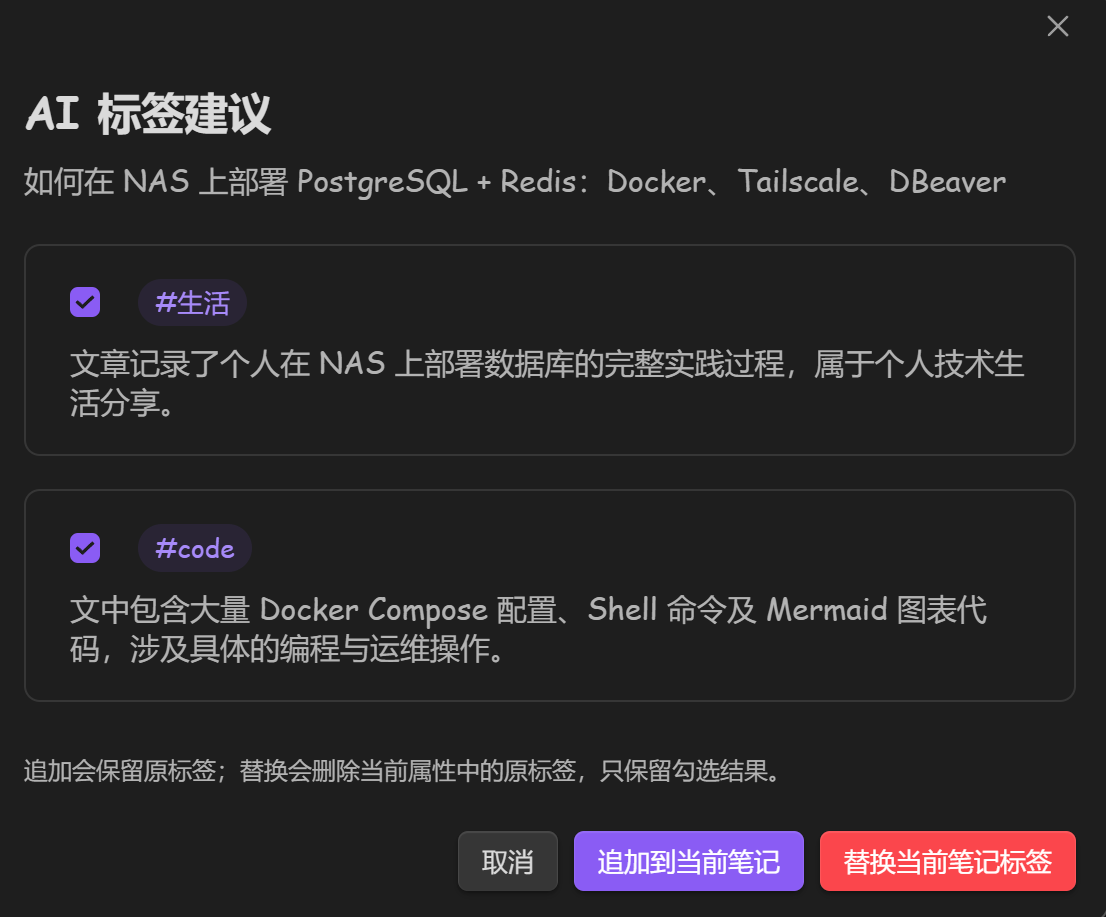
- ✅ 人工确认 — 推荐结果支持多选,可追加到当前笔记或替换当前属性标签
- 🗂️ 标签库管理 — 从 Vault 导入、新增、搜索并持久化允许标签
- 🔄 全库维护 — 重命名或删除标签时显示影响篇数,并同步更新属性标签与正文标签
- 🌳 层级标签 — 支持
领域/人工智能形式的 Obsidian 层级标签 - 🛡️ 本地校验 — 模型输出与受控标签库取交集,不接受模型自行创造的标签
- 🧭 标签内涵库 — 从已有标签与笔记的对应关系中提炼实际语义、适用条件和判断边界
- ⚡ 增量缓存 — 未变化的标签复用已有内涵,可手动更新或选择每日、每周、每月更新
- 🚫 无遥测 — 不收集使用统计,不包含广告,不连接作者服务器
📸 界面与流程
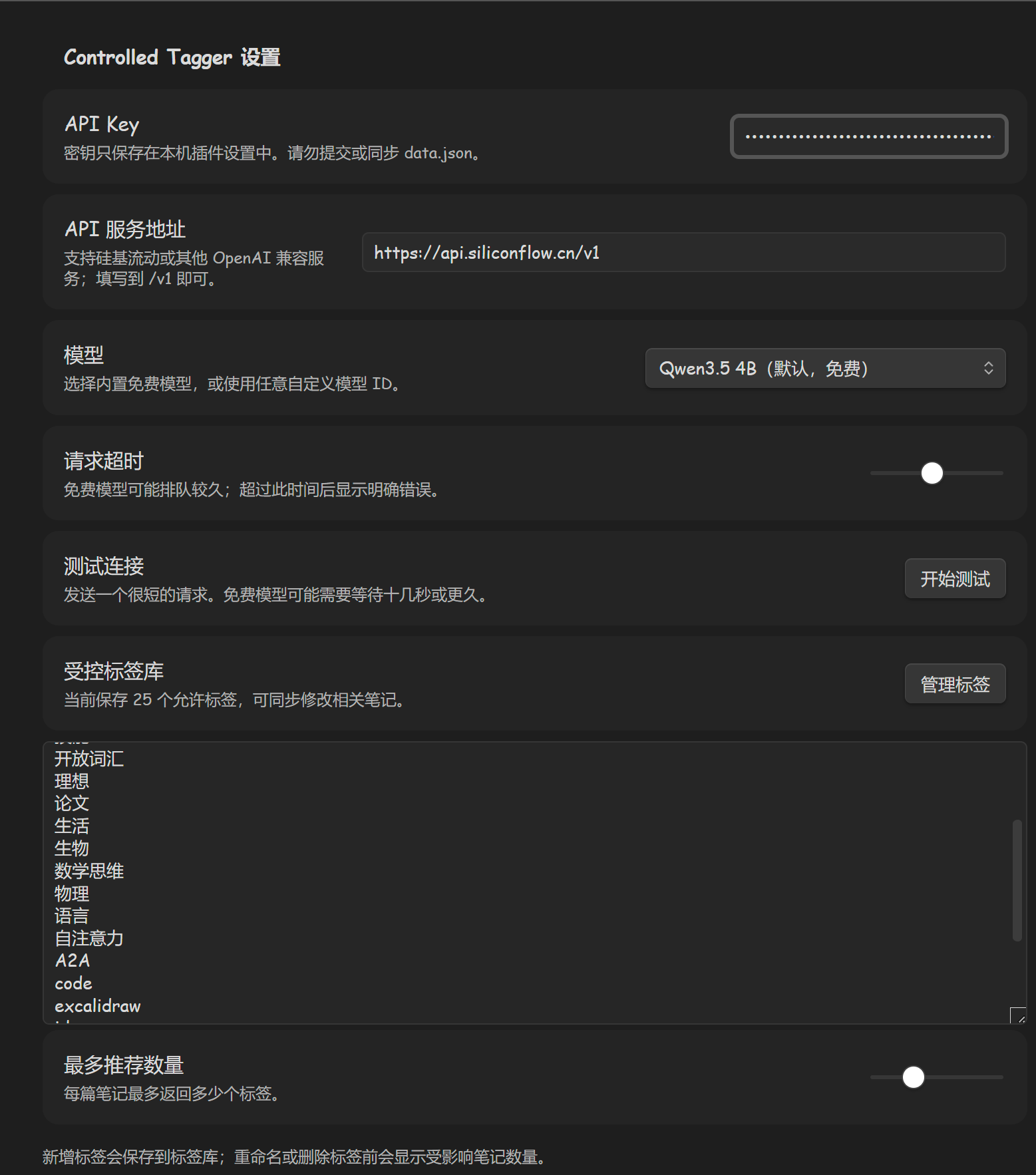
1. 配置模型与受控标签库
2. 从侧边栏或命令面板运行
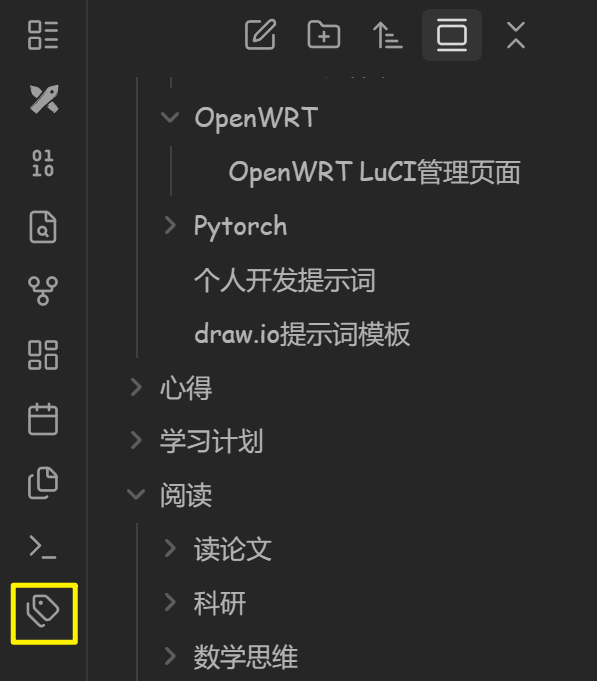
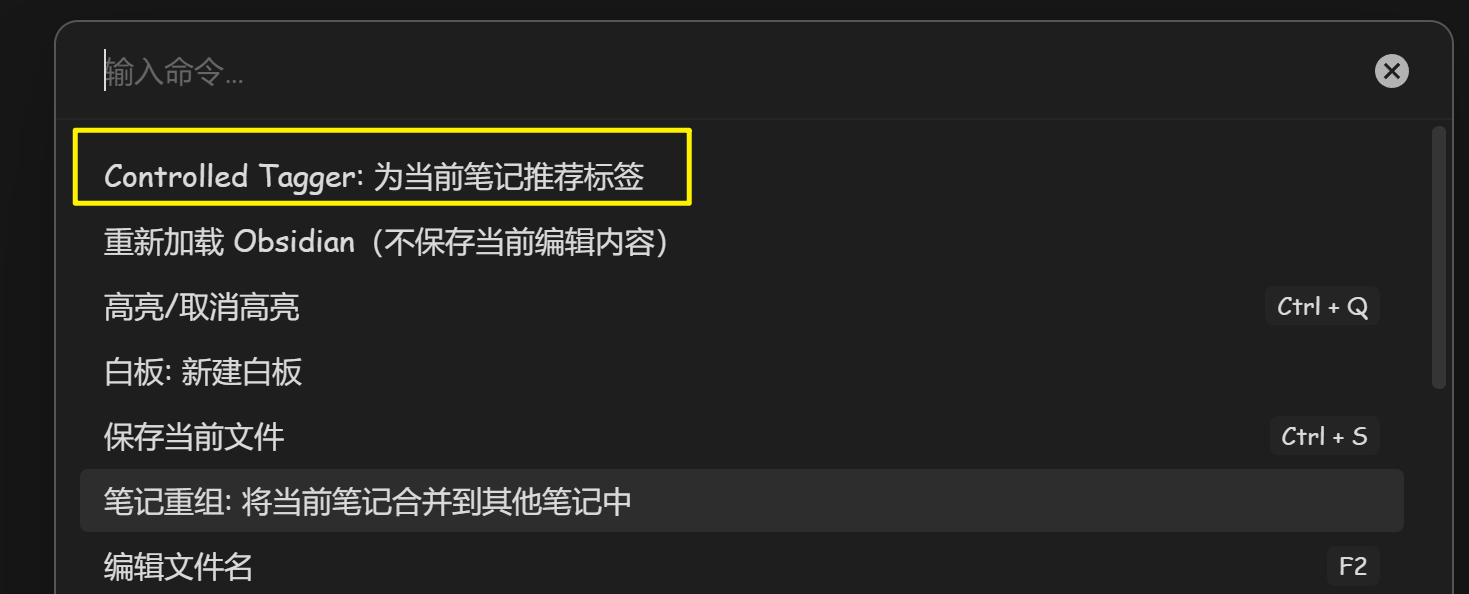
| 侧边栏按钮 | 命令面板 |
|---|---|
 |
 |
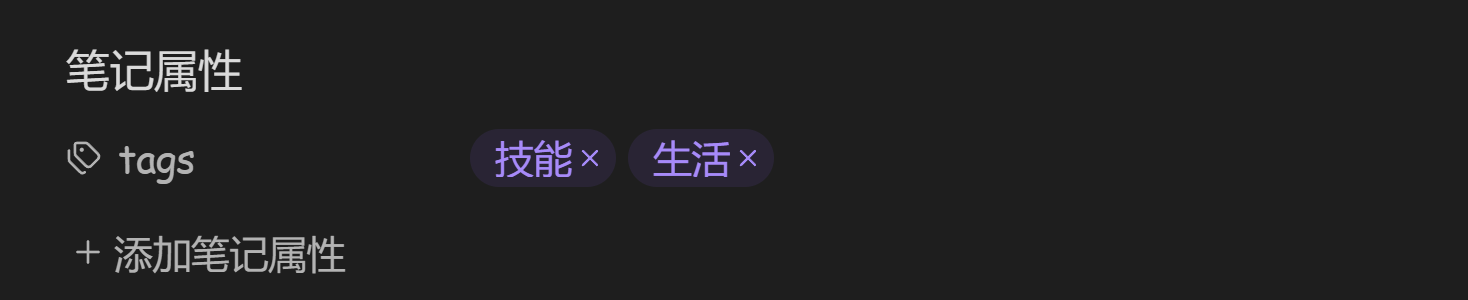
3. 审核并应用推荐结果
| 多选、追加或替换 | 写入后的 Obsidian 属性 |
|---|---|
 |
 |
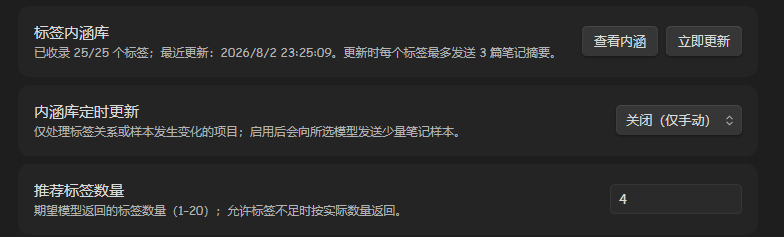
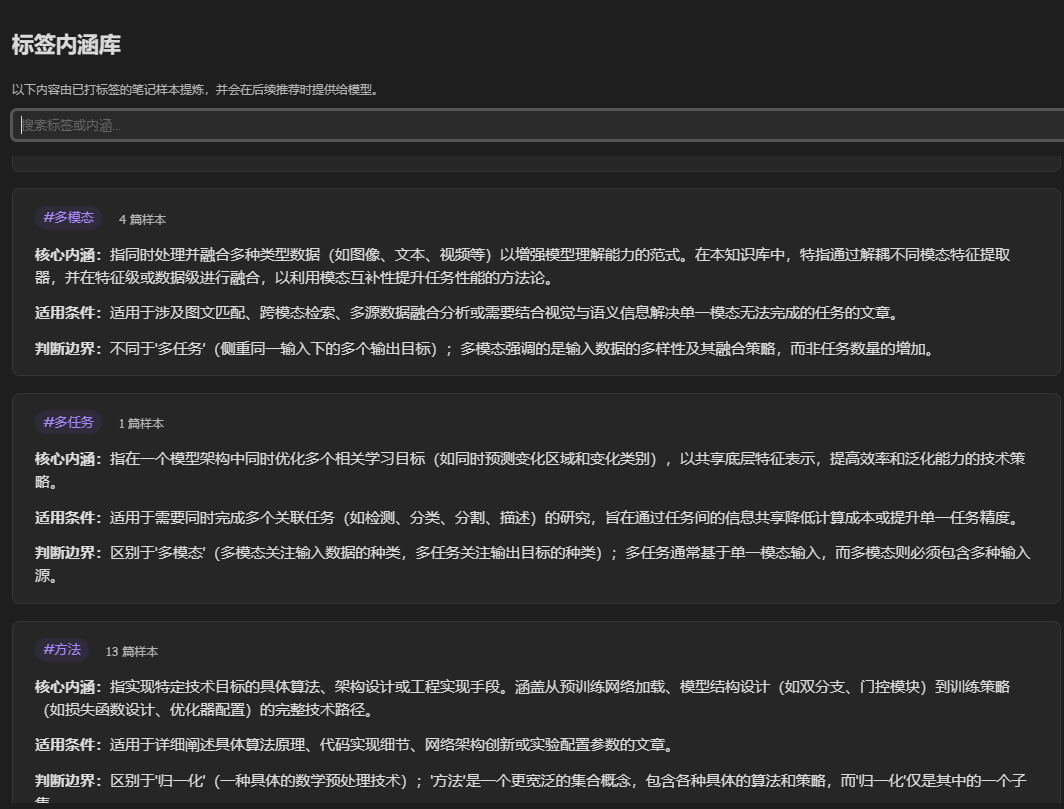
4. 建立并查看标签内涵库
| 设置状态、手动与定时更新 | 查看并搜索生成的内涵 |
|---|---|
 |
 |
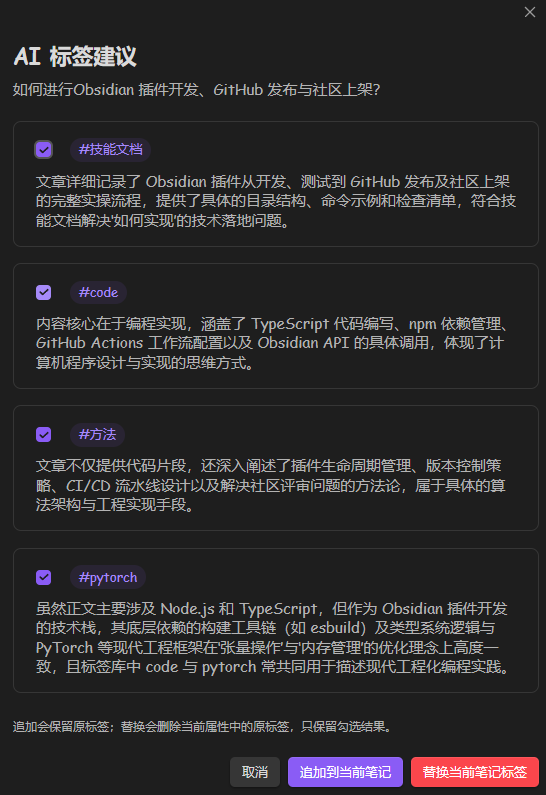
5. 获得结合知识库实际用法的推荐理由
📦 安装
社区插件商店
Controlled Tagger 已正式发布到 Obsidian 官方社区插件商店。
- 打开 Obsidian 的“设置 → 第三方插件”。
- 关闭安全模式(如果尚未关闭),然后点击“浏览”。
- 搜索 Controlled Tagger。
- 点击“安装”,安装完成后点击“启用”。
也可以直接打开 Controlled Tagger 商店页面查看插件信息。
GitHub Release 手动安装(备用)
- 从 Releases 下载
main.js、manifest.json和styles.css。 - 在你的 Vault 中创建目录:
.obsidian/plugins/controlled-tagger/。 - 将三个文件放入该目录。
- 重启 Obsidian,在“设置 → 第三方插件”中启用 Controlled Tagger。
BRAT 安装(备用)
- 安装 Obsidian 社区插件 BRAT。
- 在 BRAT 中选择 “Add a beta plugin”。
- 输入:
Yuriyagn/controlled-tagger。
🚀 使用
- 打开“设置 → Controlled Tagger”。
- 填写 API Key、API 服务地址和模型。
- 点击“开始测试”,确认连接成功。
- 打开“管理标签”,从 Vault 导入标签或新增允许标签。
- 点击“标签内涵库 → 立即更新”,或在首次推荐时让插件自动初始化内涵库。
- 打开一篇 Markdown 笔记。
- 点击左侧标签按钮,或从命令面板运行“Controlled Tagger: 为当前笔记推荐标签”。
- 勾选需要的标签,然后选择“追加到当前笔记”或“替换当前笔记标签”。
配置项
| 配置 | 说明 | 默认值 |
|---|---|---|
| API Key | 模型服务商提供的访问密钥 | 空 |
| API 服务地址 | OpenAI 兼容 API 的基础地址 | https://api.siliconflow.cn/v1 |
| 模型 | 内置预设或自定义模型 ID | Qwen/Qwen3.5-4B |
| 请求超时 | 免费或繁忙模型的最长等待时间 | 90 秒 |
| 推荐标签数量 | 单篇笔记期望返回的标签数(1–20) | 3 |
| 标签内涵库 | 查看状态、内涵内容并手动执行增量更新 | 首次推荐时初始化 |
| 内涵库定时更新 | 关闭、每天、每周或每月 | 关闭 |
模型是否可用、是否免费及具体价格由服务商决定,可能随时变化。
🏷️ 标签库行为
- 首次运行时,插件会从当前 Vault 的属性标签和正文
#标签建立受控标签库。 - 新增标签只会进入受控标签库;应用到笔记后才会出现在 Obsidian 原生标签面板。
- “从 Vault 导入新标签”只添加缺失标签,不会自动恢复你从受控库中主动删除的标签。
- 重命名或删除会修改所有包含该标签的 Markdown 笔记,操作前会显示受影响篇数并要求确认。
- “替换当前笔记标签”只替换 YAML 属性中的
tags;正文内联标签保持不变。
🧭 标签内涵库如何工作
标签名称往往很短,无法完整表达它在个人知识库中的真实含义。内涵库会扫描“哪些笔记已经使用了哪些标签”,并为发生变化的标签抽取最多 3 篇近期笔记作为样本。每篇样本只包含标题和最多 800 个字符的正文摘要。
模型为每个标签生成三类缓存信息:核心内涵、适用条件和判断边界。后续推荐只把这些缓存说明提供给模型,不会为了每篇新文章重新扫描和提炼整个 Vault。插件使用标签—笔记关系、文件修改时间和大小生成本地指纹;指纹和模型均未变化时会跳过该标签。
- 首次主动推荐时,如果内涵库尚未建立,会先初始化一次。
- “立即更新”执行增量检查,只请求发生变化或更换了模型的标签。
- 定时更新默认关闭;启用后会按每天、每周或每月在后台执行相同的增量检查。
- 可以在设置中查看并搜索已经生成的标签内涵。
- 新增但尚未用于任何笔记的标签不会生成虚构内涵,仍可依靠标签名称参与推荐。
[!WARNING] 全库重命名和删除不是事务操作。请在执行前备份 Vault,或使用 Obsidian Git、文件历史等方式确保可以回滚。
🔐 隐私与安全
Controlled Tagger 不提供模型代理服务,也不会把数据发送给作者。
当你点击“测试连接”“为当前笔记推荐标签”“立即更新内涵库”,或主动启用定时更新时,插件会连接你配置的 API 服务。推荐请求可能包含:
- API Key 与所选模型 ID;
- 当前笔记标题;
- 当前笔记正文的前 20,000 个字符;
- 受控标签列表和推荐指令。
内涵库更新请求还可能包含:
- 发生变化标签的名称;
- 每个标签最多 3 篇近期已标注笔记的标题;
- 每篇样本最多 800 个字符的正文摘要。
样本正文只用于本次模型请求,不会保存在 data.json。本地只持久化模型生成的内涵摘要、适用条件、判断边界、样本数量、更新时间和不可逆的变更指纹。
这些数据由你选择的第三方模型服务商处理,请在使用前阅读相应服务商的隐私政策。标签新增、导入、重命名和删除均在本地完成,不会调用模型。
API Key 由 Obsidian 保存在插件目录的 data.json 中,属于明文配置。请勿提交该文件,也不要同步到不受信任的设备。本项目不包含遥测、分析、广告或隐藏网络请求。
为了实现标签统计、从 Vault 导入标签、内涵库采样以及全库重命名或删除,插件会在本地枚举 Markdown 文件路径并读取 Obsidian 元数据缓存。它只在推荐当前笔记、提炼发生变化的标签内涵,或执行你已经确认的标签修改时读取所需笔记正文;这些 Vault 数据不会发送给插件作者。
🧩 技术结构
| 模块 | 实现 |
|---|---|
| 插件与界面 | Obsidian TypeScript API |
| 模型接口 | OpenAI-compatible Chat Completions |
| 网络请求 | Obsidian requestUrl |
| 属性更新 | Obsidian processFrontMatter |
| 标签内涵缓存 | 本地增量指纹 + data.json 持久化摘要 |
| 构建 | TypeScript + esbuild |
| 测试 | Vitest + V8 coverage |
🛠️ 开发
插件要求 Obsidian 1.5.0 或更高版本;Obsidian 1.13.0 以上同时支持设置搜索。开发环境要求 Node.js 20 或更高版本。
git clone https://github.com/Yuriyagn/controlled-tagger.git
cd controlled-tagger
npm ci

# 类型检查、覆盖率测试、发布元数据校验和生产构建
npm run check

# 仅构建 main.js
npm run build
GitHub Actions 会在每次推送和 Pull Request 上运行完整检查。推送与 manifest.json 完全一致的版本标签(例如 0.5.0)后,Release 工作流会构建、生成来源证明并发布 Obsidian 所需文件。
🤝 贡献与反馈
- 问题与功能建议:GitHub Issues
- 贡献说明:CONTRIBUTING.md
- 安全问题:SECURITY.md
提交 Issue 时请删除 API Key、笔记正文和其他私人数据。
📄 许可
本项目基于 MIT License 开源。