Search...Search plugins and themes...
⌘K
Sign in
  • Get started
  • Download
  • Pricing
  • Enterprise
  • Account
  • Obsidian
  • Overview
  • Sync
  • Publish
  • Canvas
  • Mobile
  • Web Clipper
  • CLI
  • Learn
  • Help
  • Developers
  • Changelog
  • About
  • Roadmap
  • Blog
  • Resources
  • System status
  • License overview
  • Terms of service
  • Privacy policy
  • Security
  • Community
  • Plugins
  • Themes
  • Discord
  • Forum / 中文论坛
  • Merch store
  • Brand guidelines
Follow us
DiscordTwitterBlueskyThreadsMastodonYouTubeGitHub
© 2026 Obsidian

Consecutive Lists

jtucker2jtucker21k downloads

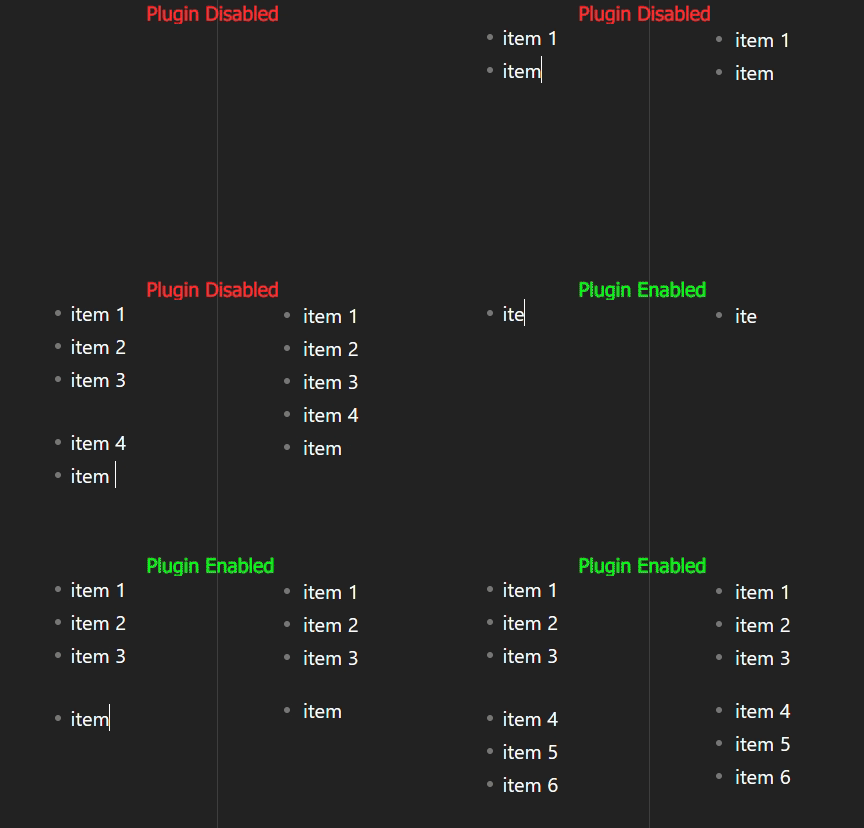
Create consecutive lists that are displayed separately in reading mode.
Add to Obsidian
  • Overview
  • Scorecard
  • Updates2

Create consecutive lists that are displayed separately in reading mode.

This plugin changes nothing about the way markdown is interpreted in Obsidian. It creates markdown entirely compatible with other parsers, ensuring your notes are transferrable, and completely unreliant on this plugin.

It works simply by automatically inserting alternating list characters in consecutive lists, so they appear correctly separated in reading mode.

Explanation

Say you wanted to create these two lists:

  • item 1
  • item 2
  • item 3
  • item 4
  • item 5
  • item 6

This wouldn't work using this markdown:

- item 1
- item 2
- item 3

- item 4
- item 5
- item 6

Which would result in this:

  • item 1

  • item 2

  • item 3

  • item 4

  • item 5

  • item 6

So the plugin automatically changes the list character for the second list, resulting in this markdown:

- item 1
- item 2
- item 3

+ item 4
+ item 5
+ item 6

Resulting in what we wanted:

  • item 1
  • item 2
  • item 3
  • item 4
  • item 5
  • item 6
68%
HealthFair
ReviewSatisfactory
About
Create consecutive lists that render as separate lists in reading mode by automatically alternating list markers for adjacent lists. Keep Markdown fully compatible with other parsers so notes remain transferable and readable without the plugin.
MarkdownFormattingEditing
Details
Current version
1.0.1
Last updated
2 years ago
Created
2 years ago
Updates
2 releases
Downloads
1k
Compatible with
Obsidian 0.15.0+
Platforms
Desktop, Mobile
License
GPL-3.0
Report bugRequest featureReport plugin
Author
jtucker2jtucker2
github.com/jtucker2
GitHubjtucker2
  1. Community
  2. Plugins
  3. Markdown
  4. Consecutive Lists

Related plugins

Outliner

Work with your lists like in Workflowy or Roam Research.

Various Complements

Complete words similar to auto-completion in an IDE.

Linter

Format and style your notes. Linter can be used to format YAML tags, aliases, arrays, and metadata; footnotes; headings; spacing; math blocks; regular Markdown contents like list, italics, and bold styles; and more with the use of custom rule options.

Easy Typing

Auto format when typing.

Blur

Create obfuscated blocks of text.

List Callouts

Create simple callouts in lists.

Columns

Create columns in Markdown.

Advanced Tables

Improved table navigation, formatting, and manipulation.

Importer

Import data from Notion, Evernote, Apple Notes, Microsoft OneNote, Google Keep, Bear, Roam, and HTML files.

Meta Bind

Make your notes interactive with inline input fields, metadata displays, and buttons.