Search...Search plugins and themes...
⌘K
Sign in
  • Get started
  • Download
  • Pricing
  • Enterprise
  • Account
  • Obsidian
  • Overview
  • Sync
  • Publish
  • Canvas
  • Mobile
  • Web Clipper
  • CLI
  • Learn
  • Help
  • Developers
  • Changelog
  • About
  • Roadmap
  • Blog
  • Resources
  • System status
  • License overview
  • Terms of service
  • Privacy policy
  • Security
  • Community
  • Plugins
  • Themes
  • Discord
  • Forum / 中文论坛
  • Merch store
  • Brand guidelines
Follow us
DiscordTwitterBlueskyThreadsMastodonYouTubeGitHub
© 2026 Obsidian

Colorful Note Background

andresgongoraandresgongora1k downloads

Set note background based on file location or frontmatter metadata.

Add to Obsidian
  • Overview
  • Scorecard
  • Updates5

Apply colored backgrounds to notes based on folder location or frontmatter metadata.

About

This plugin is a fork of obsidian-colorful-note-borders by rusi. I am very thankful to the original author for creating such a useful foundation.

Key difference: While the original plugin applies colored borders, this version uses subtle background colors instead—providing a less intrusive visual distinction.

Preview

Preview

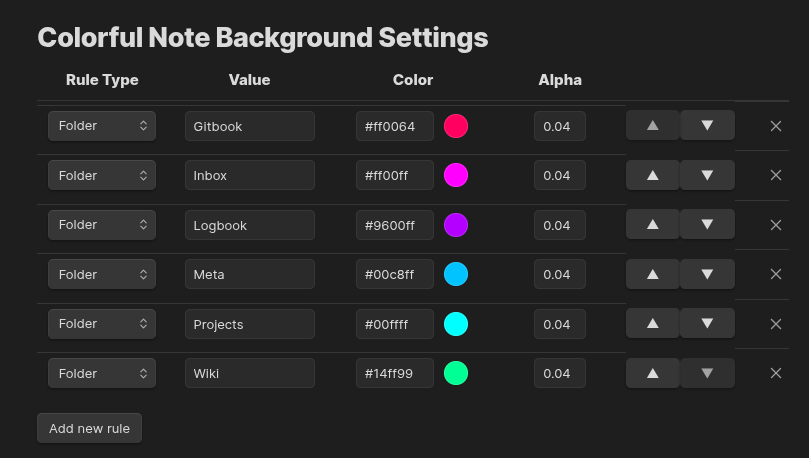
Settings

Installation

From Community Plugins

  1. Open Settings → Community plugins.
  2. Disable Safe mode if prompted.
  3. Click Browse and search for "Colorful Note Background".
  4. Install and enable the plugin.

Using BRAT

  1. Install BRAT from Community Plugins.
  2. Run command: BRAT: Add a beta plugin for testing.
  3. Enter: https://github.com/andresgongora/obsidian-colorful-note-background.
  4. Enable the plugin in Settings → Community plugins.

How It Works

The plugin applies background colors to notes based on configurable rules:

  • Folder rules: Match notes by folder name anywhere in the path
  • Frontmatter rules: Match notes by metadata key-value pairs (e.g., category: private)

Rules are evaluated in order—the first matching rule applies.

Configuration

For best result, use subtle colors with low alpha values to avoid overpowering note content. This can guide you through your vault by letting you subtly recognize note types without distractions.

Go to Settings → Colorful Note Background to manage rules. Each rule has:

Field Description
Type Folder or Frontmatter
Value Folder name or key: value for frontmatter
Color Background color (hex)
Alpha Transparency (0–1, recommended: 0.04)

Use the arrow buttons to reorder rules (priority) or the × to remove them.

License

MIT License. See LICENSE for details.

76%
HealthGood
ReviewCaution
About
Apply subtle colored backgrounds to notes based on folder location or frontmatter metadata to visually distinguish note types without distraction. Match by folder name anywhere in the path or by frontmatter key:value, with rules evaluated in order so the first match applies.
AppearanceFoldersProperties
Details
Current version
1.0.6
Last updated
4 months ago
Created
9 months ago
Updates
5 releases
Downloads
1k
Compatible with
Obsidian 0.15.0+
Platforms
Desktop, Mobile
License
OTHER
Report bugRequest featureReport plugin
Author
andresgongoraandresgongora
GitHubandresgongora
  1. Community
  2. Plugins
  3. Appearance
  4. Colorful Note Background

Related plugins

Pretty Properties

Makes note properties look more fun: adds side image, banners, list property colors and allows to hide specific properties.

Multi Properties

Add properties to multiple notes at once. Either right-click a folder or select multiple notes and right-click the selection.

Colored Bases Properties

Color property lists and formula properties in Bases.

File Name History

Store file name or folder name change history into note properties.

Advanced Canvas

Supercharge your canvas experience. Create presentations, flowcharts and more.

Minimal Theme Settings

Control the colors and fonts in Minimal Theme.

Hider

Hide interface elements such as tooltips, status bar, titlebar, and more.

Meta Bind

Make your notes interactive with inline input fields, metadata displays, and buttons.

Style Settings

Adjust theme, plugin, and snippet CSS variables.

Flexplorer

Enhance the file explorer with custom sorting, pinning, and hiding.