Colorful Highlights
 Moy524 downloads
Colorize highlights with emoji prefixes to create a colorful highlighted-text effect.
- Overview
- Scorecard
- Updates5
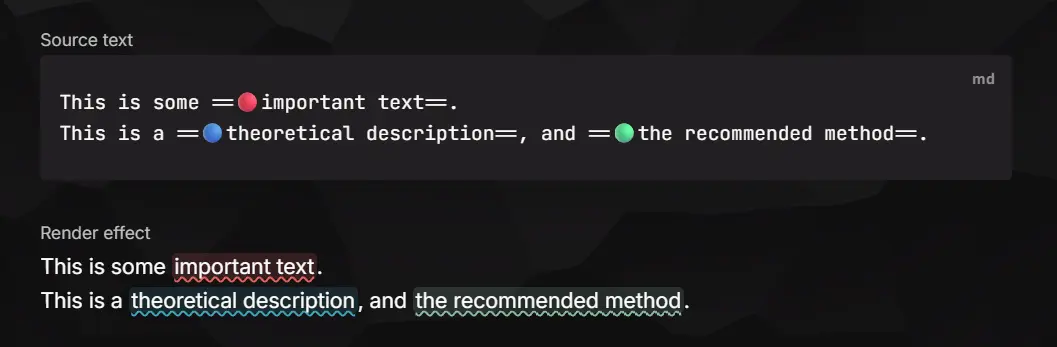
Want colored highlights in Obsidian? Colorize ==highlights== with emoji prefixes. Text like ==🔴important content== is rendered as a red highlight — the emoji is hidden by default and shown while editing.
Features
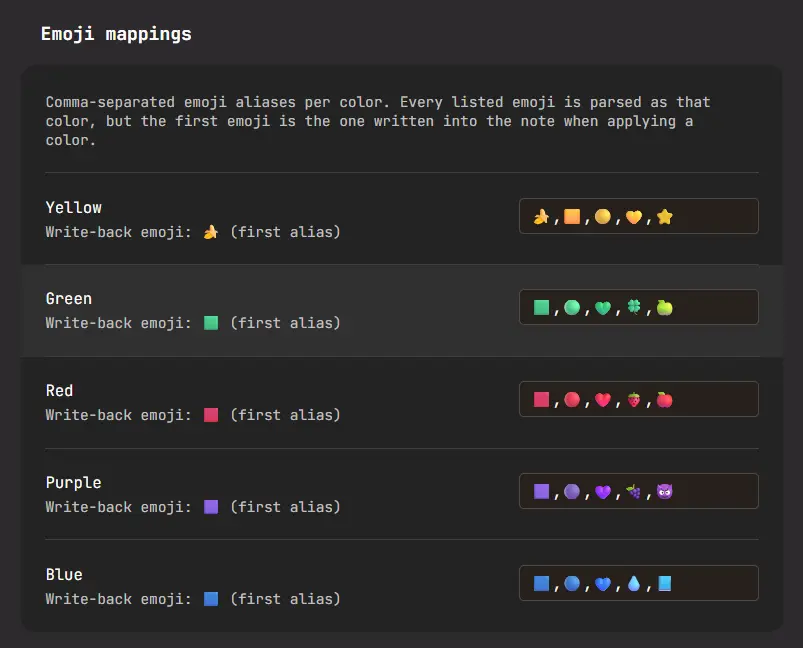
- Custom emoji prefixes — map any emoji to 5 color slots (yellow / green / red / purple / blue), expandable to 10 (orange / cyan / magenta / gray / Black (Spoiler)) via the extended-colors toggle in settings. Each color can be shown or hidden independently. For example,
🍎can represent red and🍌can represent yellow. The first emoji in each slot is used when writing highlights. - Live Preview & Source mode — Live Preview shows only the colored highlight style; the emoji appears when the cursor enters the highlight. Source mode can optionally keep the emoji visible.
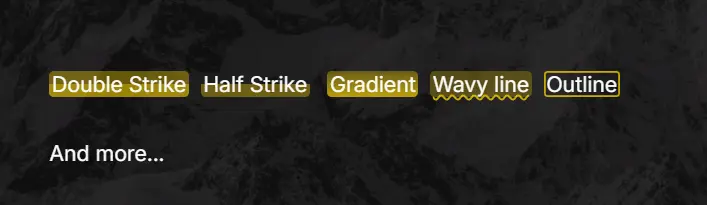
- Highlight styles — default, half-strike, double-strike, underline, wavy line, underline only, wavy line only, rounded, outline, and gradient.
- Default highlight color — plain
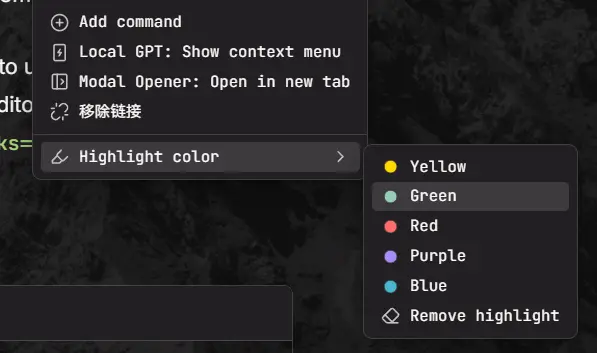
==text==without an emoji can map to a color slot; switching to that color does not add an emoji prefix. - Commands & context menu — toggle highlights, highlight with a specific color, or remove highlights. Select text (or an existing highlight) and right-click to access the color actions.
Usage
- Select text and run Highlight with red (or any color) from the command palette — the selection becomes
==🔴text==. - Run another color command to switch colors; run Toggle highlight to remove the highlight.
- Right-click selected text to find the same color actions in the editor menu.
- Or type the syntax manually:
==🔵any emoji prefix works==.
Example:
This is some ==🔴important text==.
This is a ==🔵theoretical description==, and ==🟢the correct way to handle it==.
Styles
Choose a highlight style in Settings:
Example results:
Settings
| Setting | Description |
|---|---|
| Enable colorful highlights | Master switch for parsing and decoration. |
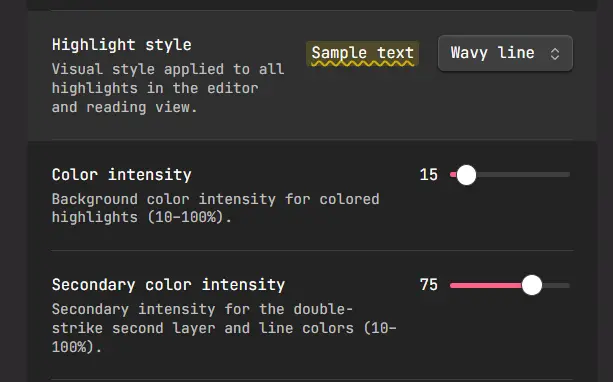
| Highlight style | Default / half-strike / double-strike / underline / wavy line / underline only / wavy line only / rounded / outline / gradient. |
| Default highlight color | Color for plain ==text==; switching to it removes the emoji prefix. |
| Color intensity | Background color mix percentage (10–100%). |
| Secondary color intensity | Second layer of double-strike and line colors (10–100%). |
| Color rendering | Plugin styles paint the background directly; theme native only overrides --text-highlight-bg and lets your theme paint highlights. |
| Decorate in editor / Reading view | Toggle each surface independently. |
| Extended colors | Reveal five extra color slots (orange / cyan / magenta / gray / Black (Spoiler)) in commands, menus, and settings. Use the toggle beside each color to keep only the colors you prefer. Off by default. |
| Colors | Choose a hex color for each regular slot; Black (Spoiler) uses a fixed text-colored cover. The toggle beside each color controls whether it appears in mappings, commands, menus, and rendering. |
| Emoji mappings | Map multiple different emojis to a specific color. You do not need to use every emoji; all of them can represent the corresponding color, but usually only the first one is needed for write-back. |
| Custom color names | Custom display names for the colors. Give them meaning for a color-coding system that fits your workflow. This affects the editor menu and commands; leave blank to use the color name. Off by default. |
Compatibility
- Works on desktop and mobile (
isDesktopOnly: false). - Requires Obsidian 1.13.0+.
- Uses only local parsing and rendering — no network requests, no data leaves your vault.
Credits
The emoji-highlight mechanism was originally built as PR #114 for Sidebar Highlights. This plugin extracts that feature into a standalone package. If you also use Sidebar Highlights, the two plugins coexist: this one renders colors in the editor and Reading view, while the sidebar plugin manages highlights and comments.
The ==🔴red== syntax was inspired by the Octarine project.
Star History
License
MIT
HealthExcellent
ReviewCaution
About
Colorize ==highlights== with emoji prefixes, five configurable color slots, and styles including strike, underline, rounded, outline, wavy, and gradient.Details
Current version
1.2.1
Last updated
2 weeks ago
Created
2 months ago
Updates
5 releases
Downloads
524
Compatible with
Obsidian 1.13.0+
Platforms
Desktop, Mobile
License
MIT