ColorCoder Tables
 Jan Ma136 downloads
2D Kanban/Swimlane task board with Task-as-File architecture, virtual grouping, and dynamic color coding.
- Overview
- Scorecard
- Updates4
A Notion-like 2D Kanban/Swimlane board for Obsidian with Task-as-File architecture, typed properties, and dynamic color coding.
🎬 Visuals
Board Demo — Color-coded 2D Kanban with Drag & Drop
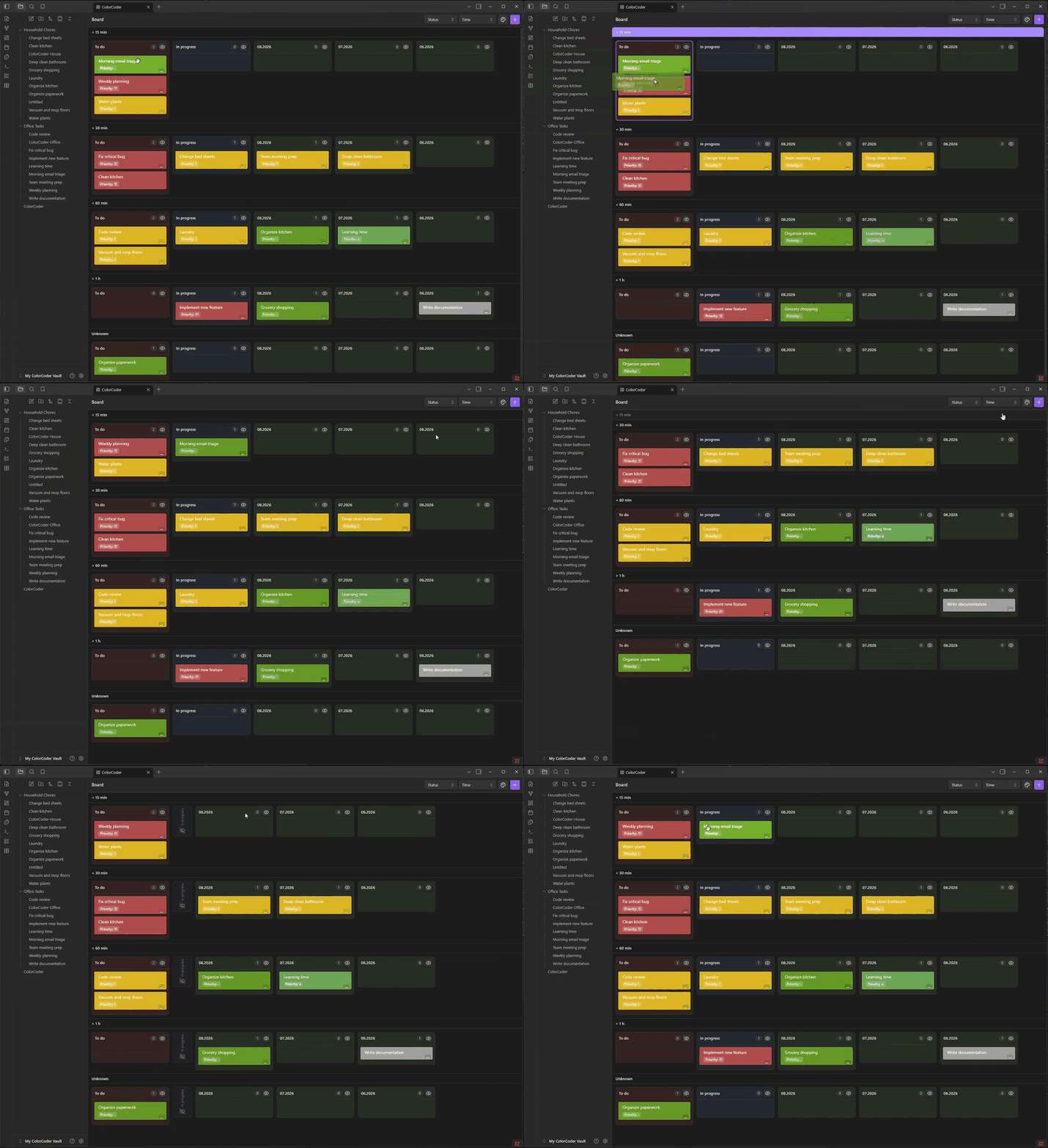
Color-coded board, drag & drop between columns/swimlanes, hiding groups and swimlanes
Color Rules Settings
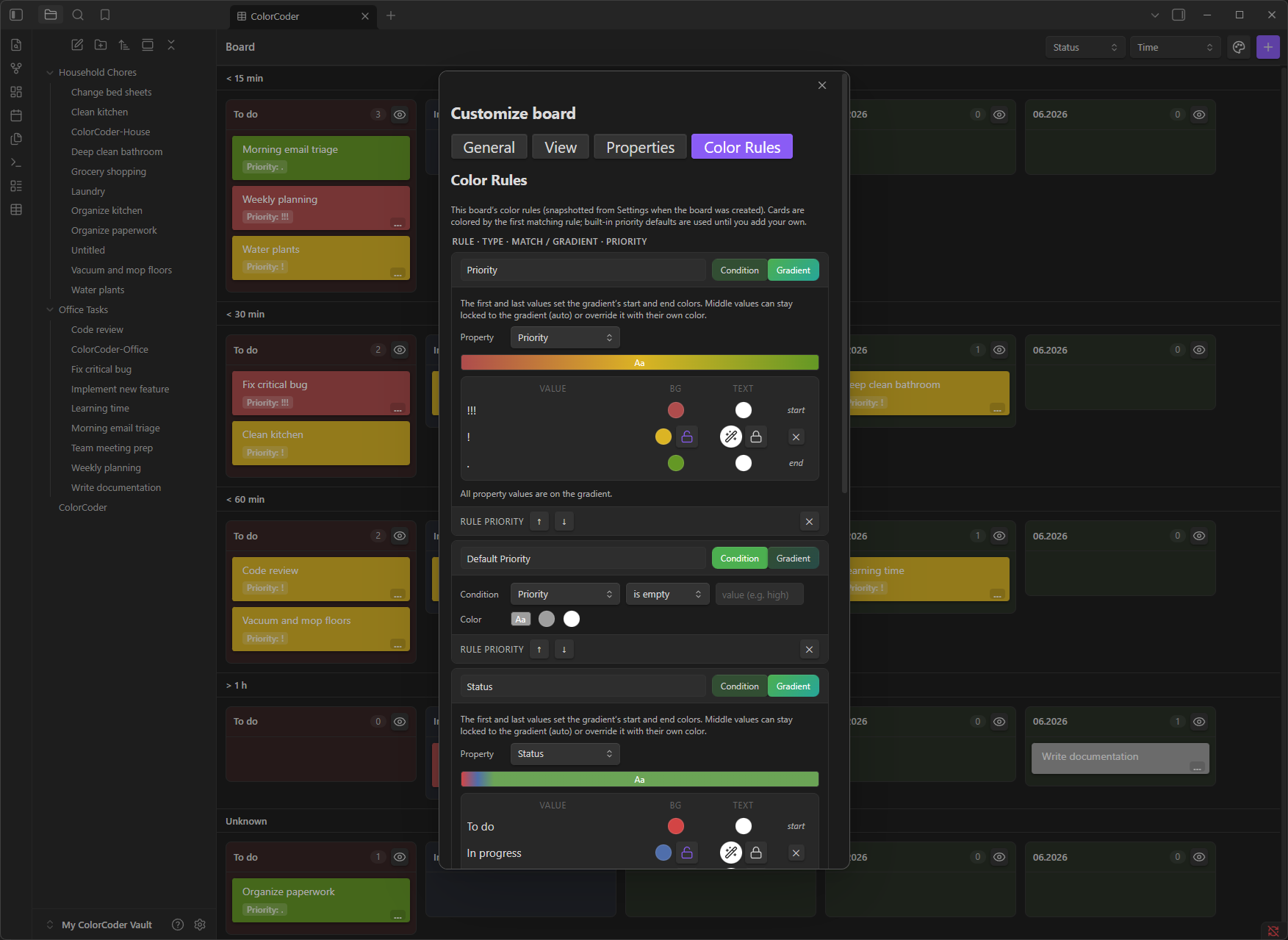
Condition rules + Gradient rules with live preview, priority ordering, per-board overrides
🌱 Origin & Motivation
ColorCoder Tables was born from a personal need: I wanted the power of Notion's databases and Kanban boards inside Obsidian—without leaving my vault, without cloud sync, and with full ownership of my data as Markdown files.
As a solo developer (jaho123i), I built this plugin to solve my own workflow gaps and to give back to the incredible Obsidian community that has given me so much. Every feature exists because I needed it daily. If it helps you too, that's the best reward.
No hidden telemetry • No cloud dependency • Your vault, your rules
✨ Features
| Feature | Description |
|---|---|
| 🎯 Task-as-File Architecture | Every task is a Markdown file with YAML frontmatter. No proprietary database—just plain text you can version, grep, and script. |
| 📋 2D Kanban + Swimlanes | Columns (group by any property) × Swimlanes (second dimension). Drag cards to update values instantly. |
| ⚡ Notion-like Quick Add Modal | Press a hotkey → typed form appears with dropdowns, date pickers, toggles, multi-selects—all based on your property schema. |
| 🏷️ Typed Properties with Validation | Text, Number, Checkbox, Date/DateTime, Select, Multi-select, Reference. Auto-adoption detects existing vault properties. |
| 🎨 Dynamic Color Coding | Condition rules (Priority = High → red) + Gradient rules (progress bars across values). Per-board or global defaults. |
| 🔄 Virtual Grouping | Group tasks by shared property values across folders—solves the "directory problem" elegantly. |
| 📦 Segmented Views | Split boards into segments by project type, duration, or custom criteria. |
| 📥 Notion Import | Export a Notion database as Markdown → import → every row becomes a task with all properties preserved. |
| 🔧 Per-Board Customization | Each board snapshots settings at creation. Global defaults never override existing boards unless you explicitly apply them. |
| 📱 Mobile-First | Touch-friendly drag & drop, Capacitor back-button support, responsive UI. |
| 🌙 Dark Mode Native | Uses Obsidian CSS variables—looks great in any theme. |
🚀 How to Use
1. Create Your First Board
- Command Palette →
Create ColorCoder Board→ pick a folder - Right-click a folder in the file explorer →
Create ColorCoder board here - A board file (
<name>-board.md) is created. It reads tasks from that folder and all subfolders.
2. Add Tasks — The Quick Add Way
Open the board (or run
Quick Add Taskfrom anywhere)Pick the target board from the picker
Fill in the typed form:
- Select/Multi-select → dropdown with your defined options
- Date → native date picker (toggle "Include time" for datetime)
- Checkbox → toggle
- Number → numeric input with validation
- Reference → file path input
Hit Create → task file appears instantly on the board
3. Organize with Drag & Drop
- Drag between columns → updates the group-by property (e.g., Status: Todo → In Progress)
- Drag between swimlanes → updates the swimlane property (e.g., Priority: Low → High)
- Drag within column → reorders cards (persisted per-group)
4. Color Code Your Way
Open Settings → ColorCoder Tables → Color Rules (or board Customize → Color Rules):
- Condition Rules:
Property+Operator+Value→Background/Text Color - Gradient Rules: Pick a property → each value gets an interpolated color between start/end
- Priority: Drag rules to reorder (first match wins)
5. Customize Per Board
Click the paint palette icon (or Customize board command) on any board:
- General: Cards per column, panel tinting, font size, compact toolbar
- View: Column/swimlane order, sort mode, visible groups, card fields
- Properties: Types, options, hide/exclude, auto-adopt new ones
- Color Rules: Board-specific overrides
6. Import from Notion
- Export Notion database as Markdown & CSV
- Run
Import Notion Exportcommand - Pick source folder → pick destination vault folder
- Every row with frontmatter becomes a task; database pages skipped; board created automatically
📦 Installation
Option 1: Community Plugins (Recommended)
- Open Settings → Community Plugins → Browse
- Search for "ColorCoder Tables"
- Click Install → Enable
Option 2: Manual Installation
Go to the Releases page
Download the latest release assets:
main.jsmanifest.jsonstyles.css
Copy all three files to:
<your-vault>/.obsidian/plugins/colorcoder-tables/
- Reload Obsidian → enable ColorCoder Tables in Community Plugins
Option 3: BRAT (For Beta Testing)
- Install BRAT (Beta Reviewers Auto-update Tool) from Community Plugins
- In BRAT settings →
Add Beta Plugin→ paste this repo URL:
https://github.com/jaho123i/ColorCoder_Tables_System
- BRAT will fetch the latest build and keep it updated
💬 Feedback & Contact
| Channel | Purpose |
|---|---|
| GitHub Issues | 🐛 Bug reports, 💡 Feature requests, 📝 Documentation improvements |
| Obsidian Discord | 💬 Quick questions, 🤝 Community discussion, 🙋♂️ Tag @jaho123i |
Please use GitHub Issues for anything that needs tracking. Discord is great for chat, but issues get lost there.
❤️ Support / Funding
ColorCoder Tables is completely free — no paywalls, no locked features, no tracking.
There are no donation links set up yet. If you find this plugin highly valuable and want to support development financially, just let me know via GitHub Issues or ping @jaho123i on Discord — I'll gladly add a Ko-fi / GitHub Sponsors link!
Your feedback, bug reports, and kind words are already the best fuel for this project. 🚀
📄 License
MIT License — see LICENSE for details.
🙏 Acknowledgments
- The Obsidian Team for an extensible, developer-friendly platform
- The Obsidian Community for inspiration, API docs, and peer support
- @dnd-kit for the excellent drag-and-drop primitives
- @tanstack/react-table for headless table logic
Built by jaho123i.