Color Preview
 stephanteig1k downloads
Render color swatches from hex codes with RGB, CMYK, and PMS data. Includes palette blocks, inline dot previews, click-to-edit, and multiple insertion methods.
- Overview
- Scorecard
- Updates10
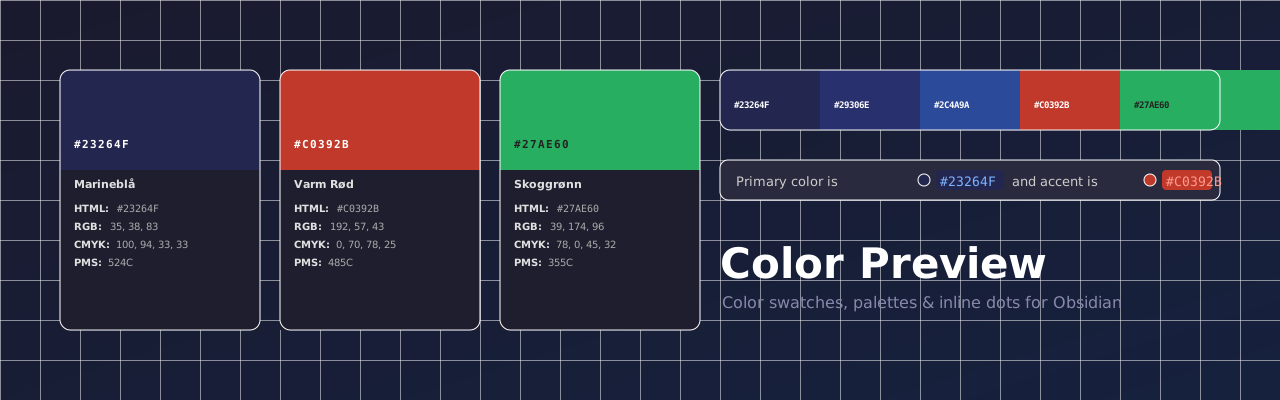
Color Preview turns raw hex codes into beautiful, interactive color cards inside your Obsidian notes — perfect for brand guidelines, design systems, and color documentation.
Features
- Color cards — visual swatch with hex, RGB, CMYK, and PMS displayed below
- Palette blocks — display a whole brand palette as a horizontal strip of swatches
- Inline dot previews — small color dots appear automatically next to any hex code in your notes
- Click swatch to edit — tap any swatch to open the color picker and update the hex in place
- Click to copy — tap any value (HTML / RGB / CMYK) to instantly copy it to clipboard
- Auto-calculated values — if only a hex is provided, RGB and CMYK are approximated automatically
- Multiple insertion methods — ribbon icon,
/colorslash command, paste detection, command palette, and more - PDF / DOCX safe — the underlying markdown stays readable as plain text when exported
Color Card
Write a color fenced code block with any combination of fields:
```color
name: Marineblå
hex: #23264F
rgb: 35, 38, 83
cmyk: 100, 94, 33, 33
pms: 524C
```
Only
hexis required. Ifrgborcmykare omitted, approximate values are calculated automatically and shown in italic.
Minimal example — hex only
```color
hex: #27AE60
```
RGB and CMYK are derived from the hex and marked with ~ to indicate they are approximate.
Palette Block
Show an entire brand palette as a side-by-side strip. Click any swatch to copy its hex.
```palette
#23264F Marineblå
#29306E Mellomblå
#2C4A9A Blå
#FFFFFF Hvit
#1A1A1A Kull
```
Each line accepts either #hex name or name: #hex format.
Inline Dot Previews
Hex codes anywhere in your notes automatically get a small color dot — no extra syntax needed.
The primary color is `#23264F` and the accent is `#C0392B`.
Plain text works too: background is #F2F2F2.
Inserting Colors
| Method | How |
|---|---|
| Ribbon icon | Click the palette icon in the left sidebar |
/color |
Type /color in any note for a 4-option dropdown |
| Paste detection | Paste a bare #RRGGBB → choose Insert as block or Insert as text |
| Command: color picker | Color Preview: Insert color (color picker) |
| Command: type hex | Color Preview: Insert color (type hex) |
| Command: from clipboard | Color Preview: Insert color from clipboard |
| Command: empty template | Color Preview: Insert empty color block |
| Command: convert | Select old-format color text → Color Preview: Convert selection to color block |
Editing Colors
Click any color swatch to open the color picker and update the hex: value in the note directly — no manual editing needed. Works in both Live Preview and Reading view.
On mobile, tapping the swatch opens a hex input modal pre-filled with the current color.
Installation
Community Plugin Browser (once approved)
- Open Settings → Community plugins
- Disable Restricted mode if prompted
- Click Browse and search for Color Preview
- Click Install → Enable
Manual
- Download
main.js,manifest.json, andstyles.cssfrom the latest release - Copy them into
<vault>/.obsidian/plugins/color-preview/ - Reload Obsidian and enable the plugin under Settings → Community plugins
Settings
| Setting | Default | Description |
|---|---|---|
| Swatch height | 80px | Height of the color rectangle |
| Max card width | 320px | Maximum width of the color card |
| Show color name | On | Whether to display the name field in the card |
Screenshots
Add screenshots to the
assets/folder and update the paths below.
| Color cards | Palette block |
|---|---|
 |
 |
| Inline dots | Color picker |
|---|---|
 |
 |
License
MIT © Stephan Teig