Codian
 bcs1k downloads
A multi-provider AI agent workspace: connect local coding agents with your vault, conversations, skills, and tools while preserving provider-native sessions and permissions.
- Overview
- Scorecard
- Updates22
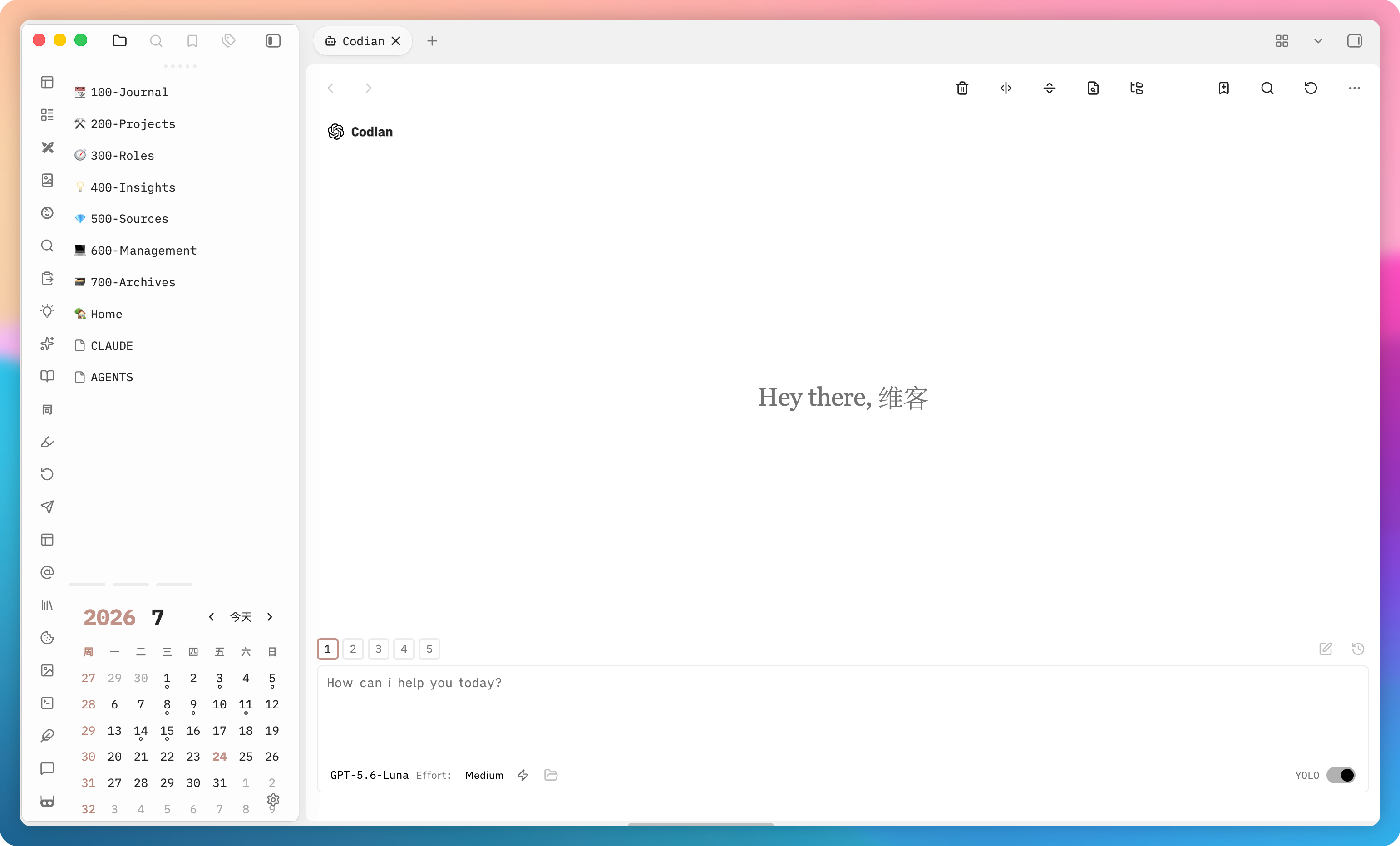
Codian is a multi-provider AI agent workspace for Obsidian. Instead of treating your vault as one-off context, it keeps notes, folders, conversations, Skills, and local tools working around the same problem. Use installed agents from sidebar chat or inline editing while preserving each provider's native authentication, session, and permission boundaries; your reasoning, execution, and results stay in your vault.
✨ Feature Highlights
- 💬 Continuous Conversation Workflow: Multi-tab interface, saved conversations, fast session search, resume, fork, rewind, and provider-native history replay. Conversation-dot navigation previews and jumps to each prompt.
- ✏️ Inline Editing: Inline prompt execution with real-time word-level diff previews directly in your active editor.
- 📝 Live Markdown Composer: Powered by CodeMirror 6 live preview, auto-completing
@noteand@foldermentions, drag-and-drop vault items, image attachments, and File Explorer "Add to Codian" integration. - 🌐 Provider-Native Connections: Supports 6 local CLI providers (
claude,codex,kimi,grok,opencode,pi). Models, sessions, authentication, and permissions follow provider-native capabilities; feature parity is never assumed. - ⚙️ Shared Workspace Resources: Manage Skills, MCP servers, subagents, and commands. Supported providers can discover managed symlink Skills from vault
.agents/skills. - 🔧 Models and Claude Services: Model menus are organized by provider. Claude supports custom models, aliases, China Science and Technology Cloud, Alibaba Bailian, Volcengine Ark, DeepSeek, and custom Anthropic-compatible endpoints. Secrets use Obsidian
SecretStorage. - ✨ Focused Entry Experience: Empty chats show a reduced-motion-aware thinking-orbs animation; switch back to traditional navigation buttons when preferred.
- 🛡️ Privacy & Safety: Operates directly with local provider CLIs. No third-party telemetry services.
📦 Requirements & Prerequisites
- Obsidian: Version 1.11.4 or later on macOS, Linux, or Windows.
- Provider CLIs: One or more installed provider CLIs available on your system
$PATH: - Node.js: Node.js 24 (only required if building from source).
🚀 Installation
Option 1: Obsidian Community Plugins (Recommended)
- Open Obsidian Settings -> Community plugins.
- Search for Codian (Plugin ID:
codianz). - Click Install, then Enable.
Option 2: Manual Installation (Release Build)
- Download
main.js,manifest.json, andstyles.cssfrom the latest GitHub Release. - Open your Vault's plugin directory:
<vault>/.obsidian/plugins/codianz/(create thecodianzfolder if it does not exist). - Copy the 3 downloaded files into that folder.
- Reload Obsidian or toggle Codian on in Community plugins settings.
Option 3: Build from Source (Developers)
git clone https://github.com/BCS1037/codian.git
cd codian
npm ci
npm run build
Copy the generated main.js, manifest.json, and styles.css to your vault's .obsidian/plugins/codianz/ directory.
⚙️ Configuration & Third-Party Endpoints
Codian includes provider-neutral configuration controls under Obsidian Settings:
- Third-Party Claude Profiles: Configure custom Anthropic-compatible endpoints (e.g., Alibaba Bailian, Volcengine Ark, China Science & Technology Cloud) directly in the Claude Provider tab.
- SecretStorage: API keys and auth tokens are securely stored using Obsidian's native SecretStorage API rather than stored in plain text files.
- Provider Connection Settings: Configure absolute CLI executable paths or provider-specific parameters per provider under Settings -> Provider -> Connection.
❓ Frequently Asked Questions & Troubleshooting
1. Why does Codian report "CLI not detected"?
macOS GUI applications (launched via Finder or Dock) do not automatically inherit environment variables defined in Shell configuration files (e.g., ~/.zshrc or ~/.bash_profile).
- Fix: Go to Codian Settings -> Provider -> select the target Provider -> Connection tab, and enter the absolute file path to the CLI executable in CLI Path (e.g.,
/usr/local/bin/claudeor/opt/homebrew/bin/codex).
2. How to set up Kimi Code CLI?
Kimi Code CLI requires an initial login before Codian can start an ACP session.
- Fix: Open your terminal, run
kimi, and complete the interactive authentication process. Once configured, Codian will be able to discover models and connect successfully.
3. What is the difference between plugin ID codianz and display name Codian?
codianz is the unique internal plugin identifier registered with the Obsidian Community Plugin registry, while Codian is the user-visible display name. Always ensure your vault's plugin directory is named codianz.
🛠️ Development & Verification
# Install dependencies
npm ci

# Run type check, linter, and unit test suite
npm run verify

# Verify license boundaries and secret scanning
npm run security:audit
Please review CONTRIBUTING.md before submitting Pull Requests. Report security vulnerabilities privately per SECURITY.md.
💖 Support & Sponsor
If you find Codian helpful and would like to support its ongoing maintenance and development of new features, you are welcome to sponsor me on Afdian (爱发电).
Thank you for your support! 🙏
🙏 Acknowledgments
Codian is built upon the foundation of Claudian, created by Yishen Tu. I am deeply grateful to Yishen Tu and the Claudian contributors for their pioneering work in bringing AI coding agents to Obsidian.
I also thank the authors and maintainers of all open-source dependencies and tools that make Codian possible.
📄 License
Codian modifications and derived source code are licensed under AGPL-3.0. Upstream Claudian source code remains under the MIT License. See NOTICE for Claudian upstream attribution and THIRD_PARTY_NOTICES.md for third-party component notices.
📢 Feedback & Follow
Open an Issue for feedback, or follow WeChat Official Account 「维客笔记」. Dedicated to exploring minimalist ways to solve problems!
- X (Twitter): https://x.com/bcs1037