Codeblock Template
 sylcool3k downloads
Reuse content within code blocks, with the ability to use variables.
- Overview
- Scorecard
- Updates5
一个可以把 Code Block 的内容在任何笔记中重复利用Obsidian模板插件!
- 模板变量:可根据传入的变量改变模板内容。 —— 2023年6月3日
- 批量匿名变量:可传入以
,分隔的多个值,避免为过多变量取名。(类似CSV语法) —— 2023年6月4日 - array循环变量:值为
[1,2,3,4]的array类型,可循环显示该行的内容。 —— 2023年6月12日 - 输入提示:在需要插入模板的地方输入
...或 ```pack-view,按下空格就可以自动补全完整的模板。 —— 2023年6月14日
安装
目前这个插件还没上传到 Obsidian 插件库,还需要手动安装。
- 通过右方 release latest 下载
main.js和manifest.json。 - 在你的插件目录(.obsidian/plugins)新建文件夹
codeblock-template,并将 main.js 和 manifes.json 文件放入此文件夹即可。
使用
设置
设置模板存放路径,默认路径为根目录的templates。

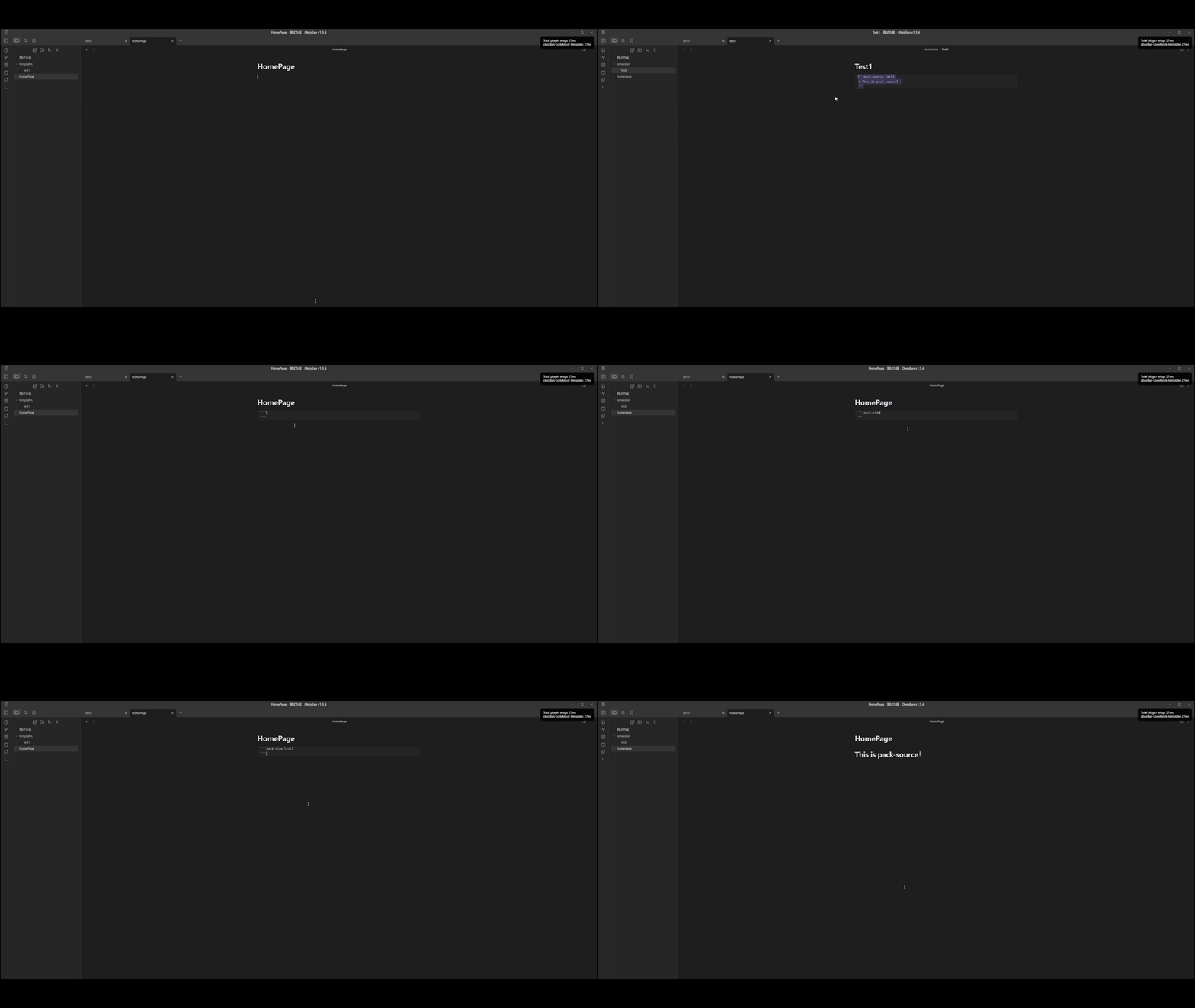
基本使用
创建模板
```pack-source a
# This is pack-source!
```
注意:要在设置中Template Source Path指定的路径下创建才有效。
使用模板
```pack-view a

```
插值
可以在创建模板时使用$.{}来定义变量,在使用时传入变量。
```pack-source test1
Hello $.{name}!
```
通过key = value或key = "value"来定义变量。模板可以重复利用。
注意:为了方便存储,key 要符合标识符定义规则^1
```pack-view test1
name = "Super10"
```

---

```pack-view test1
name = "Sylcool"
```

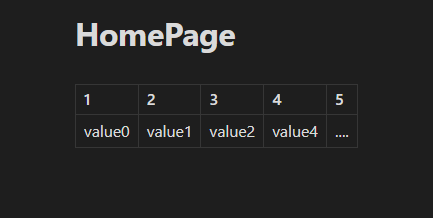
匿名变量
匿名变量的前缀支持通过设置自定义,默认是anonymous_var_。
注意:为了方便存储,key 要符合标识符定义规则^1
定义模板
```pack-source test_anonymous
| 1                   | 2                   | 3                   | 4                   | 5                   |
| ------------------- | ------------------- | ------------------- | ------------------- | ------------------- |
| $.{anonymous_var_0} | $.{anonymous_var_1} | $.{anonymous_var_2} | $.{anonymous_var_3} | $.{anonymous_var_4} |
```
使用模板
```pack-view test_anonymous
value0,value1,value2,value4,....
```
循环变量
定义
```pack-source test_loop
List:
1. $.{a}
```
使用
```pack-view test_loop
a = [A,B,C,D]
```

配合其他插件使用
dataview
````pack-source dv
```dataview
LIST FROM "$.{path}"
```
````
tasks
````pack-source tasks
```tasks
not done
due after $.{date}
```
````
预计开发
- 读取本地 JSON、CSV 数据
HealthFair
ReviewRisks
About
Reuse code-block content across notes as templates with named variables, anonymous CSV-style variables, and array loops for repeated entries. Insert templates by referencing code-block names, pass variables for inline substitution, and trigger insertion with short inline markers for quick autocompletion.Details
Current version
1.3.1
Last updated
3 years ago
Created
3 years ago
Updates
5 releases
Downloads
3k
Compatible with
Obsidian 0.15.0+
Platforms
Desktop, Mobile
License
MIT