Code Graph
 Joshua Williams664 downloads
Visualize how your code files connect — imports, calls, inheritance, implements, comment-links, ADRs, and tests — as an interactive graph alongside your notes.
- Overview
- Scorecard
- Updates6
Code Graph
Visualize how your code files connect — imports, calls, inheritance, implements, comment-links, ADRs, and tests — as an interactive graph alongside your notes.
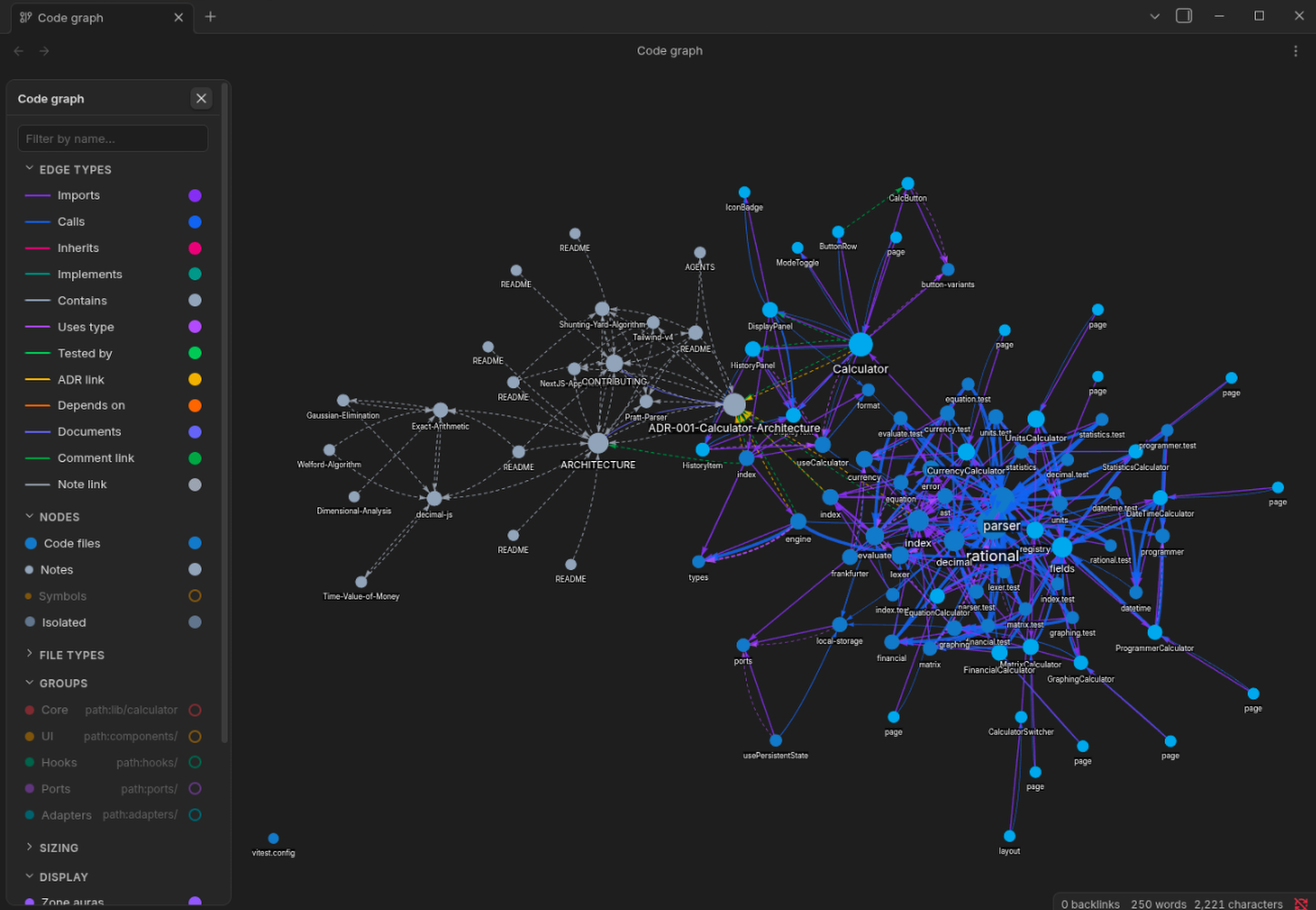
Code Graph turns your vault into a navigable knowledge graph of your codebase. It parses source files with tree-sitter, extracts typed relationships, and renders them as a force-directed graph you can explore, filter, and drill into — right next to your Obsidian notes.
Features
Structural analysis
- AST-parsed edges — imports, calls, inherits, implements, uses-type, and contains relationships, extracted via tree-sitter for TypeScript, TSX, JavaScript, and Python.
- Imports-only support — regex-based import extraction for CSS, C, C++, Go, Rust, Java, Lua, and PHP.
- Symbol-level nodes — toggle into functions, classes, methods, interfaces, and types as first-class graph nodes inside their containing files.
- TODO / FIXME visibility — files with
TODOcomments glow orange; files withFIXMEcomments glow red. Technical debt is visible at a glance.
Documentation protocol
@see,@tested-by,@adr,@depends-ontags in code comments become typed graph edges connecting code to tests, decisions, and dependencies.@domain,@status,@authortags become node metadata for coloring, filtering, and hover tooltips.- Note ↔ code links — markdown frontmatter
related-codecreatesdocumentsedges from notes to code, closing the loop between documentation and implementation. - Seed domains command — one command discovers a domain vocabulary from
your folder structure and stamps
@file/@domain/@statusheaders into code files automatically.
Interactive graph
- Color modes — language, domain, status, or auto-detected community (label propagation reveals natural module boundaries).
- Zone-aura heatmap — soft colored glows behind nodes, driven by domain, community, or user-defined color groups.
- Color groups — query-based grouping with
domain:,path:,ext:,kind:,status:,tag:prefixes or free-text substring. - Node sizing — constant, lines of code, degree, fan-in, or fan-out.
- Neighborhood filtering — focus on a file and show only nodes within N hops.
- Dead-code highlighting — dim nodes with no incoming edges.
- Hover-focus spotlight — dim distant nodes/edges on hover to spotlight a node's neighborhood.
Edge types
Every edge below is produced automatically when code follows ordinary
conventions — static imports, extends/implements, type annotations, and the
@tag/[[wikilink]]/frontmatter protocol. Write idiomatic, well-documented
code and the graph fills in. The first six edges come from the AST/regex parser;
the rest come from the documentation protocol.
| Edge | Color | Source | Meaning | Produced by |
|---|---|---|---|---|
| imports | #8b5cf6 |
AST / regex | File A imports from file B | import / require / #include / use / @import |
| calls | #3b82f6 |
AST | File A calls a symbol in file B | call to an exported function/method |
| contains | #6b7280 |
AST | File A contains symbol B | defining a function/class/interface in a file |
| inherits | #ec4899 |
AST | Class A extends class B | extends |
| implements | #14b8a6 |
AST | Class A implements interface B | implements |
| uses-type | #a855f7 |
AST | Symbol A references type B | type annotation referencing another file's type |
| tested-by | #22c55e |
@tested-by |
Code A is verified by test B | @tested-by [[test-file]] in a comment |
| adr-link | #eab308 |
@adr |
Code A is governed by decision B | @adr [[ADR-note]] in a comment |
| depends-on | #f97316 |
@depends-on |
Code A depends on concept B | @depends-on [[service-or-concept]] |
| documents | #6366f1 |
frontmatter | Note A documents code B | related-code: [[file]] in note frontmatter |
| comment-link | #16a34a |
@see / [[wikilink]] |
Comment references B | @see [[X]], [[X]], @link x, ref: [[x]] |
| md-link | #9ca3af |
Obsidian links | Note A links to note B | [[wikilink]] in a note's body |
For per-edge optimization guidance — exactly what to write to maximize each edge honestly — see §5 Edge-maximization guide in the skill guide.
Node types
Nodes come in two layers. File-level nodes are always rendered; symbol
nodes (shown when Show symbols is on) nest inside their containing file via
contains edges.
| Node kind | Layer | Color | Produced by |
|---|---|---|---|
code |
file | by language (see below) | any file matching a configured code extension |
note |
file | note color | any .md file (when Show notes is on) |
other |
file | neutral | any other recognized file |
function |
symbol | #f59e0b amber |
top-level / exported function |
class |
symbol | #ef4444 red |
class declaration |
method |
symbol | #10b981 emerald |
method declared inside a class |
interface |
symbol | #a855f7 purple |
interface declaration |
variable |
symbol | #84cc16 lime |
top-level const / let / var |
type |
symbol | #ec4899 pink |
type alias |
enum |
symbol | #eab308 yellow |
enum declaration |
constant |
symbol | #14b8a6 teal |
named constant |
Symbol nodes are available in Tier A languages only (TypeScript, TSX,
JavaScript, Python). Tier B languages produce file-level nodes plus imports
edges, and still fully support the @tag / [[wikilink]] / TODO / FIXME /
frontmatter protocol. Node fill color follows the active Color mode:
language (default), domain (@domain), status (@status), or auto-detected
community. Symbol colors deliberately avoid blue, which is reserved for file
nodes.
Each node also carries metadata the plugin surfaces: domain, status,
author (hover tooltip), tags, todoCount/fixmeCount (orange/red glow),
and lines/fan-in/fan-out (node sizing). Writing the @tags and frontmatter
documented in the skill guide populates
all of this automatically.
Quick start
- Install — from Obsidian's community plugin browser, or manually copy
main.js,manifest.json, andstyles.cssinto<vault>/.obsidian/plugins/code-graph/. - Enable — in Settings → Community plugins.
- Open — click the graph ribbon icon, or run Code Graph: Open graph view from the command palette.
- Tag (optional) — run Code Graph: Seed domains from codebase to
auto-tag your files with
@domain/@statusheaders.
The documentation protocol
The plugin ships an AI-ready skill — skills/obsidian-code-graph/SKILL.md —
that tells AI agents (and humans) exactly how to write code comments, file
headers, and markdown frontmatter so the graph extracts maximum semantic value.
Load it into your AI coding agent, or read it directly. When code adheres to the
protocol below, the graph populates automatically — every @tag, [[link]],
and frontmatter field becomes a typed edge or node attribute.
Install the skill into your AI agent (works with any agent that supports the skills.sh format — Claude Code, Cursor, OpenCode, and others):
npx skills add mrjw717/obsidian-code-graph -g -y
Or browse/list before installing: npx skills add mrjw717/obsidian-code-graph -l.
The skill loads the full protocol — tag reference, per-edge and per-node
optimization guidance, language matrix, and a domain auto-detection procedure —
into any compatible agent.
Code files — Tier 1 header + typed links:
/**
 * @file Calculator engine — math expression evaluation
 * @domain calculator
 * @status stable
 * @author Josh
 *
 * @see [[Shunting Yard Algorithm]]
 * @tested-by [[engine.test.ts]]
 * @adr [[ADR-001-Calculator-Architecture]]
 * @depends-on [[MathEngine]]
 */
Markdown notes — frontmatter closes the code↔docs loop:
---
related-code:
  - "[[engine.ts]]"
domain: calculator
type: adr
status: accepted
tags: [calculator, architecture]
---
The skill guide contains the full tag reference, per-edge and per-node optimization guidance, the language support matrix, a domain auto-detection procedure for AI agents, and a verification checklist. Point your AI agent at it and it will detect your codebase's domains, offer them as suggestions, and document files to maximize graph edges.
Language support
| Tier | Languages | Edges |
|---|---|---|
| Full structural (tree-sitter AST) | TypeScript, TSX, JavaScript, Python | imports, calls, inherits, implements, uses-type, contains, symbol nodes |
| Imports-only (regex) | CSS, C, C++, Go, Rust, Java, Lua, PHP | imports only |
The @tag / [[wikilink]] / TODO / FIXME / frontmatter protocol works in
any language — only the structural edges differ. See the
skill guide for
details on adding a language to the full-structural tier.
Requirements
- Obsidian 1.7.2 or later.
- Desktop only. The plugin parses source with tree-sitter WASM grammars,
which is a heavy, desktop-oriented workload that hasn't been validated on
mobile. (
isDesktopOnly: truein the manifest.)
Privacy & permissions
Code Graph is local-first. It makes no network requests and collects no telemetry — all parsing and graph rendering happen entirely inside your vault. The permissions it does use:
| Permission | Why |
|---|---|
| Reads & writes vault files | Reads your code/notes via the Obsidian vault API to extract relationships. |
| Enumerates vault files | vault.getFiles() lists files to discover which ones are code/notes to graph. |
| Writes to its own plugin folder | On first run, materializes the bundled tree-sitter WASM grammars into .obsidian/plugins/code-graph/wasm/ so parsing works. |
| Clipboard (optional) | The right-click Copy path action writes a file path to the clipboard. User-initiated only. |
| Bundled WASM / base64 | tree-sitter is embedded as base64 WASM inside main.js so fresh installs are self-contained. |
No file outside the vault is read or written.
Obsidian Sync note:
main.jsis ~5.8 MB because the tree-sitter grammars are embedded for self-contained installs. Obsidian Sync Standard (5 MB file cap) will not sync it — use Sync Plus or another sync method.
Each release ships with GitHub artifact attestations so main.js,
manifest.json, and styles.css can be cryptographically verified against the
source build.
Development
npm install      # install dependencies
npm run dev      # watch mode — rebuild on save
npm run build    # production build (tsc typecheck + esbuild minified)
npm run lint     # ESLint with eslint-plugin-obsidianmd
npm test         # vitest unit tests (27 tests)
Build pipeline
The build embeds the tree-sitter core runtime and 4 grammar WASM files as
base64 directly into main.js, making the plugin fully self-contained. Fresh
installs from a GitHub release need only main.js, manifest.json, and
styles.css — no external downloads or manual extraction.
| Script | Purpose |
|---|---|
scripts/copy-wasm.mjs |
Copies 4 used grammars + core runtime from node_modules to wasm/ |
scripts/embed-wasm.mjs |
Generates src/indexer/wasm-embedded.ts with base64 constants |
esbuild.config.mjs |
Bundles src/main.ts → main.js (CJS, minified, tree-shaken) |
Release artifacts
main.js, manifest.json, and styles.css are attached to GitHub releases
tagged with the version number. The release workflow automatically builds,
attests, and publishes.
Support
If Code Graph saves you time, consider supporting development.
License: 0-BSD · Author: Joshua Williams · Repository: mrjw717/obsidian-code-graph