Search...Search plugins and themes...
⌘K
Sign in
  • Get started
  • Download
  • Pricing
  • Enterprise
  • Account
  • Obsidian
  • Overview
  • Sync
  • Publish
  • Canvas
  • Mobile
  • Web Clipper
  • CLI
  • Learn
  • Help
  • Developers
  • Changelog
  • About
  • Roadmap
  • Blog
  • Resources
  • System status
  • License overview
  • Terms of service
  • Privacy policy
  • Security
  • Community
  • Plugins
  • Themes
  • Discord
  • Forum / 中文论坛
  • Merch store
  • Brand guidelines
Follow us
DiscordTwitterBlueskyThreadsMastodonYouTubeGitHub
© 2026 Obsidian

Clipboard Compare

chaowenchaowen2 downloads

Compare the active note with your clipboard and apply individual changes, just like VS Code.

Add to Obsidian
  • Overview
  • Scorecard
  • Updates1

Compare text from your clipboard with the active note in Obsidian. It works like VS Code’s Compare Active File with Clipboard command.
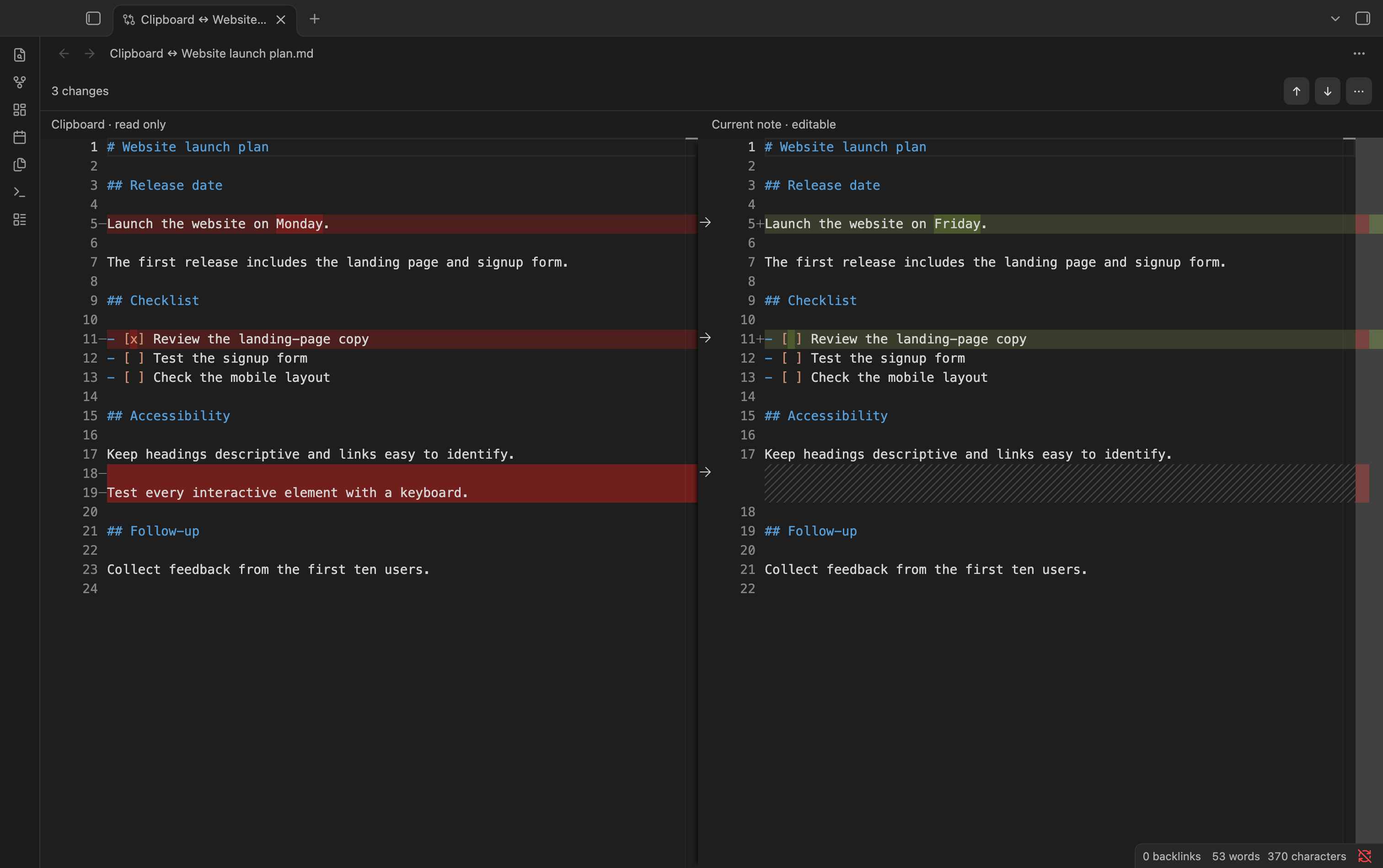
Clipboard Compare

Use

  1. Copy the text you want to compare.
  2. Open your note and run Clipboard Compare: Compare active file with clipboard from the command palette.
  3. Click an arrow to bring that change into your note. Leave it untouched to keep your original text.

Changes save automatically and can be undone.

Install

  1. Open GitHub Releases and download clipboard-compare.zip under Assets in the latest release.
  2. Unzip it and move the clipboard-compare folder into your vault’s .obsidian/plugins/ folder.
  3. Restart Obsidian and enable Clipboard Compare under Settings → Community plugins.

Works offline in Obsidian on desktop.

MIT license.

HealthExcellent
ReviewSatisfactory
About
Compare clipboard text with the active note and view inline differences directly in the editor. Apply individual changes by clicking arrows to merge them into the note; changes save automatically and can be undone.
EditingCommands
Details
Current version
0.1.0
Last updated
8 hours ago
Created
9 hours ago
Updates
1 release
Downloads
2
Compatible with
Obsidian 1.14.5+
Platforms
Desktop only
License
MIT
Report bugRequest featureReport plugin
Sponsor
Buy Me a Coffee
Author
chaowenchaowen
chaovven.github.io/
GitHubchaovven
  1. Community
  2. Plugins
  3. Editing
  4. Clipboard Compare

Related plugins

Sort and Permute lines

Sort and Permute lines in whole file or selection.

Heading Shifter

Easily Shift and Change Markdown headings.

Paste URL into selection

Paste URL "into" selected text.

Keyshots

Add classic hotkey/shortcuts commands from popular IDEs like Visual Studio Code or JetBrains Family.

LanguageTool Integration

Advanced grammar and spell checking, powered by LanguageTool.

Meta Bind

Make your notes interactive with inline input fields, metadata displays, and buttons.

Quick Switcher++

Enhanced Quick Switcher, search open panels, and symbols.

Thino

Quickly capture memos and display them in the sidebar with a heatmap. (Closed source)

Copilot

Run AI agents such as Claude Code, Codex, and OpenCode inside your vault. Turn your second brain into a smart assistant that gets knowledge work done.

Advanced Tables

Improved table navigation, formatting, and manipulation.