Companion for Claude
 Sasan Sotoodehfar4k downloads
Chat with Claude inside your vault, generate gallery-grade interactive planning artifacts, and sync everything Claude produces back into your notes.
- Overview
- Scorecard
- Updates79
Cowork with Claude inside your Obsidian vault. Companion brings vault-aware chat, reviewable agent work, interactive artifacts, and an evidence-backed research workflow into Obsidian while your notes remain the source of truth.
Install from the Obsidian community store · Getting started · All guides
Install
- Open Settings → Community plugins → Browse.
- Search for Companion for Claude, then install and enable it.
- Open Companion and choose a connection:
- Claude Code sign-in on desktop, using the installed
claudecommand. - Anthropic API on desktop or mobile, using your own credential.
- Local model through Ollama or an OpenAI-compatible endpoint.
- Claude Code sign-in on desktop, using the installed
- Open a note, enable the Note context chip, and send your first message.
Walk through setup and the first useful workflows →
What Companion adds to Obsidian
- Vault-aware chat with the active note, selection, links, search results, notes a typed search result relates to, folders, PDFs, images, and pasted screenshots as context.
- Agent mode that can search, read, and follow links while showing every tool call; writes remain behind confirmation.
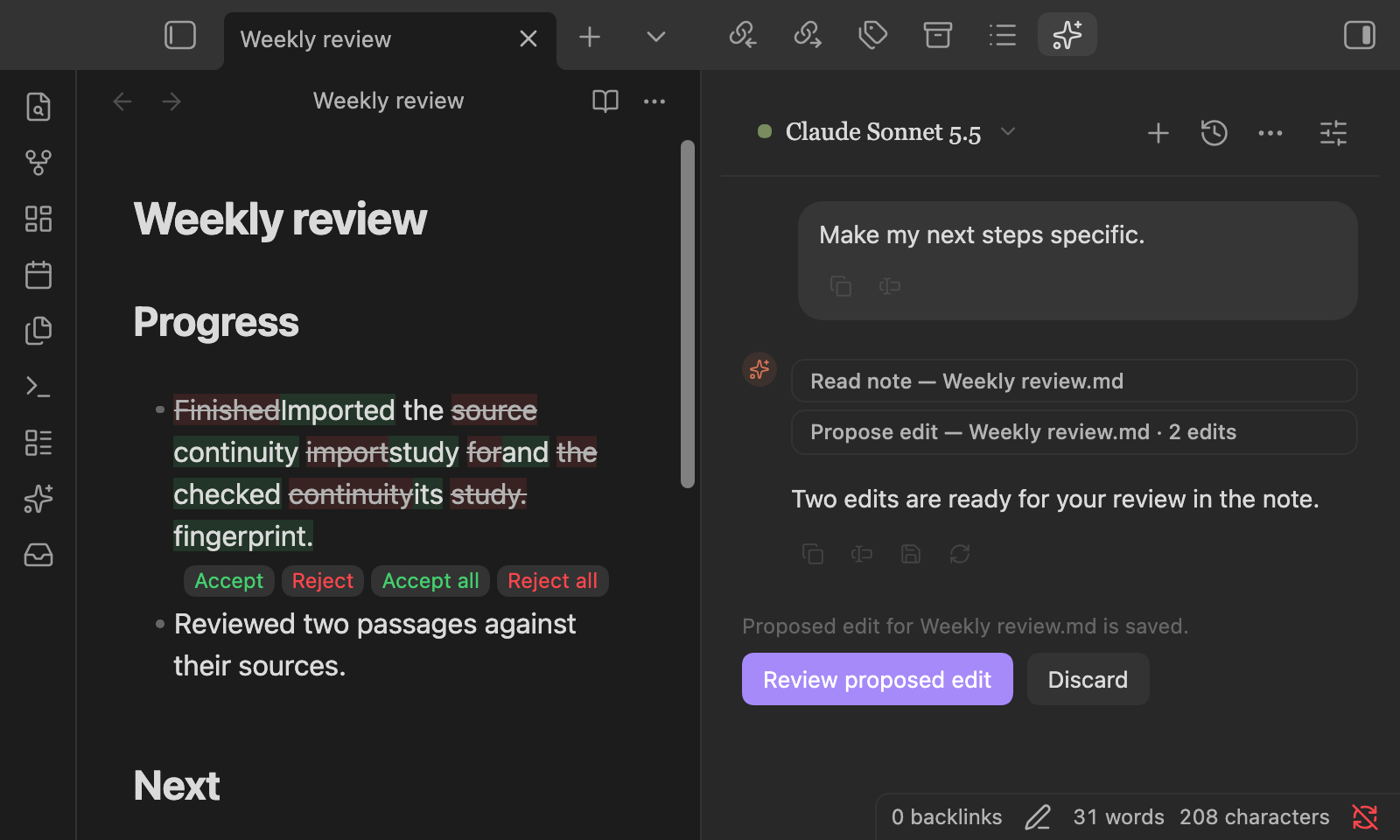
- Reviewable edits with per-hunk acceptance before a note changes.
- Research Desk for sources, evidence, claims, outlines, drafts, and deterministic assurance checks.
- Interactive
claude-htmlartifacts, native Canvas files, and Obsidian Bases generated from your vault. - On-device semantic search on desktop and mobile, including page-located PDF chunks.
- Durable conversations that survive restarts. An interrupted model turn returns as stopped work with a Retry action.
- Multiple chat tabs, each with its own conversation, via the "New chat tab" command.
- Chat projects: scope a conversation to a
chat-projectnote or a Research Desk project — its instructions and pinned notes join the system prompt, and automatic vault search narrows to its folder. Choose one from the "@" menu or the "Chat: choose project" command. - Optional integrations: a loopback MCP bridge for live-vault tools, and an MCP client for servers you explicitly configure.
The product overview stays in the repository README. Detailed behavior and setup live in the guides:
- Agent mode, edits, and guardrails
- Research Desk
- Interactive artifacts
- Local models and semantic search
- Claude Code and the MCP bridge
- Authentication and cost
- Architecture
- FAQ
Desktop agents
Companion chat can run directly through Claude Code. Choose Claude Code — your subscription under Connection and Companion uses one resumable CLI session per saved conversation. This backend does not require the MCP bridge.
For portable Claude Code workflows using the official Obsidian CLI:
/plugin marketplace add cavi-ai/plugins
/plugin install obsidian-agent@cavi-ai
The optional Companion MCP bridge is for Claude Desktop and advanced clients
that need live research, semantic-search, ontology, or controlled-write tools.
It is off by default, binds only to 127.0.0.1, requires a non-empty bearer
token, and does not advertise mutation tools until Allow writes is enabled.
Set up desktop integrations and review the tool boundary →
What leaves your machine
Companion has no telemetry or analytics. Network activity follows an action you take or a backend you choose.
- Anthropic or your API base URL: a direct-API chat, agent, or utility turn sends the prompt, attached vault context, and system prompt.
- The installed
claudecommand: a desktop Claude Code turn sends the prompt and attached vault context to the CLI, which owns authentication and service traffic. - Your Ollama host or OpenAI-compatible endpoint: selecting that backend sends the request to the server you run.
- Tag classifier model: Check with model in Optimize brain sends tag
names and up to 3 note titles per tag to the configured classifier model; in
the background it runs only when the classifier is served from this machine
or a private-network address (
localhostor a loopback or private-range IP); no other host name qualifies. - Note type classifier model: Check with model in the type review sends each untyped note's title, folder, up to 10 tags, up to 5 headings, and its first 200 characters, plus the names of the ontology types and up to 6 property keys per type, to the configured classifier model. Secrets (API keys, tokens, passwords) are removed from note text before sending. It runs only on that click, never in the background.
- Hugging Face and jsDelivr: the one-time embedding download requests only the model and ONNX runtime after you approve it; both are cached.
- Cloud-session services: Send to cloud Claude session sends the prompt and attached note context to your configured routine fire URL. Pulling cloud replies sends the repository, branch, and folder you configured to GitHub.
- Research services: an explicit discovery or import action sends search terms or bibliographic identifiers to OpenAlex, Crossref, arXiv, or Zotero.
- Web pages and search services: web capture,
web_fetch, andweb_searchsend only the URL or query you supplied. - External MCP servers: a tool call you confirm sends that tool's arguments to the server you configured.
Semantic and keyword indexes stay on device. Credentials live in Obsidian's
encrypted secret storage, never the vault-synced data.json. Desktop shell
execution uses argument arrays rather than shell strings and covers only the
Claude/Obsidian CLIs, browsers you select for artifacts, and stdio MCP servers
you configure; it is disabled on mobile.
For the complete endpoint, WebAssembly, site-specific capture, and cloud-session details, see Authentication and cost, Local models, and the architecture guide.
Artifact security
Companion renders a fenced ```claude-html block in a sandboxed iframe
with scripts allowed but same-origin access denied. A restrictive content
security policy blocks network requests and form submissions, so the artifact
cannot reach the vault, cookies, or remote services. Saving an artifact writes
the same block to a normal Markdown note.
Artifact behavior and authoring examples →
Development and testing
All commands run from this directory:
pnpm install
pnpm run typecheck
pnpm run lint
pnpm test
pnpm run docs:verify
pnpm run build
To install a development build, copy main.js, manifest.json, and
styles.css to <vault>/.obsidian/plugins/claude-companion/, then enable
Companion for Claude in Community plugins. pnpm run dev watches and
rebuilds main.js for active development.
See CONTRIBUTING.md for the full gate and release
workflow.
Releases
- Store listing: Companion for Claude
- Source:
cavi-ai/claude-obsidian - Release artifacts:
cavi-ai/companion-for-claude - Version lockstep:
manifest.json,versions.json,package.json, and the git tag use the same exact version.