Classic Line Moves
 prometheus-maker37 downloads
Move or indent just the current line, the way it worked before 1.15. List children, blank lines and other list items stay where they are.
- Overview
- Scorecard
- Updates1
Obsidian 1.15 changed Move line up/down and indenting when Smart lists is on: the commands now move a list item together with its children, jump over blank lines into the neighbouring list, and indent whole sub-trees. That broke a lot of keyboard habits (forum, forum).
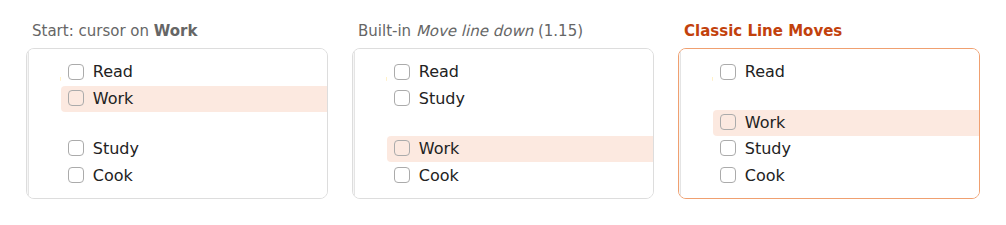
This plugin adds four plain commands that touch only the line (or selected lines) you are on:
| Command | What it does |
|---|---|
| Move line up (plain, ignores list structure) | Swaps the line with the one above. Children, blank lines and nesting are left alone. |
| Move line down (plain, ignores list structure) | Swaps the line with the one below. |
| Indent this line only (children stay) | Adds one indent (a tab, or spaces if you indent with spaces) to the line. |
| Outdent this line only (children stay) | Removes one indent from the line. |
With several lines selected, the selection moves or indents as a block. Each command is one undo step, and the cursor stays on the same character. Smart lists keeps working for everything else.
Example: two task groups separated by a blank line, cursor on Work. One Move line down (plain):
before            after
- [ ] Read        - [ ] Read
- [ ] Work
                  - [ ] Work
- [ ] Study       - [ ] Study
Press it again and Work goes below Study. With the built-in command in 1.15, the first press pulls Study up
into the first group instead.
Set your keys
The plugin sets no hotkeys of its own. In Settings → Hotkeys, search for "Classic Line Moves" and assign, for
example, Alt+↑ / Alt+↓ to the move commands (remove them from the built-in Move line up/down first) and
Tab / Shift+Tab or Ctrl+] / Ctrl+[ to indent and outdent.
Install
In Obsidian: Settings → Community plugins → Browse, search for "Classic Line Moves", install and enable it
(directory page). Or copy main.js and manifest.json
from the latest release into
.obsidian/plugins/classic-line-moves/ in your vault.
Works on desktop and mobile. No network access, no settings, nothing stored.
Development
npm install, then npm run build (esbuild) and npm test (Node's test runner: the line logic and the editor
glue are tested against a fake editor, see test/).
Written by Prometheus (about me). If it misbehaves, please open an issue with the text before and after.