Cite Engine
 Nick115 downloads
Drift-proof, closed-corpus citations via block refs. Cite only from your clipped sources — fabrication impossible by construction.
- Overview
- Scorecard
- Updates5
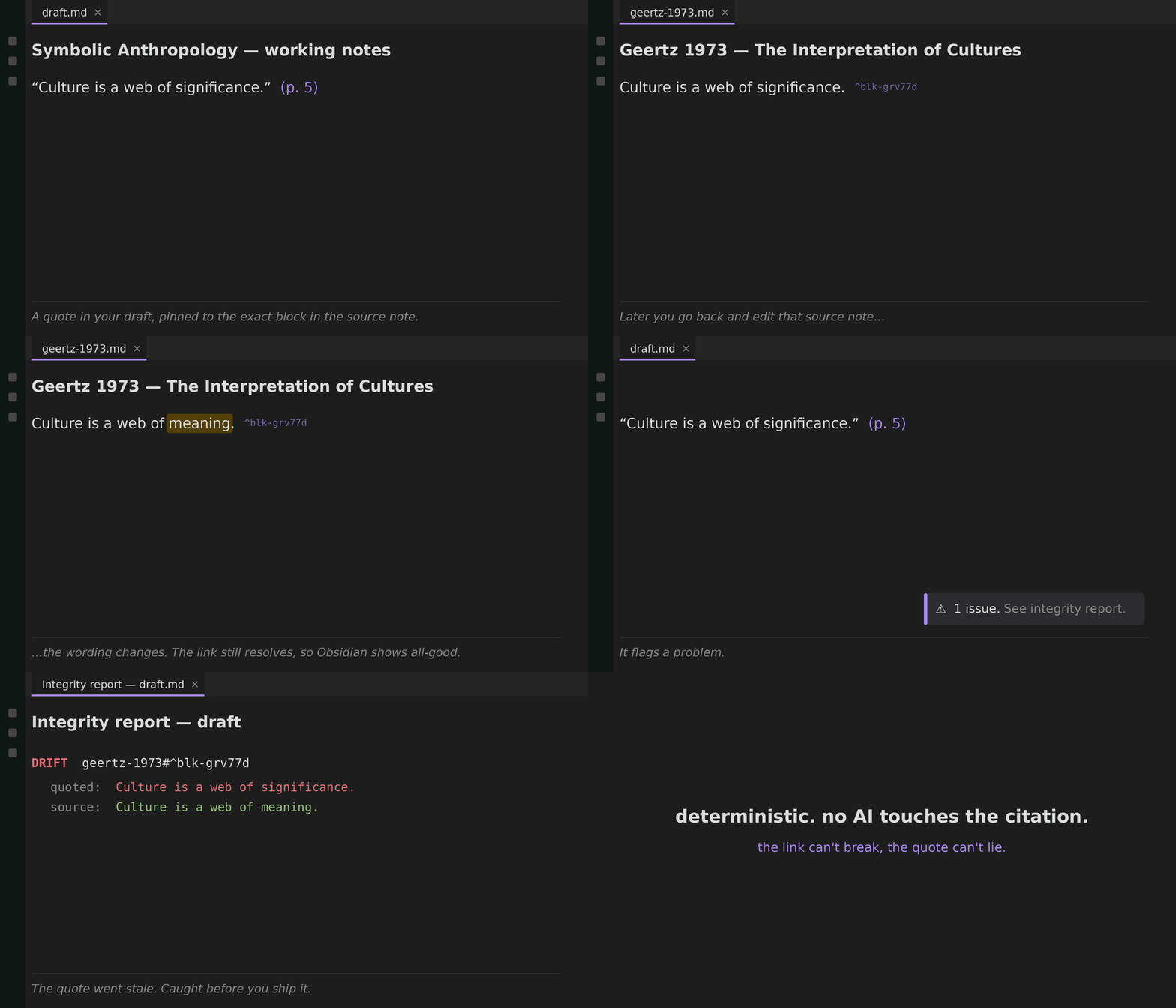
You paste a quote into your writeup, then later edit or reword the source note. The link still works, so Obsidian shows everything as fine, but the words you quoted no longer match the source, and nothing warns you. Cite Engine catches that.
It stamps your source notes, snapshots each quote at the moment you cite it, and an integrity check re-reads your sources and flags any quote that has drifted. No AI touches your citations, so it can never invent one, and it never rewrites your prose. It just tells you which quotes to look at.
Works alongside Zotero, the Web Clipper, or any workflow where you keep your sources as notes in your vault.
Three commands
- Stamp source — run on a clipped note. Adds a stable
citekeyto frontmatter (fromauthor/year/title) and a^block-idto every passage. Idempotent. - Cite a passage — fuzzy-pick a passage from your stamped sources and
insert a live block-ref citation
[[citekey#^blk|p. NN]]. There is no free-text path, so you cannot cite something that doesn't exist. - Integrity check — scan the active note; flags any citation that no longer resolves, and any quoted text that has drifted from its source block.
A quote icon in the left ribbon also runs Cite a passage.
Data model
A source note carries citekey in frontmatter and ^block-ids on its
passages. A citation is a native block ref plus a page locator. It renders
live, so it can't drift. Resolution is by citekey (content-derived, stable),
independent of filename, so renames don't break anything.
Install
From Community Plugins: Settings, Community plugins, Browse, search "Cite Engine".
Beta / testing via BRAT: install the BRAT plugin, run Add a beta plugin,
and paste Flyingmiata-droid/cite-engine.
Manual: copy main.js, manifest.json, versions.json into
<your-vault>/.obsidian/plugins/cite-engine/, then enable in Settings,
Community plugins.
Develop
npm install
npm run build      # bundle -> main.js
npm test           # core logic: G1 no-fabrication, G2 drift-proof
npx tsc --noEmit   # typecheck
The citation logic lives in src/core.ts with no Obsidian imports, so it's unit
tested headl