Chinese Popover Dictionary
 Kantulaev 孔凯风22 downloads
Double-click Apple Liquid Glass Chinese popover dictionary with Pinyin, Jyutping, Cantonese pronunciation, and concise definitions.
- Overview
- Scorecard
- Updates6
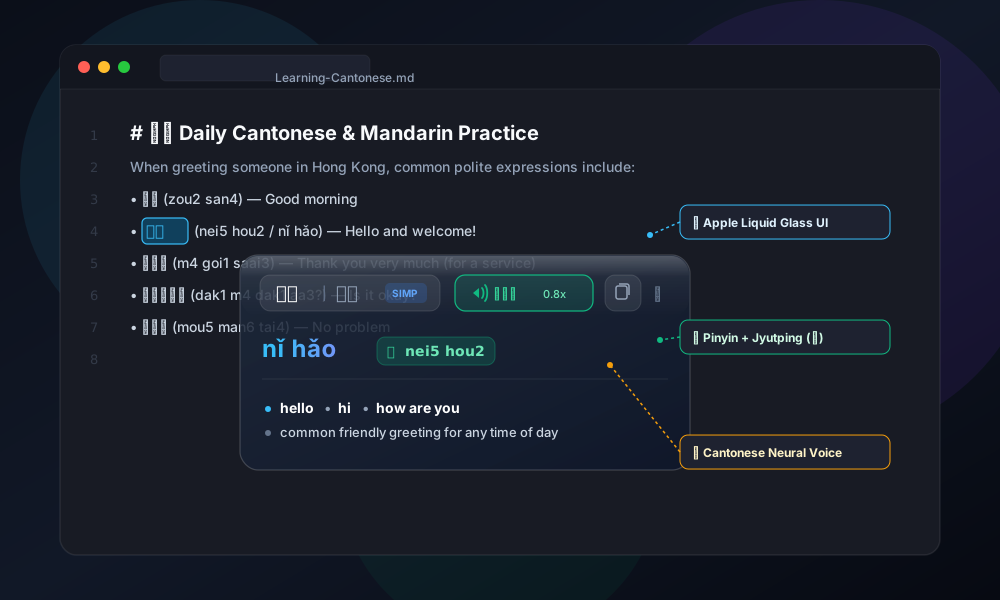
Instant, beautiful Chinese popover lookup and personal vocabulary book for Obsidian.
Featuring dual Mandarin Pinyin and Cantonese Jyutping, smart Chinese word selection (word splitting), authentic neural audio pronunciation, simplified & traditional Hanzi, and an Apple Liquid Glass aesthetic.
🌟 Why Chinese Popover Dictionary?
Reading and studying Chinese in Obsidian shouldn't pull you out of your flow. Chinese Popover Dictionary brings a desktop-grade popover experience directly into your notes:
- 💎 Apple Liquid Glass Design — Translucent frosted glass squircle with fluid blur effects, crisp typography, and adaptive light/dark theming.
- ✂️ Smart Chinese Word Selection (Word Splitting) — Solves Obsidian's lack of Chinese word boundaries. Double-clicking any Chinese character cleanly selects the exact word (
学习or香港) instead of a single character or the entire paragraph, powered by CEDICT and nativeIntl.Segmenter. - 📖 Permanent Personal Vocabulary Notebook — Star difficult words with
⭐in 1 click; they are saved permanently into a clean Markdown note in your vault (Chinese Vocabulary.md). - 🃏 Interactive Sidebar & Flashcards — Review saved words in a sleek right sidebar tab with search, filters, audio buttons, and tap-to-reveal quiz mode.
- 🀄 Dual Phonetics (Pinyin + Jyutping) — Perfect for learners of both Mandarin (
Putonghua) and Cantonese (Guangdonghua). - 🔊 Native Voice Pronunciation — Studio-quality neural audio for both dialects with adjustable playback speed (0.5x – 1.4x) and offline Web Speech support.
- ⚡ Instant Multi-Trigger Access — Double-click, hover with modifier key (
Option / Alt / Shift / Cmd / Ctrl), or hotkey navigation. - 📚 Massive Vocabulary (118,000+ words) — Powered by CC-CEDICT merged with Pleco's Cantonese readings, CC-Canto, and Rime Cantonese.
- 🛡️ Obsidian Margin Protection — Automatically stays within your text container and never spills off-screen or into empty side margins.
📸 Overview
┌────────────────────────────────────────────────────────────────┐
│  你好  |  你好  [SIMP]   🔊 廣東話 0.8x   📋 Copy   ⭐ Star   ✕  │
├────────────────────────────────────────────────────────────────┤
│  nǐ hǎo         粵 nei5 hou2                                   │
├────────────────────────────────────────────────────────────────┤
│  • hello  • hi  • how are you                                  │
│  • common friendly greeting for any occasion                   │
└────────────────────────────────────────────────────────────────┘
✨ Feature Highlights
1. Dual Phonetic Support
Display tone-marked Pinyin alongside Cantonese Jyutping simultaneously, or switch modes on the fly:
- Both (
both): Displays Mandarin Pinyin with diacritics (nǐ hǎo) and a dedicated green Jyutping badge (粵 nei5 hou2). - Pinyin only (
pinyin): Focused view for Mandarin learners. - Jyutping only (
jyutping): Tailored for Cantonese learners. - Auto by Dialect (
dialect_auto): Automatically highlights the phonetics corresponding to your selected speech dialect.
2. Authentic Neural Pronunciation
- Cantonese (
廣東話): Natural Hong Kong neural voice (zh-HK/yue). - Mandarin (
普通话): Clear Putonghua neural voice (zh-CN). - Adjustable Speed: Slow down pronunciation (default
0.8x) to hear tones with razor-sharp clarity. - Smart Fallback: Online Google HD TTS with automatic fallback to local Web Speech API.
3. Simplified & Traditional Hanzi
- Displays both Simplified and Traditional characters side-by-side in equal font size.
- Configurable separator (
-,/,·, or( )). - Option to hide Traditional characters for a more compact card.
4. Smart Positioning & Margin Clamping
- Designed specifically for Obsidian's "Readable line length" mode.
- Clamps popovers inside the active note container to avoid hanging awkwardly into empty grey side margins.
- Auto-flips vertically if a word is near the top edge of your screen.
5. 📖 Personal Vocabulary Notebook & Flashcards
- Permanent Vault Storage: Star difficult words with
⭐in the popover or via hotkey. All saved words are stored permanently in a clean Markdown note in your vault (Chinese Vocabulary.md). - Right Sidebar Tab: Access your vocabulary anytime with the ribbon icon (
book-marked) or command palette. - Interactive Liquid Glass Cards: Each card shows Simplified/Traditional Hanzi, tone-marked Pinyin, green Jyutping badge, definitions, context sentence, and an instant audio playback button.
- 🃏 Flashcards / Practice Mode: Click to mask definitions and test your memory before sleep or study sessions. Tap any card to reveal.
- Context Retention: Automatically remembers the sentence where you found the word!
- Full-text Search & Sort: Filter words instantly by Hanzi, Pinyin, Jyutping, or English meanings. Sort by date or alphabetical order.
6. ✂️ Smart Chinese Word Selection (Word Splitting)
Chinese text contains no spaces between words. By default, Obsidian's editor often highlights an entire sentence or just a single character when double-clicked:
- Native Word Boundaries: Automatically calculates Chinese word boundaries using CC-CEDICT combined with JavaScript's native
Intl.Segmenterand dedicated Cantonese grammar heuristics. - 🇭🇰 First-Class Cantonese Intelligence:
- HKSCS & Astral Plane Support: Handles Hong Kong Supplementary Character Set characters and CJK extensions (e.g.
𨋢/ lift,𠵱家/ now,𨳊). - Grammar Patterns: Recognizes colloquial Cantonese A-not-A questions (
去唔去,識唔識,知唔知,食唔食), potential complements (睇唔明,搞得掂,食得落), and verb aspect particles (食緊,買咗,食晒,睇吓).
- HKSCS & Astral Plane Support: Handles Hong Kong Supplementary Character Set characters and CJK extensions (e.g.
- Zero External Dependencies: 0 KB external WASM bloat — runs entirely via native browser APIs and built-in lexicon without heavy binary downloads or IndexedDB cache.
- Precise Double-Click Selection: Snaps editor selection to the exact Chinese word in both Live Preview (editing mode) and Reading View via CodeMirror 6's native
mouseSelectionStyle.
🚀 Quick Start
Installation via Community Directory (Recommended)
- In Obsidian, go to Settings > Community plugins.
- Make sure Restricted mode is turned off.
- Click Browse and search for
Chinese Popover Dictionary. - Click Install, then click Enable.
Manual Installation
- Download
main.js,manifest.json, andstyles.cssfrom the latest GitHub Release. - Create a folder named
chinese-popover-dictin your vault's plugins folder:<YourVault>/.obsidian/plugins/chinese-popover-dict/ - Place
main.js,manifest.json, andstyles.cssinto that folder. - Reload Obsidian and enable the plugin under Settings > Community plugins.
⌨️ Hotkeys & Commands
All actions can be bound to your favorite keyboard shortcuts under Settings > Hotkeys:
| Command | Suggested Shortcut | Description |
|---|---|---|
| Look up word under cursor or selection | Alt + D | Opens popover for active cursor position or selection |
| Star or unstar word | Alt + B | Adds or removes word from Personal Vocabulary notebook |
| Open vocabulary in sidebar | — | Opens the vocabulary notebook panel in the right sidebar |
| Pronounce active word | Alt + P | Plays audio for current word in chosen dialect |
| Copy active word card | Alt + C | Copies formatted dictionary entry to clipboard |
| Switch Dialect | Alt + S | Toggles between Cantonese (廣東話) and Mandarin (普通话) |
| Cycle Phonetic Display | Alt + T | Cycles: Both → Pinyin → Jyutping → Auto |
| Toggle Chinese Dictionary | — | Enables or disables popover triggers |
| Close Popover | Escape | Closes any open popover immediately |
⚙️ Customization
Customize everything to match your vault's theme:
- Personal Vocabulary:
- Customizable markdown file path (
Chinese Vocabulary.md). - Auto-save context sentences: On / Off.
- Practice / flashcard mode toggle.
- Customizable markdown file path (
- Trigger Modes: Double-click, Hover with modifier key (Alt/Option, Shift, Ctrl, Cmd), Hover always, or Hotkeys only.
- Themes:
- 🌌 Liquid Glass Dark — Deep glassmorphism with vivid cyan/emerald highlights.
- ☀️ Liquid Glass Light — Frosted translucent glass tuned for light themes.
- ⬛ Solid Minimalist — Opaque card styling with zero transparency.
- 🔄 Auto — Adapts seamlessly to your current Obsidian theme.
- Card Dimensions: Adjust popover width (260–460 px), height (130–250 px), and backdrop blur (0–60 px).
- Typography: Fine-tune font sizes for Hanzi, Pinyin, and translations independently.
🔒 Privacy & Security
We believe your notes and thoughts belong solely to you:
- 🛡️ 100% Local Dictionary Queries: Words are looked up entirely inside your local vault. No note content, text selections, or keystrokes are ever sent to an external server.
- 📁 Your Data Stays Yours: Your personal vocabulary is written to standard Markdown in your vault. It will never be locked into proprietary formats and will remain readable forever.
- 🚫 Zero Telemetry: No trackers, no cookies, no analytics.
- 🌐 External Connections:
- Google TTS API (
translate.google.com): When the audio button is clicked, an audio stream is fetched for the selected word. You can switch to Web Speech API in settings for 100% offline pronunciation. - CEDICT Database Download: On first run, the plugin downloads the offline dictionary database (
cedict.json, ~42 MB) from GitHub Releases and caches it in your plugin folder for lifetime offline use.
- Google TTS API (
📜 Credits & Licenses
- CC-CEDICT: Licensed under Creative Commons Attribution-Share Alike 3.0.
- Pleco Software: Hand-curated Cantonese readings database.
- CC-Canto: Additional colloquial Cantonese vocabulary.
- Rime Cantonese: Frequency and phonetic mappings.
📄 License
Distributed under the MIT License. Built with ❤️ for the Chinese learning community.