Search...Search plugins and themes...
⌘K
Sign in
  • Get started
  • Download
  • Pricing
  • Enterprise
  • Account
  • Obsidian
  • Overview
  • Sync
  • Publish
  • Canvas
  • Mobile
  • Web Clipper
  • CLI
  • Learn
  • Help
  • Developers
  • Changelog
  • About
  • Roadmap
  • Blog
  • Resources
  • System status
  • License overview
  • Terms of service
  • Privacy policy
  • Security
  • Community
  • Plugins
  • Themes
  • Discord
  • Forum / 中文论坛
  • Merch store
  • Brand guidelines
Follow us
DiscordTwitterBlueskyThreadsMastodonYouTubeGitHub
© 2026 Obsidian

Chinese Converter

lanternyorulanternyoru158 downloads

Convert between Simplified and Traditional Chinese.

Add to Obsidian
  • Overview
  • Scorecard
  • Updates1

A simple Obsidian plugin to quickly convert text between Simplified Chinese and Traditional Chinese.

Features

  • Convert text using the Ribbon icon. The icon state toggles automatically:
    • When the icon shows "繁", it will convert Simplified -> Traditional.
    • When the icon shows "简", it will convert Traditional -> Simplified.
  • Supports conversion via Command Palette:
    • Convert simplified to traditional
    • Convert traditional to simplified
  • Works on selected text or the entire document if no text is selected.

How to Use

  1. Click the "繁" / "简" icon in the left-side Ribbon.
  2. Or, open the Command Palette (Cmd/Ctrl + P) and search for "Convert...".

Demo
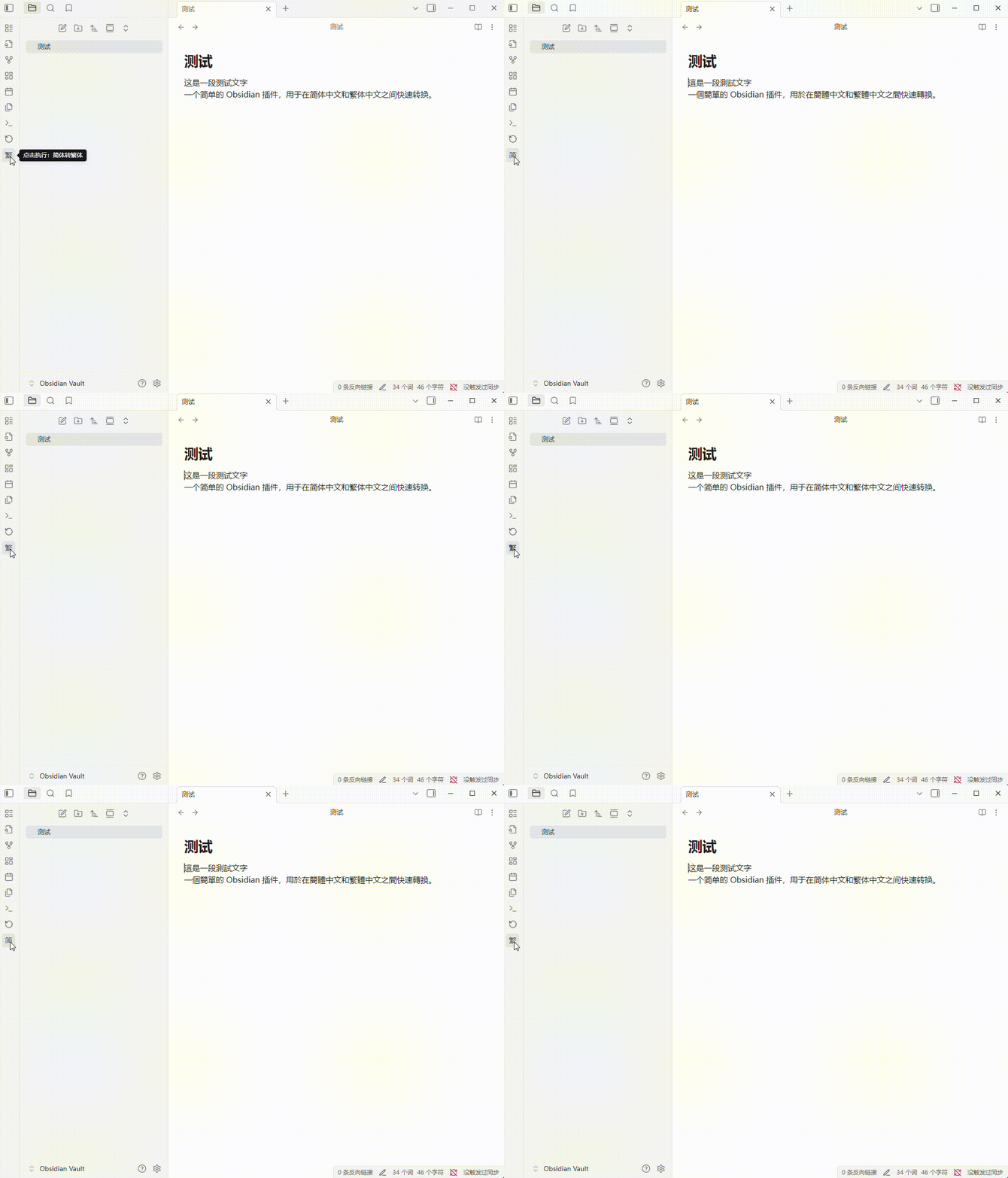
插件功能演示

Author

LanternYoru


中文简繁转换 (Chinese Converter)

一个简单的 Obsidian 插件,用于在简体中文和繁体中文之间快速转换。

功能

  • 通过左侧 Ribbon 栏的图标按钮进行简繁转换。该按钮会自动切换状态。
    • 图标显示 “繁” 时,点击执行“简体 -> 繁体”。
    • 图标显示 “简” 时,点击执行“繁体 -> 简体”。
  • 支持命令面板调用:
    • Convert Simplified to Traditional (简体转繁体)
    • Convert Traditional to Simplified (繁体转简体)
  • 支持对选中文本或整个文档进行转换。

如何使用

  1. 点击左侧 Ribbon 栏的 “繁” / “简” 图标。
  2. 或打开命令面板 (Cmd/Ctrl + P),输入“繁体”或“简体”来查找转换命令。

演示

插件功能演示

作者

LanternYoru

79%
HealthExcellent
ReviewSatisfactory
About
Convert selected content or the entire document to Simplified Chinese or Traditional Chinese. Use the buttons in the left toolbar or command panel to convert with a single click; the buttons automatically switch between "Traditional/Simplified" to indicate the conversion direction.
LanguagesEditingCommands
Details
Current version
1.0.0
Last updated
8 months ago
Created
8 months ago
Updates
1 release
Downloads
158
Compatible with
Obsidian 0.15.0+
Platforms
Desktop, Mobile
License
0BSD
Report bugRequest featureReport plugin
Author
lanternyorulanternyoru
GitHublanternyoru
  1. Community
  2. Plugins
  3. Languages
  4. Chinese Converter

Related plugins

Simplified Chinese Word Splitting

Adds Simplified Chinese word splitting support for the editor and Vim mode.

Easy Typing

Auto format when typing.

Paste URL into selection

Paste URL "into" selected text.

LanguageTool

Unofficial integration of the LanguageTool spell and grammar checker.

Vimrc Support

Auto-load a startup file with Vim commands.

Code Editor Shortcuts

Add keyboard shortcuts (hotkeys) commonly found in code editors such as Visual Studio Code (VS Code) or Sublime Text.

Slash Commander

Customize the slash command list, assign each command an icon.

Advanced Tables

Improved table navigation, formatting, and manipulation.

Quick Switcher++

Enhanced Quick Switcher, search open panels, and symbols.

Meta Bind

Make your notes interactive with inline input fields, metadata displays, and buttons.