
- Overview
- Scorecard
- Updates17
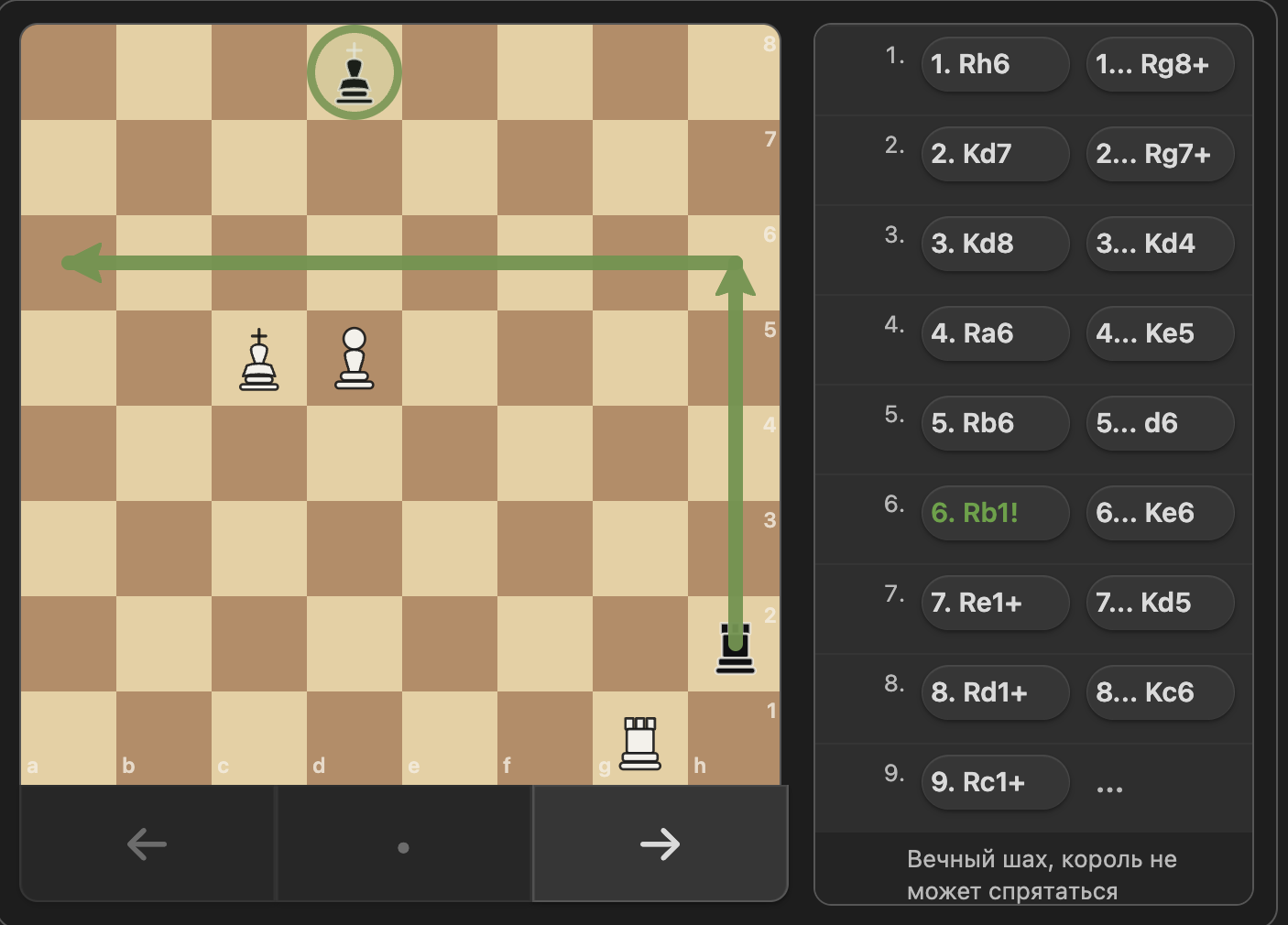
Chess PGN Viewer is an Obsidian plugin that renders interactive chess games and static positions inside fenced chess code blocks. It turns PGN into a clickable board, supports FEN positions, and displays comments, variations, board annotations, and move glyphs.
See CHANGELOG.md for release history.
Screenshots
Features
- Interactive chess board with previous, next, reset, keyboard, and drag-to-move navigation
- PGN parsing with mainline moves and nested variations
- Static FEN position rendering
- Support for PGN comments and board annotations:
%cslsquare highlights%calarrows
- Lichess-style board circles and arrows with right-click controls and PGN saving
- Move annotation glyphs from PGN NAGs:
!,?,!!,??,!?,?!
- Compact study-style notation layout with clickable moves
- Board geometry that stays aligned on resize
- Safe rendering limits for oversized chess blocks and very large PGN trees
Installation
- Open Obsidian Settings.
- Go to Community plugins.
- Search for
Chess PGN Viewer. - Install the plugin.
- Activate the plugin from Community Plugins.
Usage
Create a fenced code block with the chess language:
```chess
orientation: white
showMoves: true
showComments: true
showVariations: true

[Event "Training Game"]
[White "Kasparov"]
[Black "Karpov"]

1. e4 {King pawn opening [%csl Ge4][%cal Ge2e4]}
   e5
2. Nf3 Nc6
3. Bb5 (3. Bc4 {Italian-style line}) a6
```
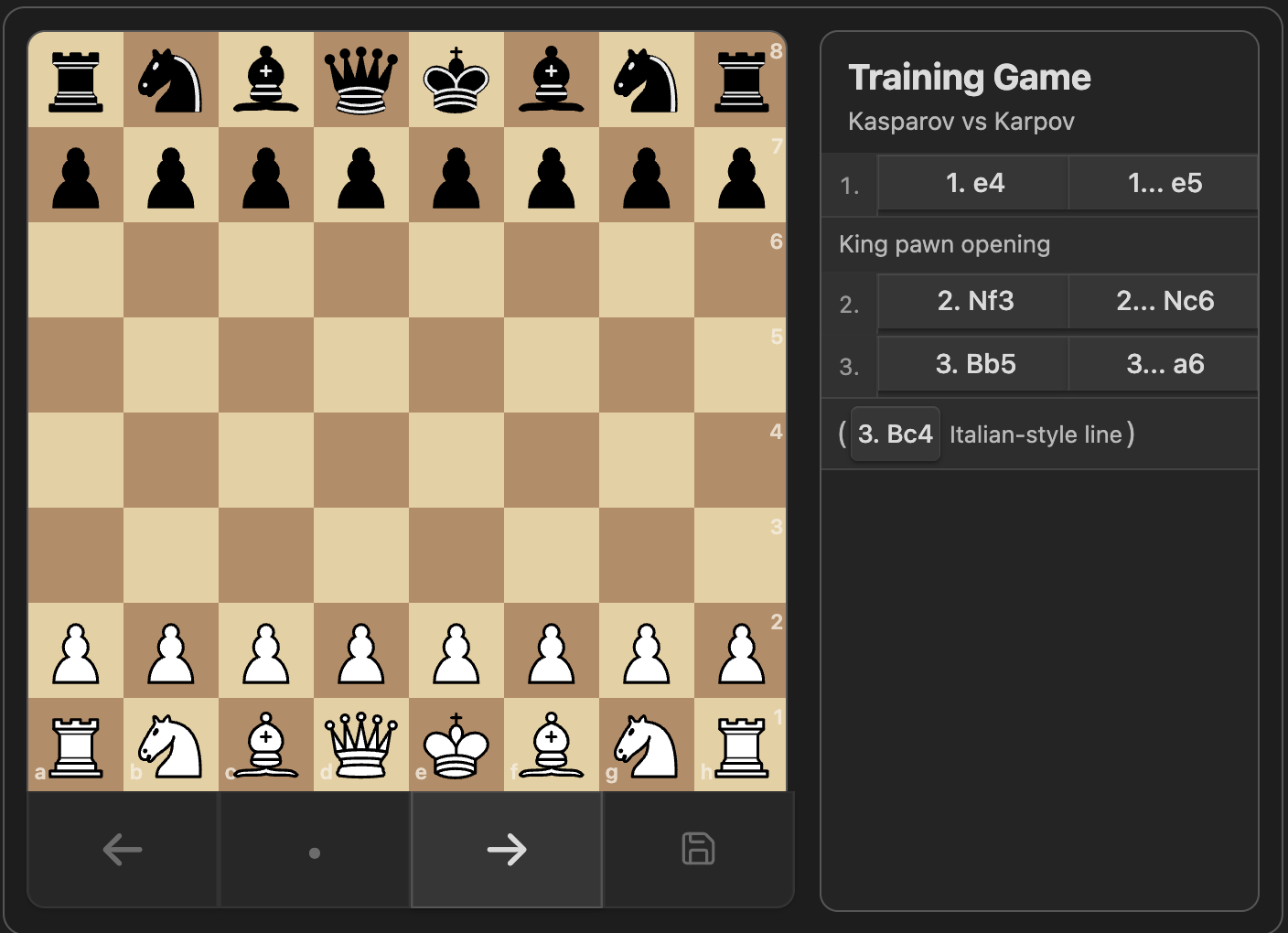
Focus the viewer and use the left and right arrow keys to step backward and forward through moves. You can also drag a piece to its recorded destination square to navigate through the PGN from the board. Drag navigation follows the mainline first, then matching variations. It does not edit the PGN or create new moves.
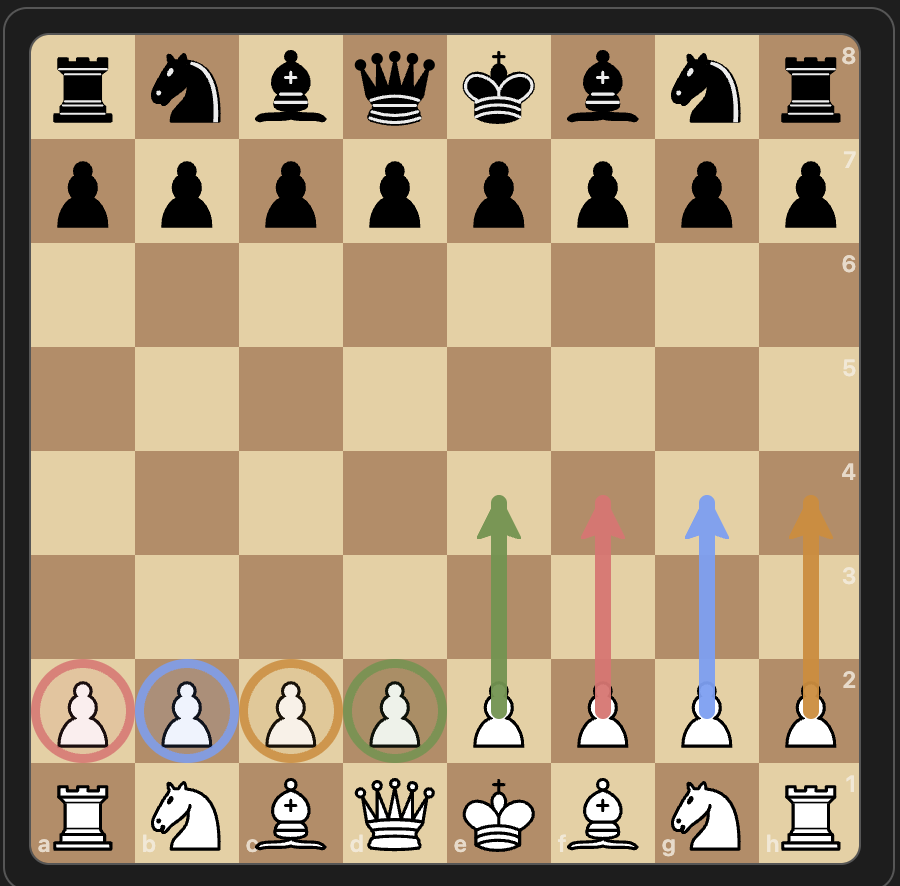
You can also add temporary board marks while viewing a game:
- Right-click a square to toggle a circle.
- Right-drag from one square to another to toggle an arrow.
- Use
CommandorOptionfor blue,Controlfor red, andControlwithCommandorOptionfor orange. - Select a PGN move and click the save icon to write the current board marks into that move comment as
%csland%calannotations.
Unsaved board marks are temporary for the selected move and are cleared when you navigate to another move. Saved board marks are written back to the note as standard PGN annotations. Orange marks are saved as yellow because %csl and %cal support green, red, yellow, and blue.
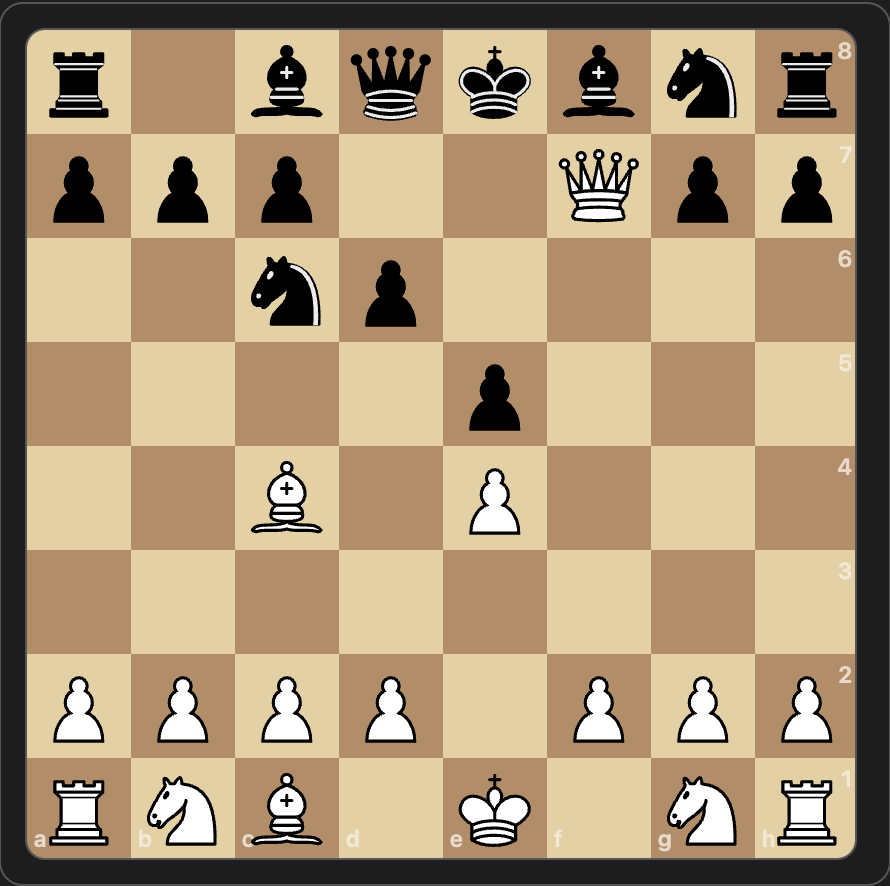
For a static position, use either fen::
```chess
fen: r1bqkbnr/ppp2Qpp/2np4/4p3/2B1P3/8/PPPP1PPP/RNB1K1NR b KQkq - 0 4
```
Or use a standalone [FEN "..."] header:
```chess
[FEN "r1bqkbnr/ppp2Qpp/2np4/4p3/2B1P3/8/PPPP1PPP/RNB1K1NR b KQkq - 0 4"]
```
Static FEN blocks accept positions that are not legal chess positions, including positions without kings, as long as the FEN syntax is valid.
Supported block options
orientation: white | blackfen: <FEN>startMove: <move number>(for example,5after White's move or5...after Black's move)showMoves: true | falseshowComments: true | falseshowVariations: true | false
If a block option is omitted, the plugin uses its default value.
startMove selects the initial board position from the PGN main line while keeping the full game available for navigation. If the requested move is not present, the viewer starts from the initial position.
Development
Use Node.js 24 for parity with the GitHub Actions release workflow.
npm install
npm run dev
npm test
npm run build
npm run devbuilds in watch mode.npm testruns the Vitest suite.npm run buildcreates the productionmain.jsbundle.- After
npm run build, refresh the installed vault copy before manual testing:
cp main.js .obsidian/plugins/chess-pgn-viewer/main.js
cp styles.css .obsidian/plugins/chess-pgn-viewer/styles.css
- To verify the installed copy is current, compare the files directly:
git diff --no-index -- main.js .obsidian/plugins/chess-pgn-viewer/main.js
git diff --no-index -- styles.css .obsidian/plugins/chess-pgn-viewer/styles.css
No output means the local Obsidian plugin copy is in sync.
Release
GitHub Releases are published by GitHub Actions when a version tag is pushed.
- Update
package.json,package-lock.json,manifest.json,versions.json, andCHANGELOG.md. - Run
npm run lint,npm test,npm run build,npm audit --omit=dev --audit-level=high, andnpm audit --audit-level=high. - Commit the release changes, open a pull request into
main, and merge it. - Create and push a signed version tag from
main:
git tag -s -m "X.Y.Z" X.Y.Z HEAD
git push origin main
git push origin X.Y.Z
The release workflow audits production dependencies and the release toolchain at the high-severity threshold, verifies that the tag version matches package.json, manifest.json, and versions.json, rebuilds main.js, creates GitHub artifact attestations, and uploads manifest.json, main.js, and styles.css as release assets. Obsidian requires the GitHub release tag to match manifest.json exactly, so use 1.0.0, not v1.0.0.
Project Structure
src/main.ts- Obsidian plugin entry pointsrc/chess/block.ts- PGN/FEN parsing and game-state modelsrc/chess/viewer.ts- board rendering, navigation, and notation UItests/- Vitest coverage for parsing and viewer behaviordocs/assets/- screenshot assets used in this READMEstyles.css- plugin stylesmain.js- built plugin bundle
Testing
Tests use vitest with jsdom. The most important coverage is around PGN/FEN parsing, notation layout, navigation, geometry, and annotation rendering. Run the full suite before publishing changes.
When fixing notation layout bugs, add a focused regression in tests/chess-viewer.test.ts first and cover both the CSS contract and the rendered DOM behavior.
Notes
- The plugin targets Obsidian desktop and does not require a separate backend.
- Chess piece artwork is based on the Chessground cburnett assets from
chessground.cburnett.css. main.jsis generated; do not edit it by hand.- The local development copy in
.obsidian/plugins/chess-pgn-viewer/is for testing only and is not part of the Git repository. - Oversized
chessblocks and PGN trees with too many moves or variations are rejected before rendering to keep Obsidian responsive. - Manual Obsidian checks should include long SAN labels, black-move prefixes like
1..., and variation rows in a narrow notation panel to ensure text wraps instead of clipping.