Search...Search plugins and themes...
⌘K
Sign in
  • Get started
  • Download
  • Pricing
  • Enterprise
  • Account
  • Obsidian
  • Overview
  • Sync
  • Publish
  • Canvas
  • Mobile
  • Web Clipper
  • CLI
  • Learn
  • Help
  • Developers
  • Changelog
  • About
  • Roadmap
  • Blog
  • Resources
  • System status
  • License overview
  • Terms of service
  • Privacy policy
  • Security
  • Community
  • Plugins
  • Themes
  • Discord
  • Forum / 中文论坛
  • Merch store
  • Brand guidelines
Follow us
DiscordTwitterBlueskyThreadsMastodonYouTubeGitHub
© 2026 Obsidian

Checkbox Progress

Wallace WyslasWallace Wyslas62 downloads

Shows checkbox progress bar in the view header (mobile + desktop) and status bar, with a reset button to clear all checkboxes.

Add to Obsidian
  • Overview
  • Scorecard
  • Updates1

An Obsidian plugin that displays a real-time checkbox completion counter in your status bar (next to words and characters). It also adds a progress bar with a reset button to the view header on both desktop and mobile!
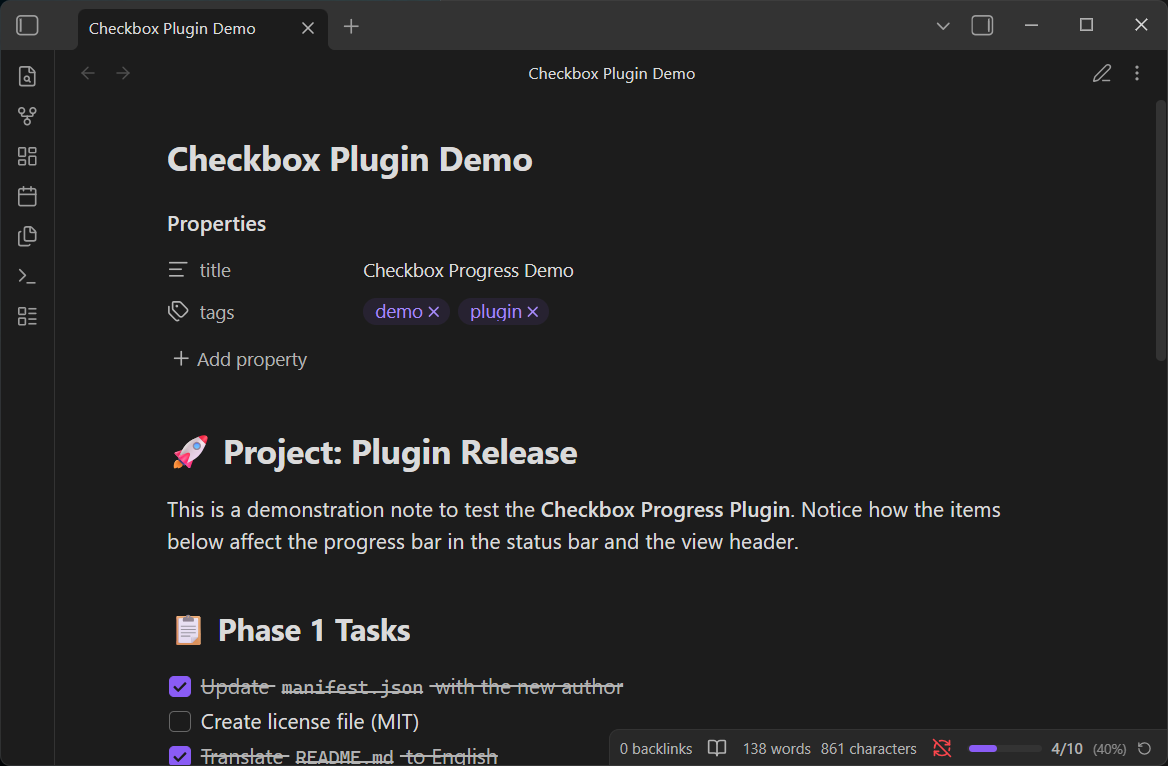
Status Bar and View Header

Features

  • Real-time Counting: Counts all checkboxes (- [ ], - [x], - [-], - [/]) in the active note.
  • Status Bar Integration: Displays ☑ 3/10 (30%) directly in the Obsidian status bar.
  • Smart Ignoring: Automatically ignores checkboxes inside code blocks (like dataviewjs) and frontmatter YAML.
  • Auto-hide: The counter hides itself gracefully in notes without any checkboxes.
  • Reset Button: Quickly clear all completed checkboxes in a note with a single click.
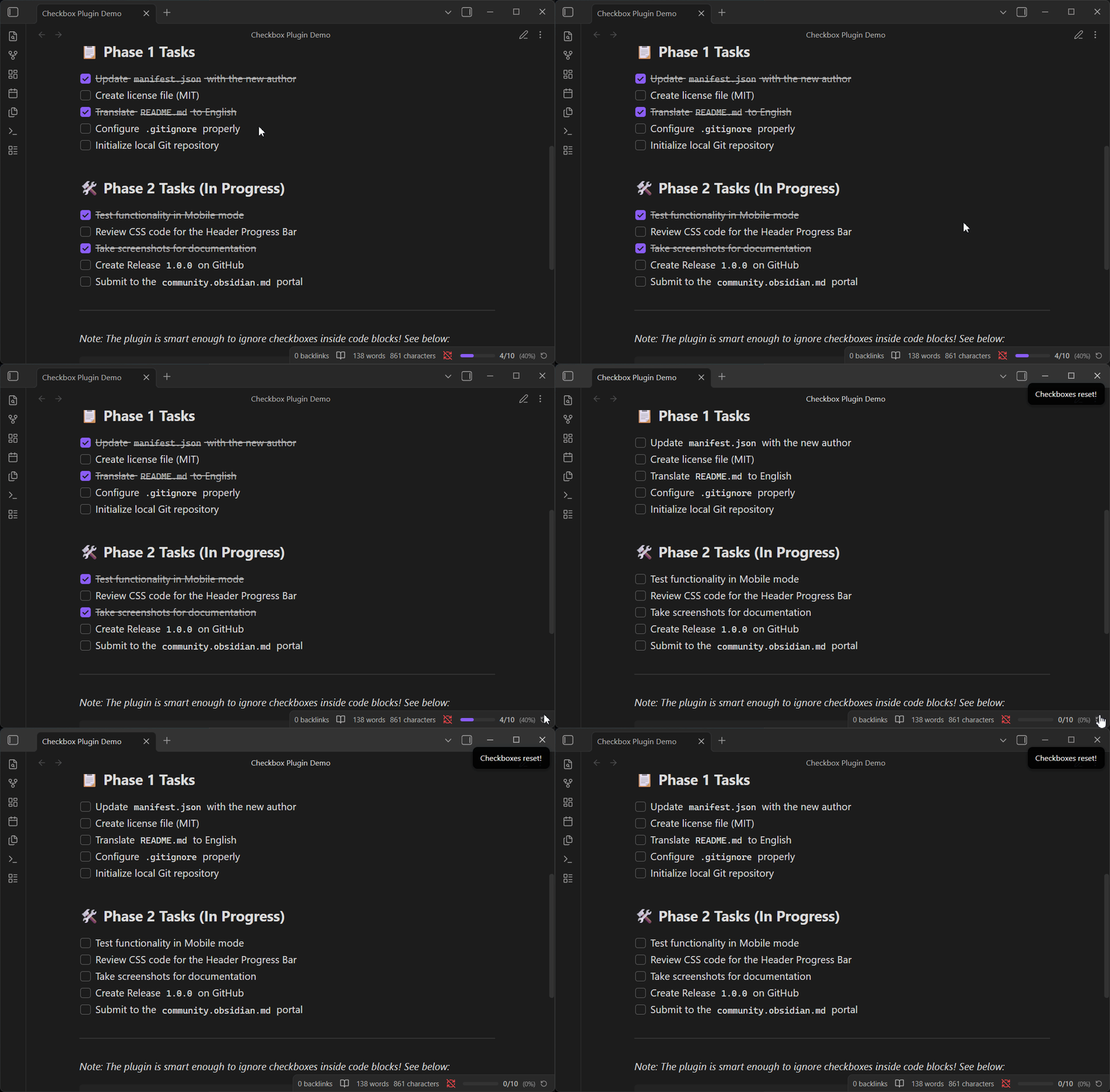
Reset Button Action

Manual Installation

While the plugin is not yet available in the Community Plugins directory, you can install it manually:

  1. Download the latest release from the GitHub Releases page.
  2. Extract the contents (main.js, manifest.json, styles.css) into your Obsidian vault's plugin directory: .obsidian/plugins/checkbox-progress/.
  3. In Obsidian, go to Settings > Community plugins and click Reload plugins.
  4. Enable "Checkbox Progress" in the plugins list.

Development

To build the plugin from source:

npm install
npm run build

How it works

The plugin listens to several Obsidian events to provide a seamless experience:

  • File open events
  • File modification (debounced 300ms for performance)
  • Tab/pane switching

Upon each event, it quickly scans the active note's content, counts total vs. completed checkboxes, and updates the UI elements accordingly.

License

This project is licensed under the MIT License - see the LICENSE file for details.

HealthExcellent
ReviewCaution
About
Display a real-time checkbox completion counter in the status bar and a progress bar with a reset button in the note header on desktop and mobile. Count all checkbox states in the active note (checked, unchecked, indeterminate) while ignoring code blocks and frontmatter, and hide when no checkboxes are present.
TasksStatus bar
Details
Current version
1.0.0
Last updated
Last month
Created
Last month
Updates
1 release
Downloads
62
Compatible with
Obsidian 1.0.0+
Platforms
Desktop, Mobile
License
MIT
Report bugRequest featureReport plugin
Author
Wallace WyslasWallace Wyslaswallacewyslas
GitHubwallacewyslas
  1. Community
  2. Plugins
  3. Tasks
  4. Checkbox Progress

Related plugins

Day Planner OG

Day planning from a simple task list in a Markdown note (bare bones, preserves the features and behavior of the original plugin).

Completed Task Display

Controls for displaying or hiding completed tasks.

Pomodoro Timer

Manage your daily focus using the Pomodoro Technique.

TaskNotes

Note-based task management with calendar, pomodoro and time-tracking integration.

Tasks

Track tasks across your vault. Supports due dates, recurring tasks, done dates, sub-set of checklist items, and filtering. Maintained by Clare Macrae and Ilyas Landikov, created by Martin Schenck.

Day Planner

Turn tasks from daily notes, the Tasks plugin, and calendars into time blocks on an editable timeline, with built-in time tracker.

TickTickSync

Sync TickTick tasks.

Operon

Task and project management system that unifies inline tasks and file-based tasks in the same workflows with Tables, Filters, Calendars, Kanban boards, Gantt views, Canvas, and time tracking.

dotpm

Full-featured task and project management: stunning Gantt charts, Kanban boards, Table views, customizable fields, due date notifications, dependancies

Task Collector

Change task status and collect tasks within a document using hotkeys and context menus.