Chat Log Render
 muzaijian41 downloads
Render chat logs into bubble-style cards from chat code blocks. Paste raw chat exports and they become chat cards in reading view.
- Overview
- Scorecard
- Updates4
Render chat logs into chat-bubble cards inside your Obsidian notes. Paste a raw chat export (WeChat, QQ, or any name + time + message text) into a ```chat code block and it becomes a clean chat UI in reading view.
在 Obsidian 笔记里把聊天记录渲染成聊天气泡卡片。把微信、QQ 或任意「昵称 + 时间 + 消息」格式的原始聊天记录粘贴进 ```chat 代码块,阅读视图自动变成干净的聊天界面。
| Paste raw export → rendered card(写代码块 → 得到聊天卡片) | Media, system lines & right-side bubbles(媒体消息、系统提示与右侧绿气泡) |
|---|---|
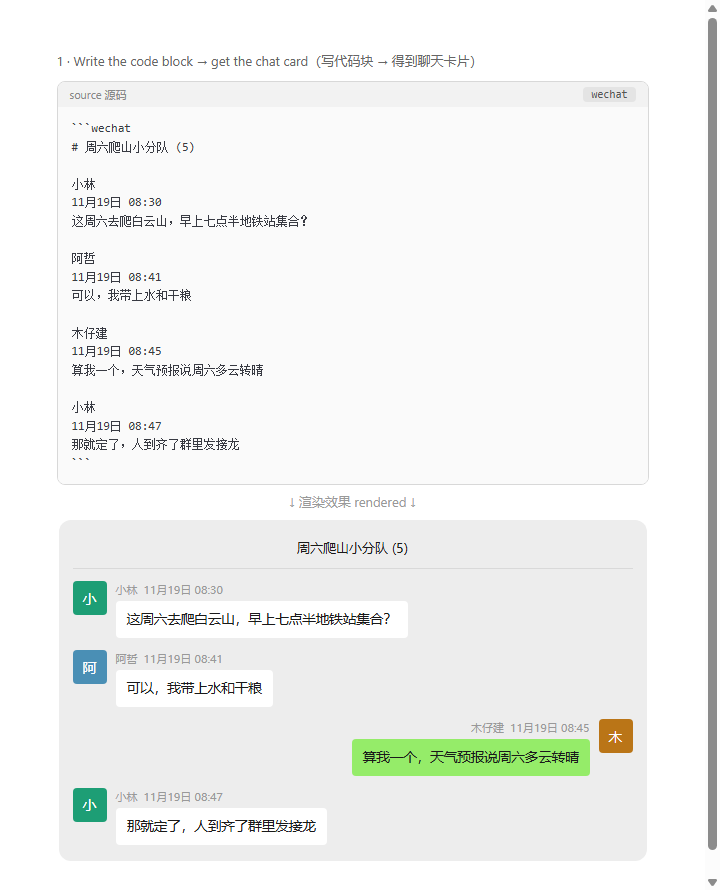 |
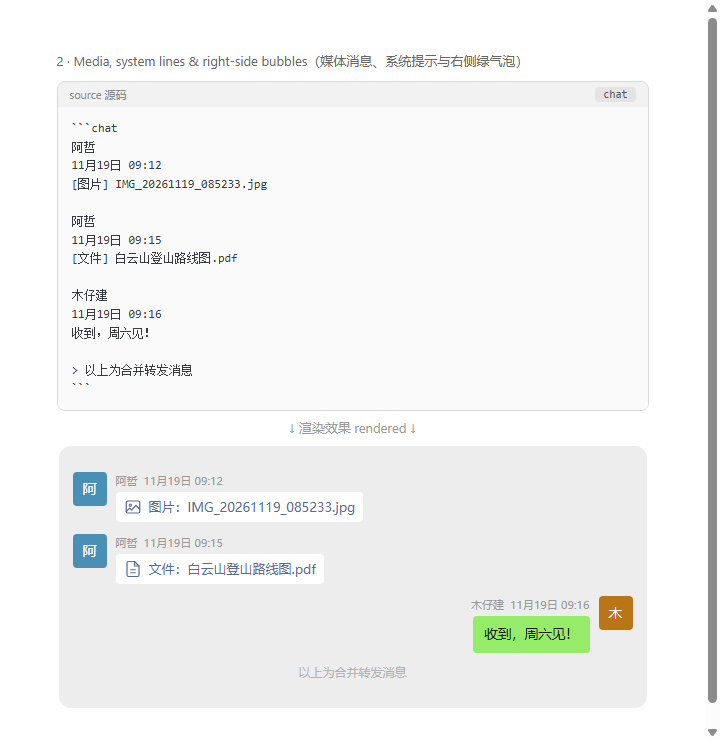 |
Each screenshot shows the source code block above and the rendered result below (all data in the screenshots is fictional). 截图为「源码块在上、渲染结果在下」的对照图(图中数据均为虚构)。
Features 功能
- Paste and go(粘贴即用) — no rigid schema. Paste chat text straight from WeChat mobile multi-select, PC exports, or handwritten notes. 无需固定模板,手机多选复制、PC 导出、手写文本都能解析。
- Three header formats(三种消息头格式) auto-detected(自动识别):
Name line followed by a time line(昵称行 + 时间行,微信手机端导出):
Alice
2026/11/19 9:31
Good morning!
Name and datetime on one line(昵称 + 时间同行,PC 端导出):
Alice 2026/11/19 9:31:02
Good morning!
Bracket style(方括号格式):
[2026/11/19 9:31:02] Alice: Good morning!
- Smart parsing(智能防误判) — data timestamps inside message bodies (e.g.
2026-10-17 13:34:02pasted as part of a debug log) are kept as body text, not misread as new messages. 消息正文里的数据时间戳不会被误拆成新消息。 - Images inside bubbles(气泡内图片) — standard Markdown
, relative paths (../../../附件/img.png), and Obsidian embeds![[img.png]]all render as real images inside the bubble. Path resolution tries vault-relative → note-relative → filename lookup. 气泡内的 Markdown 图片、相对路径、Obsidian 嵌入语法都会显示为真实图片(按 库内路径 → 笔记相对路径 → 文件名 三级解析)。 - Media lines(媒体消息) —
[image]、[file]、[voice]、[video]([图片]、[文件]、[语音]、[视频])and similar lines render as media cards with icons. 带图标的媒体卡片。 - System lines(系统提示) — a line starting with
>renders as a centered grey system notice (e.g. "Merged forwarded messages" / 「以上为合并转发消息」). - Date dividers(日期分隔线) — inserted automatically when the date changes. 日期变化时自动插入。
- Avatars(头像) — deterministic colors from the sender name hash; first character as the avatar letter. 按昵称稳定取色,首字符作头像。
- Title(标题) — a
# headingon the first line becomes the chat window title (group name). 首行# 标题渲染为顶部群名。
Usage 用法
```chat
# Project Team

Alice
2026/11/19 9:31
Which API was it?

Bob
2026/11/19 9:46
Project ID: bf5ad9cf
API: POST /project/update
- When was it changed
2026-10-17 13:34:02
```
Accepted code block languages: chat, chatlog, wechat, 微信.
支持的代码块语言:chat、chatlog、wechat、微信。
Settings 设置
| Setting 设置 | Description 说明 |
|---|---|
| Right-side name 靠右显示的昵称 | Your own nickname in the chat. Messages from this sender render as green bubbles on the right (like WeChat). Empty = all left. 填你在聊天中的昵称,该昵称消息以绿色气泡靠右显示;留空则全部靠左。 |
| Show avatars 显示头像 | Toggle avatar blocks on/off. 开关头像块。 |
Manual install 手动安装
- Download
main.js,manifest.json,styles.cssfrom the latest release. 从最新 Release 下载三个文件。 - Put them in
<vault>/.obsidian/plugins/obsidian-chat-log-render/. 放入库的.obsidian/plugins/obsidian-chat-log-render/目录。 - Enable "Chat Log Render" in Settings → Community plugins. 在 设置 → 第三方插件 里启用。
How parsing works 解析原理
The parser scans the block twice: first it classifies every line (time header / nick line / body / system / media), then it groups lines into messages. A standalone time line right after body text is treated as data inside the message (common when pasting debug logs); only time lines preceded by a blank line or another message start a new message.
解析器两遍扫描:第一遍给每行分类(时间头 / 昵称行 / 正文 / 系统行 / 媒体行),第二遍按类组装消息。紧跟在正文后面的独立时间行视为消息内的数据(粘贴排障日志时常见);只有前面是空行或另一条消息的时间行才开启新消息。
Compatibility 兼容性
- Requires Obsidian 1.0.0 or later. 需要 Obsidian 1.0.0 及以上。
- Works on desktop and mobile (pure JS, no build step). 桌面端、移动端均可用(纯 JS,免构建)。