Search...Search plugins and themes...
⌘K
Sign in
  • Get started
  • Download
  • Pricing
  • Enterprise
  • Account
  • Obsidian
  • Overview
  • Sync
  • Publish
  • Canvas
  • Mobile
  • Web Clipper
  • CLI
  • Learn
  • Help
  • Developers
  • Changelog
  • About
  • Roadmap
  • Blog
  • Resources
  • System status
  • License overview
  • Terms of service
  • Privacy policy
  • Security
  • Community
  • Plugins
  • Themes
  • Discord
  • Forum / 中文论坛
  • Merch store
  • Brand guidelines
Follow us
DiscordTwitterBlueskyThreadsMastodonYouTubeGitHub
© 2026 Obsidian

Character Insertion

takamichietakamichie4k downloads

Insert a specified symbol under the cursor.

Add to Obsidian
  • Overview
  • Scorecard
  • Updates1

A plug-in that inserts a specified character in advance at the cursor position.
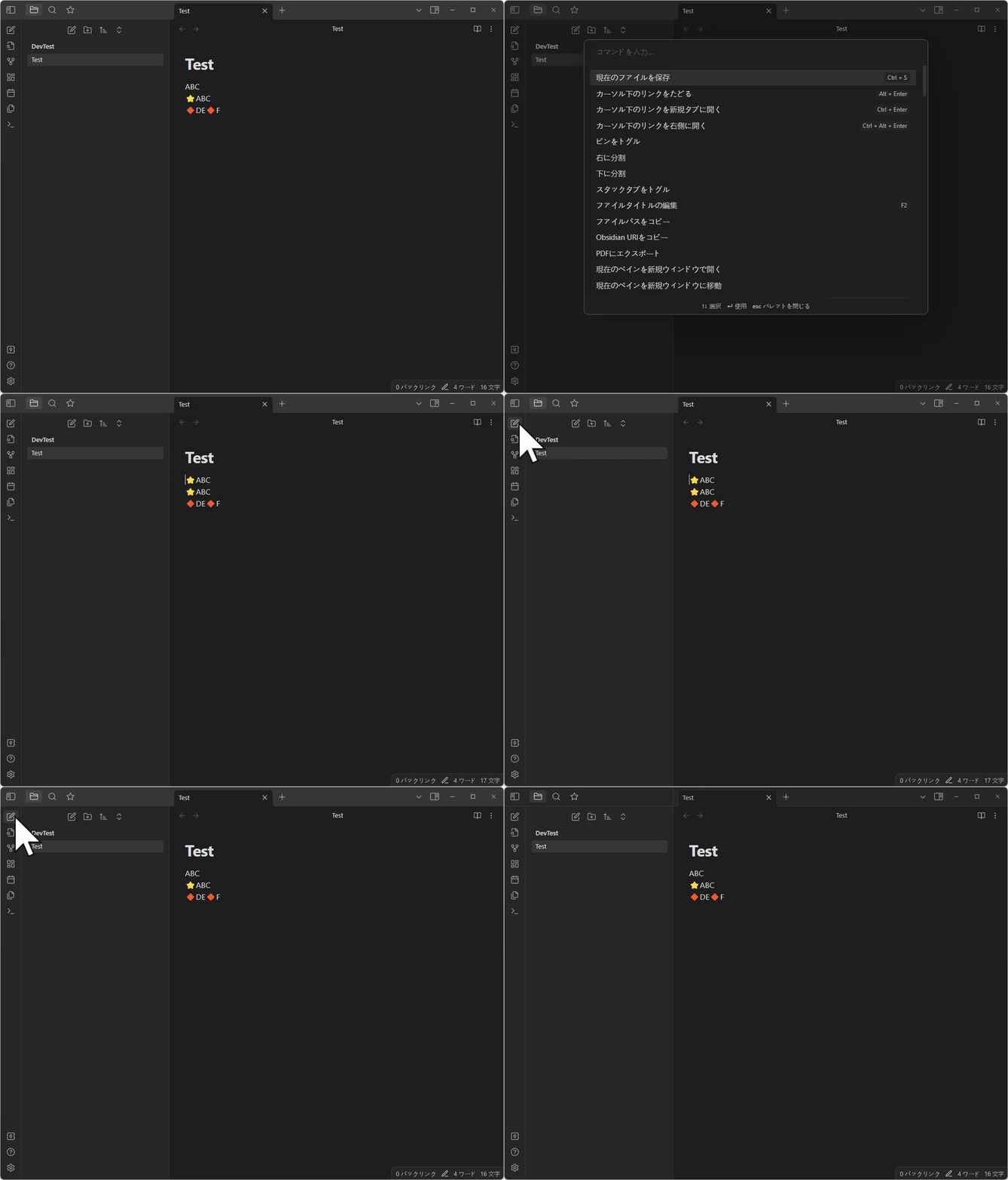
demo

Insert the character set in advance in the cursor position in the settings.

For example, if the value of the specified "input charactor" is the following value...

⭐
🔶
👍

Each time the command is executed, the following characters are inserted / deleted in the cursor position.

flowchart LR
  A[Without letters] --> B["⭐"]
  B --> C["🔶"]
  C --> D["👍"]
  D --> E["No text <br> (deleted 👍)"]

When to use it?

The author creates a diary with Obsidian.

In the diary, each line marked each line with emoticons, but I felt it was troublesome to copy the mark and paste it to the necessary parts.

Similarly.If you want to mark the markdown documents with fixed rules, I think this plugin will be useful.

HealthFair
ReviewSatisfactory
About
Insert a configured sequence of characters at the cursor, cycling through the list each time the command runs. Mark diary lines, headings, or notes with emojis, symbols, or fixed markers without manual copy‑paste by advancing through your preset characters.
EditingEmojiCommands
Details
Current version
1.0.0
Last updated
3 years ago
Created
4 years ago
Updates
1 release
Downloads
4k
Compatible with
Obsidian 1.1.16+
Platforms
Desktop, Mobile
License
MIT
Report bugRequest featureReport plugin
Sponsor
Buy Me a Coffee
Author
takamichietakamichie
github.com/TakamiChie
GitHubtakamichie
  1. Community
  2. Plugins
  3. Editing
  4. Character Insertion

Related plugins

Sort and Permute lines

Sort and Permute lines in whole file or selection.

Heading Shifter

Easily Shift and Change Markdown headings.

Emoji Toolbar

Quickly search for and insert emojis into your editor.

Paste URL into selection

Paste URL "into" selected text.

Keyshots

Add classic hotkey/shortcuts commands from popular IDEs like Visual Studio Code or JetBrains Family.

Vimrc Support

Auto-load a startup file with Vim commands.

Code Editor Shortcuts

Add keyboard shortcuts (hotkeys) commonly found in code editors such as Visual Studio Code (VS Code) or Sublime Text.

LanguageTool Integration

Advanced grammar and spell checking, powered by LanguageTool.

Meta Bind

Make your notes interactive with inline input fields, metadata displays, and buttons.

Quick Switcher++

Enhanced Quick Switcher, search open panels, and symbols.