Canvas Word + PDF Export
 Henrik Korslind71 downloads
Export a canvas to PDF or Word (.docx), either as drawn or as running text that follows the arrows.
- Overview
- Scorecard
- Updates6
Canvas Word + PDF Export
An Obsidian plugin that exports a Canvas to PDF or Word (.docx).
It can export a canvas in two different ways:
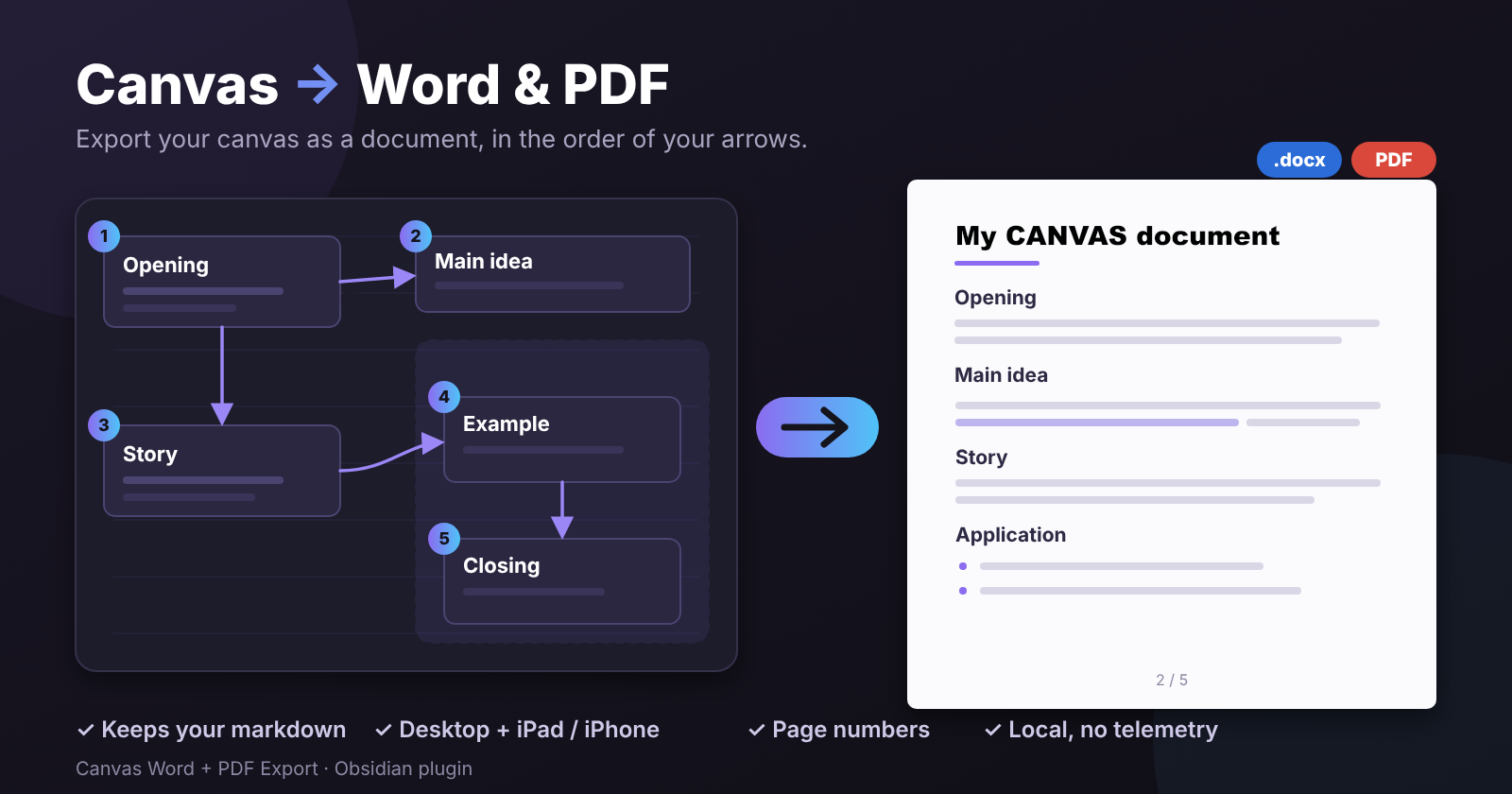
- As a document, following the arrows – the canvas is read in the order of its arrows and written as a running text document, with the markdown formatting kept. Works on desktop and mobile (iOS/iPadOS).
- As drawn – a PDF that looks like the canvas: boxes, groups, colours, arrows and labels where you placed them. Desktop only.
Features
Document export (follow arrows)
- Start at nodes without incoming arrows and follow the arrows. Branches are read left to right; a node where several arrows meet comes after all its predecessors; cycles are handled.
- Unconnected nodes are placed by their position on the canvas.
- Group names become headings (first time the flow enters a group). Arrow labels become an italic line (
» label) before the node they lead to. The canvas name can be used as the title. - Markdown is kept: headings, bold, italic, strikethrough, highlight, inline code and code blocks, links, bullet/numbered/task lists (nested), quotes, callouts, tables and images. Notes added as file nodes (including
#headingsections), link nodes and images are included. - Output as Word (.docx) or PDF (A4). Neither format uses the browser's print engine, so it behaves the same on every platform.
As drawn (desktop)
- One page sized to the canvas, or the canvas scaled onto A4 landscape/portrait.
- Text, notes, images, links, groups, colours, arrows and labels.
- If the normal print route produces a blank page, the plugin automatically falls back to an image-based PDF with an invisible text layer, so the text can still be selected and searched.
Installation
With BRAT (recommended until the plugin is in the community list)
- Install the BRAT plugin from Community plugins.
- In BRAT choose Add beta plugin and enter
sm7urw/canvas-word-pdf-export. - Enable Canvas Word + PDF Export in Settings → Community plugins.
BRAT also works on iOS/iPadOS, where hidden folders such as .obsidian can't be reached from the Files app.
Manually
- Download
main.jsandmanifest.jsonfrom the latest release. - Put them in
<your vault>/.obsidian/plugins/canvas-word-pdf-export/. - Restart Obsidian and enable the plugin. (If your vault syncs between devices, the files follow along.)
Usage
Open a canvas and run one of these from the command palette, or right-click the canvas file / use its ⋯ menu:
| Command | Result |
|---|---|
| Export current canvas as Word document (follow arrows) | <name>-document.docx |
| Export current canvas as PDF document (follow arrows) | <name>-document.pdf |
| Export current canvas to PDF (as drawn) – desktop | <name>.pdf |
The file is saved in the vault, next to the canvas by default (or in a folder you choose). On desktop you can instead get a save dialog. On mobile the exported PDF opens right away; Word files are handed to the system.
Settings
- Canvas name as title, Arrow labels, Group names as headings, Page numbers (
2 / 5in the footer) – for the document export. - Vault output folder – leave empty to save next to the canvas.
- Desktop only: page format for the drawn PDF, always use light theme, export method (automatic or image-based), save location, and Save debug HTML for troubleshooting.
Good to know
- No network access, no telemetry: everything happens locally in Obsidian.
- The PDF document uses the Roboto font, so emojis and rarely used symbols may be missing in the PDF. Word keeps them.
- Long text in a node is clipped to the node's box in the as drawn export, just as on the canvas.
- Tested on macOS and iPadOS. Windows, Linux and Android are untested – reports are welcome.
Development
npm install
npm run dev      # watch + rebuild main.js
npm run build    # type-check + production build
npm test         # unit tests
Copy main.js and manifest.json into a test vault's .obsidian/plugins/canvas-word-pdf-export/ to try a build.
Releasing
npm version patch      # or minor / major – updates package.json, manifest.json and versions.json, commits and tags
git push --follow-tags
The tag is the version number without a leading v (set in .npmrc). Pushing it triggers the Release workflow, which builds the plugin and attaches main.js and manifest.json to a GitHub release.