Canvas Mindmap Widget
 yidachen-1434 downloads
Edit lightweight mind maps directly inside Canvas. All mind-map data stays in the .canvas file. Requires Advanced Canvas.
- Overview
- Scorecard
- Updates3
Edit a lightweight mind map as one object inside Obsidian Canvas. Topics, floating branches, relationships, summaries, and attachments stay in the same .canvas file; creating a mind map does not create extra note files.
Requires desktop Obsidian 1.13.0+ and enabled Advanced Canvas 7.1.0+. This plugin uses Advanced Canvas extension events to preserve custom Canvas data and native undo history. Mobile is not supported.
Get started
- Install and enable Advanced Canvas.
- Install Canvas Mindmap Widget from Community plugins. For manual installation, put the release's
main.js,manifest.json, andstyles.cssin.obsidian/plugins/canvas-mindmap-widget/and enable it. - Open a Canvas and use the bottom mind-map button or the Add mind map command. Drag the button to place a new map.
Editing
| Action | Result |
|---|---|
| First double-click a locked map | Enter editing only; no topic is created |
| Double-click again on a topic | Edit its text |
| Double-click again on empty map space | Create a floating topic at that location |
| Tab / Enter | Add a child / sibling topic |
| Drag a topic to empty space | Detach and position its branch freely |
| Drag a floating topic onto another topic | Reattach its branch |
| Relationship button, then another topic | Connect topics directly on the diagram |
| Escape | Cancel text editing or return to Canvas navigation |
Use the sidebar switch to keep properties open or closed. Selecting another topic updates its properties without opening or closing the sidebar. Shapes, colors, fonts, structure, and branch styles apply immediately to the selected topics. Structures can differ between branches. Drag to a topic center to attach a child, or to its edges and adjacent gaps to insert before/after siblings; an insertion marker shows the destination. Lines and boundaries follow moving topics during the drag.
Seven graphical branch forms are available, with additional curve, tapered, and hidden options. Branch color, multicolor, width, dash pattern, and end markers are adjustable. Relationship endpoints and curve handles can be moved on the diagram; labels mask the line behind their text.
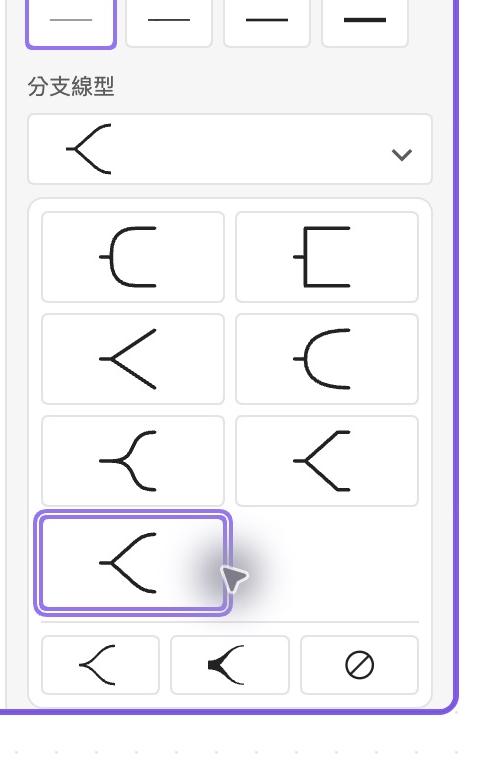
Other local tools include continuing a summary with new topics, boundaries, visible comments, categorized emoji, text-outline mode, images and attachments, search, templates, and local import/export. Formulas render as offline SVG using bundled MathJax. XMind import/export is supported, but does not reproduce every XMind feature or layout exactly.
Preferences
Open Settings → Canvas Mindmap Widget for the language, persistent sidebar switch, toolbar visibility/order, and default structure and palette for new maps. English is the default; 18 languages are available independently of the Obsidian interface language. Switching languages updates open maps and commands without translating stored topic content. Existing maps retain their own content and styling.
Data and privacy
- Mind-map content is stored in a normal Canvas text node's
mindmapextension field. When disabled, the plugin leaves a text-outline fallback. Editing that fallback while disabled does not synchronize changes back into the stored mind map. - No account, telemetry, automatic network request, AI service, cloud synchronization, or collaboration backend is used.
- Imports and attachments read only local files you explicitly select through the file picker, including files outside the vault. Embedded media are stored as base64 in the Canvas, up to 10 MB per file and 20 items per topic. Exports use browser downloads or the print dialog.
- Opening links and microphone recording are explicit user actions. Recording requires the system microphone permission; real recording hardware has not been validated.
This is an early desktop release. Native checks cover macOS, Obsidian 1.13.7, Advanced Canvas 7.1.0, and the default light/dark themes. Other desktop platforms, third-party themes, physical input hardware, large maps, and complete XMind interoperability still need broader validation.
Development
Use Node.js 24 and pnpm 10.12.1:
pnpm install --frozen-lockfile
pnpm run build
The build checks TypeScript, runs the regression suite, and bundles main.js. MathJax and emoji data are bundled; there are no separately downloaded runtime engines. Source builds are checked by GitHub Actions.
License and credits
MIT for the plugin's own code. MathJax 3.2.2 is Apache-2.0; Unicode emoji/CLDR data are Unicode License v3. See THIRD_PARTY.md and vendor for attribution and license texts. Emoji glyphs come from the operating system, not Apple or XMind image assets. This is an independent plugin, not an official Obsidian or XMind product.