Search...Search plugins and themes...
⌘K
Sign in
  • Get started
  • Download
  • Pricing
  • Enterprise
  • Account
  • Obsidian
  • Overview
  • Sync
  • Publish
  • Canvas
  • Mobile
  • Web Clipper
  • CLI
  • Learn
  • Help
  • Developers
  • Changelog
  • About
  • Roadmap
  • Blog
  • Resources
  • System status
  • License overview
  • Terms of service
  • Privacy policy
  • Security
  • Community
  • Plugins
  • Themes
  • Discord
  • Forum / 中文论坛
  • Merch store
  • Brand guidelines
Follow us
DiscordTwitterBlueskyThreadsMastodonYouTubeGitHub
© 2026 Obsidian

Canvas Format Brush

wenlzhangwenlzhang2k downloads

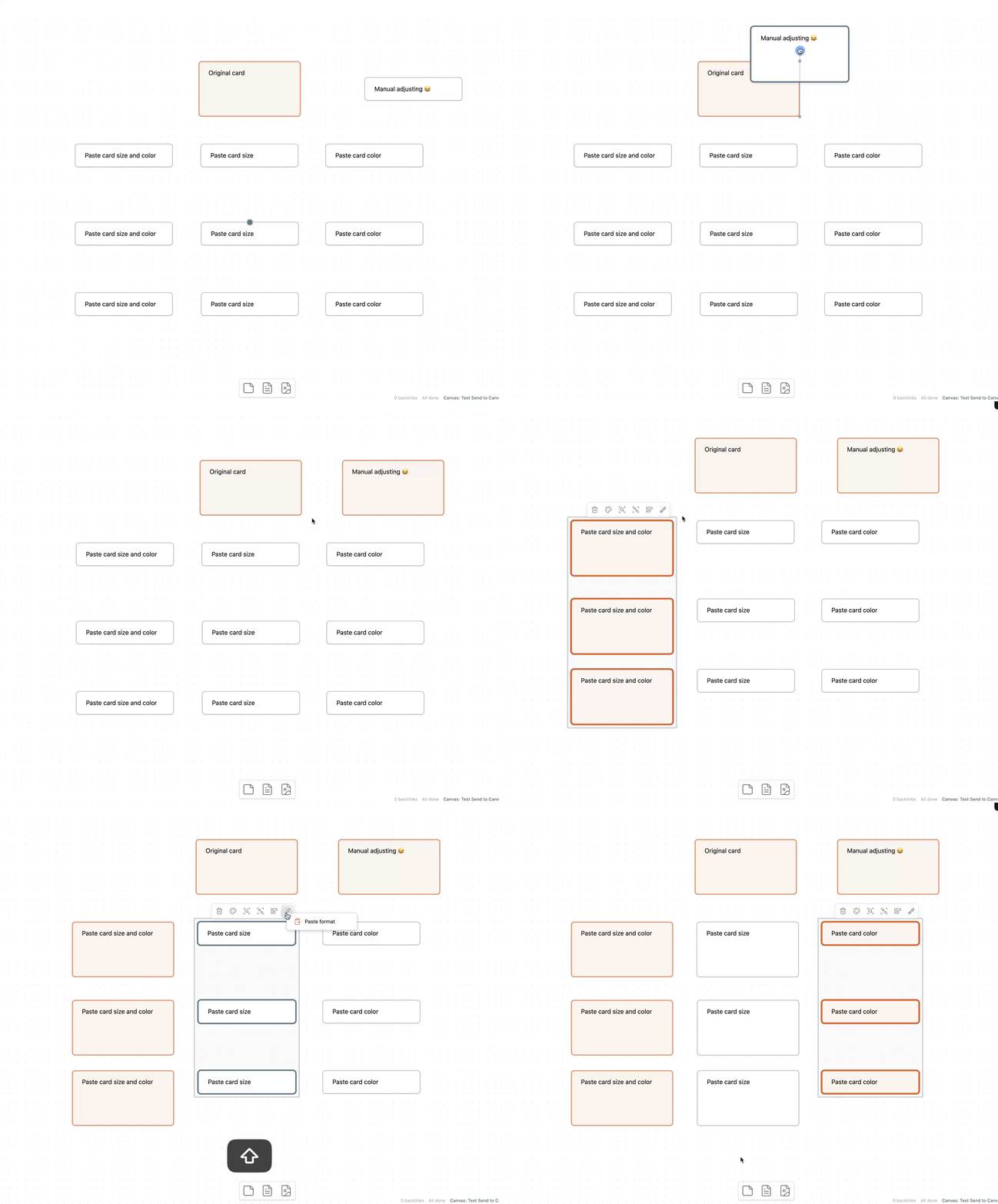
Copy and paste formatting attributes (size and color) between canvas elements, similar to the format painter in Word.
Add to Obsidian
  • Overview
  • Scorecard
  • Updates2

An Obsidian plugin that allows you to copy and paste formatting attributes (size and color) between canvas elements, similar to the format painter in Word.

demo

Features

  • Copy and paste formatting between canvas elements
  • Supports copying:
    • Card size and color
    • Card size only
    • Card color only
  • Context menu and commands
  • Status bar indicator showing when format is copied

Videos
New Plugin: Format Painter for Obsidian Canvas

Commands

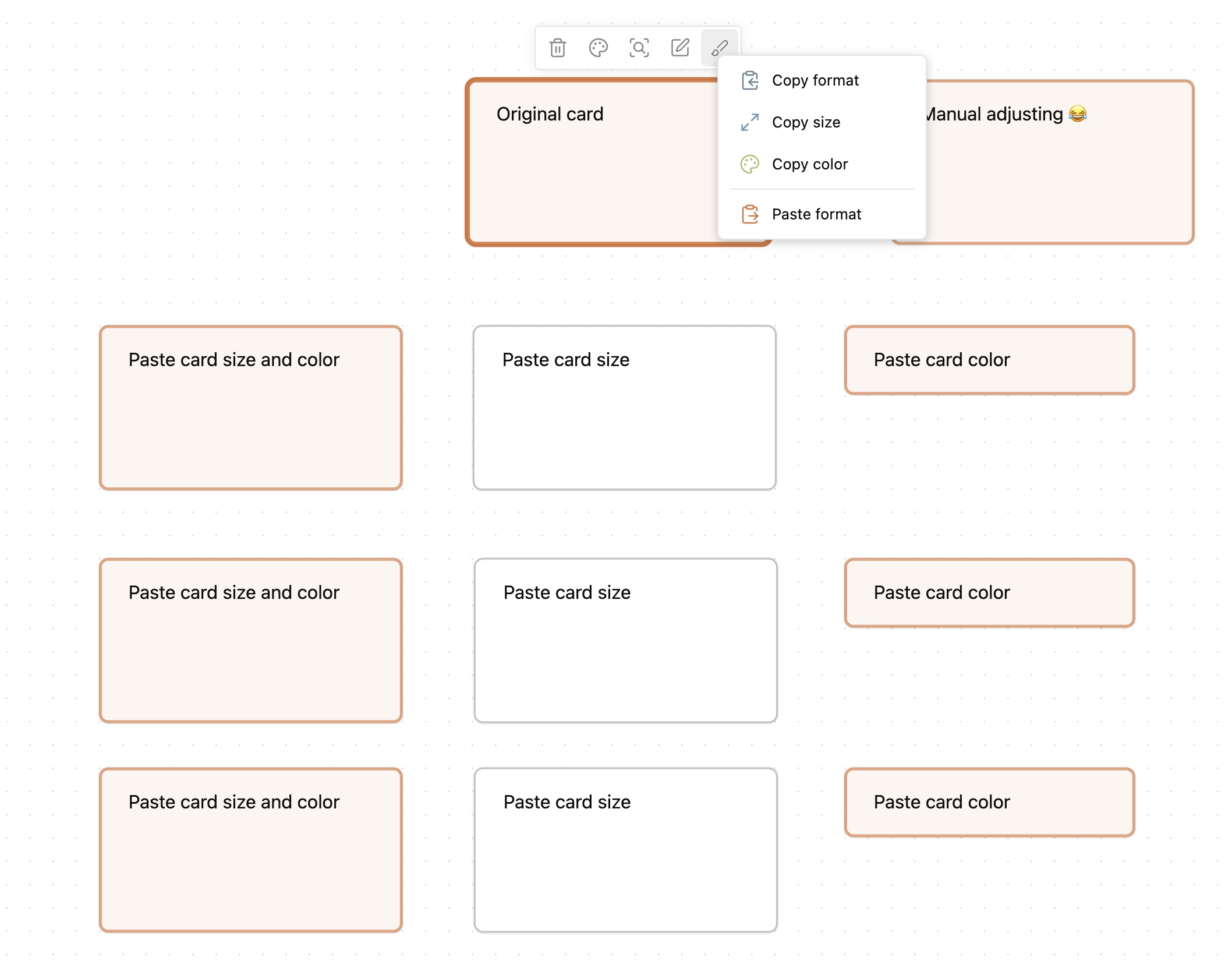
  • Copy format: Copies all formatting attributes from the currently selected canvas element
  • Copy size: Copies only size attributes from the selected canvas element
  • Copy color: Copies only color attributes from the selected canvas element
  • Paste format: Applies the copied formatting to all currently selected canvas elements

Documentation

📚 View Full Documentation

Visit the documentation site to learn how to make the most of Canvas Format Brush in your Obsidian workflow.

Support & Community

This plugin is a labor of love, developed and maintained during my free time after work and on weekends. A lot of thought, energy, and care goes into making it reliable, user-friendly, and aligned with PTKM principles.

If you find this plugin valuable in your daily workflow:

  • If it helps you copy and paste formatting between canvas elements more effectively
  • If it saves you time and mental energy

Please consider supporting my work. Your support would mean the world to me and would help me dedicate more time and energy to:

  • Developing new features
  • Maintaining code quality
  • Providing support and documentation
  • Making the plugin even better for everyone

Ways to Support

You can support this project in several ways:

  • ⭐ Star the project on GitHub
  • 💝
  • Sponsor my work on GitHub
  • 💌 Share your success stories and feedback
  • 📢 Spread the word about the plugin
  • 🐛 Report issues to help improve the plugin

Thank you for being part of this journey! 🙏

68%
HealthFair
ReviewCaution
About
Copy and paste formatting between Canvas elements to transfer card size and color like a format painter. Use commands, context menu, and the status-bar indicator to copy all formatting, size only, or color only, then apply them to selected elements.
CanvasAppearanceCommands
Details
Current version
0.1.1
Last updated
Last year
Created
Last year
Updates
2 releases
Downloads
2k
Compatible with
Obsidian 1.0.0+
Platforms
Desktop, Mobile
Report bugRequest featureReport plugin
Sponsor
Ko-fi
GitHub Sponsors
Author
wenlzhangwenlzhang
github.com/wenlzhang
GitHubwenlzhang
  1. Community
  2. Plugins
  3. Canvas
  4. Canvas Format Brush

Related plugins

Note Toolbar

Add customizable toolbars to your notes.

Canvas Send to Back

Move cards in canvas to the top or behind all other cards.

UI Tweaker

Add, hide, or modify various interface elements.

Advanced Canvas

Supercharge your canvas experience. Create presentations, flowcharts and more.

Minimal Theme Settings

Control the colors and fonts in Minimal Theme.

Hider

Hide interface elements such as tooltips, status bar, titlebar, and more.

Quick Switcher++

Enhanced Quick Switcher, search open panels, and symbols.

Commander

Customize your workspace by adding commands everywhere, create macros and supercharge your mobile toolbar.

Style Settings

Adjust theme, plugin, and snippet CSS variables.

Link Favicons

See the favicon for a linked website.