Canvas Finder
 siulved5420 downloads
Fuzzy-search the cards and files on a canvas and jump straight to the match.
- Overview
- Scorecard
- Updates1
Fuzzy-search the cards and files on a canvas and jump straight to the match.
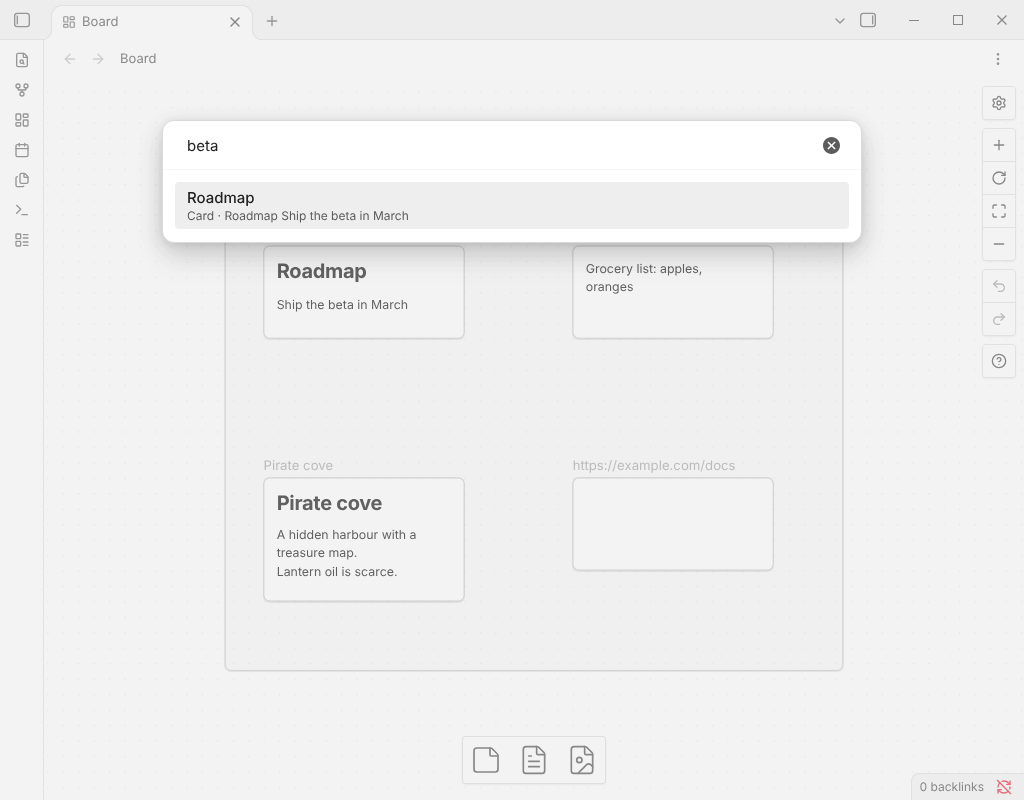
Why this one
- Searches what is on the cards. Text cards, the notes behind file cards, link URLs and group names.
- Jumps and zooms. Pick a result and the canvas selects that card and centres on it.
- Tolerates typos and initials in short titles ("archve" finds "Archive"), without matching random letters inside long notes.
- One canvas or all of them. Search the open canvas, or every canvas in the vault and open the right one.
Usage
Open a canvas and run Find in this canvas from the command palette (assign a hotkey in Settings → Hotkeys to make it instant). Type a few words: every word has to match. Use the arrow keys and Enter to jump to the card.
Find in all canvases searches every .canvas file in the vault; each result also shows which canvas it is on.
File cards are searched by the text of the note they point to (the first 20,000 characters), so you can find a card by something written inside it.
No settings: it only reads your canvases and never changes them.
Installation
In Obsidian, open Settings → Community plugins → Browse and search for "Canvas Finder".
More plugins by Siulved54
| Plugin | What it does | Source |
|---|---|---|
| Shared Blocks | Write a block of text once and reuse it in any note. Edit the source and every reference re-renders live. | shared-blocks |
| Text Case and Cleanup | Change case, make camelCase or slugs, sort lines and remove duplicates, and repair text pasted out of a PDF, without touching code or URLs. | text-format |
| Typography as You Type | Curly quotes, dashes and ellipses as you type, kept out of code and maths, with Backspace to take one back. | smart-typography-plugin |
| Section Numbering | Number headings as an outline (1, 1.1, 1.2) and keep every link to them working when they renumber. | section-numbering |
| Spreadsheet to Table | Paste cells from Excel or Google Sheets as a Markdown table with a real header, insert CSV files, and copy tables back out. | spreadsheet-to-table |
| Hybrid Line Numbers | Relative and hybrid line numbers for Vim-style jumps, where a folded section counts as one line. | hybrid-line-numbers |
| List Item Callouts | Colour a single list item as a callout by starting it with a character such as &, ! or ?. |
list-item-callouts |
| Folder Counts | See how many notes or files each folder holds, right in the file explorer, with a vault total and folder exclusions. | folder-counts |
| Note Reading Time | Reading time of the current note or your selection in the status bar, optionally saved to a property. | note-reading-time |
| Task Rollover | Roll unfinished tasks from your last daily note into today's when it is created, with a real undo. | task-rollover |
| Zoom Into Section | Zoom into a heading or list item to see only it and its contents, with a breadcrumb bar to climb back out. | zoom-into-section |
| Link Title on Paste | Paste a web address and get a Markdown link with the page's title, fetched in the background and undone in one step. | link-title-on-paste |
| Update Radar | Checks your installed community plugins for updates in the background, shows what changed, and flags the ones that look abandoned. | community-update-checker |
| Dataview to Bases | Convert Dataview queries into Bases blocks, and see which queries in your vault can be converted. | dataview-to-bases |
| Line Editing Commands | Duplicate, join, sort and reverse lines, insert blank lines and jump to a line number, with multi-cursor support. | line-editing-commands |
| Note Mover Rules | Move notes into folders by ordered rules on tags, properties, titles and paths, with a preview before any bulk move. | note-mover-rules |
| Tab History | Keeps each tab's back and forward history across restarts, and adds commands to move, maximize and close tabs. | tab-history |
| URL Cards | Shows web addresses as cards with title, description and image, and reads existing cardlink blocks. | url-cards |
| Vim Config | Loads a vimrc-style file from your vault so your key mappings and editor commands are ready when vim mode starts. | vim-config |
| Task Archive | Moves completed tasks, with their sub-items, into an archive section or note. | task-archive |
| Revisit Later | Link the current note into a future daily note, with a date typed in plain English, so it comes back when you want to review it. | revisit-later |
| Explorer Colors Plus | Color files and folders in the file explorer, with a palette, cascading to children, and import from File Color. | explorer-colors-plus |
| Book Lookup | Create book notes from Open Library or Google Books, with cover images, ISBN search and Book Search compatible templates. | book-lookup |
| Web Search Menu | Search the web for selected text or the note title from the right-click menu, with engines you define. | web-search-menu |
| Word Lookup | Look up any word in a sidebar dictionary with definitions, phonetics, synonyms and antonyms, or create a note for it. | word-lookup |
| Quick Translate | Translate the selection or a whole note into another language with no account, keeping links, code and front matter untouched. | quick-translate |
| Dice Rolls | Inline dice rolls you click to reroll, in Live Preview and Reading view, with full dice notation, a roll dialog and a roll history. Reads Dice Roller notes. | dice-rolls |
| Claude Studio | Notion-style AI writing, chat and vault tools powered by your local Claude Code CLI. | claude-studio |
| Book Studio | Turn notes into a print-ready paperback PDF and an EPUB 3, entirely on your device. | book-studio |
| Emoji Search | Insert emojis from a searchable picker or by typing a :shortcode. | emoji-search |
| Inline TOC | Show a live table of contents inside any note with a toc code block, or insert a plain Markdown one. | inline-toc |
| Run Code Blocks | Adds a Run button to code blocks and shows the output right below, for JavaScript, Python, shell and more. | run-code-blocks |
All of them are in the community directory: Settings -> Community plugins -> Browse, then search for the name. Demos and install links for every one: the catalog.
Follow new plugins and updates on X: @luenpereza