Search...Search plugins and themes...
⌘K
Sign in
  • Get started
  • Download
  • Pricing
  • Enterprise
  • Account
  • Obsidian
  • Overview
  • Sync
  • Publish
  • Canvas
  • Mobile
  • Web Clipper
  • CLI
  • Learn
  • Help
  • Developers
  • Changelog
  • About
  • Roadmap
  • Blog
  • Resources
  • System status
  • License overview
  • Terms of service
  • Privacy policy
  • Security
  • Community
  • Plugins
  • Join the community
  • Discord
  • Forum / 中文论坛
  • Merch store
  • Brand guidelines
Follow us
DiscordTwitterBlueskyThreadsMastodonYouTubeGitHub
© 2026 Obsidian

Canvas Daily Note

andrewmcgiveryandrewmcgivery3k downloads

Add a daily note node to the canvas that will always show today's note.

Add to Obsidian
  • Overview
  • Scorecard
  • Updates3

A plugin for Obsidian.MD that allows you to add a daily note node to the canvas that will always show todays note.
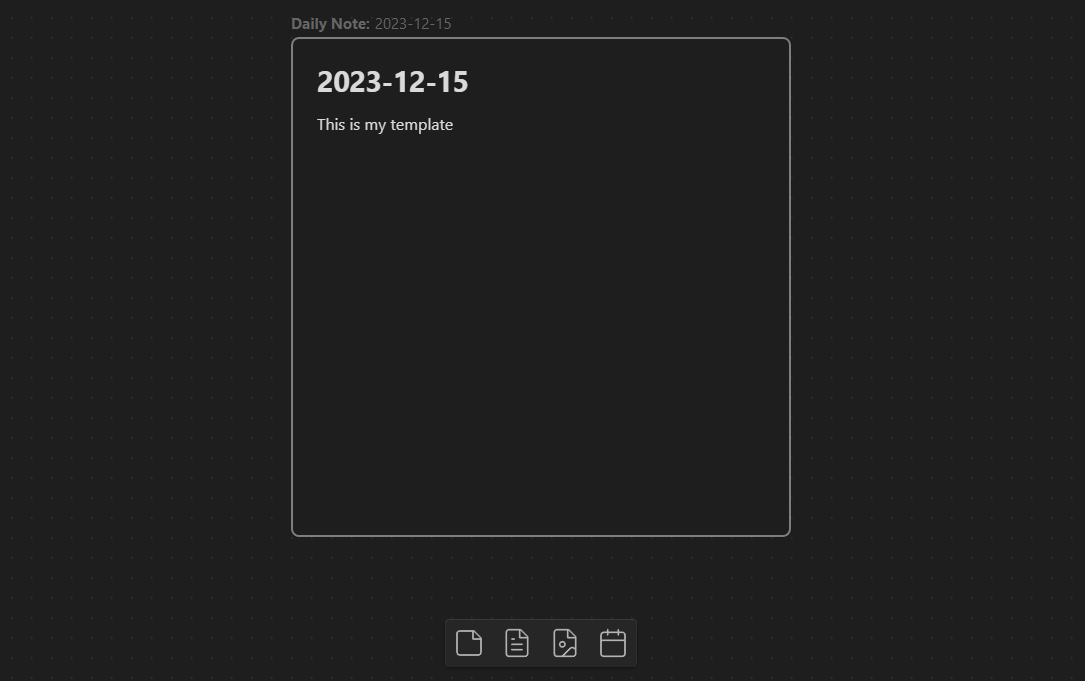
A screenshot of a daily note on the canvas and the "add daily note" button in the bottom controls

How to Install

Plugin is availale to isntall from the Official Community Plugins.

How to Use

On a canvas view, a new button will be added. When you click this button, it will add a new file node for your daily note. The plugin will automatically keep this file node up to date with the latest daily note whenever you open the canvas.
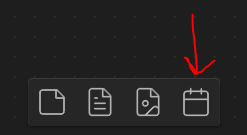
A screenshot showing the "add daily note" button

[!NOTE] This plugin works by adding a special metadata (unknownData) to the file node. It will only work on these nodes crated via the plugin and will not work on existing file nodes.

[!WARNING] The updating of the daily note to today's note involved removing the existing canvas node and replacing it with a new one. As a result, the plugin currently doesn't support connections from the daily note node to other nodes.

Settings

When inserting a new node, or updating en existing node to today's daily note, the plugin by default will create the daily note if it does not already exist.

If you would like the plugin to not do this, or not do it on specific days of the week, you can update this in settings.
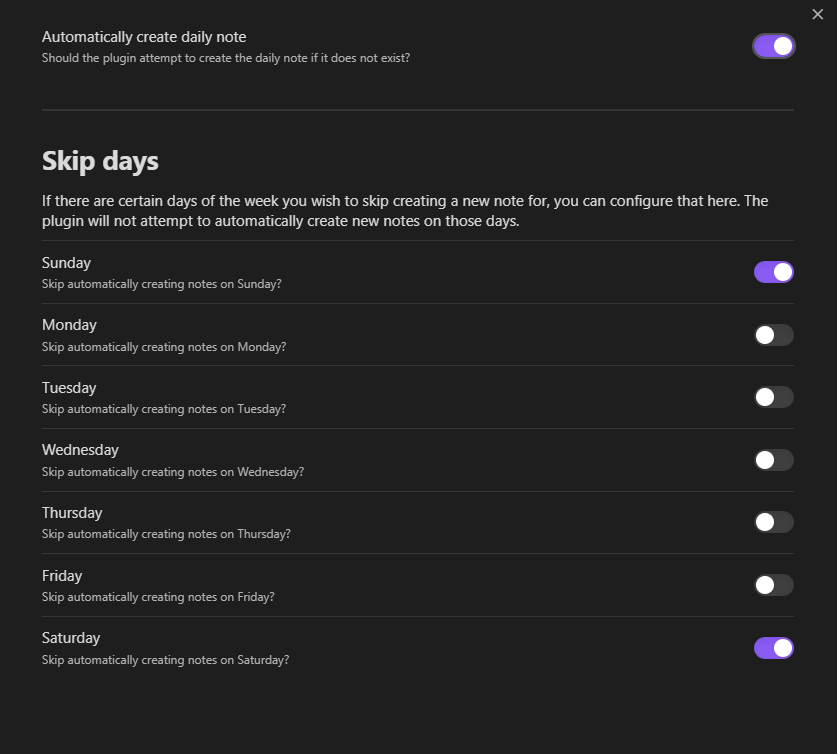
A screenshot of the settings screen

Customization

To customize the appearance of a daily note node, you can utilize CSS to target the element.

/* Change look of Button */
.canvas-button-adddailynote {
}
/* Change look of daily note node */
.canvas-node-dailynote {
}
/* Change look of daily note node label */
.canvas-node-dailynote .canvas-node-label {
}
/* Change look of daily note node label pre-text */
.canvas-node-dailynote .canvas-node-label:before {
}

Reporting Issues

If you run into any issues with this plugin, please open an issue and incude as much detail as possible, including screenshots.

Leave a Tip

68%
HealthFair
ReviewSatisfactory
About
Add a daily note node to Canvas that always displays today's note and updates automatically when you open the canvas. Insert the node via a Canvas button and let the plugin create the daily note if it doesn't exist. Expect the node to be replaced when updated, so connections from it are not preserved.
CanvasDatesAutomation
Details
Current version
1.0.2
Last updated
2 years ago
Created
2 years ago
Updates
3 releases
Downloads
3k
Compatible with
Obsidian 0.15.0+
License
MIT
Report bugRequest featureReport plugin
Sponsor
Buy Me a Coffee
Author
andrewmcgiveryandrewmcgivery
github.com/andrewmcgivery
GitHubandrewmcgivery
  1. Community
  2. Plugins
  3. Canvas
  4. Canvas Daily Note

Related plugins

Rollover Daily Todos

Rollover any unchecked checkboxes from your last daily note into today's note.

Update frontmatter modified date

Automatically update a frontmatter modified date field when the file is modified.

Vault Changelog

Maintain a changelog of recently edited notes.

Templater

Create and use dynamic templates.

BRAT

Easily install a beta version of a plugin for testing.

Day Planner

Day planning from a task list in a Markdown note with enhanced time block functionality.

Tasks

Track tasks across your vault. Supports due dates, recurring tasks, done dates, sub-set of checklist items, and filtering.

Linter

Format and style your notes. Linter can be used to format YAML tags, aliases, arrays, and metadata; footnotes; headings; spacing; math blocks; regular Markdown contents like list, italics, and bold styles; and more with the use of custom rule options.

Advanced Canvas

Supercharge your canvas experience. Create presentations, flowcharts and more.

Readwise Official

Sync highlights from Readwise to your vault.