
- Overview
- Scorecard
- Updates48
Cannoli allows you to build and run no-code LLM scripts using the Obsidian Canvas editor.
What is a Cannoli?
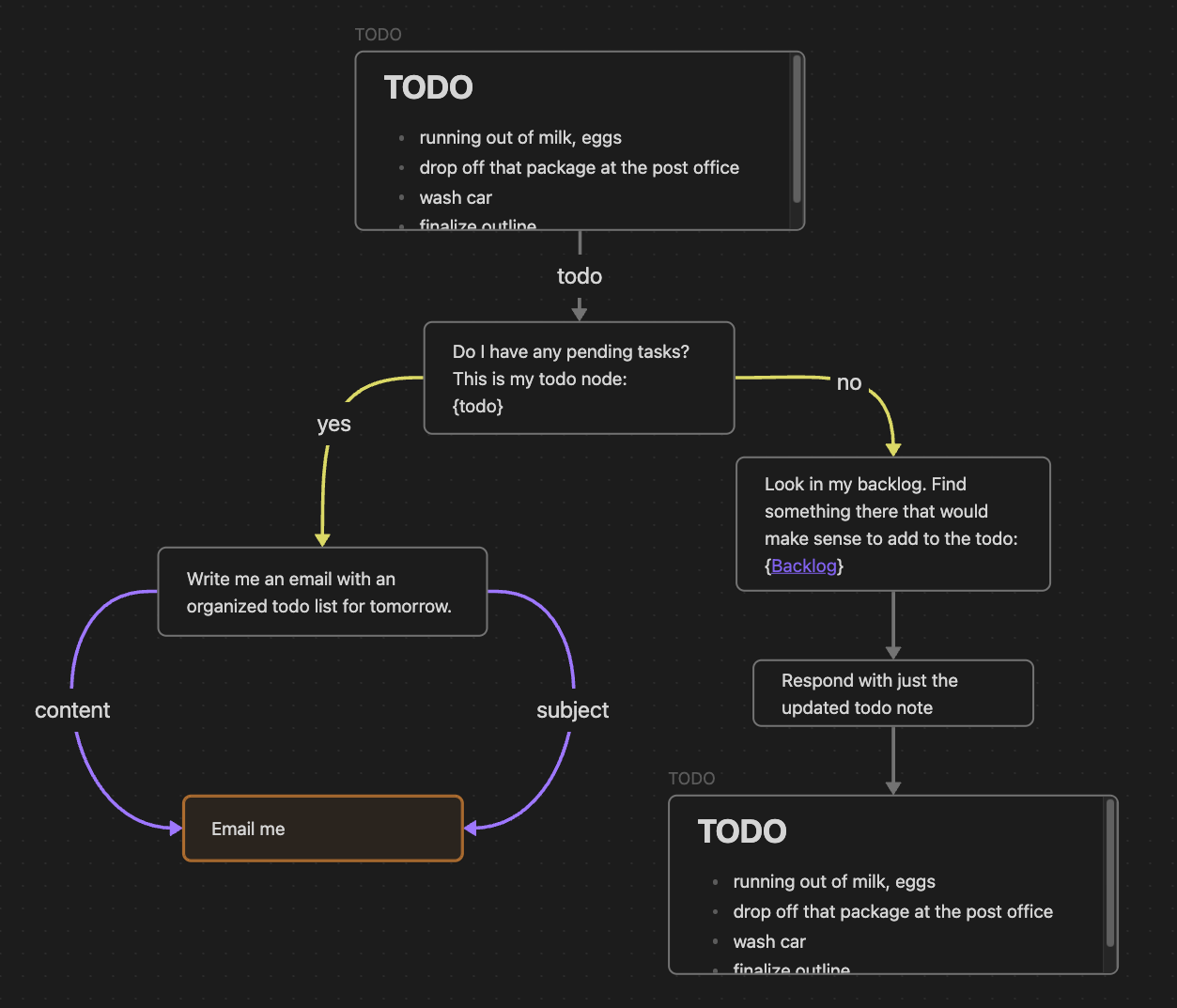
Cannolis are scripts that leverage LLMs to read/write to your vault, and take actions using HTTP requests. Cannolis are created in the Obsidian Canvas editor, using cards and arrows to define variables and logic. They can be run within Obsidian using the control ribbon button or the command palette.
Using colors or prefixes, you can create nodes and arrows of different types to define basic logical functions like variables, fields, loops, and branching choices. If a Canvas is a Directed Acyclic Graph and follows the Cannoli schema, it can be run as a cannoli.
Cannoli can also be used to make llm-chatbots with custom logic and abilities. Complete with streaming and customizable formatting.
Documentation
You can access a walkthrough folder of sample cannolis in the plugin settings (full docs website forthcoming).
Running Cannolis
Cannolis can be run in several ways:
Click the Cannoli ribbon icon
- If you're on a canvas file, it will be run as a cannoli
- If you're on a note with a "cannoli" property, the canvas file in that property will be run as a cannoli
Run the "Start/Stop cannoli" command in the command palette (functions the same as the ribbon icon)
If a canvas file name ends with ".cno", it will have its own run command in the command palette
Make an audio recording on a note with a "cannoli" property
- That recording will be (1) transcribed using Whisper, (2) replace the reference, and (3) trigger the cannoli defined in the property.
AI providers
Cannoli currently supports the following LLM providers:
- OpenAI
- Groq
- Anthropic
- Gemini
You can select a default provider, edit its settings individually, and override that default wherever you like.
Ollama setup
Cannoli can also use local LLMs with Ollama. To use Ollama, switch the "AI provider" dropdown to Ollama, and make sure the ollama url reflects your setup (the default is usually the case).
We also need to configure the OLLAMA_ORIGINS environment variable to "*" in order for requests from obsidian desktop to reach the ollama server successfully. Reference this document to configure this environment variable for each operating system, for example, in Mac OS you will run the command launchctl setenv OLLAMA_ORIGINS "*" in your terminal and restart ollama.
You can change the default model in the settings, and define the model per-node in Cannolis themselves using config arrows as usual, but note that the model will have to load every time you change it, so having several models in one cannoli will take longer.
Network use
- Cannoli makes requests to LLM provider APIs based on the setup of the cannoli being run.
- Cannoli can send HTTP requests that you define up front.
Development
See DEVELOPMENT.md for development instructions.